00194440-10_SM_X-Series_Customer_en.pdf - 第235页
Service Work 3.12.1 Replacing the Power Pack [0302593 8-XX] Docking Station fo r X-Series Component Tr olley Service Manual SIPLACE X Series 235 3.12 3 . 1 2 D o c k in g S t a t io n f o r X - S e r ie s C o m p o n e n…
Service Work
Component Trolley HF R2 3.11.4 Replacing the Feeder Control Unit [03002179]
234 Service Manual SIPLACE X Series
3.11.4
3.11.4 Replacing the Feeder Control Unit [03002179]
Replacing the Feeder Control Unit [03002179]
Overview
1. Feeder control unit (FCU)
► Move the component trolley out of the machine.
► Unplug the connection cable from the back of the
FCU.
► Loosen the fastening screws.
► Fit the new FCU and reconnect to the electrical sys-
tem.
1
Service Work
3.12.1 Replacing the Power Pack [03025938-XX] Docking Station for X-Series Component Trolley
Service Manual SIPLACE X Series 235
3.12
3.12 Docking Station for X-Series Component Trolley
Docking Station for X-Series Component Trolley
3.12.1
3.12.1 Replacing the Power Pack [03025938-XX]
Replacing the Power Pack [03025938-XX]
Parts, equipment and tools
▪ Circuit diagram folder for your machine
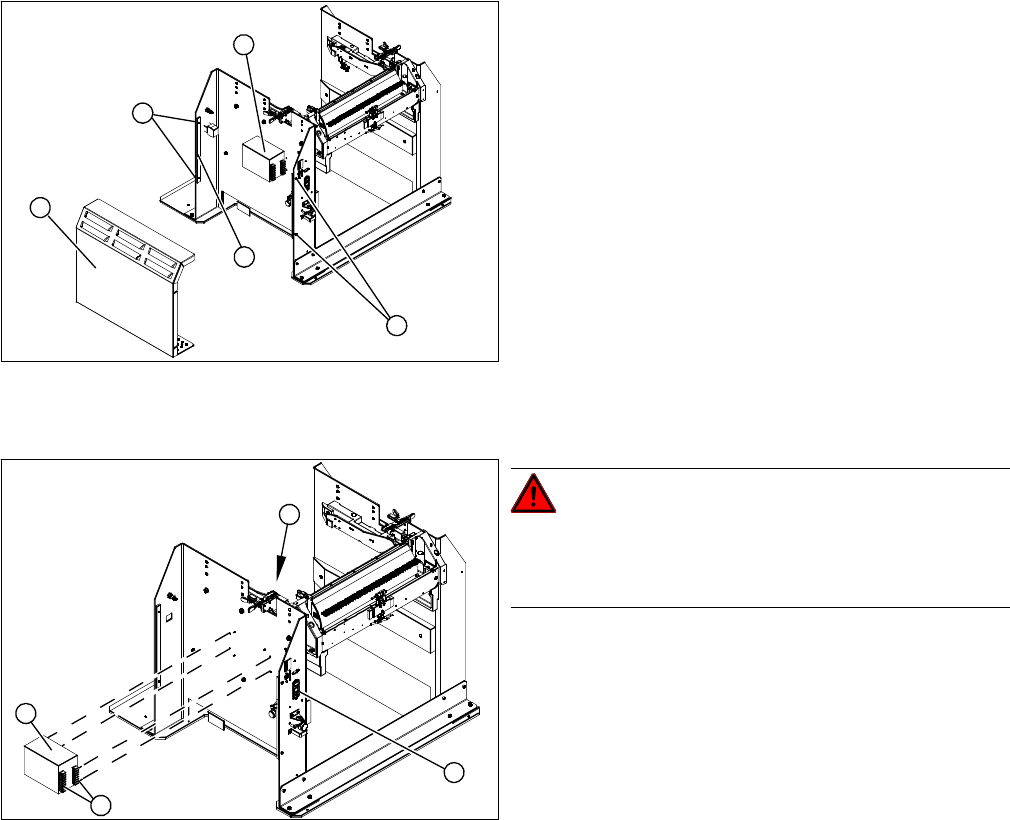
Overview
Removal/installation
► Reconnect the connection leads and install the new power pack.
► Connect the power pack connection cable and press the ON/OFF button to switch on.
► Set the output voltage of the power pack to 26.8 V (+/- 0.5 V) at terminals nine and twelve.
► Refit the cover.
1. Cover
2. Bar for clamping the cover
3. Fastening screws
4. Power pack
► Loosen the four screws (3) fastening the cover (1).
The cover is clamped in place with the help of the bar
(2).
► Pull the cover out of the docking station.
► Take care not to damage the earth connection.
4
3
1
3
2
DANGER!
Switch off the voltage supply
Press the ON/OFF button (1) to switch off, and discon-
nect the power supply.
► Loosen the four screws (2) fastening the power pack
(3) on the inside of the docking station.
► Label the connection leads and disconnect these
from the terminal strip (4).
4
3
1
2
Service Work
Docking Station for X-Series Component Trolley 3.12.2 Replacing the Micro Fuse [03033387-XX]
236 Service Manual SIPLACE X Series
3.12.2
3.12.2 Replacing the Micro Fuse [03033387-XX]
Replacing the Micro Fuse [03033387-XX]
Parts, equipment and tools
▪ Microfuse [03033387-xx]
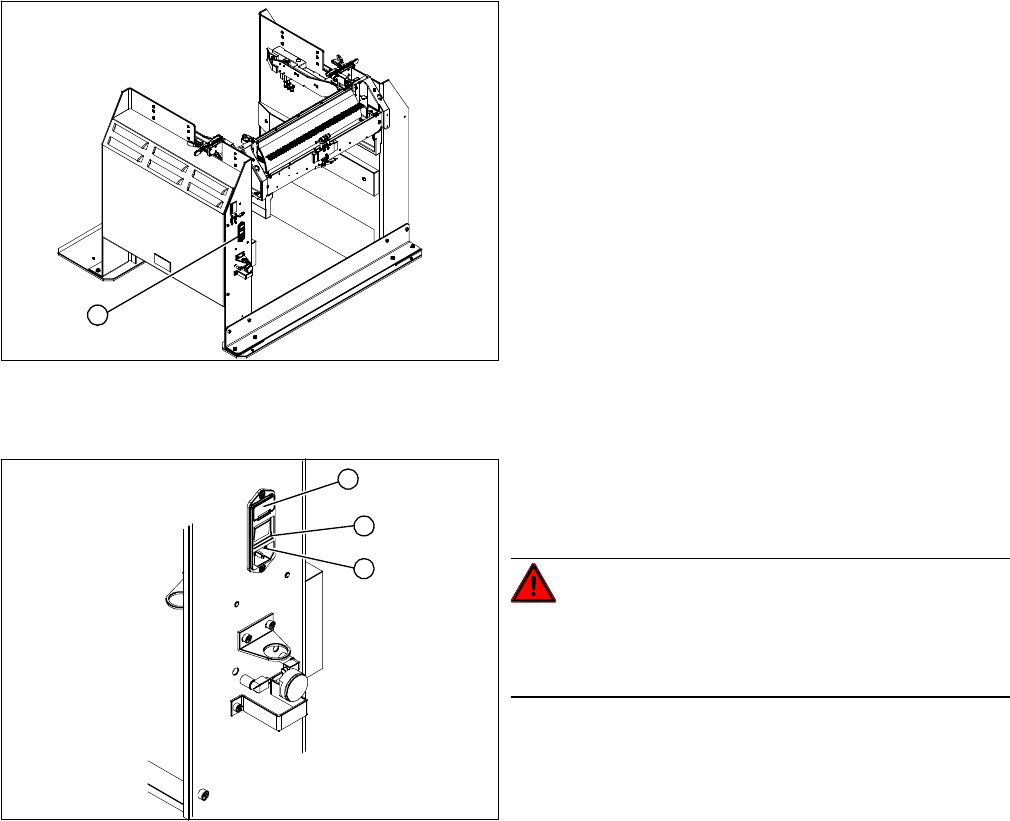
Overview
Replacing the micro switch
► Open the cover (1) on the micro fuse.
► Pull out the micro fuse.
► Insert the new micro fuse and close the cover (1).
► Connect the connection cable (3) and press the ON/OFF button to switch on (2).
1. Position of micro fuse (T 8.0 A)
1
1. Position of micro fuse (T 8.0 A)
2. ON / OFF switch
3. Power supply plug
DANGER!
Switch off the voltage supply
Press the ON/OFF button (2) to switch off, and discon-
nect the power supply (3).
1
3
2