00194440-10_SM_X-Series_Customer_en.pdf - 第261页
Settings 5.1.4 Anticrash Function for the A364 Axis Card Gantry Settings Service Manual SIPLACE X Series 261 5.1.4.5 5 . 1 . 4 . 5 A n t ic r a s h F u n c t io n Anticrash Function Example of the anti crash functi on se…
Settings
Gantry Settings 5.1.4 Anticrash Function for the A364 Axis Card
260 Service Manual SIPLACE X Series
5.1.4
5.1.4 Anticrash Function for the A364 Axis Card
Anticrash Function for the A364 Axis Card
5.1.4.1
5.1.4.1 Anticrash Function for the A364
Anticrash Function for the A364
▪ The anticrash function is no longer provided by the anticrash board but instead by the A364 software
(application 1). This means that the proximity switches used to monitor the travel range and the sen-
sor for monitoring the gantry spacing are no longer required.
▪ Tasks:
– Monitoring the X and Y axis travel ranges
Evaluation of the actual position of the respective axis in the direction of the bumper, based on
the speed.
– Monitoring the distance of both Y axes in a placement area
Evaluation of the actual position of the own gantry and the partner gantry at gantry crash moni-
toring.
– Count error monitoring of the gantry axis
Monitoring incoming count pulses (edge control) over time.
5.1.4.2
5.1.4.2 Anticrash Monitoring for the A364
Anticrash Monitoring for the A364
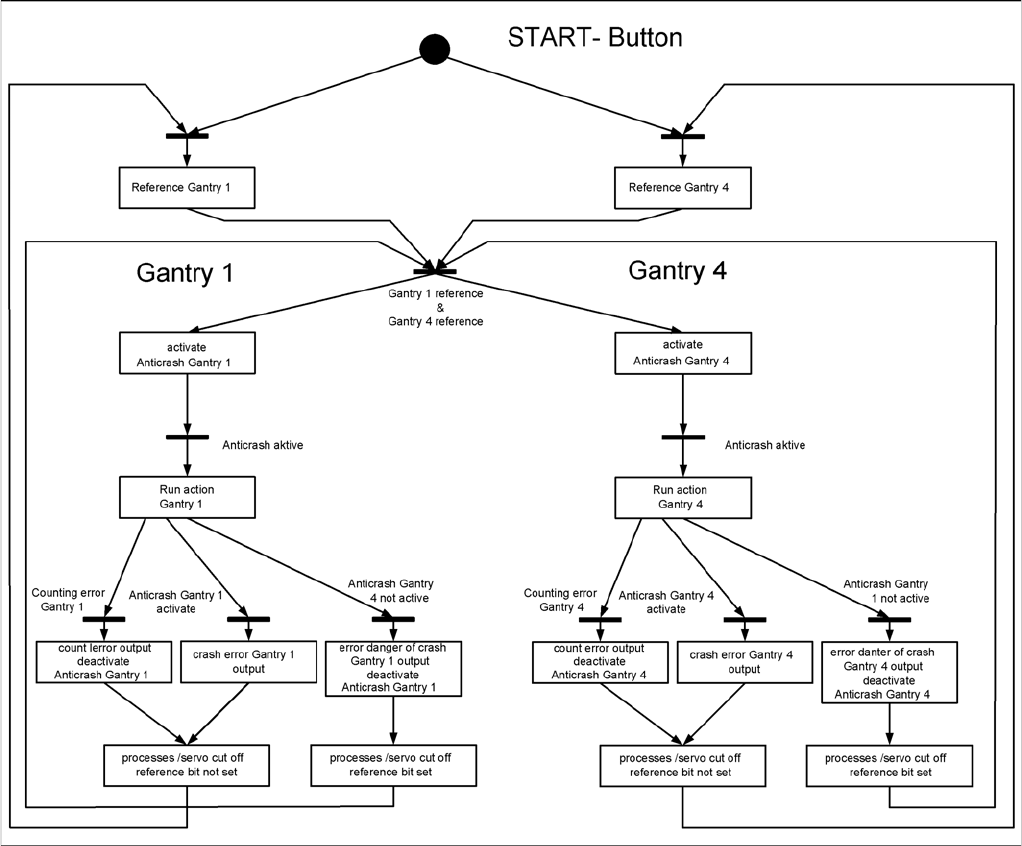
The anticrash function is activated after the X/Y axes have been referenced. When the gantry axes are
referenced for the first time, anticrash monitoring is not active, which does not matter, due to the low ref-
erence speed.
After this, the bit is set for the anticrash monitoring function and the actual position for the relevant part-
ner gantry is continuously communicated via the SPI Bus.
The following information is exchanged between the Y axes:
▪ Actual position and speed of the own gantry
▪ Status information (reference state, anticrash monitoring state ).
5.1.4.3
5.1.4.3 Error "Gantry Crash"
Error "Gantry Crash"
A “gantry crash” error is established by calculating the position difference and speed difference for both
axes. A gantry crash error is signaled via the axis card and the CAN Bus. The servo is released for both
axes and both need to be referenced again.
5.1.4.4
5.1.4.4 Count Error:
Count Error:
If the axis board detects a "fatal count error", the axis concerned will be released and the anticrash func-
tion disabled. The other axis is informed of this in the status information and will also disable the ant-
icrash function. The released axis now needs to be referenced again.
after which the anticrash function will be re-enabled for both axes.
Settings
5.1.4 Anticrash Function for the A364 Axis Card Gantry Settings
Service Manual SIPLACE X Series 261
5.1.4.5
5.1.4.5 Anticrash Function
Anticrash Function
Example of the anticrash function sequence in placement area 1
Settings
Gantry Settings 5.1.5 Anticrash board
262 Service Manual SIPLACE X Series
5.1.5
5.1.5 Anticrash board
Anticrash board
The anticrash board is installed in the axis unit of all machines with the A363 axis card and causes the
main axes to stop immediately in the event of excess speed in the stopper area.
Anticrash board in SIPLACE X
NOTICE
Settings on the anticrash board are not required for SIPLACE X2 machines and machines with
the A364 axis card!
On X3/X4/D3 machines with axis card A363 the proximity sensor between gantry 1 and 4 or the
one between gantry 2 and 3 is active and needs to be adjusted.
This check and this adjustment are not necessary in SIPLACE machines using the A364 axis
controller (in axis unit version 2).
Anticrash board
CAUTION!
Press the EMERGENCY STOP before resetting!
If the anti-crash board issues an error message, press
the EMERGENCY STOP button on the machine and
keep it pressed, while also pressing the reset button (T1)
to reset the error.
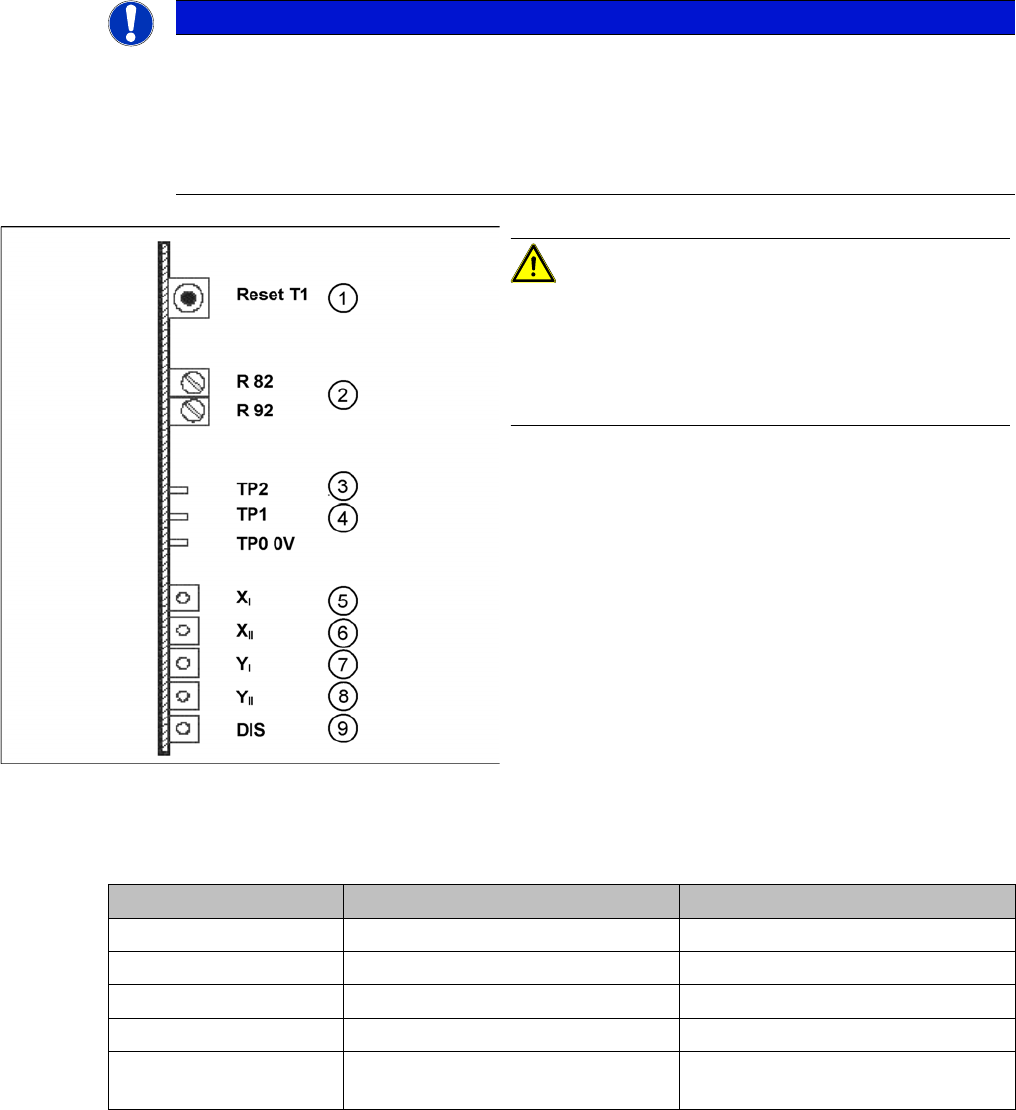
1. T 1-> Reset button
2. R82, R92 = potentiometer
3. TP2 -> speed signal
4. TP1 -> Distance sensor signal
5. LED X
I
-> 1st X axis "malfunction"
6. LED X
II
-> 2nd X axis "malfunction"
7. LED Y
I
-> 1st Y axis "malfunction"
8. LED Y
II
-> 2nd Y axis "malfunction"
9. LED DIS = signals that the distance sensor has trig-
gered (not used for X2)
Description Anti-crash board in axis unit PA 1 Anti-crash board in axis unit PA 2
LED X I 1st X axis X axis, gantry 1 X axis, gantry 2
LED X II 2nd X axis X axis, gantry 4 X axis, gantry 3
LED Y I 1st Y axis Y axis, gantry 1 Y axis, gantry 2
LED Y II 2nd Y axis Y axis, gantry 4 Y axis, gantry 3
LED DIS Either active or inactive, depending
on machine type
Either active or inactive, depending
on machine type