00194440-10_SM_X-Series_Customer_en.pdf - 第361页
Settings 5.6.7 Installing the CAN Card Driver Other Settings Service Manual SIPLACE X Series 361 ► Reboot your machine and check th e operating system to make s ure that the CAN driver has been correctly inst alled or th…
Settings
Other Settings 5.6.7 Installing the CAN Card Driver
360 Service Manual SIPLACE X Series
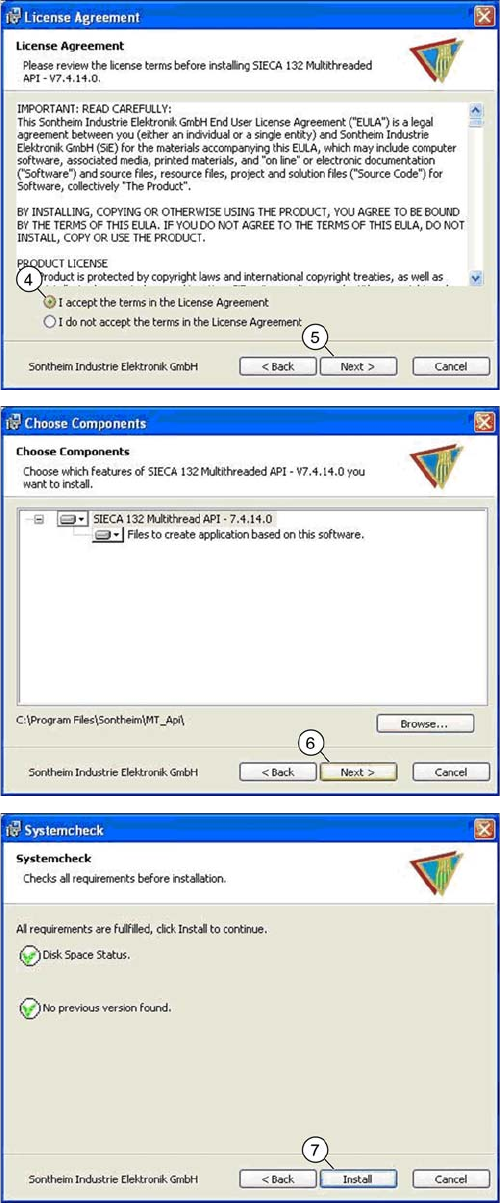
► Select the top option (4) and click on the "Next" (5)
button.
► Click on the "Next" (6) button.
► Click on the "Install" (7) button.
Settings
5.6.7 Installing the CAN Card Driver Other Settings
Service Manual SIPLACE X Series 361
► Reboot your machine and check the operating system to make sure that the CAN driver has been
correctly installed or that the firmware and serial number are recognized correctly.
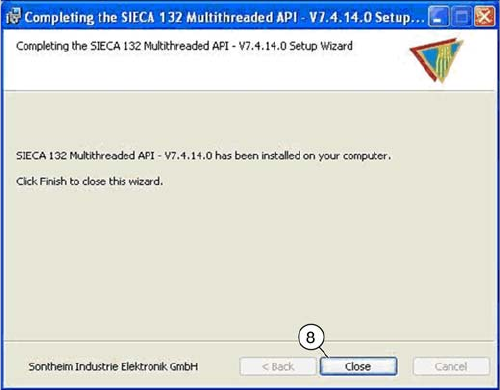
► Once the installation has finished, click on the "Close"
(8) button to close the installation wizard.
Settings
Other Settings 5.6.7 Installing the CAN Card Driver
362 Service Manual SIPLACE X Series