00194440-10_SM_X-Series_Customer_en.pdf - 第172页
Service Work Modular PCB Conveyor System 3.6.12 Replacing the Complete Liftin g T able Cylinder [00358703-xx] 172 Service Manua l SIPLACE X Series 3.6.12 3 . 6 . 1 2 R e p la c in g t h e C o m p le t e L if t in g T a b…
Service Work
3.6.11 Replacing the Lifting Table Fork Light Barrier [00363079-xx] Modular PCB Conveyor System
Service Manual SIPLACE X Series 171
3.6.11
3.6.11 Replacing the Lifting Table Fork Light Barrier [00363079-xx]
Replacing the Lifting Table Fork Light Barrier [00363079-xx]
Parts
▪ Light barrier for track A – dual conveyor [00363079-xx]
▪ Light barrier for track B – dual conveyor [00363080-xx]
▪ Light barrier for track A – single conveyor [00363111-xx]
▪ Light barrier for track B – single conveyor [00363113-xx]
Removal/installation
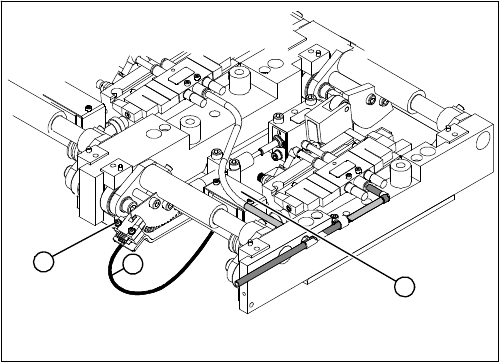
1. Connection cable for the conversion board of the lift-
ing table
2. Two fork light barriers (distance measuring system
lane A and B)
3. Conversion board of the lifting table (under the cover)
► Move the PCB conveyor to the position which gives
you best access to the lifting table.
► Move the Y gantries into the area outside the PCB
conveyor.
► Switch off the machine and secure it to prevent unau-
thorized reactivation.
► Loosen the screws fastening the lifting table plate and
remove the lifting table plate from the lifting table unit.
► Loosen the two screws (2) fastening the fork light bar-
rier.
► Remove the cover from the conversion board of the
lifting table (3).
► Unplug the lifting table conversion board.
► Fit the new fork light barrier and reconnect to the
electrical system.
1
3
2
Service Work
Modular PCB Conveyor System 3.6.12 Replacing the Complete Lifting Table Cylinder [00358703-xx]
172 Service Manual SIPLACE X Series
3.6.12
3.6.12 Replacing the Complete Lifting Table Cylinder [00358703-xx]
Replacing the Complete Lifting Table Cylinder [00358703-xx]
Overview
Removal
DANGER!
Press the EMERGENCY STOP!
Before performing adjustment work you must ensure that
the lifting table has been secured against movement.
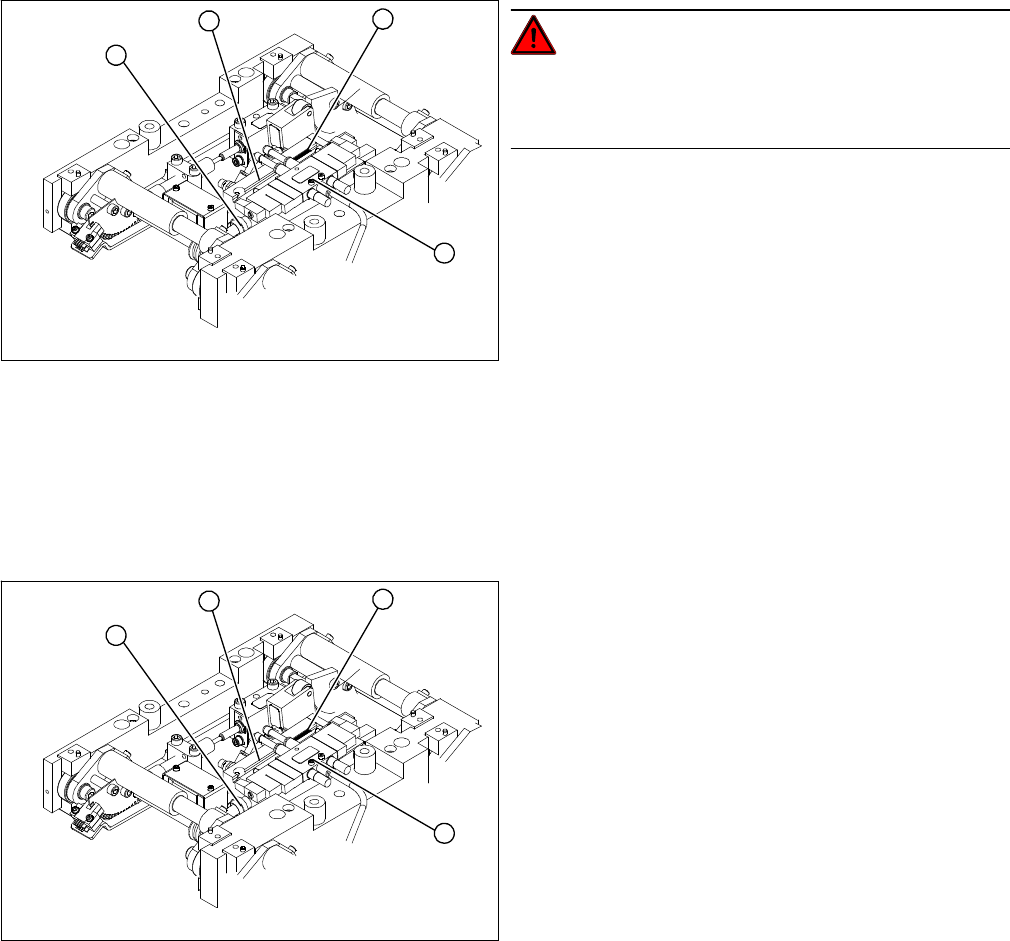
1. End position proximity switch
2. Lifting table cylinder
3. Piston rod with locknut
4. Solenoid valve
► Move the PCB conveyor to the position which gives
you best access to the lifting table.
► Move the Y gantries into the area outside the PCB
conveyor.
► Switch off the machine and secure it to prevent unau-
thorized reactivation.
► Switch off the compressed air supply.
4
1
3
2
► Loosen the screws fastening the lifting table plate and
remove the lifting table plate from the lifting table unit.
► Loosen the fastening screws for the solenoid valve
(4) and remove it from the lifting table cylinder.
► Loosen the grub screw at the end position proximity
switch (1) and push the end position proximity switch
out of the lifting table cylinder guide rail (2).
► Loosen the locknut on the piston rod (3) and twist the
piston rod out until it releases itself from the actuator.
► Loosen and remove the two screws fastening the lift-
ing table cylinder (2).
4
1
3
2
Service Work
3.6.13 Replacing the Limit Switch for the End Position Width Adjustment System [00316831-xx] Modular PCB Conveyor System
Service Manual SIPLACE X Series 173
Installation
3.6.13
3.6.13 Replacing the Limit Switch for the End Position Width Adjustment System [00316831-xx]
Replacing the Limit Switch for the End Position Width Adjustment System [00316831-
xx]
Parts
▪ Limit switch on the assembly tub
▪ Limit switch for width adjustment 1
▪ Limit switch for width adjustment 2
▪ Limit switch for width adjustment - at the conveyor edge
The microswitch [00316831-xx] is used for all limit switches.
Overview
► Insert and fasten the new lifting table cylinder (2) and
install the piston rod (3).
► Move the lifting table by hand to its end position.
► Switch the machine on.
► Push the end position proximity switch (1) into the
guide rail until the LED lights up.
► Fix this position with the grub screw.
► Install the solenoid valve (4) and the lifting table plate.
► Check the speed of the lifting table and correct where
necessary.
4
1
3
2
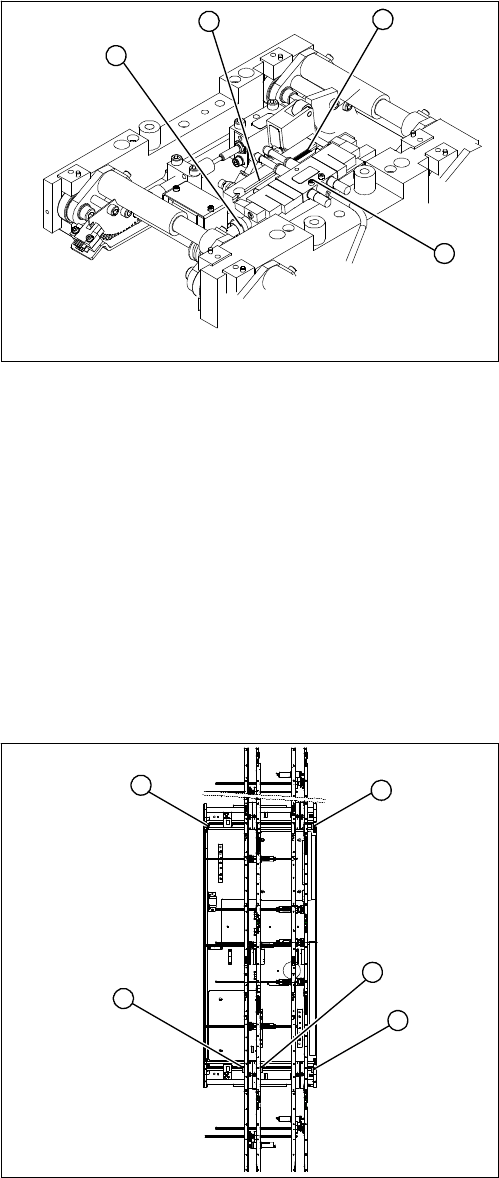
1. Limit switch 1 for width adjustment system of the ad-
justment unit
2. Limit switch for width adjustment system (for side)
3. Limit switch for assembly tub (for side)
4. Limit switch 2 for width adjustment system of the ad-
justment unit
Limit switch on the input conveyor:
There are four limit switches below the conveyor edges
near the input conveyor. The limit switch is designed to
prevent the conveyor edges hitting one another or the
conveyor base.
Limit switch on the output conveyor:
In the vicinity of the output conveyor there are two limit
switches for the adjustment unit. They serve to secure the
transport area and to initialize the adjustment unit during
width adjustment.
2
1
4
3
2