00194440-10_SM_X-Series_Customer_en.pdf - 第270页
Settings Gantry Settings 5.1.7 Track Signals and Zero Pulse 270 Service Manua l SIPLACE X Series Digital Track Signals Analog track signals A and B in X/Y osci lloscope mode ► The adjacent picture sho uld appear o n the …
Settings
5.1.7 Track Signals and Zero Pulse Gantry Settings
Service Manual SIPLACE X Series 269
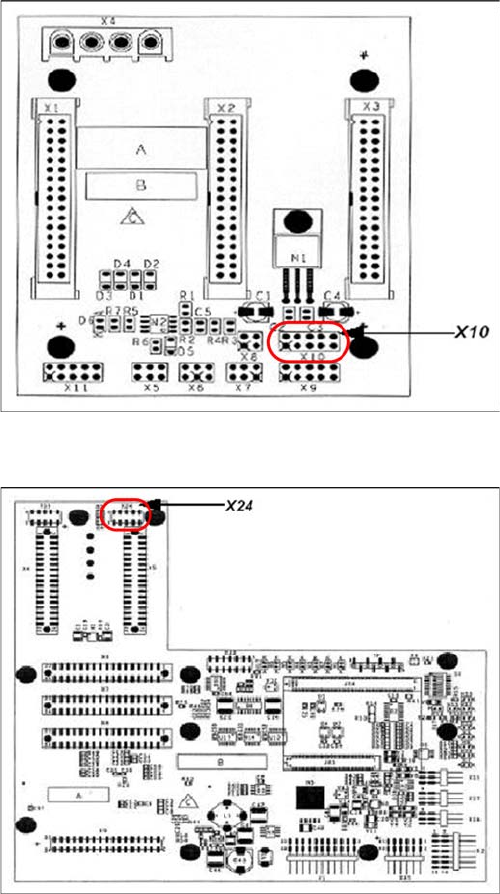
X10 on Y Axis Gantry Interface
X24 on X Axis Head Interface
5.1.7.2
5.1.7.2 Checking the Track Signals
Checking the Track Signals
Analog Track Signals
To check the track signals, connect the track signal tester and the oscilloscope. (see "5.1.7.1.1 Measur-
ing the Analog Zero Pulse Signal" [ ➙ 266])
► Switch the machine "ON"
► Switch the track signal tester to Calibrate the oscilloscope
► Set the oscilloscope to DC, Refr., Non Store, Auto (20 ms)
► Voltages V/Division decrease up to 0.5 V/Div.
► Set the oscilloscope to X/Y --> an illuminated point will appear!
► Move the point into the middle of the display.
► Set the measuring system tester to Sinus amplifier output
► Manually move the selected axis back and forth.
Connector assignment X10:
1. Pin 1 Ground
2. Pin 2 Track A
3. Pin 3 Track A\
(A\ means inverted A)
4. Pin 4 Ground
5. Pin 5 Track B
6. Pin 6 Track B\
7. Pin 7 +5V
8. Pin 8 Track N
9. Pin 9 Track N\
10. Pin 10 Key
Connector assignment X24:
1. Pin 1 Ground
2. Pin 2 Track A
3. Pin 3 Track A\
4. Pin 4 Ground
5. Pin 5 Track B
6. Pin 6 Track B\
7. Pin 7 +5V
8. Pin 8 Track N
9. Pin 9 Track N\
10. Pin 10 Key
Settings
Gantry Settings 5.1.7 Track Signals and Zero Pulse
270 Service Manual SIPLACE X Series
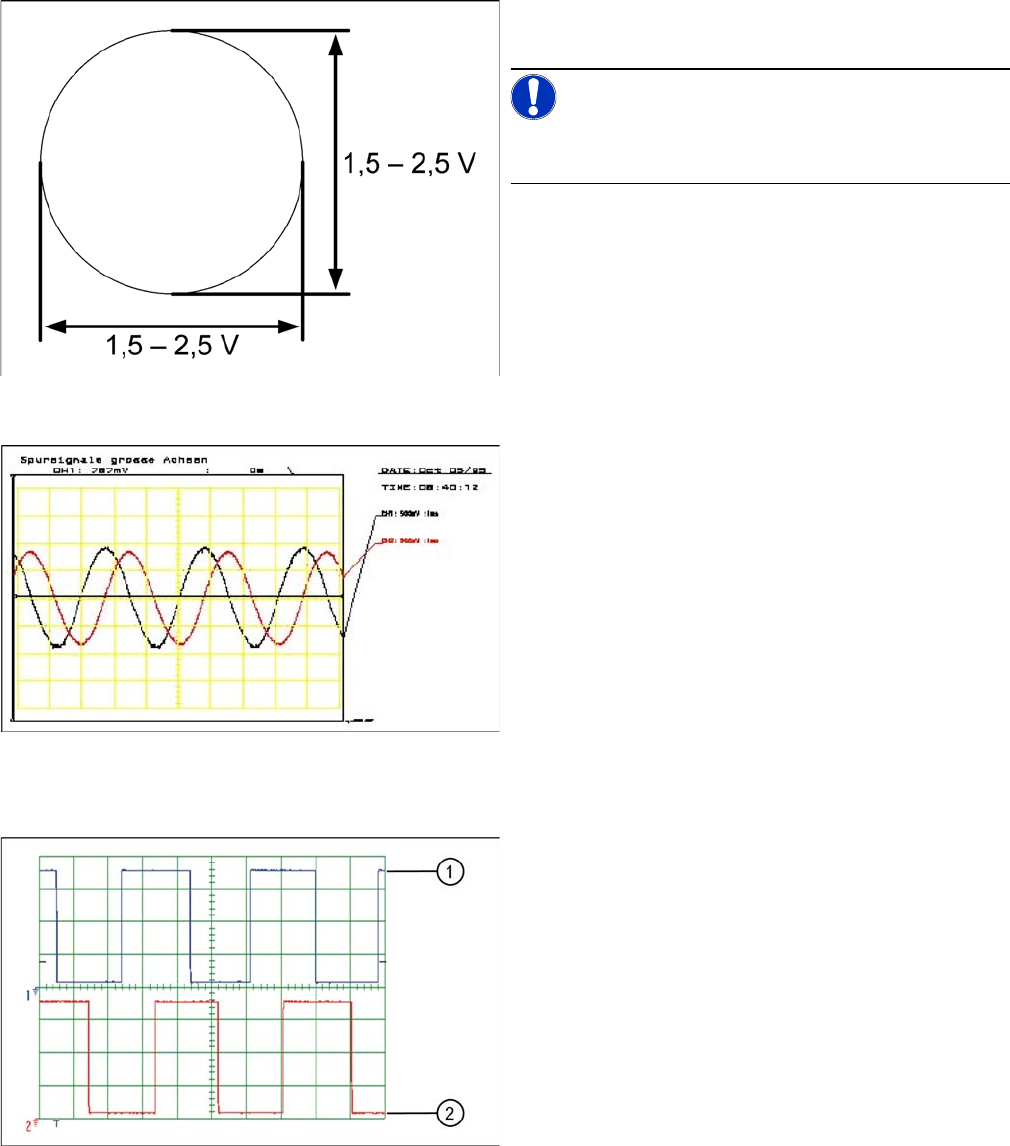
Digital Track Signals
Analog track signals A and B in X/Y oscilloscope mode
► The adjacent picture should appear on the oscillo-
scope.
NOTICE!
A new version of the incremental encoder (one field lens)
can recognize signals from 1.8 to 3.6 Vss.
Analog track signals 90° phase shift
► Switch the oscilloscope to normal operation.
► The adjacent picture should appear on the oscillo-
scope.
Digital track signals 90° phase shift
1. Track A
2. Track B
To check the digital track signals, connect the track signal
tester and the oscilloscope (see "5.1.7.1.2 Measuring the
Digital Zero Pulse Signal" [ ➙ 268]).
The measurement sequence is identical to that described
in "5.1.7.2.1 Analog Track Signals" [ ➙ 269].
Settings
5.2.1 Checking the X Axis Dynamics Axis Control
Service Manual SIPLACE X Series 271
5.2
5.2 Axis Control
Axis Control
5.2.1
5.2.1 Checking the X Axis Dynamics
Checking the X Axis Dynamics
The inspection of dynamics occurs with the following signals:
▪ Deviation of position
▪ Uncommutated target current value
▪ End signal (adapter board, axis in target position)
▪ Actual position = target position signal (axis test box output end position signal)
5.2.1.1
5.2.1.1 Measurement Setup with SAT Box and A363
Measurement Setup with SAT Box and A363
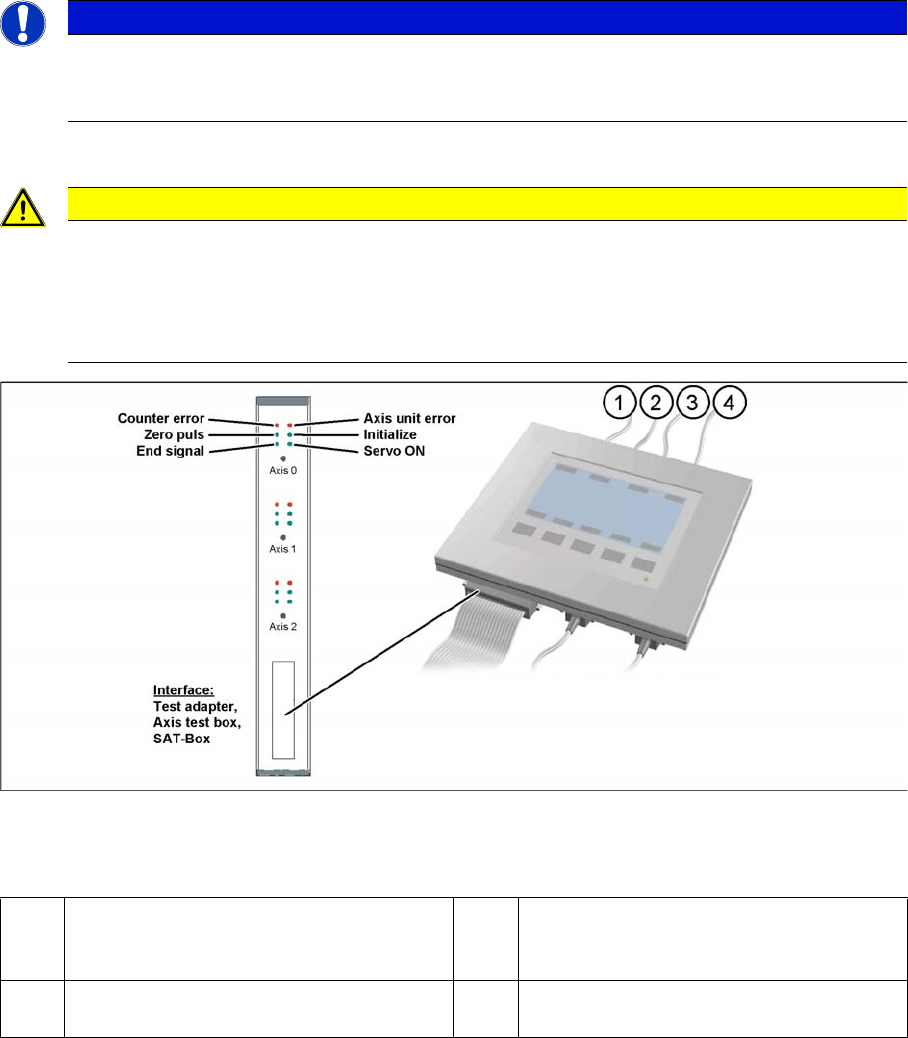
Measurement setup with SAT box
Assignment of output leads for SIPLACE Axis tester for same connection as with axis test box to oscil-
loscope.
Due to the stricter accuracy requirement for a gantry with TwinHead or higher speed for C&P20, the X
and Y axes are operated with different regulation parameters to those used when a gantry is operated
with C&P6/12 (see following diagrams).
NOTICE
Switch machine on 30 mins before start
Before checking the axis dynamics, make sure that the machine has reached its operating tem-
perature. Switch the machine on at least 30 minutes before you begin work.
CAUTION
Checking the dynamics/troubleshooting
When checking the dynamics, it may be sufficient if you check the travel times and overshoot
behavior of the axis with the SIPLACE axis tester display and the values in the settings tables.
However, when checking for errors, you will need to use a suitable oscilloscope for the dynam-
ics analysis.
1 Vnom. output (motor phase current signal I
W): is not needed for checking the X(HF)
dynamics.
3 Position deviation connected at CH1
2 Uncommutated current signal (Vreg), con-
nected to CH2
4 End position signal connected at CH3