YSP20_Users_E.pdf - 第192页
6-17 6 anaging the data Mask Mark Rec CT T ime (seconds) required for recognizing marks on the mask frame. Inspection Time T ime (seconds) required for automatic inspection of printed state on each board. (Not currentl…
6-16
6
anaging the data
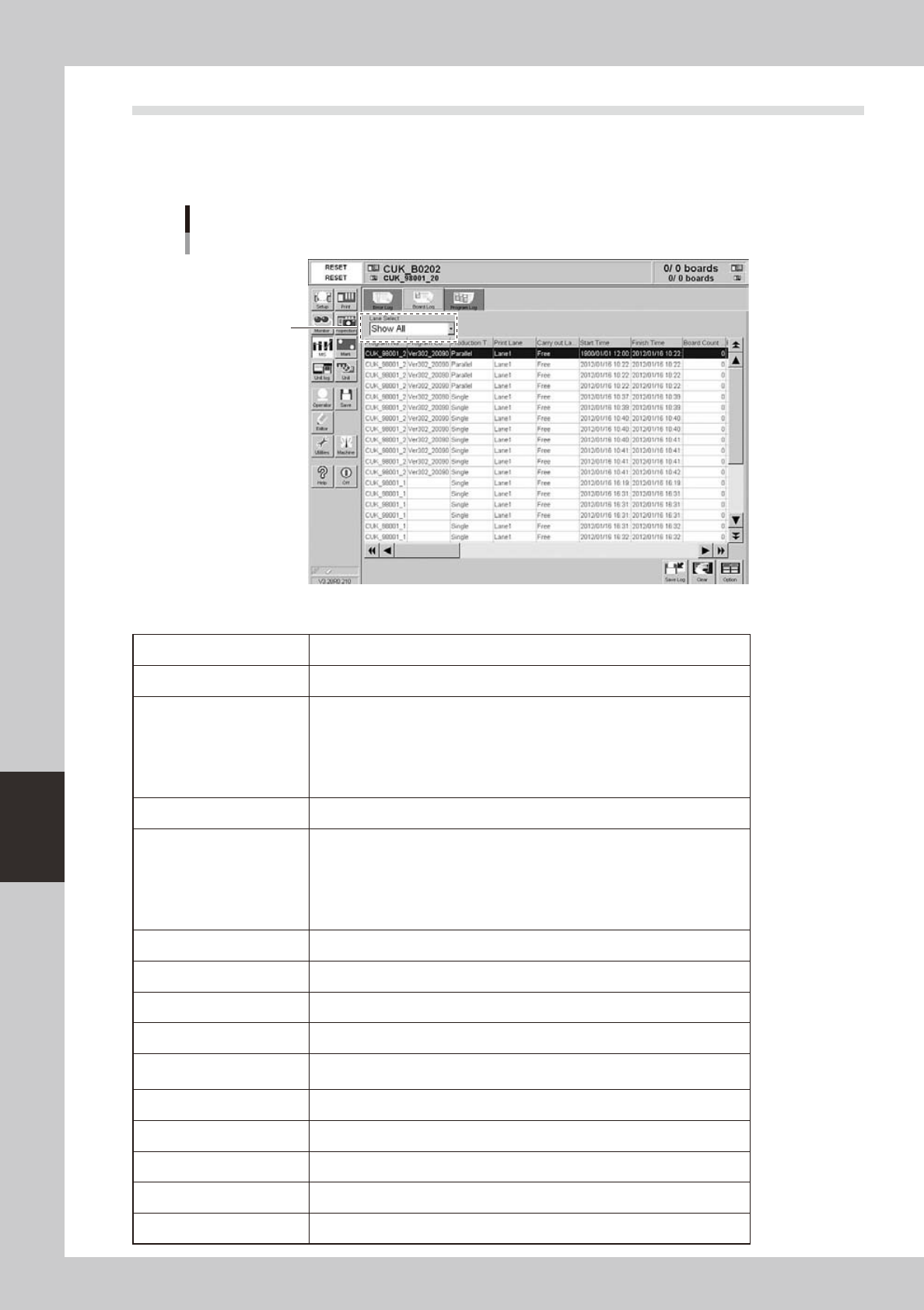
3.2 MIS: Board Log
Selecting the [Board Log] tab shows a list of production logs for each board. Each data row shows a production
log of one board. Up to 1000 rows can be listed.
The [Save Log], [Clear] and [Option] buttons at the lower right have the same functions as the [Error Log] tab.
[MIS]-[Board Log] tab
Select the lane.
64610-N3-00
Each parameter item shows the following information.
Program Name Name of program (board data) used for board production.
Program ID Comments on program (board data) used for board production.
Production Type
Production type used for this solder printing process.
Not specified: No production type was specified.
Single: Boards were printed on single lane.
Parallel: Boards were printed in parallel on Lane 1 and Lane 2.
Alternate: Boards were printed alternately on Lane 1 and Lane 2.
Sequential: Boards were printed sequentially using Lane 1 and Lane 2.
Print Lane Lane number that issued this production log.
Carry-out Lane
Lane from which printed boards were unloaded.
Free: Boards were unloaded to the lane
Lane 1: Boards were unloaded to Lane 1.
Lane 2: Boards were unloaded to Lane 2.
Request by downstream: Boards were unloaded to the lane requested by the
downstream machine.
Start Time Time when production started.
Finish Time Time when production finished.
Board Count Max. Number of boards scheduled to be produced.
Board Serial No. Serial number indicating the order that each board was produced.
Finish Flag
0: Production is finished.
1: Production is incomplete due to reset during production.
Print CT Time (seconds) required for solder printing on each board.
Transfer CT Time (seconds) required for transferring each board.
Upstream Standby CT Standby time (seconds) spent during operation due to upstream machine.
Downstream Standby CT Standby time (seconds) spent during operation due to downstream machine.
Mark Rec CT Time (seconds) required for recognizing marks on each board.
6-17
6
anaging the data
Mask Mark Rec CT Time (seconds) required for recognizing marks on the mask frame.
Inspection Time
Time (seconds) required for automatic inspection of printed state on each board.
(Not currently supported)
Cleaning Time Time (seconds) required for automatic cleaning of each board.
Stencil 1 cleaning
Cleans Stencil 1 when dual-stencil printing is used.
0: Does not perform cleaning.
1: Performs cleaning before printing solder.
2: Performs cleaning before unloading board after printing solder
3: Performs cleaning before and after printing solder and also before unloading
board.
Stencil 2 cleaning
Cleans Stencil 2 when dual-stencil printing is used.
0: Does not perform cleaning.
1: Performs cleaning before printing solder.
2: Performs cleaning before unloading board after printing solder
3: Performs cleaning before and after printing solder and also before unloading
board.
Mark Vision Error
Number of mark recognition errors that occurred during operation (including
retry count) count.
Transfer Error Number of board transfer errors that occurred during operation.
Other Error Number of other errors that occurred during operation.
Stop Number Number of errors that stopped the machine during operation.
Operator Call Time
Machine stop time (seconds) from when an error occurred during operation until
the error was cleared.
Recovery Time Time required for the machine to restart after clearing the error.
Operator Stop Time (sec)
Time (seconds) during which the machine was stopped by operator during
production.
Standby Time for Other
Lane (sec)
Time (seconds) during which the specified lane was in standby during production
due to operation of the other lane.
Board Inspection
The following log entries are recorded by machines with a solder-print inspection
function.
0: Passed inspection
1: Failed inspection
Board Distortion Check
0: No distortion found
1: Distortion found
Board Remove
0: Board not removed
1: Board removed
Board Reentry
0: Board not loaded
1: Board loaded
Feedback Print
0: Feedback print not performed
1: Feedback print performed
Feedback Cleaning
0: Feedback cleaning not performed
1: Feedback cleaning performed
Rolling width
Rolling width measured after this board was printed.
This is output only when the PSC function is used.
The initial value will be output if an error occurs.
Solder supply amount
Solder supply amount after this board was printed.
This is output only when the PSC function is used.
The initial value will be output if an error occurs.
Board ID Identification number of each board (board ID) that was printed.
6-18
6
anaging the data
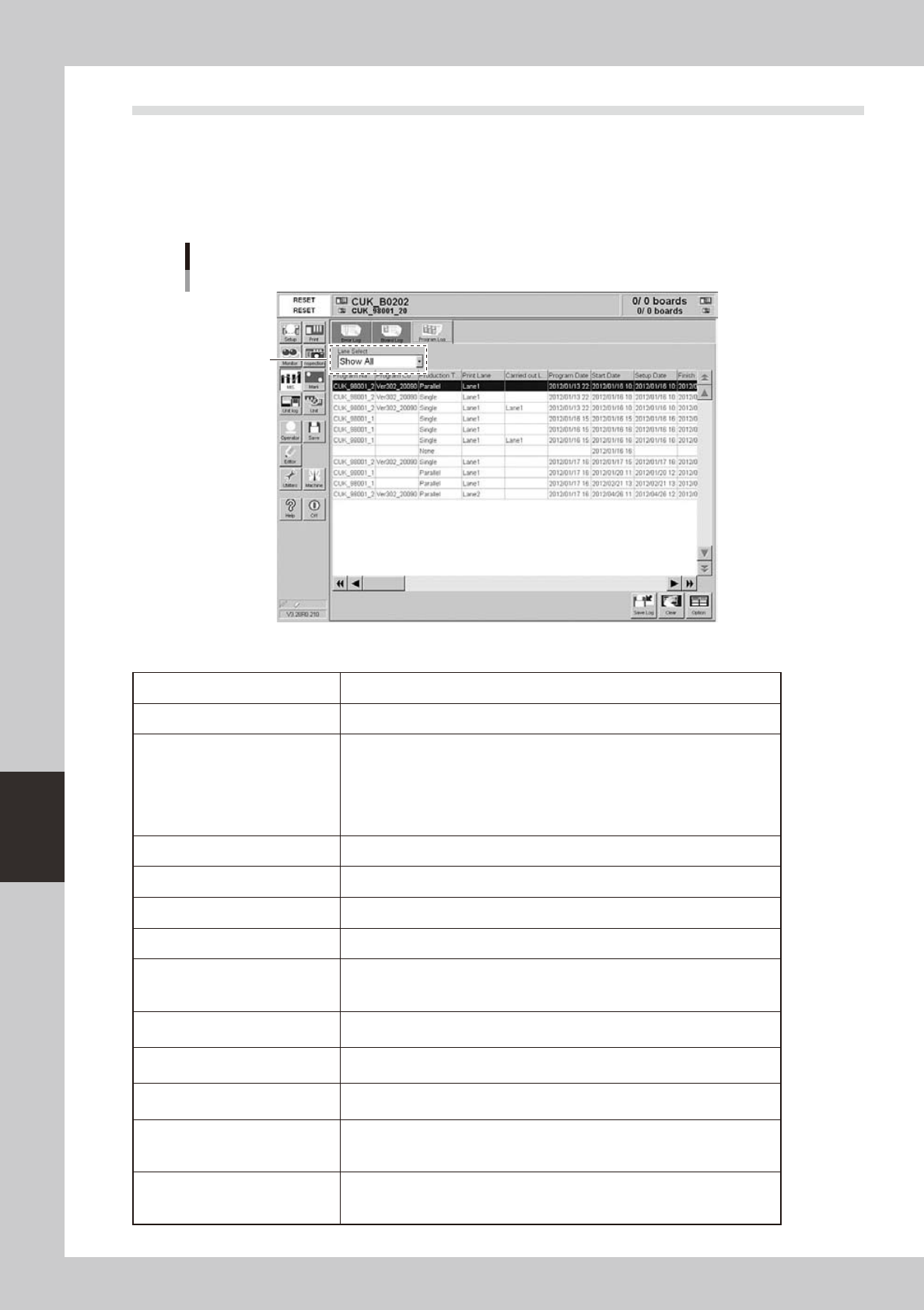
3.3 MIS: Program Log
Selecting the [Program Log] tab shows a list of production results obtained with each program (board dada). A
lot is defined as production that starts with one program (board data) and ends when the program is switched
to another program (board data). One set of production results is listed as a program lot in one data row. Up to
1000 rows can be listed.
The [Save Log], [Clear] and [Option] buttons at the lower right have the same functions as the [Error Log] tab.
[MIS]-[Program Log] tab
Select the lane.
64611-N3-00
Each parameter item shows the following information.
Program Name Name of program used for board production.
Program ID Comment on program used for board production.
Production Type
Production type used for this solder printing process.
Not specified: No production type was specified.
Single: Boards were printed on single lane.
Parallel: Boards were printed in parallel on Lane 1 and Lane 2.
Alternate: Boards were printed alternately on Lane 1 and Lane 2.
Sequential: Boards were printed sequentially using Lane 1 and Lane 2.
Print Lane Lane number that issued the log for this lot.
Carry-out Lane Lane number from which the boards for this lot were unloaded.
Program Date Date and time when program (board data) was last changed and saved.
Start Time Time when production changeover was done.
Setup Date
Time when automatic operation was first started with the START button after the
setups were complete. (If operation failed to start due to data errors, this is not
recorded as the setup date even when the START button was pressed.)
Finish Date
Time when program (board data) was switched to another program or power was
turned off.
Board Count Max.
Number of boards scheduled to be produced. (If this data was changed during
production, the most recent data is shown.)
Produced Board
Number of boards that were actually produced until program was switched or
production was finished.
Number of boards unloaded to
Lane 1
Number of boards unloaded to Lane 1.
Boards that were removed while waiting for unloading are not counted.
Boards that were returned to the conveyor and then unloaded are counted.
Number of boards unloaded to
Lane 2
Number of boards unloaded to Lane 2.
Boards that were removed while waiting for unloading are not counted.
Boards that were returned to the conveyor and then unloaded are counted.