YSP20_Users_E.pdf - 第224页
7-20 7 ther functions n Manual axis movement T his section describes how to use the buttons on the "Move Axis" screen, using the [SY/SZ] tab as an example. "Move Axis" screen [SY/SZ] tab 4 2 3 1 647…
7-19
7
ther functions
4.1 "Move Axis" screen
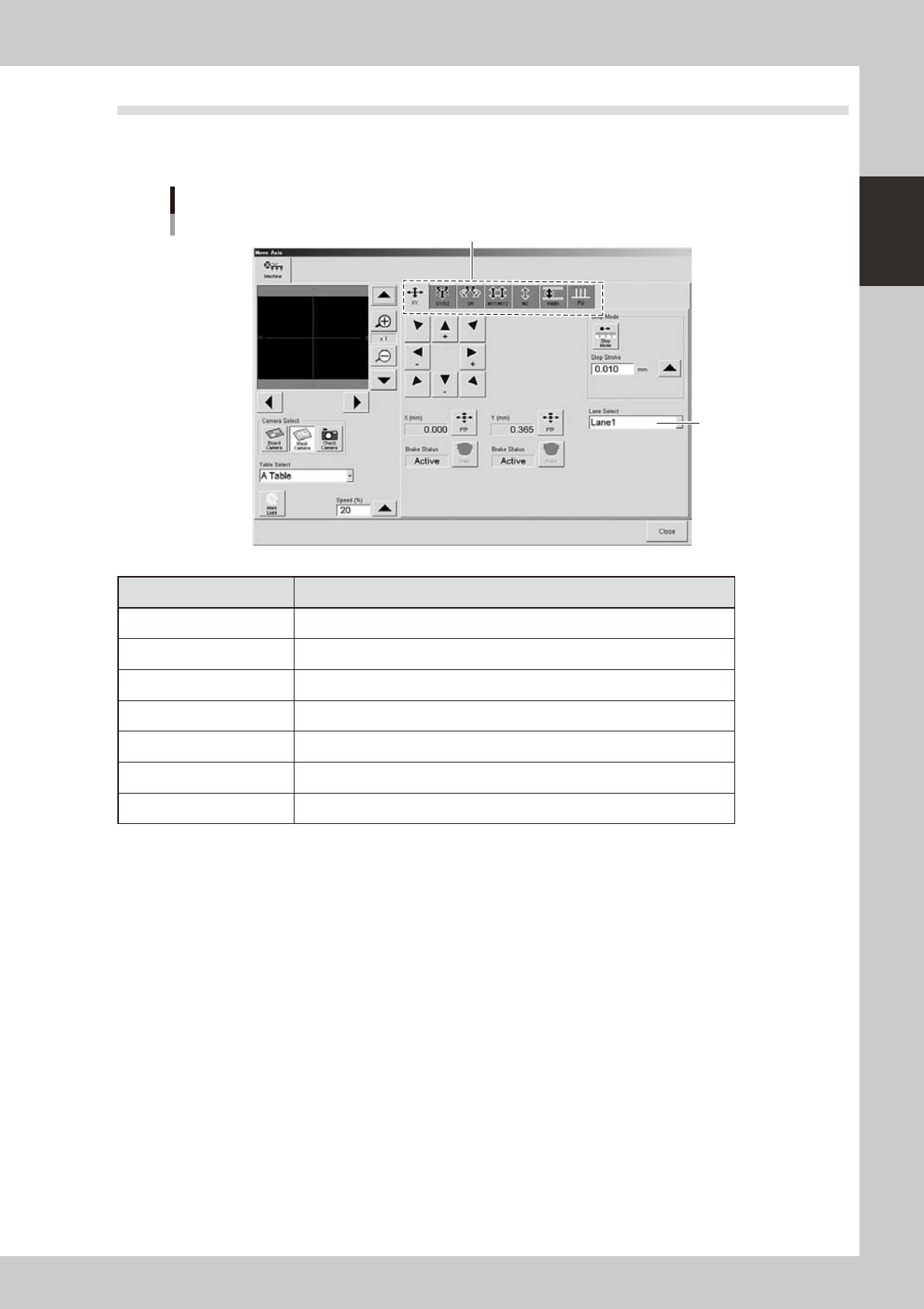
Pressing the [Axis] button on the Unit screen opens the "Move Axis" screen as shown below. You can use this to
manually move the unit on each axis.
"Move Axis" screen
Selection tab
Select the lane.
64717-N3-10
Selection tab Function
X/Y Moves the board clamp unit in the X and Y directions.
SY/SZ Moves the squeegee head in the Y direction, or vertical direction.
SR Turns the squeegee head. (3S head only)
MY1/MY2 Moves the mask (stencil) stage in the R direction.
MZ Moves the mask (stencil) stage in the Z direction.
Width Adjusts the conveyor width.
PU Raises and lower the push-up plate.
7-20
7
ther functions
n
Manual axis movement
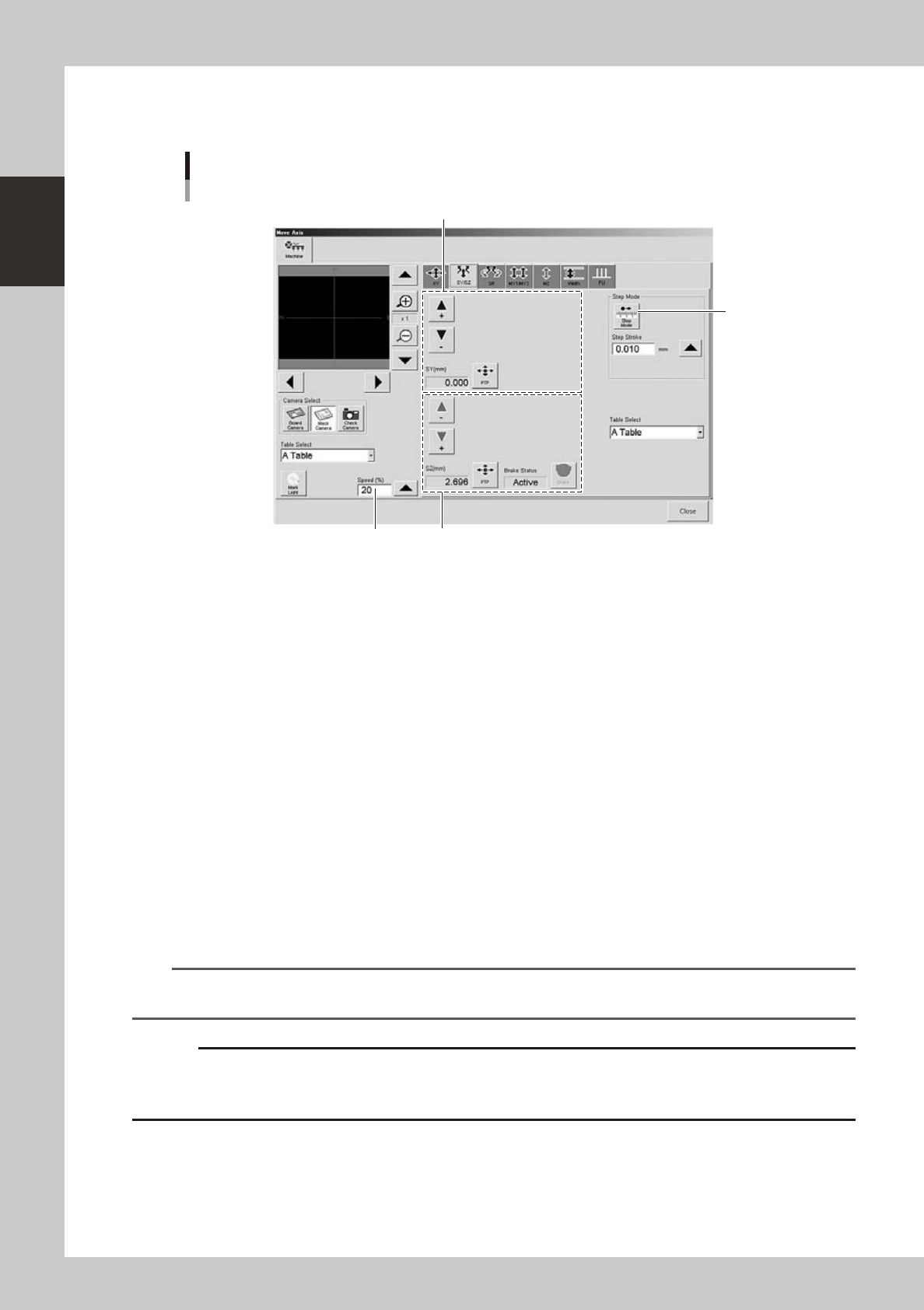
This section describes how to use the buttons on the "Move Axis" screen, using the [SY/SZ] tab as an example.
"Move Axis" screen
[SY/SZ] tab
4
2
3
1
64718-N3-00
1: SY-axis movement buttons, [PTP] button, [Brake] button
Pressing the arrow buttons moves the squeegee head in the Y direction. When the [Step Mode] button is in the depressed
state, the squeegee head moves at the specified step stroke each time the arrow buttons are pressed.
Pressing the [PTP] button displays the "PTP" dialog box. You can directly specify the position where you want to move the
squeegee head. The current position is displayed in the "SY (mm)" box.
The [Brake] button turns the SY-axis brake on or off.
2: SZ-axis movement buttons, [PTP] button, [Brake] button
Pressing the arrow buttons moves the squeegee head vertically. When the [Step Mode] button is in the depressed state,
the squeegee head moves at the specified step stroke each time the arrow buttons are pressed.
Pressing the [PTP] button displays the "PTP" dialog box. You can directly specify the position (height) where you want to
move the squeegee head. The current position is displayed in the "SZ (mm)" box.
The [Brake] button turns the SZ-axis brake on or off.
3: [Step Mode] button
Press this button to set axis movement to "step mode (inching mode)". (The button will remain depressed until you press
it again to exit "step mode".)
Specify the step stroke (inching stroke) with the arrow button or enter it directly in the "Step Stroke" box.
4: "Speed (%)" box
Select the speed to move the unit.
TIP
A [Brake] button is displayed on the tab for the axes equipped with a brake and can be used to turn the motor brake
on or off.
c
button.
7-21
7
ther functions
4.2 [Unit]-[Conveyor] tab screen
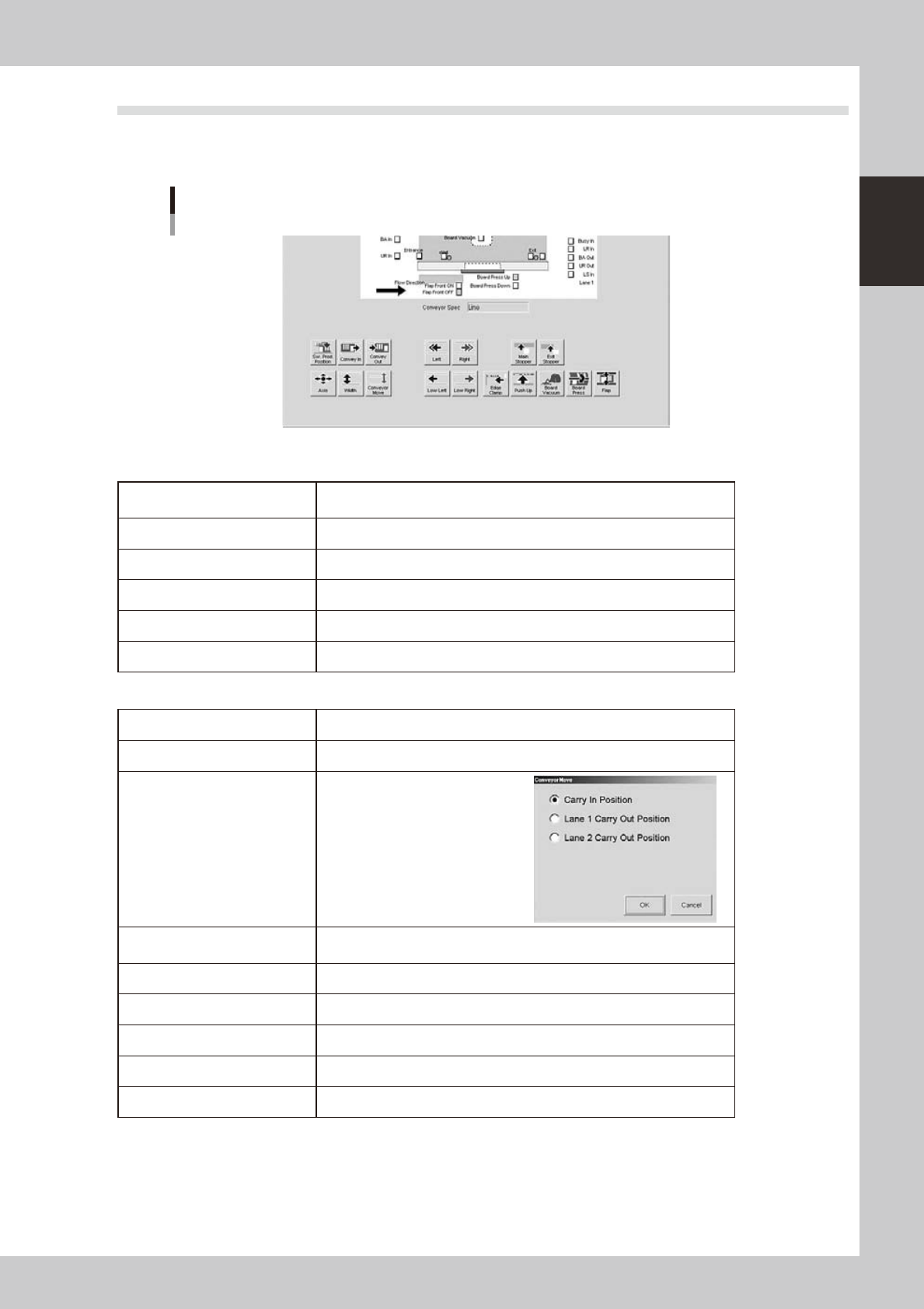
The [Unit]-[Conveyor] tab screen allows you to manually operate each conveyor unit and check the status of
the conveyor sensors and I/O signals on the graphic view. The function of each button is described below.
[Unit]-[Conveyor] tab screen
64719-N3-10
n
Operation buttons in upper row (from left)
[SW. Prod. Position] button
Moves the board clamp table to the front and the squeegee head to the
inner side.
[Convey-out] button Carries the board out from the board clamp table.
[Convey-in] button Carries a board in on the board clamp table.
[Left], [right] buttons Switches on the conveyor motor so the conveyor moves to the left or right.
[Main Stopper] button Raises or lowers the main stopper.
[Exit Stopper] button Stops a board at the conveyor exit when unloaded from the machine.
n
Operation buttons in lower row (from left)
[Axis] button Opens the "Move Axis" screen. (See "4.1" in this chapter.)
[Width] button Changes the conveyor width.
[Convey Move] button
Moves the conveyor to the specified
position on the Y axis.
[Low Left], [low Right] buttons
Switches on the conveyor motor so the conveyor moves at slow speed to
the left or right.
[Edge Clamp] button Turns the edge clamp on or off.
[Push Up] button Raises or lowers the push-up plate.
[Board Vacuum] button Turns the vacuum board gripper on or off. (option)
[Board Press] button Turns the board press unit on or off. (option)
[Flap] button Actuates the board flap.a