YSP20_Users_E.pdf - 第195页
6-20 6 anaging the data Downstream Standby Time T otal standby time (seconds) required by the downstream machine during production (including cases where the machine was waiting for the preceding board on the exit conv…
6-19
6
anaging the data
Print CT Max Longest time (seconds) required to print solder on a board in each program lot.
Print CT Min Shortest time (seconds) required to print solder on a board in each program lot
Print CT Ave Average time (seconds) required to print solder on a board in each program lot.
Transfer CT Max Longest time (seconds) required to transfer a board in each program lot.
Transfer CT Min Shortest time (seconds) required to transfer a board in each program lot.
Transfer CT Ave Average time (seconds) required to transfer a board in each program lot.
Upstream Standby CT Max
Longest standby time (seconds) spent to produce a board in each program lot,
due to the upstream machine.
Upstream Standby CT Min
Shortest standby time (seconds) spent to produce a board in each program lot,
due to the upstream machine.
Upstream Standby CT Ave
Average standby time (seconds) spent to produce a board in each program lot,
due to the upstream machine.
Downstream Standby CT Max
Longest standby time (seconds) spent to produce a board in each program lot,
due to the downstream machine.
Downstream Standby CT Min
Shortest standby time (seconds) spent to produce a board in each program lot,
due to the downstream machine.
Downstream Standby CT Ave
Average standby time (seconds) spent to produce a board in each program lot,
due to the downstream machine.
Mark Rec CT Max
Longest mark recognition time (seconds) required to produce a board in each
program lot.
Mark Rec CT Min
Shortest mark recognition time (seconds) required to produce a board in each
program lot
Mark Rec CT Ave
Average mark recognition time (seconds) required to produce a board in each
program lot.
Mask Mark Rec CT Max
Longest mask mark recognition time (seconds) required to produce a board in
each program lot.
Mask Mark Rec CT Min
Shortest mask mark recognition time (seconds) required to produce a board
during each program lot.
Mask Mark Rec CT Ave
Average mask mark recognition time (seconds) required to produce a board in
each program lot.
Inspection Time
Total time in seconds required to inspect boards in each program lot. (Available
when solder-print inspection is used.)
Inspection Time Max
Longest time (seconds) required to inspect one board in program lot. (Available
when solder-print inspection is used.)
Inspection Time Min
Shortest time (seconds) required to inspect one board in program lot. (Available
when solder-print inspection is used.)
Inspection Time Ave
Average time (seconds) required to inspect one board in program lot. (Available
when solder-print inspection is used.)
Cleaning Time Time (seconds) required for automatic cleaning in each program lot.
Mark Vision Error
Number of mark recognition errors that occurred in program lot (including retry
count).
Transfer Error Number of board transfer errors that occurred in program lot.
Other Error Number of other errors that occurred in program lot.
Operator Call Time
Total machine stop time (seconds) from when an error occurred until it was
cleared.
Recovery Time Total time (seconds) required until the machine restarted after clearing the error.
Operator Stop Time (sec)
Time (seconds) during which the machine was stopped by operator during
production.
Standby Time for Other Lane (sec)
Time (seconds) during which the specified lane was in standby during production
due to operation of the other lane.
Upstream Standby Time
Total standby time (seconds) required by the upstream machine during
production (including cases where the machine had no board in printing position
waiting for a board from the upstream machine while the preceding board was
on the exit conveyor waiting for carry-out signal from the downstream machine).
6-20
6
anaging the data
Downstream Standby Time
Total standby time (seconds) required by the downstream machine during
production (including cases where the machine was waiting for the preceding
board on the exit conveyor to be carried out while a board was set in printing
position).
Working Ratio
This is given as follows:
(Cumulative printing time + cumulative board transfer time) ÷ [(production
completion time - setup completion time) - cumulative standby time] × 100 =
working ratio (%)
Cumulative printing time:
Total time that the squeegee head is moving to print solder (including mark
recognition time)
Cumulative board transfer time:
Total board transfer time (loading/unloading)
Cumulative standby time:
Total standby time of the machine required by the upstream or downstream
machine (The squeegee head is not moving even when the green signal
lamp is on.)
Production completion time:
Time when changed to next production board or time that power was turned
off
Setup completion time:
Time that the [START] button was pressed and operation started
Mask MarkRec Count Time required to recognize the mask fiducial marks in each program lot.
Cleaning Count Number of cleaning operations that were performed in each program lot.
Inspection Count
Total number of boards that underwent solder-print inspection in each program
lot. (Available when solder-print inspection is used.)
Inspection View Count
Number of field-of-views used for automatic board or mask inspection. (Available
when solder-print inspection is used.)
Inspection Object Count
Number of points to be checked during automatic board or mask inspection.
(Available when solder-print inspection is used.)
Board Inspection NG count
Number of failed solder-print inspections. (Available when solder-print inspection
is used.)
Board Distortion Check NG Count Number of "warped" boards that were detected.
Board Remove Count Number of boards that were removed in each program lot.
Board Reentry Count Number of boards that were loaded in each program lot.
Feedback Print Count Number of boards that underwent feedback print in each program lot.
Feedback Cleaning Count Number of boards that underwent feedback cleaning in each program lot.
6-21
6
anaging the data
3.4 Specifying the destination to save the production history data
The production history data is stored in the specified files in a local drive each time the machine is turned off
or the board data is switched. You can also make settings to automatically output and save the production
history data at a specified time.
1
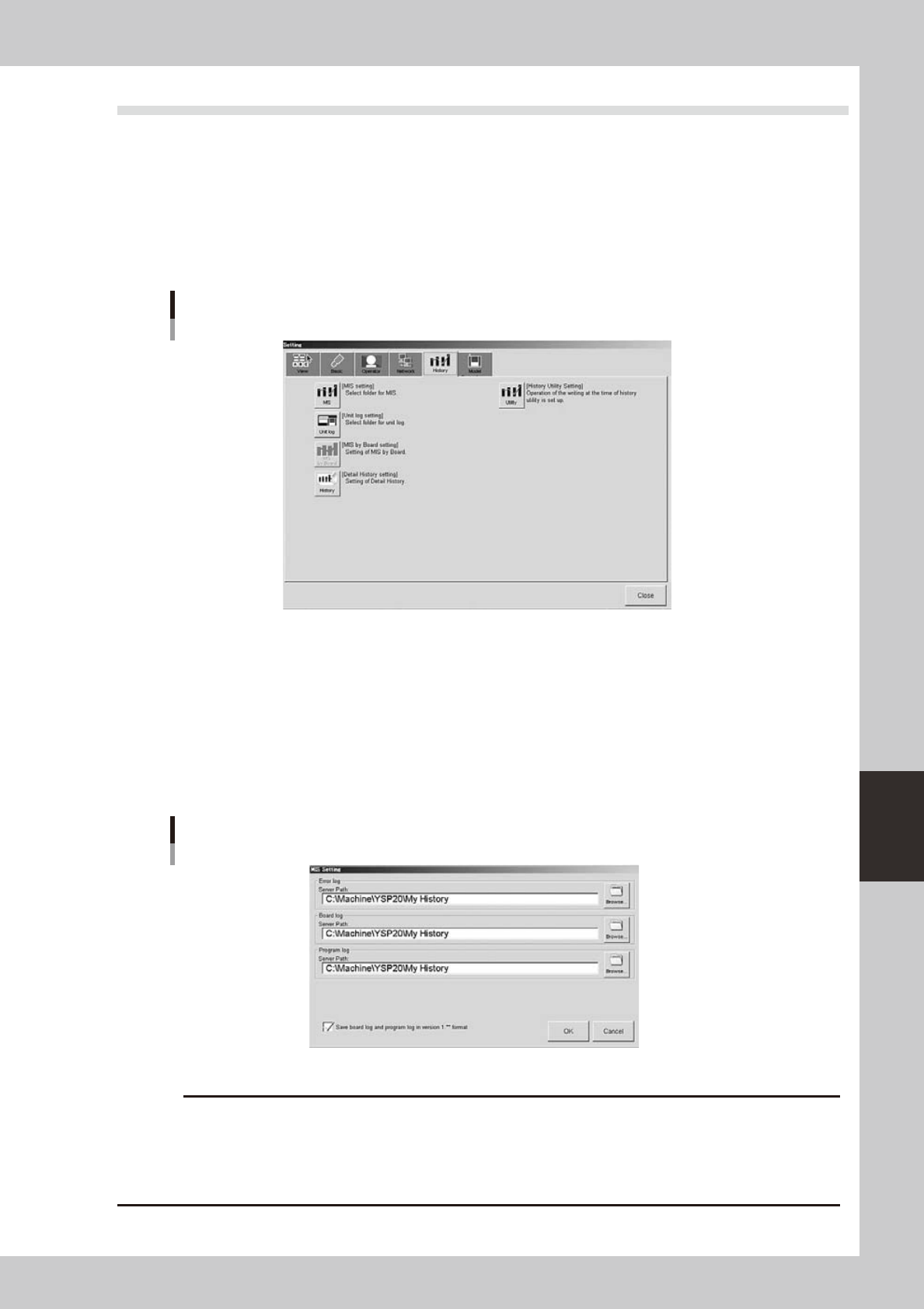
Press the [Software Setting] button on the [Utility] tab of the Setup screen.
The "Setting" dialog box opens.
2
Select the [History] tab.
"Setting" dialog box
[History] tab
64612-N3-00
3
Press the [MIS] button.
The "MIS Setting" dialog box appears.
4
Check or specify the path to each folder where the production history data will be
stored.
Enter the path or use the [Browse] button to specify the destination folder. You can set the destination
folder separately for "Error log", "Board log" and "Program log". After finished setting, press the [OK]
button.
"MIS Setting" dialog box
64613-N3-00
c
data or causing the machine to fail to start.