YSP20_Users_E.pdf - 第259页
2-15 2 Inspection and maintenance q T ake out the filter and clean it. T ake out the ring filter and blow the air from the inside of the filter with an air blow tool. If there are heavy dust deposits in the filter , repl…
2-14
2
Inspection and maintenance
3.3 Suction-blower unit
The suction-blower unit is always operated even when the machine is in emergency stop. It is therefore
necessary to clean and replace the filter and replace the blower hose periodically.
3.3.1 Cleaning and replacing the filter
To clean and replace the filter, follow the steps below.
n
Required tools
• Phillips screwdriver
• Replacement filter (KGY-M3710-40X INL FILTER ELEMENT)
• Air blow tool (option)
1
Perform return-to-origin.
e
2
Press the emergency stop button.
3
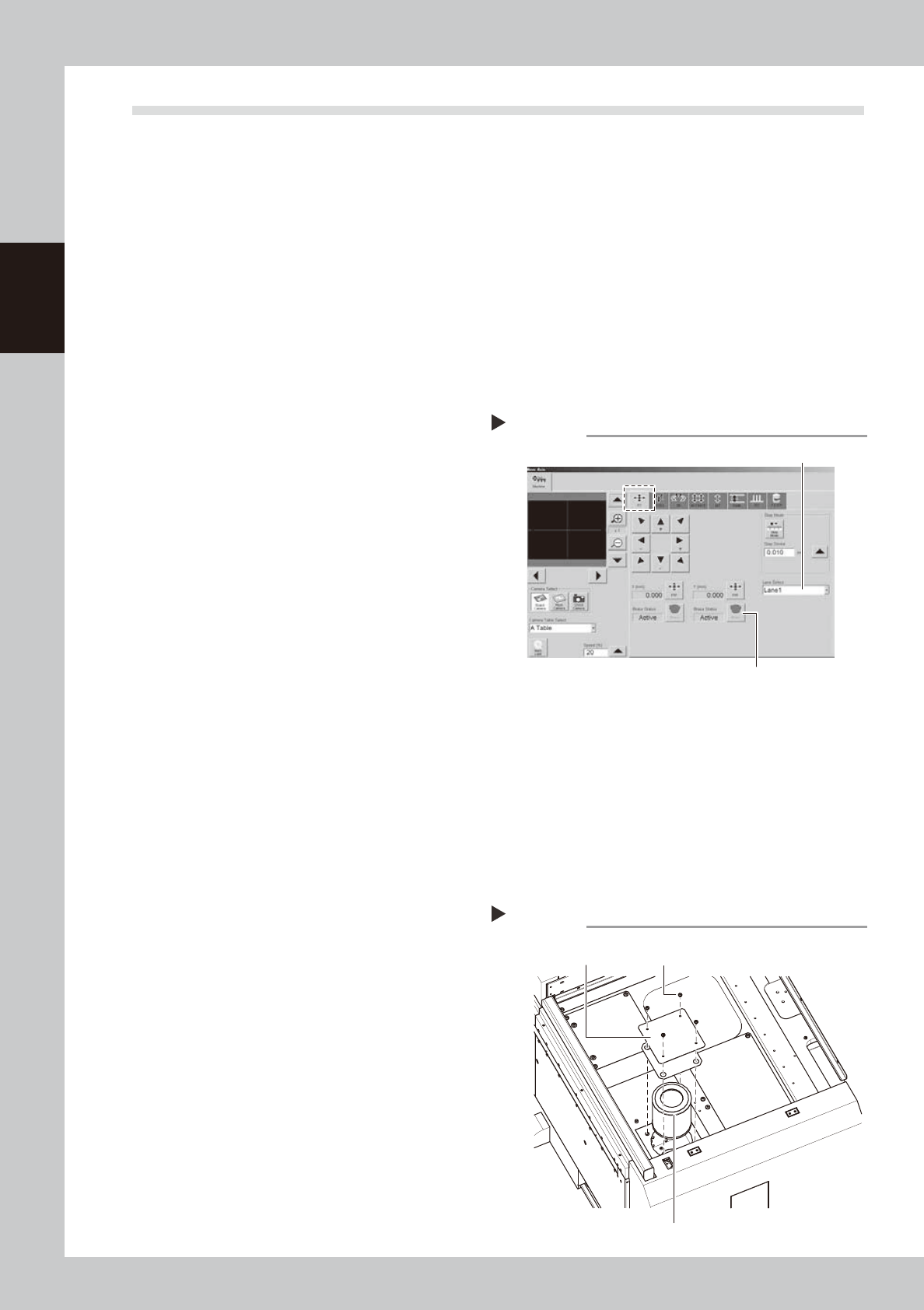
Release the Y-axis brakes on both
lanes.
1. On the [Unit]-[Conveyor] tab, press the
[Axis] to open the “Move Axis” screen.
2. Open the [XY] tab and select “Lane 1”
from the “Select Lane” drop-down list.
3. Press the [Brake] button for the Y-axis to
release the brake.
4. Select “Lane 2” and press the [Brake]
button to release the Y-axis brake on
Lane 2.
54204-N3-00
4
Open the safety cover and move
the Y-axis unit backward.
Open the safety cover of the machine side
you will service. Then move the Y-axis unit
backward until the filter underneath is
revealed.
5
Press the [Power Off] button.
Follow the message that appears on the
screen to select [Yes].
6
Continue the power off sequence.
The message, "Abort from Power Off
sequence?", will appear. Select [No].
7
Cancel the return-to-origin.
The message, "Do you want to return to
Origin?", will appear. Select [Cancel].
8
Turn off the power.
1. The message, "Close this operation?", will
appear. Select [OK].
2. Turn off the power switch.
9
Open the setup cover.
0
Remove the filter cover.
Use the Phillips screwdriver to remove the
four screws securing the cover, and remove
the cover.
53210-N3-00
Removing the filter cover
Step 10
Mounting screws (4 places)
Filter
Filter cover
[Move Axis] screen
Step 3
Select “Lane”.
Y-axis [Brake] button
2-15
2
Inspection and maintenance
q
Take out the filter and clean it.
Take out the ring filter and blow the air from
the inside of the filter with an air blow tool.
If there are heavy dust deposits in the filter,
replace it with a new filter.
w
Return the filter to its original
position.
Fit the filter into place and then reattach the
cover.
3.3.2 Replacing the blower hose
To replace the blower hose, follow the steps below.
n
Required tools
• Slotted screwdriver
• Hex wrench (4mm)
• Replacement blower hose (KKX-M3674-0XX TUBE 25)
e
1
Press the emergency stop button.
2
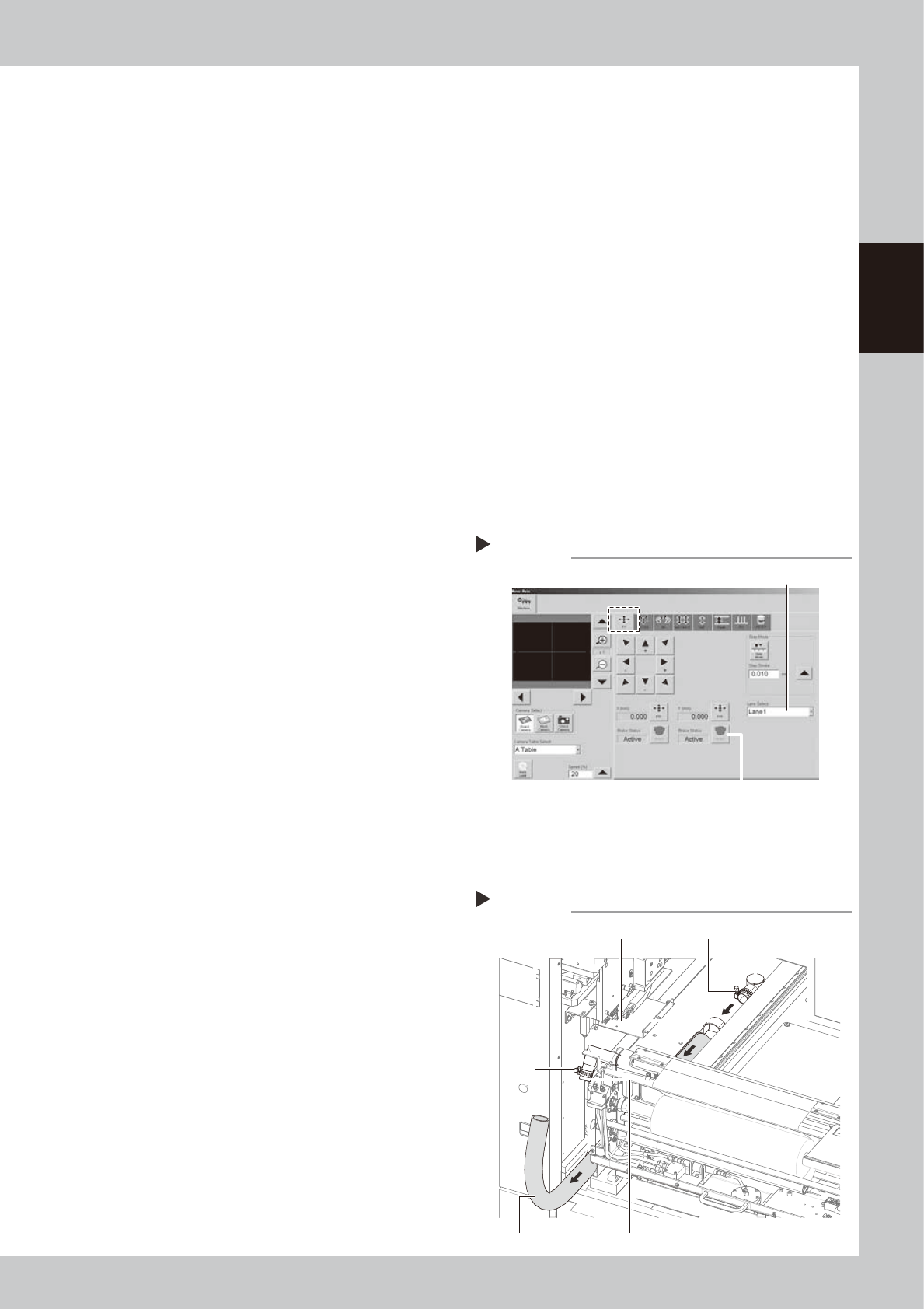
Release the Y-axis brakes on both
lanes.
1. On the [Unit]-[Conveyor] tab, press the
[Axis] to open the “Move Axis” screen.
2. Open the [XY] tab and select “Lane 1”
from the “Select Lane” drop-down list.
3. Press the [Brake] button for the Y-axis to
release the brake.
4. Select “Lane 2” and press the [Brake]
button to release the Y-axis brake on
Lane 2.
54201-N3-00
3
Open the safety cover and front
panel of the machine.
Open the safety cover and front panel on
the lane where you will replace the blower
hose.
4
Remove the blower hose from the
cleaner.
1. Move the unit on the Y-axis to the inner
end of the machine.
2. Loosen the hose band with a flat-blade
screwdriver and remove the blower hose
from the joint.
5
Remove the blower hose from the
blower.
1. Loosen the hose band with a flat-blade
screwdriver and remove the blower hose
from the joint.
2. Loosen the mounting bolts on the hose
clamps (2 bolts on each clamp) with an
Allen wrench (4mm).
3. Pull out the blower hose.
53211-N3-00
[Move Axis] screen
Step 2
Select “Lane”.
Y-axis [Brake] button
Removing the blower hose
Step 4,5
Hose bandHose band Hose clamp
Joint
Vacuum pipe
Blower hose
2-16
2
Inspection and maintenance
6
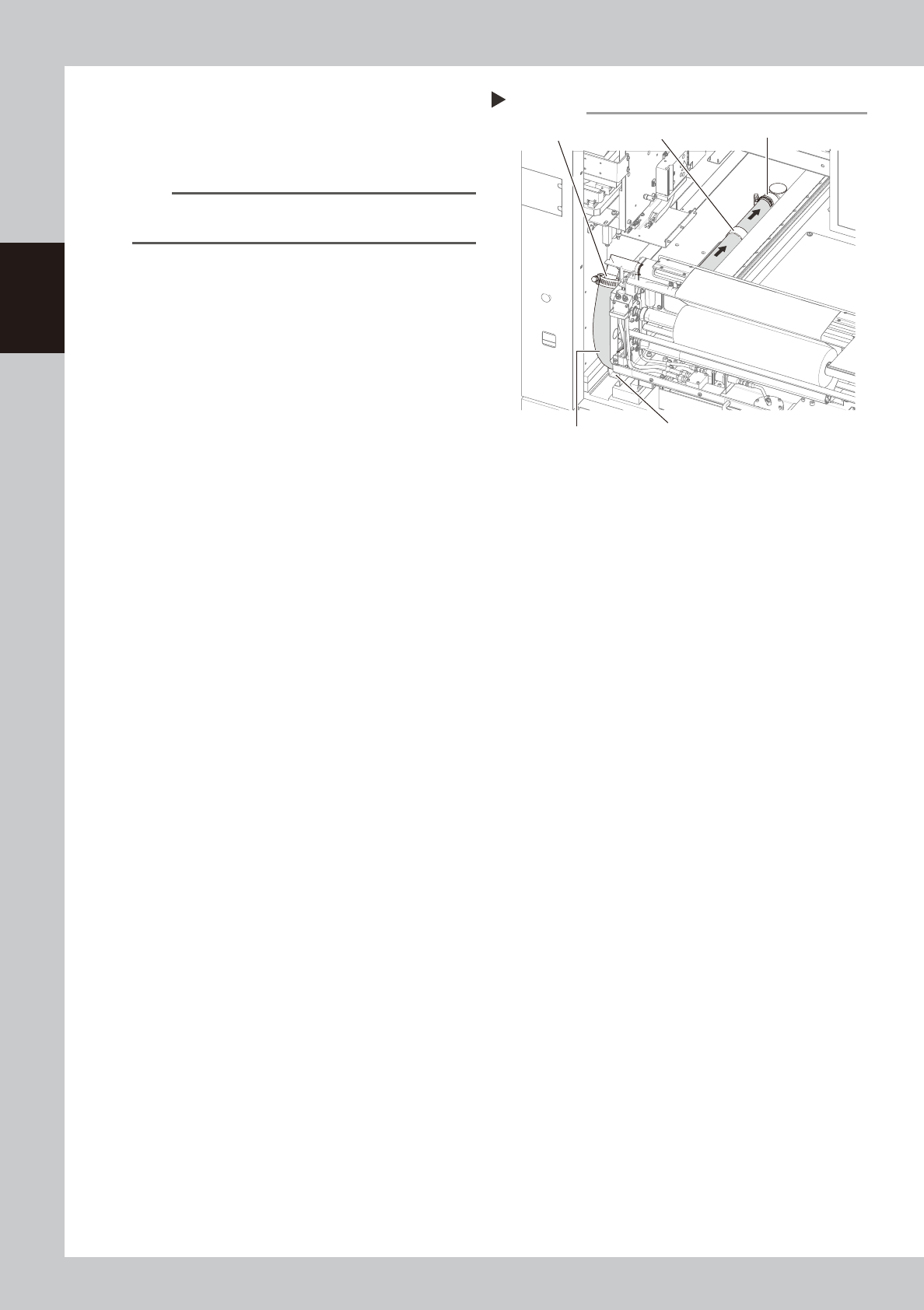
Insert a new blower hose into
place.
1. Insert the new blower hose and pass it
through the hose clamps.
n
NOTE
Insert the blower hose so that it smoothly bends
upward.
2. Connect the blower hose to the joint and
tighten the hose band with the flat-blade
screwdriver to clamp the hose.
3. Temporarily connect the blower hose to
the vacuum pipe.
53212-N3-00
7
Check the blower hose position.
Make sure the blower hose is placed straight
in the hose guide.
8
Clamp the blower hose.
1. Using the flat-blade screwdriver, tighten
the hose band on the vacuum pipe to
clamp the hose.
2. Using the Allen wrench (4mm), tighten
the mounting bolts on the hose clamps (2
bolts on each clamp) to clamp the
blower hose.
9
Close the safety cover and front
panel of the machine.
Inserting the blower hose
Step 6
Hose guide
Blower hose
Vacuum pipe
Hose clampJoint