2OM-1088-002.pdf - 第117页
Tg0699-PM-D2 2.10 "Cleaning" T ab 0207-001 Chapter 1 2-58 2.10 "Cleaning" T ab • • • • • Sheet Layout When you push "Cleaning" tab in the "Pattern Program" edit win- dow , the foll…

Tg0699-PM-D2
0207-001 Chapter 1 2-57
2.9 "Auto Stop" Tab
*6 Paste Detect
Make the ten-key window appear and enter a value in the text
box.
This data becomes valid only when "Paste Detect" is
selected in the "Paste Supply Interval Mode" text box
*4.
Tg0699-PM-D2
2.10 "Cleaning" Tab
0207-001 Chapter 1 2-58
2.10 "Cleaning" Tab
••
••
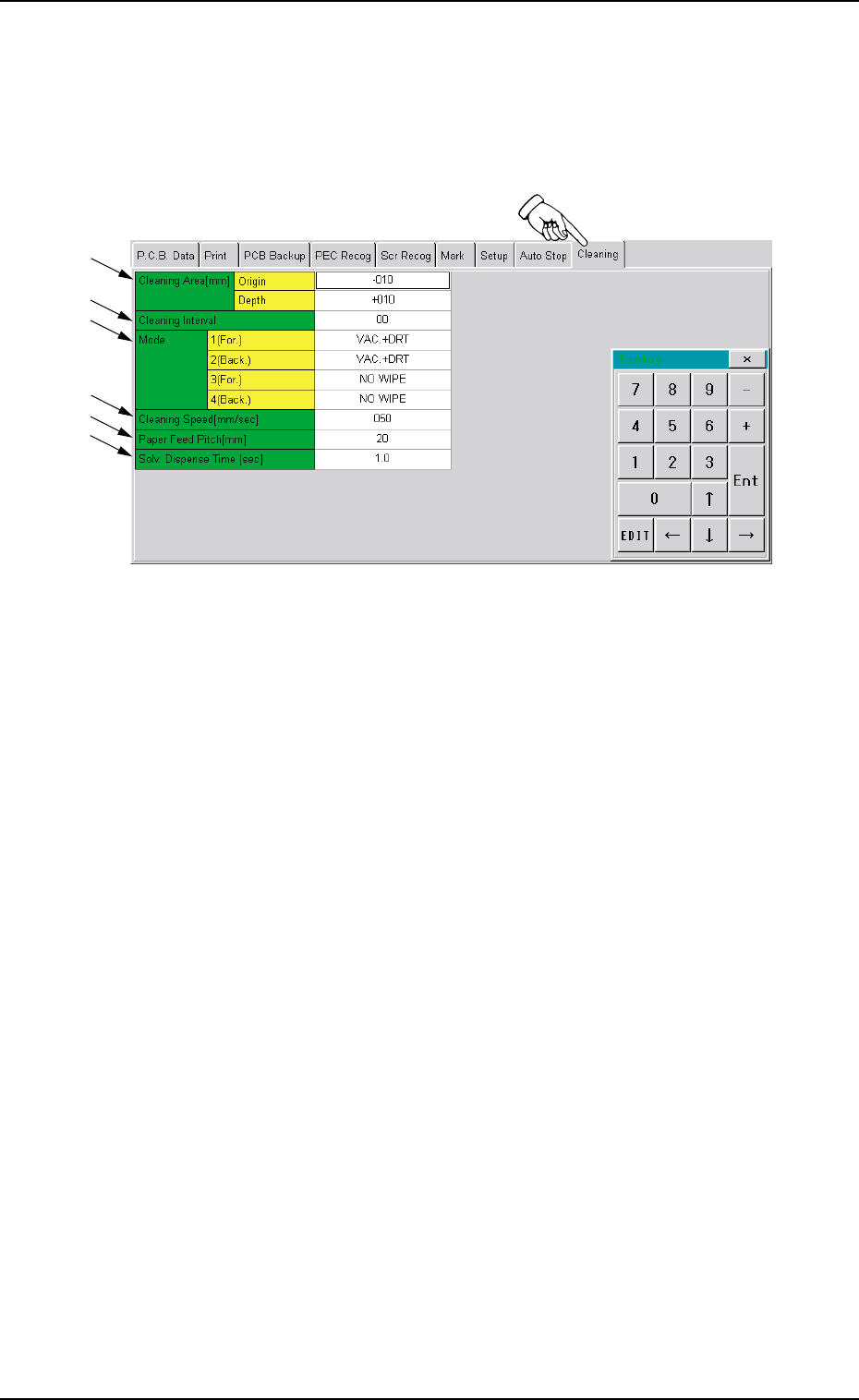
• Sheet Layout
When you push "Cleaning" tab in the "Pattern Program" edit win-
dow, the following tab sheet appears.
Fig. 3B95 "Cleaning" Tab Sheet
••
••
• Sheet Composition
*1 Cleaning Area
Make the ten-key window appear and enter values in the text
boxes.
*2 Cleaning Interval
Make the ten-key window appear and enter a value in the text
box.
*3 Mode
Push the text box twice. The text box changes to a combo box.
Push the down arrow to open the drop-down list. Select one of
the options from the drop-down list.
*4 Cleaning Speed [mm/sec]
Make the ten-key window appear and enter a value in the text
box.
*5 Paper Feed Pitch [mm]
Make the ten-key window appear and enter a value in the text
box.
*6 Solv. Dispense Time [sec]
Make the ten-key window appear and enter a value in the text
box.
*1
*2
*3
*4
*5
*6

Tg0699-PM-D2
Section 3
Menus for Management Data
This section describes the functions and operations in
each window (window which opens after a menu button
is pressed at the "MANAGE. DATA" window).
0207-001 Chapter 1 3-1