2OM-1088-002.pdf - 第200页
Tg0699-PM-D2 1.1 "MAC. ERR." Window 0207-001 Chapter 2 1-5 *5 [RESET] Button Pressing this button cancels an alarm (sound) and closes the "ERROR" window . *6 [BUZZER RESET] Button Pressing this button…
Tg0699-PM-D2
1.1 "MAC. ERR." Window
0207-001 Chapter 2 1-4
1.1 "MAC. ERR." Window
••
••
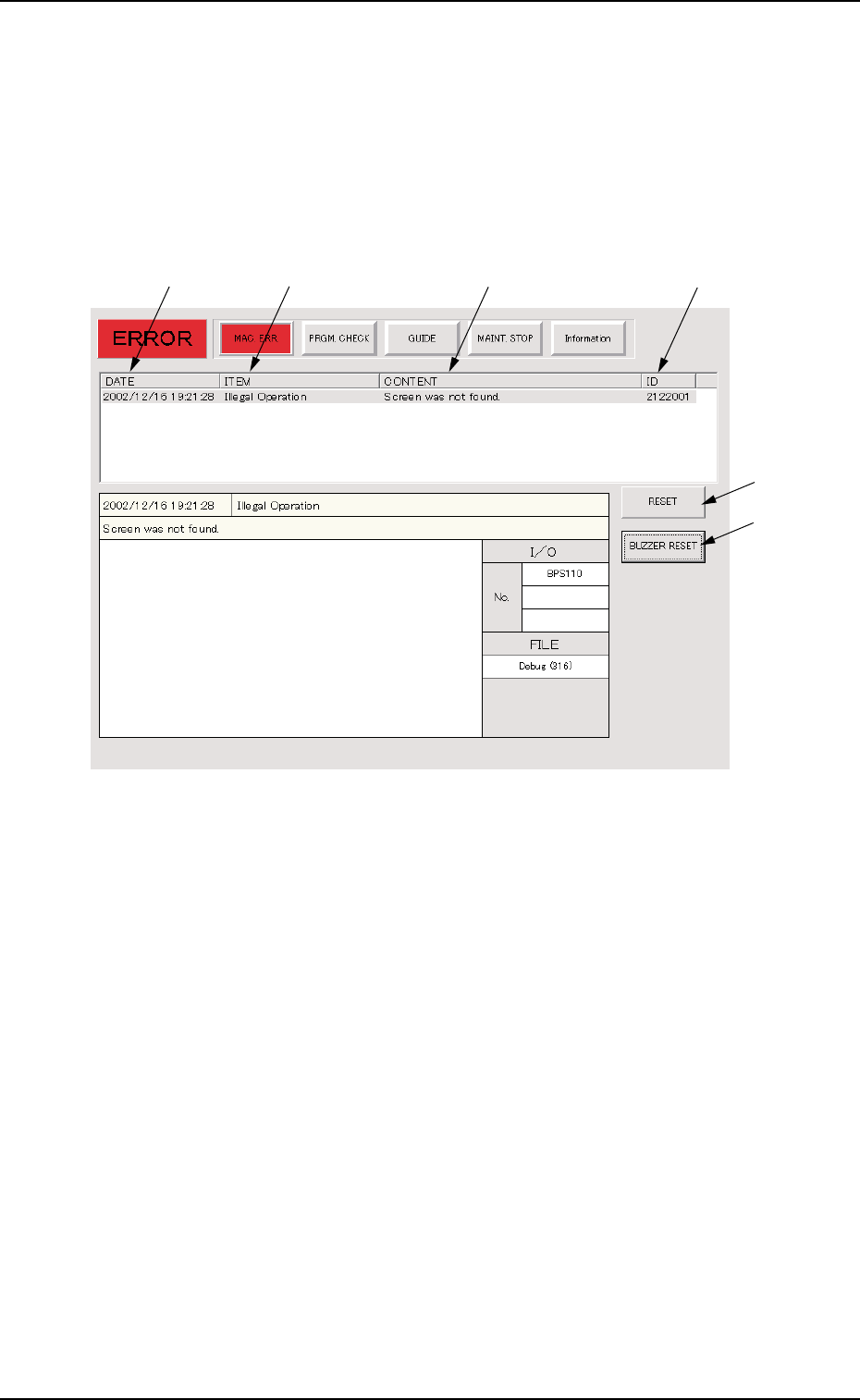
• Window Layout
When an error is detected, the following "MAC. ERR." window
opens.
Fig. 4A2 Example of "MAC. ERR." Window
••
••
• Window Composition
*1 DATE
Displayed are the date and time of error occurrence.
*2 ITEM
Displayed is an error item.
*3 CONTENT
Displayed are the contents of an error.
*4 ID
Displayed is a number that identifies an error.
When an error has occurred, use this ID as an index and refer to
"2. Troubleshooting after Error Display" (Section 2) for details.
*1
*2
*3
*4
*5
*6

Tg0699-PM-D2
1.1 "MAC. ERR." Window
0207-001 Chapter 2 1-5
*5 [RESET] Button
Pressing this button cancels an alarm (sound) and closes the
"ERROR" window.
*6 [BUZZER RESET] Button
Pressing this button cancels an alarm (sound) only.
••
••
• Reset Procedure from "ERROR" Window
(1) Take notes of the descriptions under "ID", "ITEM", and "CON-
TENT".
When you have forgotten an error message, refer to the
list of errors in the "Machine Error Recall" window.
(Operation Sequence: [RECALL MSG.] Button
(Submenu) → "Machine Error Recall" Window)
(2) Press the [RESET] button to resume the original window.
(3) Use the found ID as an index and refer to "2. Troubleshooting
after Error Display" (Section 2) for details. Then, reset the
machine to its normal condition.
Tg0699-PM-D2
1.2 "PRGM. CHECK" Window
0207-001 Chapter 2 1-6
*1
*4
*2
*3
*5
1.2 "PRGM. CHECK" Window
••
••
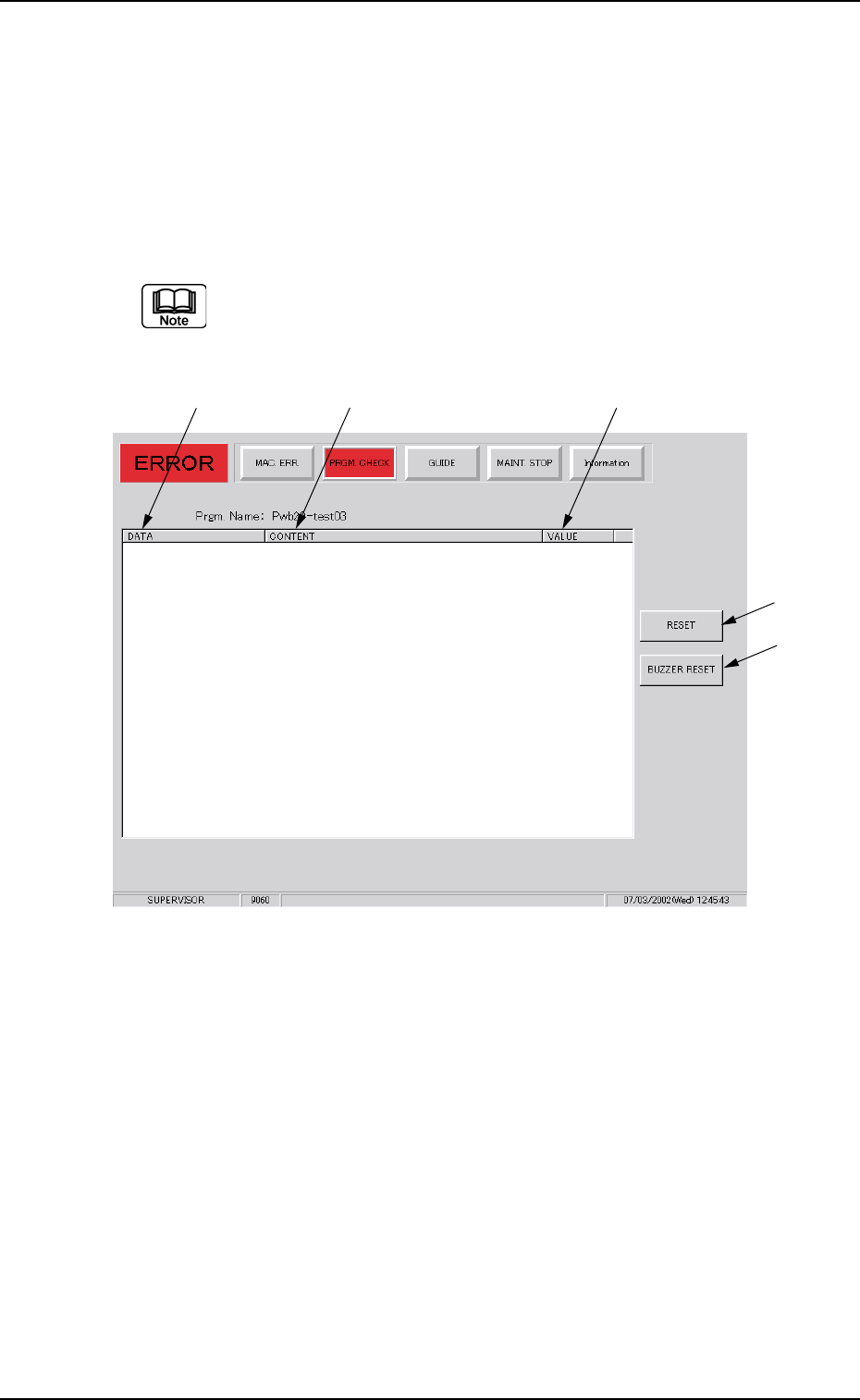
• Window Layout
When you select "Pattern Program Data Error" in the field under
"ITEM" in the "MAC. ERR." window and press the [PRGM.
CHECK] button, the following window opens.
When an item other than "Pattern Program Data Error" is
selected and the [PRGM. CHECK] button is pressed, noth-
ing appears in the display field.
Fig. 4A3
• Window Composition
*1 DATA
Displayed is the name of abnormal data.
*2 CONTENT
Displayed are the contents of an error.
*3 VALUE
Displayed is the value of abnormal data.
*4 [RESET] Button
Pressing this button cancels an alarm (sound) and closes the "ER-
ROR" window.
*5 [BUZZER RESET] Button
Pressing this button cancels an alarm (sound) only.