2OM-1088-002.pdf - 第128页
Tg0699-PM-D2 0207-001 Chapter 1 3-11 2.3 "Recog. Error" T ab *2 *1 *3 2.3 "Recog. Error" T ab This indicates the data related to the recognition errors. • • • • • Sheet Layout When the "Recog. Er…

Tg0699-PM-D2
0207-001 Chapter 1 3-10
2.2 "Time Data" Tab
*11 Maint. Stop Time
This indicates the period of time during which the machine was
stopped for the following maintenance operations.
• Manual Cleaning of Screen
• Replenishment of Cleaning Solvent
• Replenishment of Cleaning Paper
• Replenishment of Solder Paste
*12 Error Stop Time
This indicates the period of time ("*13 Error Alarm Time" + "*14
Recovery Time") during which the machine was reset to its
normal condition after an error alarm was issued.
*13 Error Alarm Time
This indicates the period of time during which the machine
issued an error alarm.
*14 Recovery Time
This indicates the period of time required for the machine to be
reset to its normal condition.
*15 Others
This indicates the period of time required for setup, program
change, and idling operations.
*16 Test Mode Time
This indicates the period of time during which the machine was
operated in the "TEST" mode (operation mode).
*17 SET-UP Time
This indicates the period of time during which the [OPERATION/
SET UP] switch on the front operation panel was set to the "SET
UP" side.
Tg0699-PM-D2
0207-001 Chapter 1 3-11
2.3 "Recog. Error" Tab
*2
*1
*3
2.3 "Recog. Error" Tab
This indicates the data related to the recognition errors.
••
••
• Sheet Layout
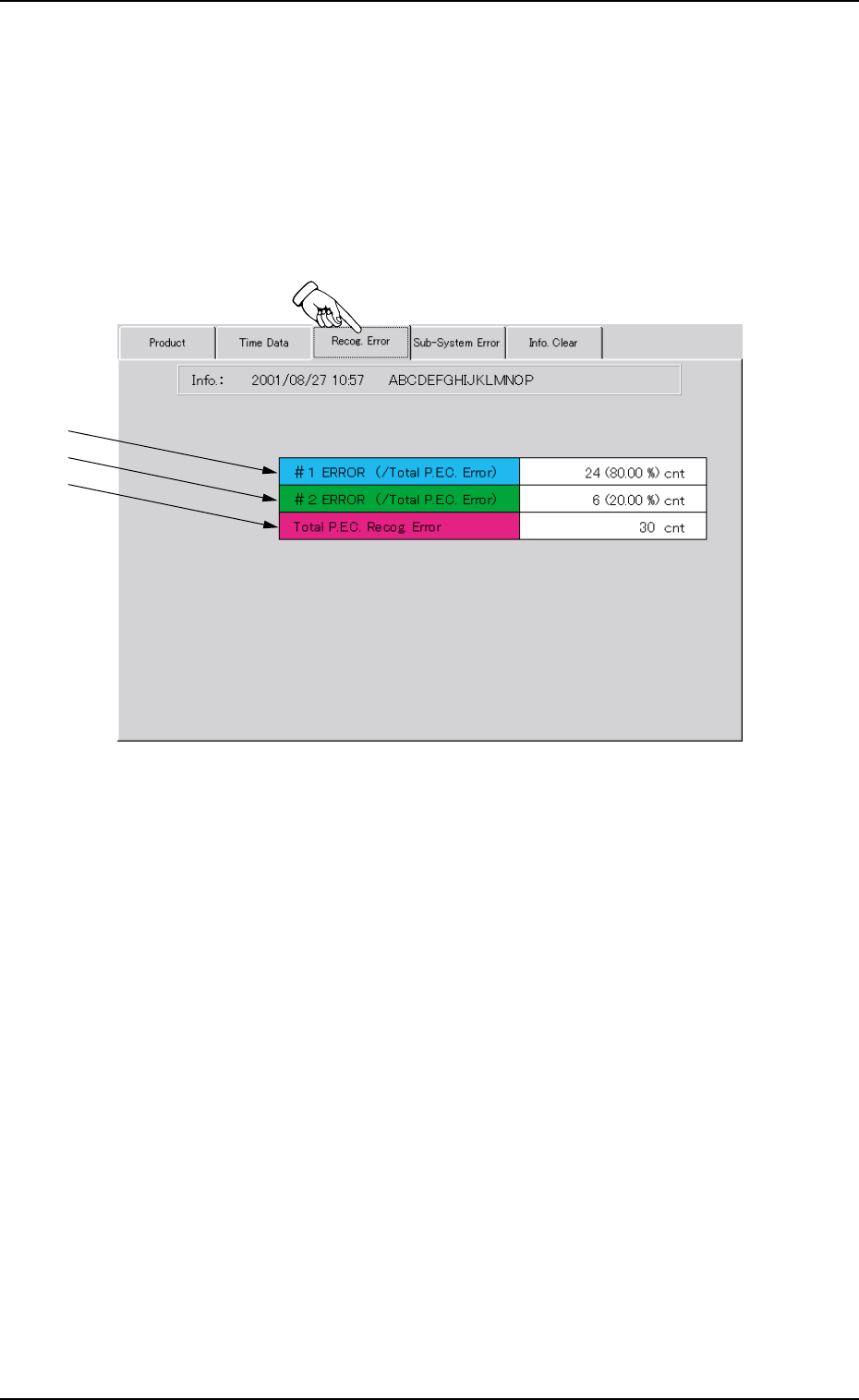
When the "Recog. Error" tab is pressed in the "MANAGE. DATA 1"
window (submenu), the following tab sheet appears.
Fgi. 3C6 "Recog. Error" Tab Sheet
••
••
• Sheet Composition
*1 #1 ERROR (/Total P.E.C. Error)
This indicates the total number of errors on the first fiducial mark
and the ratio based on the total number of P.E.C. recognition
errors.
*2 #2 ERROR (/Total P.E.C. Error)
This indicates the total number of errors on the second fiducial
mark and the ratio based on the total number of P.E.C. recogni-
tion errors.
*3 Total P.E.C. Recog. Error
This indicates the total number of errors that were detected in
P.E.C. recognition processing.
Tg0699-PM-D2
0207-001 Chapter 1 3-12
2.4 "Sub-System Error" Tab
*1
*2 *3
*4
2.4 "Sub-System Error" Tab
This indicates the error data on each individual units.
••
••
• Sheet Layout
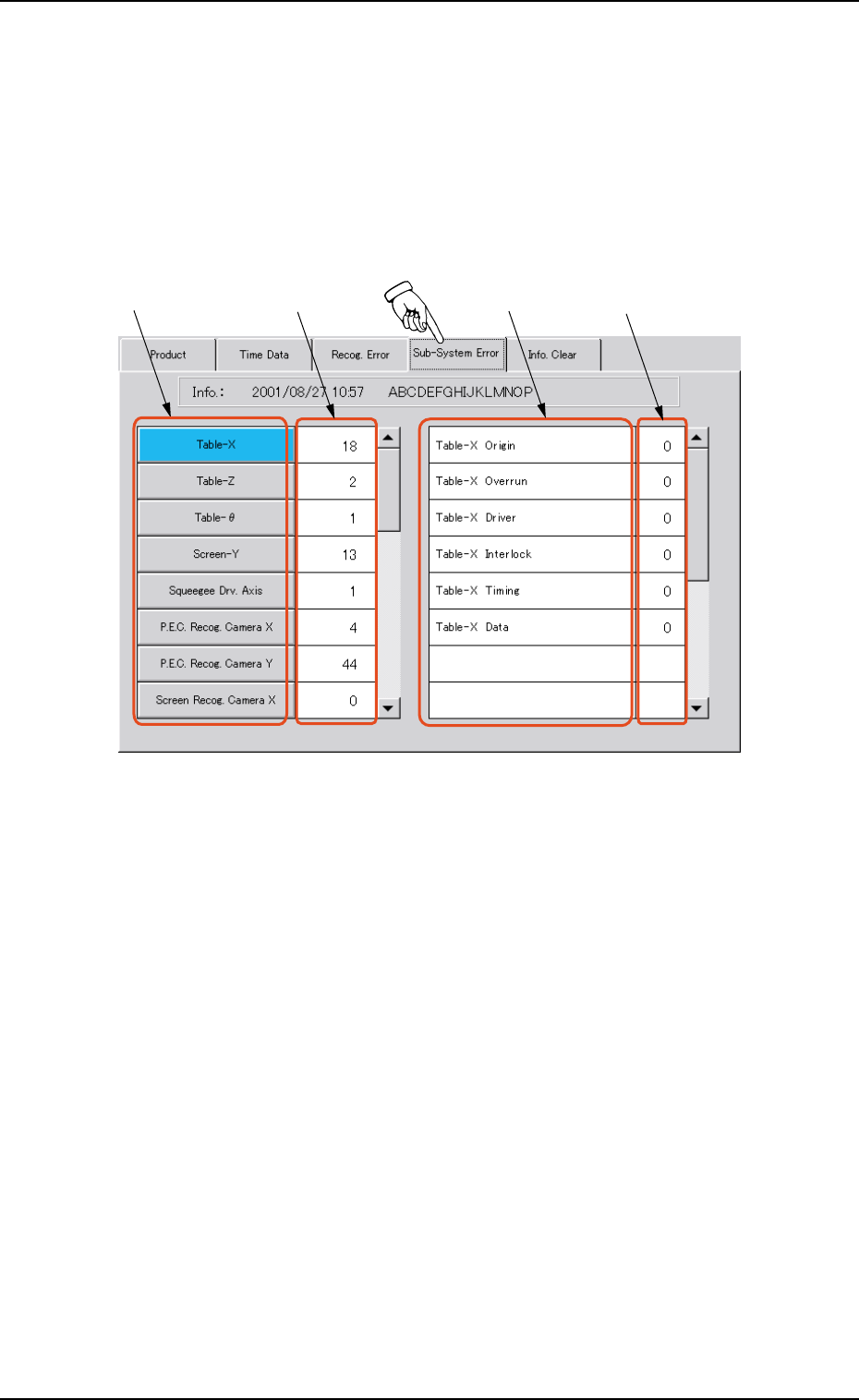
When the "Sub-System Error" tab is pressed in the "MANAGE.
DATA 1" window (submenu), the following tab sheet appears.
Fig. 3C7 "Sub-System Error" Tab Sheet
••
••
• Sheet Composition
*1 Unit Selection Buttons
These buttons are used to select the units.
When a button is pressed, the indications in "*3 Contents of
Errors" change.
*2 Total Numbers of Errors on Each Individual Units
The indicated values represent the total numbers of errors on
each individual units.
*3 Contents of Errors
Displayed are the contents of errors on each individual units.
*4 Total Numbers of Errors
The indicated values represent the numbers of errors classified
according to the contents of errors on each individual units.