2OM-1088-002.pdf - 第173页
Tg0699-PM-D2 0207-001 Chapter 1 4-25-1 3.3 "Printing Condition" T ab *4 Squeegee Up Setting The after-printing squeegee lift is set. This data is to stop any solder paste flow . The moving direction should be t…
Tg0699-PM-D2
0207-001 Chapter 1 4-25
3.3 "Printing Condition" Tab
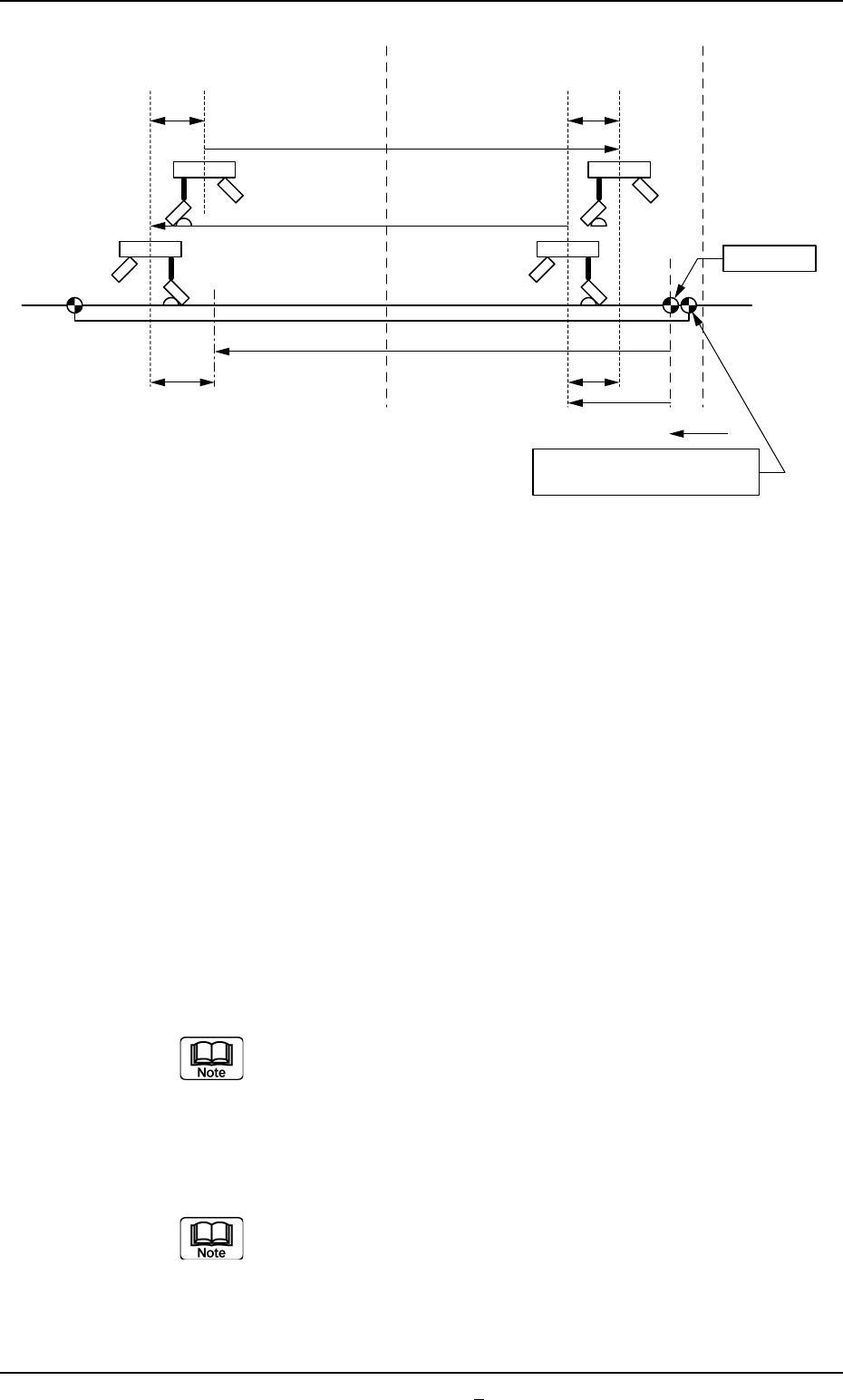
Fig. 3D16
*2 Print Margin
This is the data to find the X2 (excess amount after the comple-
tion of printing) in the above figure, which is calculated by the
machine using the following formula.
Unit : mm
X2 = Sd + Pm
Sd = Distance between Squeegees
(Calculated from squeegee angle)
Pm = Print Margin (Initial Value: 20 mm)
Display the "Ten-Key" window and input the print margin
value.
*3 Paste Release Wait Tm.
The time between the squeegee's starting lowering and it's
moving in direction Y during the paste release operation, is set.
Display the "Ten-Key" window and input the paste
release wait time value.
Screen Center
X2 X2
So
So
NC Origin
L2
A' B A B'
Squeegee Origin
L1
L ns
L1, L2 : Print Area Data (based on the NC origin)
Transfer Reference Point
at Front Side Reference

Tg0699-PM-D2
0207-001 Chapter 1 4-25-1
3.3 "Printing Condition" Tab
*4 Squeegee Up Setting
The after-printing squeegee lift is set. This data is to stop any
solder paste flow. The moving direction should be that of the
solder paste.
Y-Axis Move Distance : Sets the movement distance of the
Y-axis.
Y-Axis Move Speed : Sets the moving speed of the Y-axis.
Tg0699-PM-D2
0207-001 Chapter 1 4-26
4. "Offset Data" Submenu
*1
4. "Offset Data" Submenu
••
••
• Window Layout
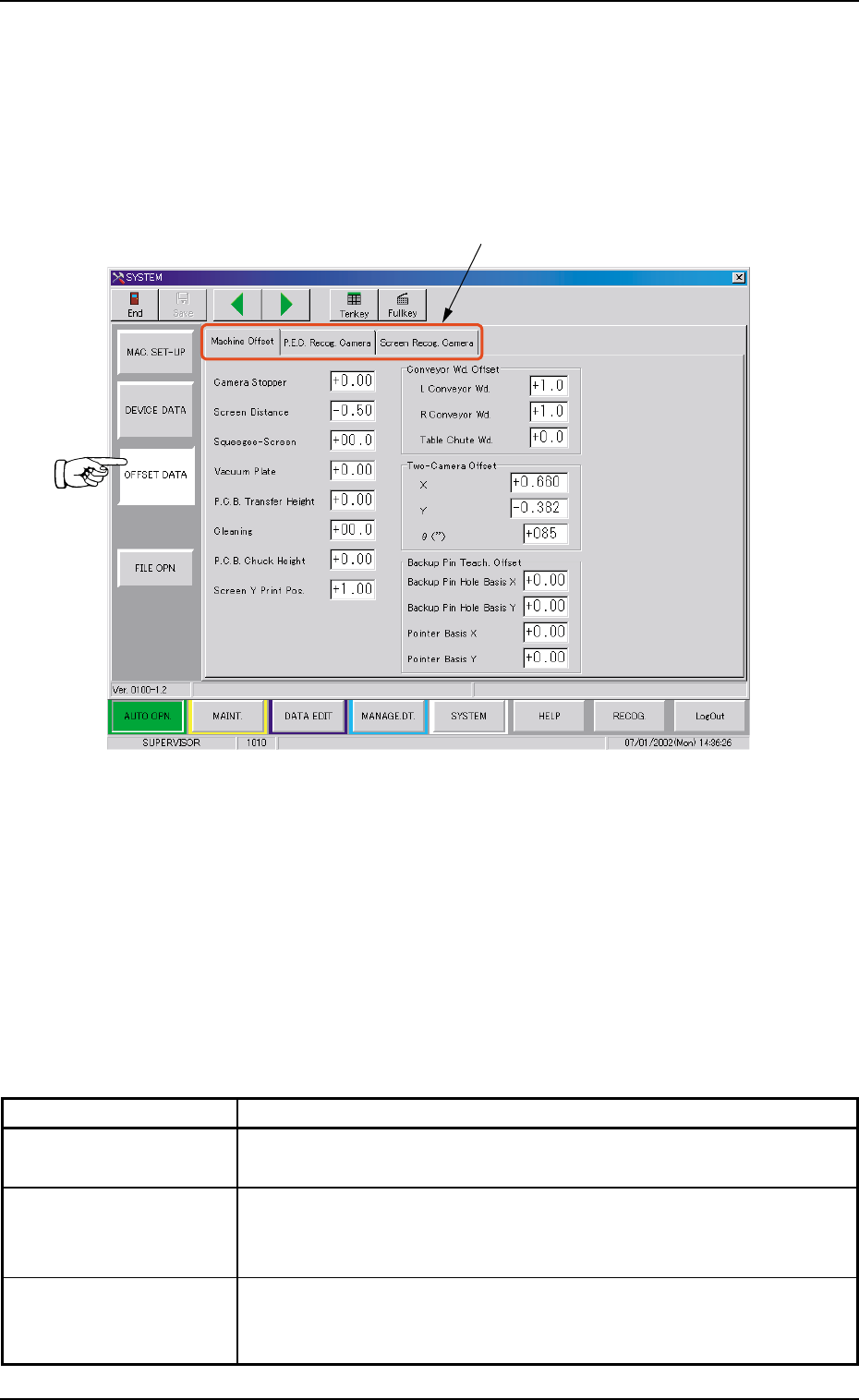
When the [OFFSET DATA] button is pressed in the "SYSTEM"
submenu bar, the following window appears.
Fig. 3D17 "Offset Data" Window (Submenu)
••
••
• Window Composition
*1 Tabs
The "Offset Data" window (submenu) is provided with 3 tab
sheets.
Every time a tab is pressed, the corresponding tab sheet ap-
pears.
Table 3D5
Tabs Description
Machine Offset This tab sheet enables the operator to set offset values for each
section of the machine.
P.E.C. Recog. Camera This tab sheet enables the operator to set offset values and magni-
fications of the P.E.C. recognition camera and gain & level (contrast
and brightness difference) of the fiducial mark.
Screen Recog. Camera This tab sheet enables the operator to set offset values and magni-
fications of the screen recognition camera and gain & level (contrast
and brightness difference) of the fiducial mark.