2OM-1088-002.pdf - 第143页
Tg0699-PM-D2 0207-001 Chapter 1 3-26 4. "FILE ON." Submenu *1 *2 *3 *4 4. "FILE ON." Submenu "Save/Read" of print data is performed, using the floppy disk drive. • • • • • Window Layout When…
Tg0699-PM-D2
0207-001 Chapter 1 3-25
3.5 "Recog. Error" Tab
*2
*1
*3
3.5 "Recog. Error" Tab
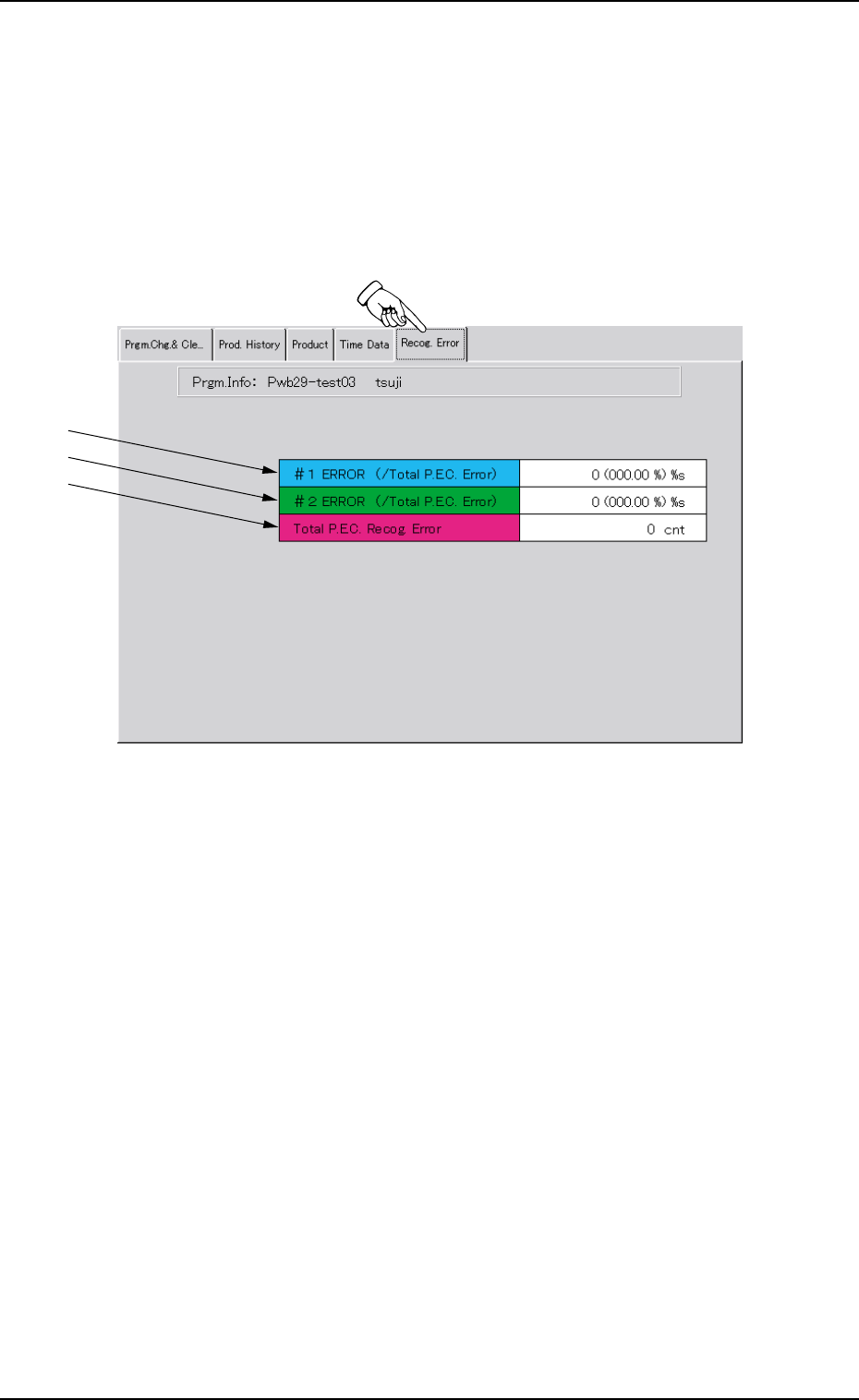
Displayed is the recognition error data of the current model.
••
••
• Sheet Layout
When the "Recog. Error" tab is pressed in the "PRGM. MNG.
DATA" window (submenu), the following tab sheet appears.
Fig. 3C17 "Recog. Error" Tab Sheet
••
••
• Sheet Composition
*1 #1 ERROR (/Total P.E.C. Error)
This indicates the total number of errors on the first fiducial mark
and the ratio based on the total number of P.E.C. recognition
errors.
*2 #2 ERROR (/Total P.E.C. Error)
This indicates the total number of errors on the second fiducial
mark and the ratio based on the total number of P.E.C. recogni-
tion errors.
*3 Total P.E.C. Recog. Error
This indicates the total number of errors that were detected in
P.E.C. recognition processing.
Tg0699-PM-D2
0207-001 Chapter 1 3-26
4. "FILE ON." Submenu
*1 *2 *3 *4
4. "FILE ON." Submenu
"Save/Read" of print data is performed, using the floppy disk drive.
••
••
• Window Layout
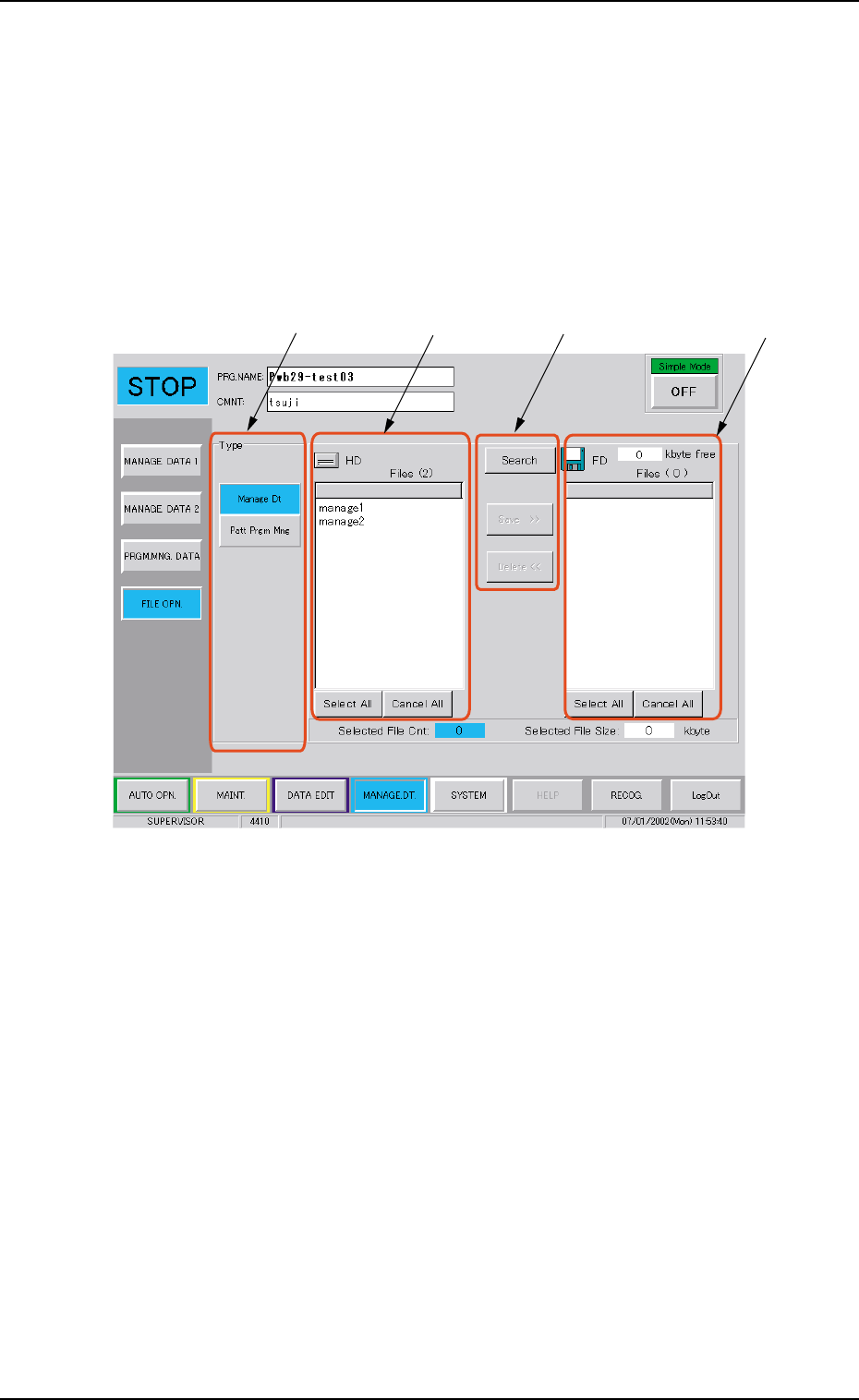
When the [File Operation] button is pressed on the machine per-
formance data sub-menu bar, the following sub-menu window
appears.
Fig. 3C18
••
••
• Window Composition
*1 Data Type Button
The following buttons are arranged.
[Management Data] :
The management data is saved in a floppy disk.
The management data file so saved can not be read in the
machine.
[Pattern Program Management Data] :
The pattern program management data is saved in a floppy disk.
The pattern program management data file so saved can not be
read in the machine.

Tg0699-PM-D2
0207-001 Chapter 1 3-27
4. "FILE ON." Submenu
*2 HD Data List
The list of data saved in the machine is indicated by data type
selected and designated using Data Type Button *1.
When the data item line is pressed in the list, the selection of the
data is cancelled.
When the [Select All] button is pressed, all the data items indi-
cated in the list are selected.
When the [Cancel All] button is pressed, the selection of all the
data items indicated in the list is cancelled.
*3 Operation Button
The following buttons are arranged.
[Search]
The data in the floppy disk set in the front service panel is read
in.
[Delete <<]
The data item selected in the FD Data List *4 is cancelled.
*4 FD Data List
The list of data items saved in the floppy disk set in the front
service panel is given by the data type selected and designated
using Data Type Button *1.
••
••
• Data Selection and Data Selection Cancel Operations
The data selection or selection cancel in the HD data list and FD
data list is performed as follows.
When the data item line indicated in the list is pressed, the data
item is selected.
When the selected data item line is pressed, the data selection
is cancelled.
When the [Select All] button is pressed, all the data items indi-
cated in the list are selected.
When the [Cancel All] button is pressed, the selection of all data
items indicated in the list is cancelled.