2OM-1088-002.pdf - 第205页
Tg0699-PM-D2 0207-001 Chapter 2 1-10
Tg0699-PM-D2
1.5 "Information" Window
0207-001 Chapter 2 1-9
1.5 "Information" Window
••
••
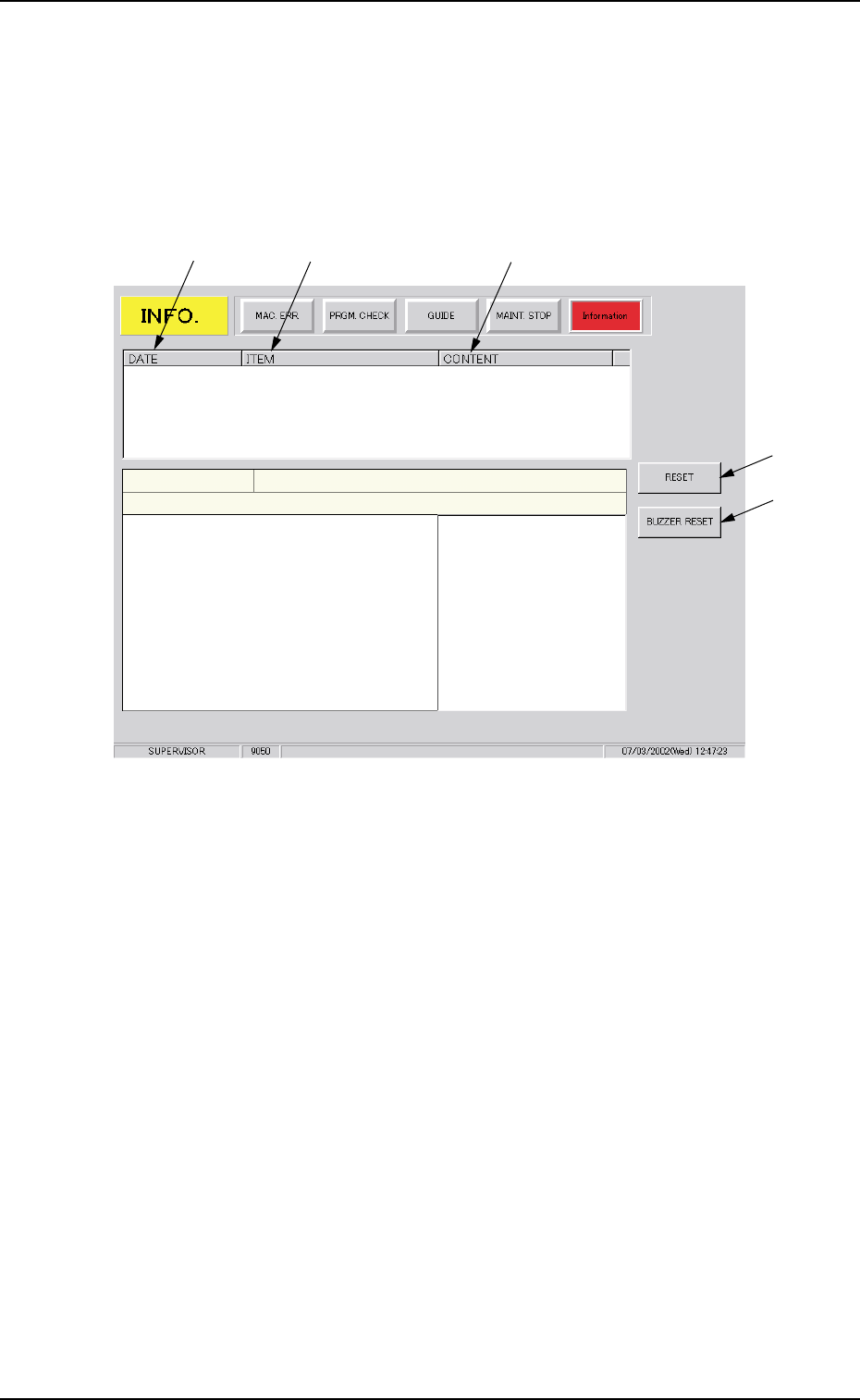
• Window Layout
When the [Information] button is pressed in the "ERROR" window,
the following window opens.
Fig. 4A6
••
••
• Window Composition
*1 DATE
Displayed are the date and time when the machine information
is issued.
*2 ITEM
Displayed are the items related to the machine information.
*3 CONTENT
Displayed are the contents of the machine information.
*4 [RESET] Button
Pressing this button cancels an alarm (sound) and closes the
"ERROR" window.
*5 [BUZZER RESET] Button
Pressing this button cancels an alarm (sound) only.
*1
*4
*2
*3
*5

Tg0699-PM-D2
0207-001 Chapter 2 1-10

Tg0699-PM-D2
Section 2
Troubleshooting on Each Section
This section describes how to solve easy problems or
reset the machine from abnormal condition (error dis-
play) to normal one.
0207-001 Chapter 2 2-1