2OM-1088-002.pdf - 第187页
Tg0699-PM-D2 0207-001 Chapter 1 4-38 5. "File Operation" SubMenu *2 [Save] Button The machine set up data, device data, and offset data saved on the machine hard disk are copied to the floppy disk. (a) The file…
Tg0699-PM-D2
0207-001 Chapter 1 4-37
5. "File Operation" Submenu
5. "File Operation" Submenu
The displayed information is for passing or deleting the management
data between the hard disk (HD) in the machine and a floppy disk
(FD).
••
••
• Window Layout
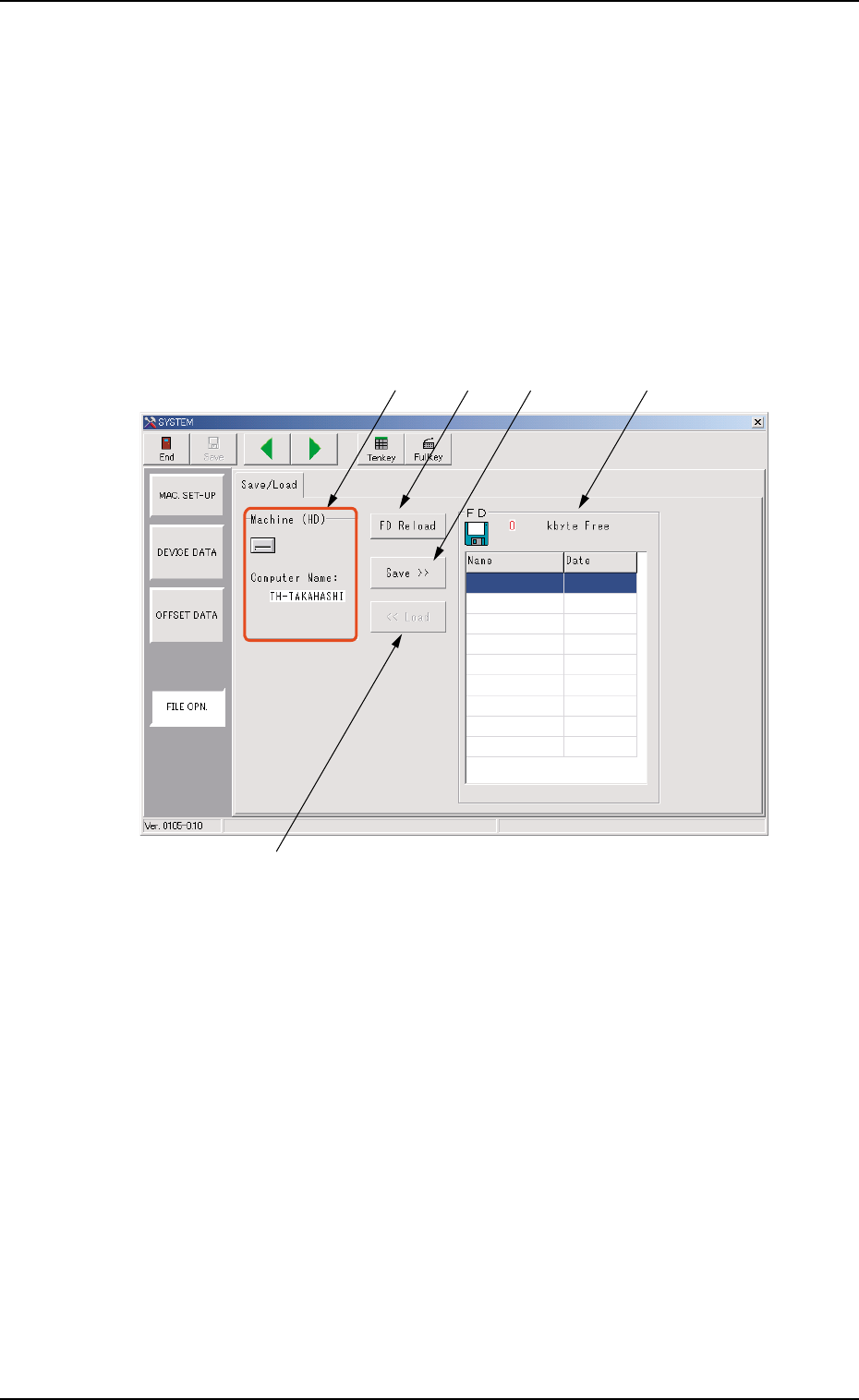
When the [FILE OPN.] button included in the system setting
submenu bar, is pressed, the following submenu window appears.
Fig. 3D31
Open the cover on the lower section of the touch panel and insert a
floppy disk in the floppy disk drive.
••
••
• Window Composition
*1 Computer Name Display
The computer name in the machine is indicated.
*1*1
*4
*5 *2 *3
Tg0699-PM-D2
0207-001 Chapter 1 4-38
5. "File Operation" SubMenu
*2 [Save] Button
The machine set up data, device data, and offset data saved on
the machine hard disk are copied to the floppy disk.
(a) The files on the machine hard disk are not deleted.
(b) The file name to be saved on the floppy disk is the same
as the computer name in the machine. In the case that
two or more machines are used and the same computer
name is entered, the data will be overwritten. Please
enter a different computer name for each machine.
*3 Data Display on FD
Data name, save date and available memory capacity of the
floppy disk, are displayed.
The date when the data is saved on the floppy disk is dis-
played.
*4 [Load] Button
When the data in the "Data Display on FD" is selected and
pressed, the selected data is loaded into the machine.
*5 [FD Reload] Button
When two or more floppy disks are used and this button is
pressed after changing a floppy disk, the data on the new floppy
disk is displayed in the Data display on FD.
During the data saving, the access lamp for the floppy disk
drive is turned on.
Ensure that the access lamp is turned off when the floppy
disk is taken out.

Tg0699-PM-D2
Section 5
Accompanying Material
0207-001 Chapter 1 5-1