00196457-05_UM_SX12DX12_SR706_EN.pdf - 第151页
User Manual SIPLACE SX1/SX2/DX1/DX2 3 Technical data and assemblies From software version SC.706.xx V ersion 06/2012 EN 3.8 PCB conveyor system 151 3.8.5 Definition of PCB wa rp age 3.8.5.1 PCB warp age on the conveyor P…
3 Technical data and assemblies User Manual SIPLACE SX1/SX2/DX1/DX2
3.8 PCB conveyor system From software version SC.706.xx Version 06/2012 EN
150
3.8.3.4 Synchronous transport mode
In synchronous mode, two PCBs of the same size are moved into the placement position at the
same time. They must be processed as a common panel.
This makes it possible to process the top and bottom sides of a board in one line. The time needed
to transport the board is reduced as two boards are always transported at the same time. It also
ensures better utilization of the nozzle configuration.
PCBs on conveyor tracks 1 and 2 are moved synchronously onto the conveyor sections (i.e. the
conveyors are controlled synchronously, but independently of one another). The components to
be placed on conveyor tracks 1 and 2 must be organized into a panel via two subpanels.
If only one conveyor lane is occupied at the beginning of placement, this single use of the con-
veyor lane will be identified as "not to be placed".
If the dual conveyor is operated in synchronous mode, the ‘PCB whispering down the line’ option
is deactivated. The "Global bad fiducial" option cannot be used.
3.8.3.5 I-Placement
In addition to the synchronous and asynchronous conveyor modes, the placement concept "I-
Placement" has now been introduced. In this case, both placement heads operate in one place-
ment area at the same time, placing their own boards fully independently of one another. In normal
mode, the placement heads operate in alternating placement mode: while the placement head in
one placement area places a board, the other placement head picks up components from the
feeder module. In the case of "I-Placement", the placement heads do not have this waiting period,
which increases the placement performance.
3.8.4 Controlling and width adjustment
3.8.4.1 Controlling using the Single Functions menu
The online help contains information on controlling the PCB conveyor system and on the Single
Functions menu.
3.8.4.2 Automatic width adjustment
When the command is received, the conveyor belts are set to the desired width. Different widths
are possible for a dual conveyor.
See the Online Help for detailed information about changing the conveyor track width.
User Manual SIPLACE SX1/SX2/DX1/DX2 3 Technical data and assemblies
From software version SC.706.xx Version 06/2012 EN 3.8 PCB conveyor system
151
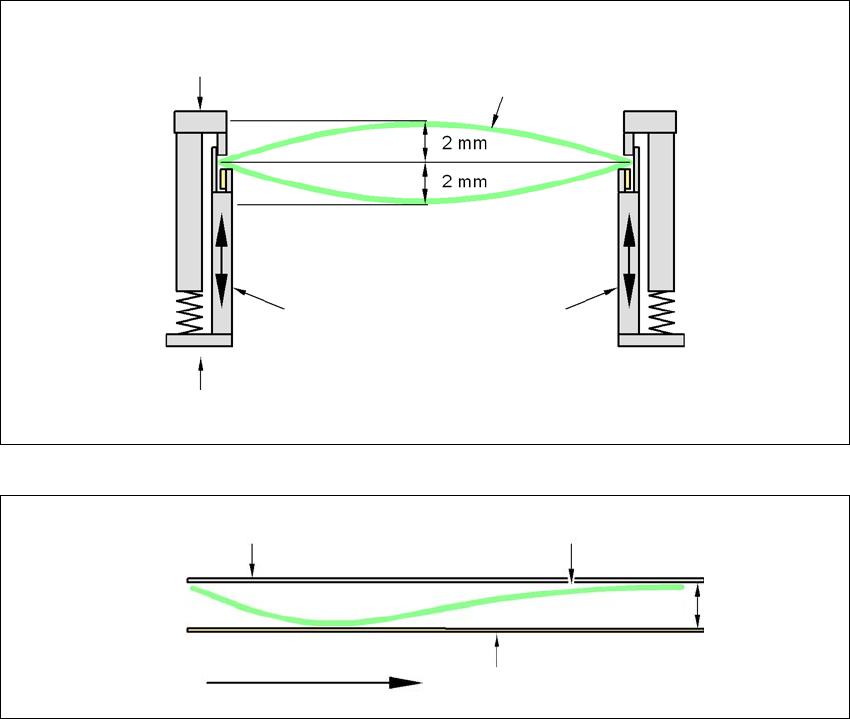
3.8.5 Definition of PCB warpage
3.8.5.1 PCB warpage on the conveyor
PCB warpage across the direction of travel max. 1 % of the PCB diagonal, but not exceeding 2 mm
3
PCB warpage in direction of travel + PCB thickness < 5.5 mm
3
Fixed clamped edge
Movable clamping device
Printed circuit board
Conveyor side wall
Fixed clamped edge
Conveyor belt
Printed circuit board
PCB transport direction
5,5 mm
3 Technical data and assemblies User Manual SIPLACE SX1/SX2/DX1/DX2
3.8 PCB conveyor system From software version SC.706.xx Version 06/2012 EN
152
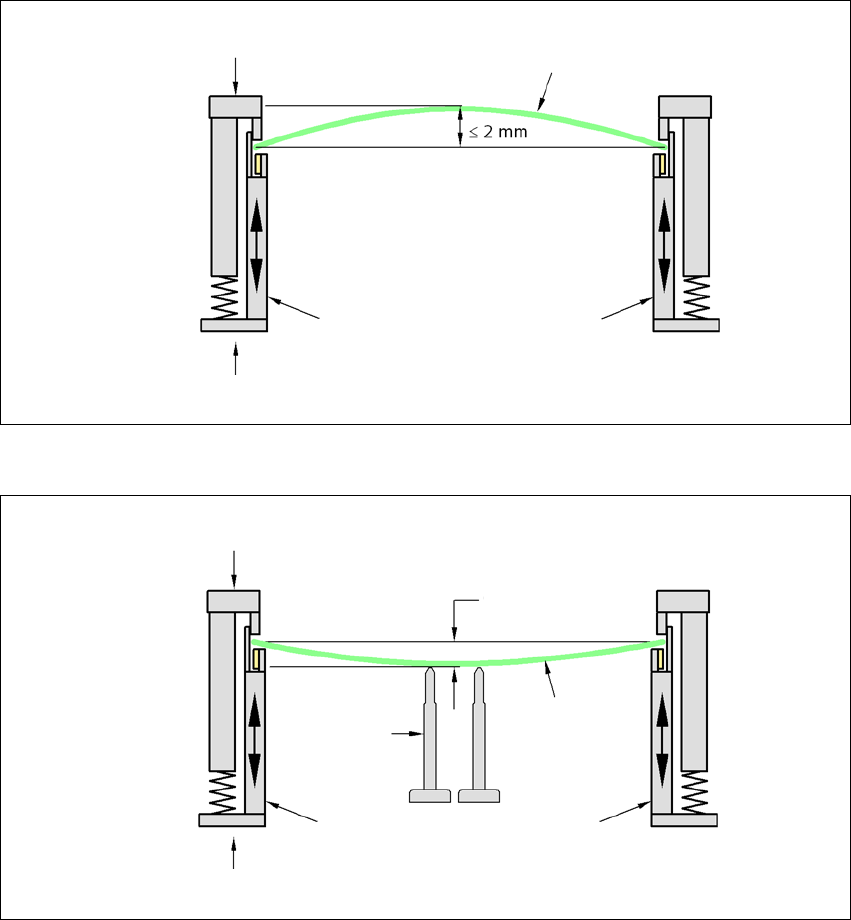
3.8.5.2 PCB warpage during placement
A warpage of 2 mm can lead to problems focussing on local fiducials and ink spots in the middle
of the PCB. The digital camera's focus is 2 mm. When all the tolerances are taken into account,
this value is reduced to 1.5 mm. Also note that the component height is reduced by the warpage.
3
3
PCB warpage down, max. 0.5 mm
3
Use magnetic pin supports to achieve this value.
Movable clamping device
Fixed clamped edge
Printed circuit board
Conveyor side wall
Printed circuit board
Magnetic pin
support
Movable clamping device
Fixed clamped edge
Conveyor side wall
0.5 mm