00196457-05_UM_SX12DX12_SR706_EN.pdf - 第231页
User Manual SIPLACE SX1/SX2/DX1/DX2 4 Setting up and commissioning From software version SC.706.xx V ersion 06/2012 EN 4.3 Setting up the machine 231 4.3.9 Aligning the machine with the machine spirit level 4 Fig. 4.3 - …

4 Setting up and commissioning User Manual SIPLACE SX1/SX2/DX1/DX2
4.3 Setting up the machine From software version SC.706.xx Version 06/2012 EN
230
4.3.8 Integrating the machine into the line
Observe the general warnings in section 4.3.1, page 218.
Observe the warnings for transportation of the machine in section 4.3.2, page 219.
For details of tools and equipment, refer to section 4.3.5, page 222.
4.3.8.1 Aligning and adjusting the machines in the line
With the fork-lift, raise the machine until the weight is taken off the machine feet.
Determine the PCB conveyor height for the machine in the line and use the hexagon socket
head screw to adjust the height approximately.
You may need to fit the machine feet to the relevant PCB conveyor height (see 4.3.6 on page
223).
Position the machine on the free location on the line using the fork-lift.
Pay attention to the alignment of the PCB conveyors and check the distance to the previous
machine.
WARNING 4
Lower the machine slowly. A second person should look underneath to ensure that all the
machine foot touch the floor at the same time. If the machine feet on one side hit the ground
hard, the fixings may be damaged.
4
Use the machine spirit level to align the machine in the X and Y directions (see 4.3.9 on page
231).
Align the PCB conveyors with the help of the long auxiliary board. Move the machine to its
final position. You must be able to push the long auxiliary board through the PCB conveyor to
the adjacent machine with ease and without jamming.
Use the machine spirit level to check the X and Y directions again and adjust the height of the
feet if necessary.
Tighten the machine feet at the clamping screw to a torque of 130 Nm.
Hit the feet with a hammer to check the load-bearing strength of the machine feet.
Use the machine spirit level to check the X and Y directions again.
User Manual SIPLACE SX1/SX2/DX1/DX2 4 Setting up and commissioning
From software version SC.706.xx Version 06/2012 EN 4.3 Setting up the machine
231
4.3.9 Aligning the machine with the machine spirit level
4
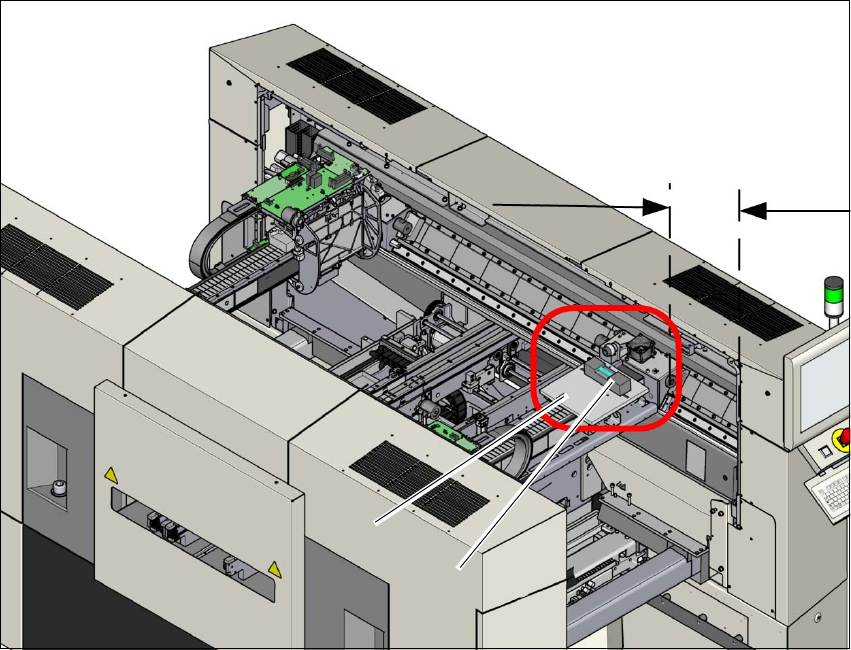
Fig. 4.3 - 8 Adjusting the machine in the X and Y directions - measurement (example of SX2)
Measurement is performed at gantry 1.
Push the gantry inwards, in the Y direction. The distance of the two bumpers should be ap-
prox. 300 mm (or approx. 4-5 red dots on the linear guide).
Place the support plate (1) onto the gantry so that the 3 support pins lie on the free areas be-
tween the running surface and the magnets. Make sure that the 3 support pins touch evenly.
Place the machine spirit level (measuring accuracy of 0.02 mm) onto the support plate and
measure at 3 points
– The alignment of the Y axis at the loose bearing side and at the fixed bearing side.
– The alignment of the X axis in the middle of the X gantry. The head mount must be in the
middle of the X gantry.
300 mm
(1)
(2)

4 Setting up and commissioning User Manual SIPLACE SX1/SX2/DX1/DX2
4.3 Setting up the machine From software version SC.706.xx Version 06/2012 EN
232
PLEASE NOTE:
To guarantee the handling accuracy of the machine spirit level, make sure that the spirit level is
always placed onto the support plate the same way round when measuring the X and Y directions.4
Adjust the machine by following the instructions below in the order listed:
(1) Align the machine in the Y direction at the fixed and loose bearing sides. The measuring tol-
erance is 0.10 mm.
(2) Align the machine in the X direction to the middle of the gantry. The measuring tolerance is
0.10 mm.
(3) Check the load-bearing strength of the 4 machine feet. The 4 machine feet must touch the
ground and be evenly loaded.
(4) Tighten the machine feet at the clamping screw to a torque of 130 Nm.
(5) Hit the feet with a hammer to check the load-bearing strength of the machine feet.
(6) Use the spirit level to ensure that the machine is precisely aligned.