00196457-05_UM_SX12DX12_SR706_EN.pdf - 第284页
5 Working with the machine User Manual SIPLACE SX1/SX2/DX1/DX2 5.10 Setting up the feeder modules From software version SC.706.xx Version 06/2012 EN 284 Guide the star t of the tape beneath the pickup window (item 2 in…
User Manual SIPLACE SX1/SX2/DX1/DX2 5 Working with the machine
From software version SC.706.xx Version 06/2012 EN 5.10 Setting up the feeder modules
283
Shorten the component tape with the now exposed component pockets by around 3 cm.
Remove the components from the open tape pockets.
Wrap the cover foil around the front edge of the tape along the bottom of the tape.
5.10.4.3 Placing tape on the X feeder module
5
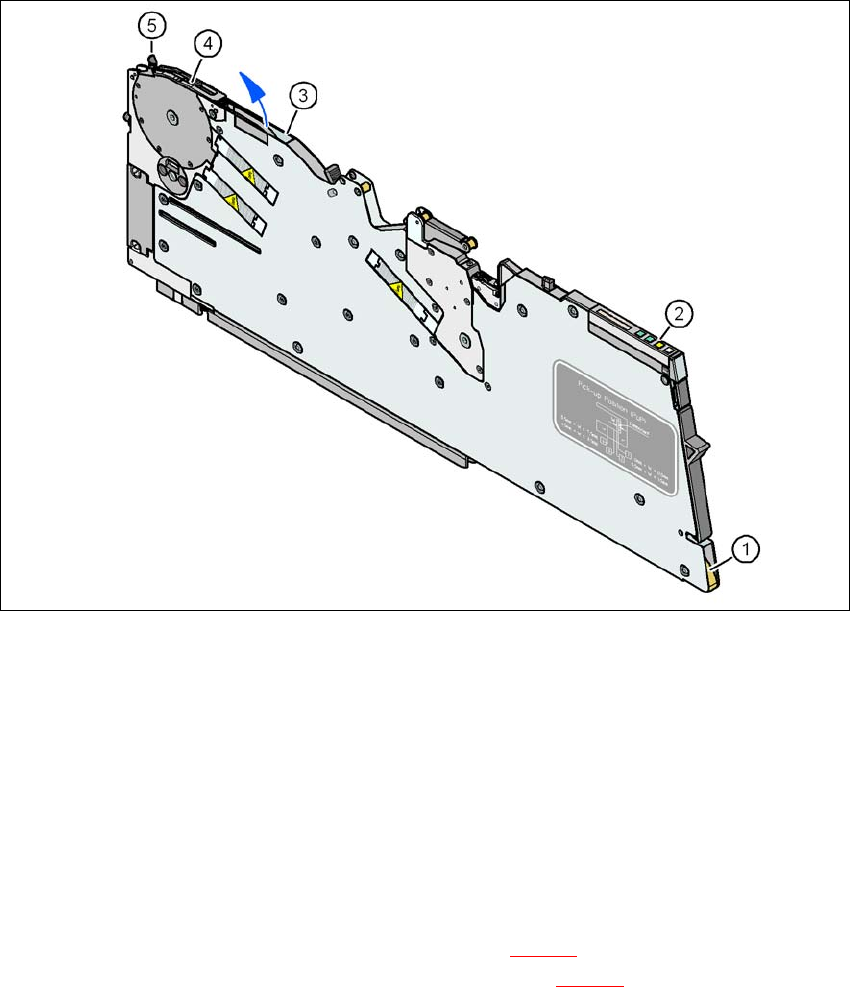
Fig. 5.10 - 4 Inserting the component tape
(1) Entry to the tape guide channel
(2) Operator panel
(3) Exit from the tape guide channel
(4) Pickup window
(5) Lever for raising the pick-up window
5
Hold the component tape so that the transport holes are on the left-hand side viewed in the
direction of travel.
Push the component tape into the entry (item 1 in fig. 5.10 - 4) to the tape guide channel and
further until it emerges from the exit opening (item 3 in fig. 5.10 - 4
).
Pull the component tape up and out, and fold the cover foil back against the top of the tape.
5 Working with the machine User Manual SIPLACE SX1/SX2/DX1/DX2
5.10 Setting up the feeder modules From software version SC.706.xx Version 06/2012 EN
284
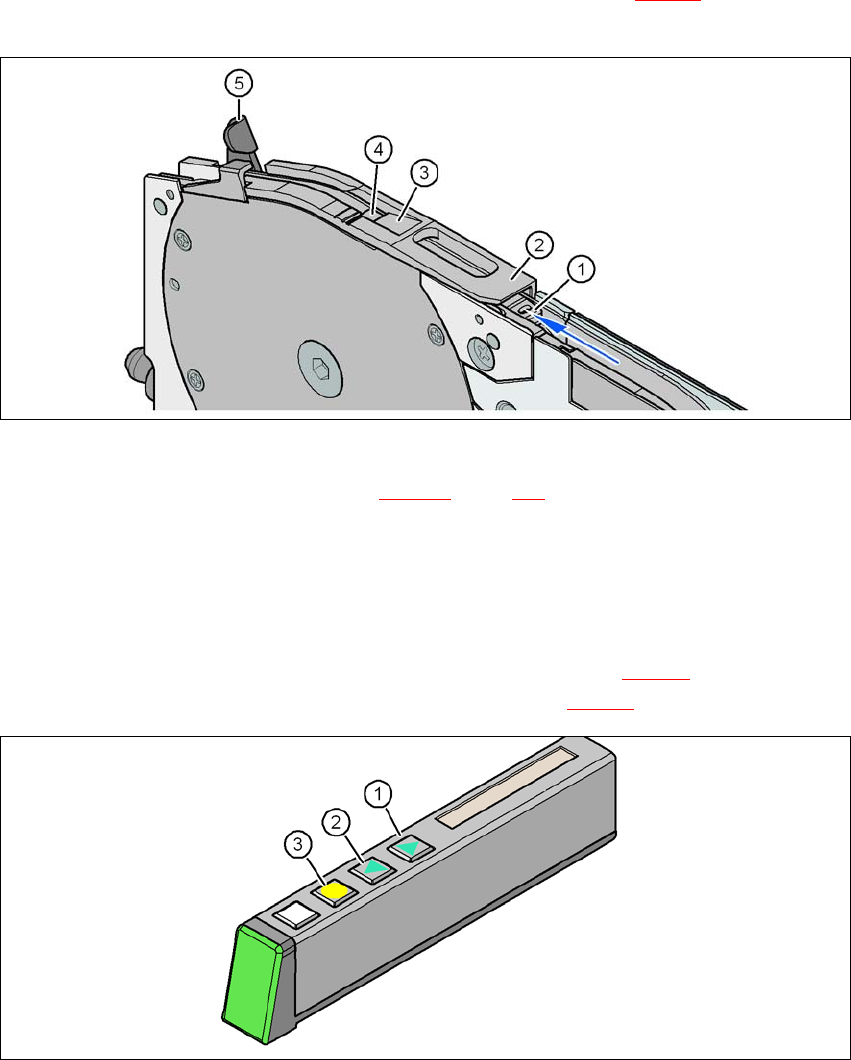
Guide the start of the tape beneath the pickup window (item 2 in fig. 5.10 - 5) and further until
the component tape is touching the sprocket wheel.
5
Fig. 5.10 - 5 Pickup window on the tape feeder module
(1) Tape support, removable (see section 5.10.4.4, page 286)
(2) Pickup window
(3) Removal edge for the cover foil
(4) Component pick-up area
(5) Lever for raising and latching the pick-up window
On the operator panel, press the FORWARD button (item 1 in fig. 5.10 - 6) until the bend of
the cover foil is in the component pickup area (item 4 in fig. 5.10 - 5
).
5
Fig. 5.10 - 6 Operator panel of the feeder module
(1) FORWARD button for moving the component tape forward
(2) BACK button for moving the component tape back
(3) FOIL button for tensioning the cover foil
User Manual SIPLACE SX1/SX2/DX1/DX2 5 Working with the machine
From software version SC.706.xx Version 06/2012 EN 5.10 Setting up the feeder modules
285
Push the lever (item 5 in fig. 5.10 - 5, page 284) forward in order to raise the pickup window
(item 2 in fig. 5.10 - 5
, page 284) into the first latching position.
Pull the cover foil at the side of the pick-up window forward and out underneath the pick-up
window.
Fold the cover foil back until it lies against the pull-off edge (item 3 in fig. 5.10 - 5, page 284).
PLEASE NOTE 5
Do not lower the pick-up window until the cover foil is lying against the pull-off edge.
Push the lever (item 5 in fig. 5.10 - 5, page 284) back to lower the pickup window.
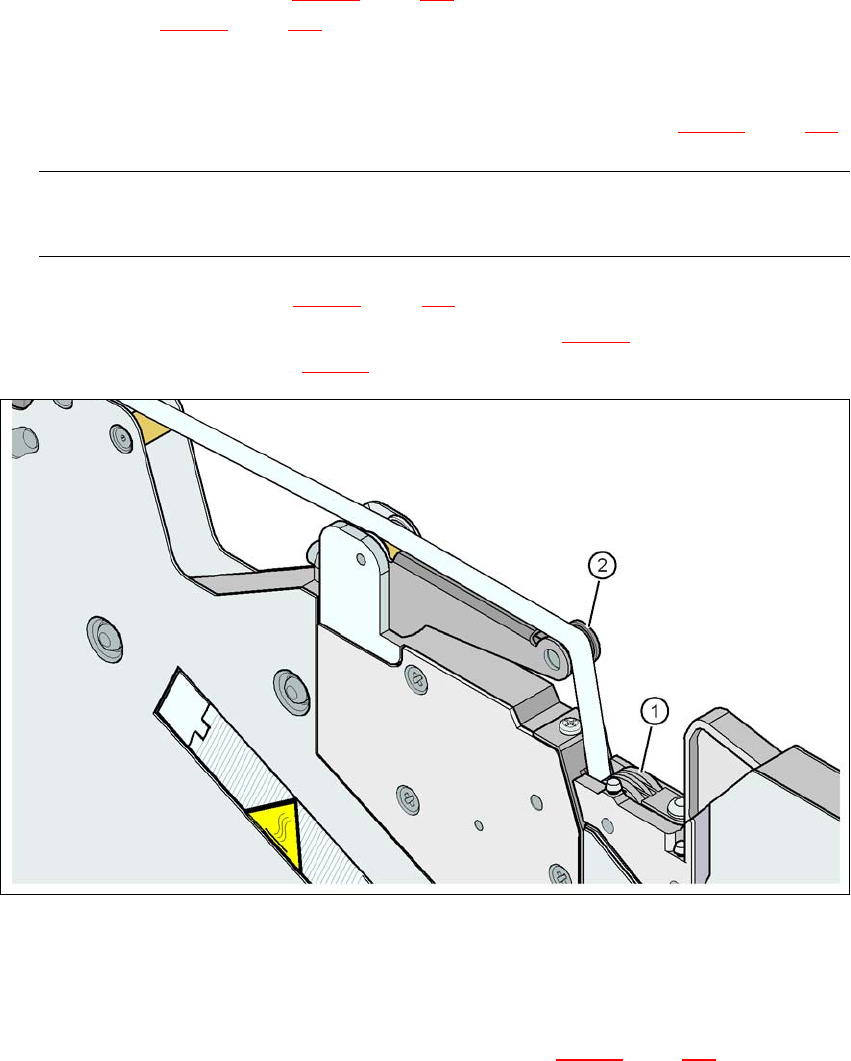
Guide the cover foil over the cover foil rocker (item 2 in fig. 5.10 - 7) until it reaches the foil
packing wheels (item 1 in fig. 5.10 - 7
).
5
Fig. 5.10 - 7 Guiding the cover foil to the foil packing wheels
(1) Cover foil packing wheels
(2) Cover foil
5
On the operator panel, press the FOIL button (item 3 in fig. 5.10 - 6, page 284) until the cover
foil is tensioned. The cover foil rocker points down and stops the drive motor.
Cut the component tape flush with the front end of the feeder module.