00196457-05_UM_SX12DX12_SR706_EN.pdf - 第308页
6 Station extensions User manual SIPLACE SX1/SX2/DX1/DX2 6.1 Nozzle changer From software version SC.706.xx Version 06/2012 EN 308 6.1.1.4 Assembly In SX machines, the nozzle changers are fixed to the component trolley d…
User manual SIPLACE SX1/SX2/DX1/DX2 6 Station extensions
From software version SC.706.xx Version 06/2012 EN 6.1 Nozzle changer
307
6.1.1.2 Technical data
6
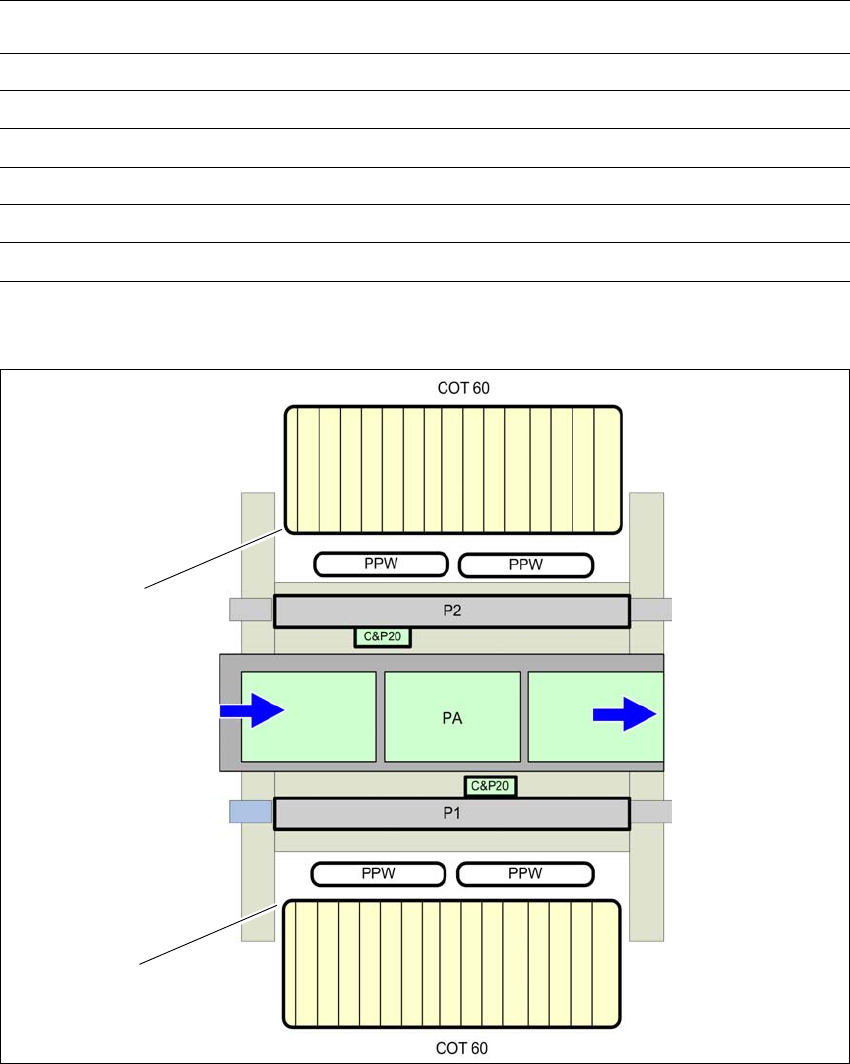
6.1.1.3 Position of nozzle changer for the SIPLACE SpeedStar in the SX2 machine
6
Fig. 6.1 - 2 Position of nozzle changer for the SIPLACE SpeedStar - example
Nozzle changer for the SIPLACE SpeedStar
Dimensions (length x width x height) 314 mm x 94.5 mm x 68.6 mm
Number of nozzle holders 48
Number of nozzle magazines 4
Nozzle types 10xx, 11xx and 12xx
Nozzle changeover time approx. 2s per nozzle
Compressed air connection 0.45 MPa (4.5 bar)
(1) Component trolley in the inner position
(PPW) Nozzle changer
(PA) Placement area
(1)
(1)
6 Station extensions User manual SIPLACE SX1/SX2/DX1/DX2
6.1 Nozzle changer From software version SC.706.xx Version 06/2012 EN
308
6.1.1.4 Assembly
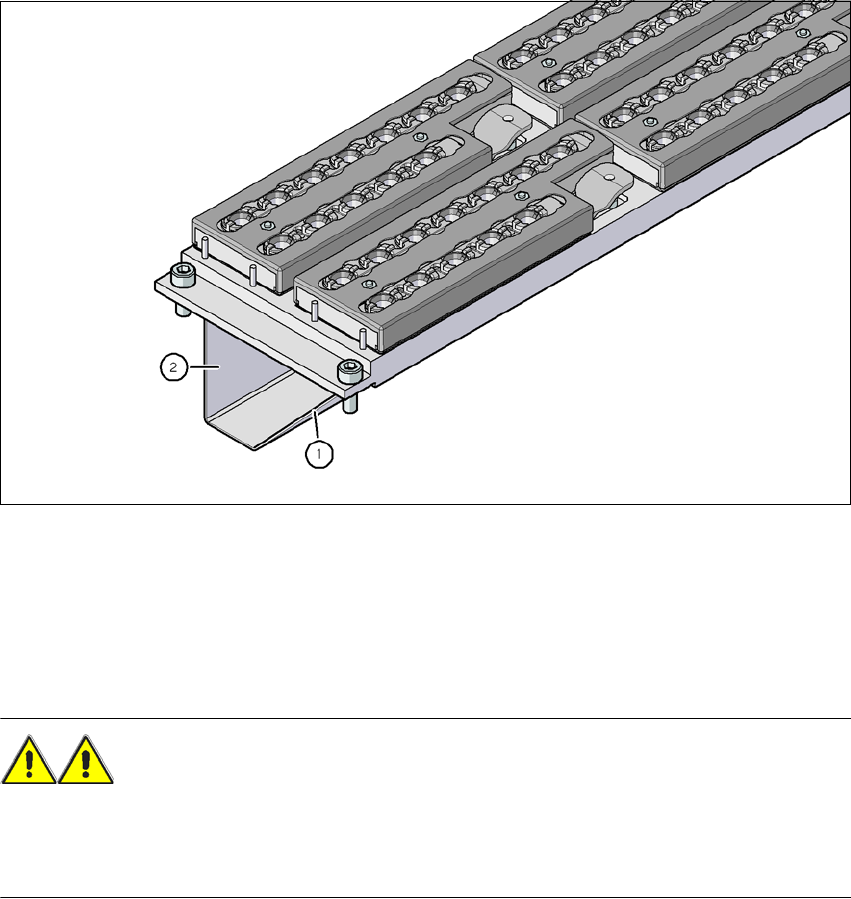
In SX machines, the nozzle changers are fixed to the component trolley docking unit.
6
Fig. 6.1 - 3 Assembly position
(1) Sloping side points towards the component trolley docking unit
(2) Vertical side points towards the PCB conveyor
Align the nozzle changer so that the sloping side points towards the component trolley dock-
ing unit.
WARNING 6
– Only install the associated nozzle changer for each placement head, with the nozzle maga-
zines for the respective placement head. There is a risk of head crashes with mixed configu-
rations.
User manual SIPLACE SX1/SX2/DX1/DX2 6 Station extensions
From software version SC.706.xx Version 06/2012 EN 6.1 Nozzle changer
309
6.1.1.5 Notes on operation
When you fill a magazine with a certain nozzle type for the first time, attach an adhesive label
to identify the type.
PLEASE NOTE 6
Fill the magazines off the machine and always replace complete magazines. 6
Open the locking plate and place the nozzles in the nozzle holders.
Close the locking plate so that the nozzles cannot drop out of the magazines.
CAUTION 6
Before you fill magazine, make sure that all the nozzles on the Collect&Place head have
been returned to their magazines. 6
PLEASE NOTE 6
Do not allow components to drop onto the magazines. f they do, they could jam the locking
plate. You should therefore regularly clean the magazines and free locations.
Programming the nozzle changer is described in the SIPLACE Pro user manual.
6.1.1.6 Changing the magazine
Press the lever (item 1 in fig. 6.1 - 4, page 310), to release the magazine from the balls of the
snap fasteners (item 5 in fig. 6.1 - 4
, page 310). Lift the magazine off the base.