00196457-05_UM_SX12DX12_SR706_EN.pdf - 第303页
User Manual SIPLACE SX1/SX2/DX1/DX2 5 Working with the machine From software version SC.706.xx Version 06/2012 EN 5. 15 Docking the component trolley in or out 303 5 Fig. 5.15 - 6 Component trolley - swivel handles down …
5 Working with the machine User Manual SIPLACE SX1/SX2/DX1/DX2
5.15 Docking the component trolley in or out From software version SC.706.xx Version 06/2012 EN
302
Use the height setting for fine adjustment to correct the height of the component trolley. The
two surfaces of the block and the bracket should not quite touch.
PLEASE NOTE
Close the protective covers since the component trolley can only be docked in if the covers are
closed.
5
5
Select the Feeder Modules... icon and the
Locations icons in the main view of the station software.
Click on the icon to lock the respective location and wait until the trolley has docked
completely. For further information, refer to the station software Online Help.
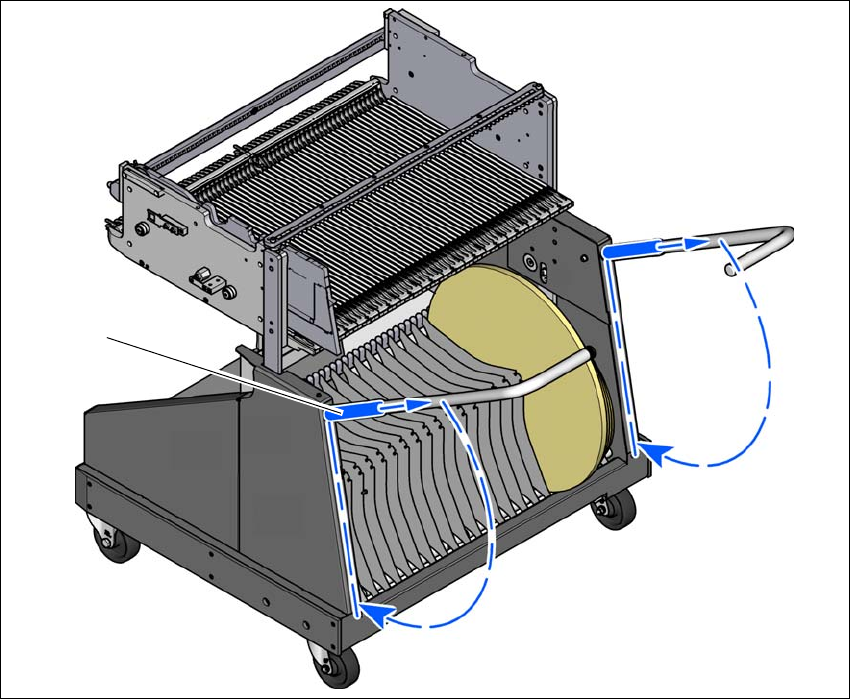
Push the sleeve up using both handles and swivel the handle
down.
User Manual SIPLACE SX1/SX2/DX1/DX2 5 Working with the machine
From software version SC.706.xx Version 06/2012 EN 5.15 Docking the component trolley in or out
303
5
Fig. 5.15 - 6 Component trolley - swivel handles down
(1) Push sleeve up
(2) Fold handle down
(1)
(2)
(2)
5 Working with the machine User Manual SIPLACE SX1/SX2/DX1/DX2
5.15 Docking the component trolley in or out From software version SC.706.xx Version 06/2012 EN
304