00196457-05_UM_SX12DX12_SR706_EN.pdf - 第339页
User manual SIPLACE SX1/SX2/DX1/DX2 6 Station exte nsions From software version SC.706.xx Version 06/2012 EN 6. 3 DX changeover tables on the SIPLACE DX1/DX2 339 6.3 DX changeover t ables on the SIPLACE DX1/DX2 Item no. …
6 Station extensions User manual SIPLACE SX1/SX2/DX1/DX2
6.2 Waffle pack changer (WPC5/WPC6) From software version SC.706.xx Version 06/2012 EN
338
6.2.8.1 Safety equipment
EMERGENCY STOP button 6
After pressing the EMERGENCY STOP button, the entire system, with SIPLACE SX and Waffle
Pack Changer, is immediately stopped. After releasing the EMERGENCY STOP button, the entire
system can be restarted again by pressing the start button on the SX machine. Placement can
then be continued or terminated.
PLEASE NOTE
Watch out for any incompletely placed PCBs.
Safety door 6
When you open the protective door, the lifting axis and the feed axis of the Waffle Pack Changer
are stopped. When the door is closed again, the Waffle Pack Changer continues its operation.
CAUTION 6
Do not open the Waffle Pack Changer protective door while a component is being picked up by
the Waffle Pack Changer. 6
Non-stop module (WPC6 only) 6
Waffle pack trays can be refilled or extracted during operations via the flap in the non-stop module,
without stopping the SIPLACE SX. The operating control indicates whether a waffle pack tray is
in the non-stop module, whether the non-stop module is empty or whether a waffle pack tray is
currently being moved.
CAUTION 6
If the operating control flashes. the waffle pack tray is being moved inside the non-stop module
and the activity has not yet been completed. Opening the flap triggers the emergency STOP.
6.2.9 Operation, maintenance, service
For detailed documentation of the operation, maintenance and servicing of the waffle pack
changer, refer to the manuals supplied with your waffle pack changer.
User manual SIPLACE SX1/SX2/DX1/DX2 6 Station extensions
From software version SC.706.xx Version 06/2012 EN 6.3 DX changeover tables on the SIPLACE DX1/DX2
339
6.3 DX changeover tables on the SIPLACE DX1/DX2
Item no. 03089820-xx DX changeover table SIPLACE DX1/DX2 with 60/2 tracks
Item no. 03089804-xx DX changeover table SIPLACE DX1/DX2 with 30/2 tracks
Item no. 03089843-xx DX changeover table docking unit for 60/2 tracks
Item no. 03089844-xx DX changeover table docking unit for 30/2 tracks
Just like the fixed DX tables, the DX changeover tables are optimized for the use of 2x8 mm SI-
PLACE tape feeder modules when using 8 mm tapes. By using 30 of these feeder modules, you
can achieve a full setup capacity of 60 8mm tracks.
The design and function of the DX changeover tables is basically identical to that of the compo-
nent changeover tables for the SIPLACE SX1/SX2 machines. See “Changeover table for SI-
PLACE SX1/SX2” on page 193.
6
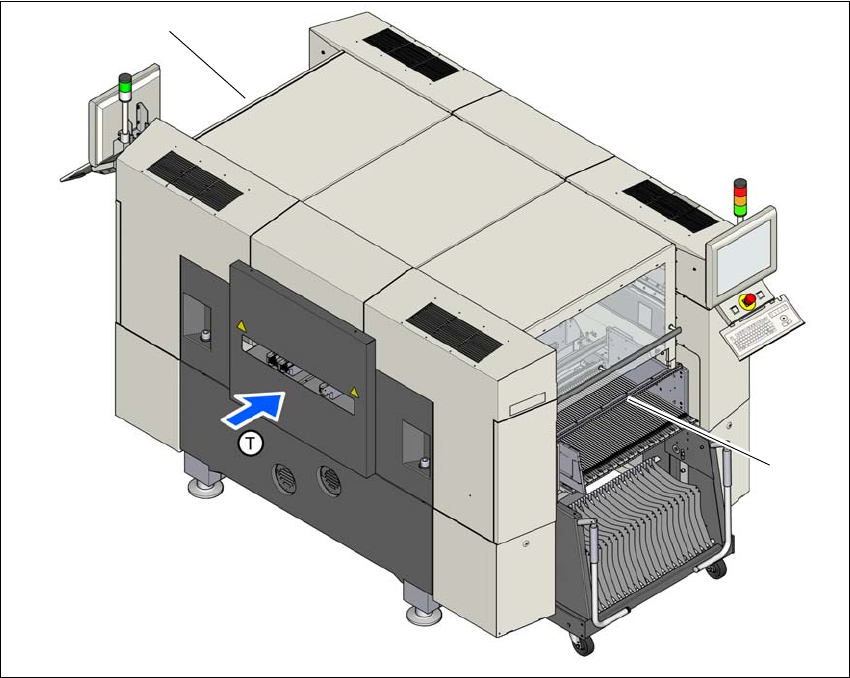
Fig. 6.3 - 1 Locations for DX changeover tables, SIPLACE DX1/DX2
(1) Location 1
(2) Location 2
(T) Direction of PCB transport
(2)
(1)
6 Station extensions User manual SIPLACE SX1/SX2/DX1/DX2
6.3 DX changeover tables on the SIPLACE DX1/DX2 From software version SC.706.xx Version 06/2012 EN
340
PLEASE NOTE:
Feeder modules can be placed on the uneven track numbers. Only these tracks are fitted with an
energy and data interface on the machine, so that the full capacity of 60 8mm tracks can only be
achieved with 30 2x8mm X feeder modules. 6
CAUTION 6
The DX changeover tables may only be docked onto locations at which the DX changeover table
docking unit for the SIPLACE DX1/DX2 has been installed (fig. 5.15 - 4, page 300).
6.3.1 Safety instructions for docking the DX changeover table in or out
WARNING 6
The placement machine may only be operated if there is a DX changeover table present and
docked at each location. Fill any free locations with dummy feeder modules as described in
section 2.7.5.1, page 79.
WARNING
To prevent accidents (risk of crushing), the DX changeover table may only be docked in or out by
one person.
WARNING 6
The waste tape container must be pulled out of the DX changeover table for emptying. There is a
risk of catching your thumbs as you do so. To prevent this, observe the safety instructions in sec-
tion 5.8.2
, page 271.
CAUTION
Do not lift the DX changeover table by its handles (handles could break). 6