00196457-05_UM_SX12DX12_SR706_EN.pdf - 第227页
User Manual SIPLACE SX1/SX2/DX1/DX2 4 Setting up and commissioning From software version SC.706.xx V ersion 06/2012 EN 4.3 Setting up the machine 227 4.3.7 Machine foot clear ances and the stationary PCB conveyor edges 4…

4 Setting up and commissioning User Manual SIPLACE SX1/SX2/DX1/DX2
4.3 Setting up the machine From software version SC.706.xx Version 06/2012 EN
226
To make sure that the height adapter can be easily pushed into the clamp (4), grease the
clamping area of the height adapter with Topas NCA 52.
Insert the correct height adapter for the required PCB conveyor height.
Push the height adapter into the clamp so that the notch engages with the locking screw (2).
Loosely tighten the locking screw (2).
Loosely tighten the clamping screw (5) so that the height adapter can be moved in the Z di-
rection with a minimum of play.
Fit the other 3 height adapters in the same manner.
Now use the fork-lift to carefully lower the machine until the height adapters touch the floor
evenly. There should always be a second person present to ensure that the machine remains
stable while it is being lowered. You may need to loosen the height adapter clamp slightly.
Use the SW 20 open double-ended ring spanner to adjust the height of each height adapter
at the setting screw, so that the relevant conveyor height is achieved.
Align the machine in the X and Y direction with the machine spirit level.
PLEASE NOTE 4
For a description of how to align the machine in the X and Y directions, refer to the section
4.3.9, page 231.
Tighten the clamping screw to a torque of 130 Nm.
User Manual SIPLACE SX1/SX2/DX1/DX2 4 Setting up and commissioning
From software version SC.706.xx Version 06/2012 EN 4.3 Setting up the machine
227
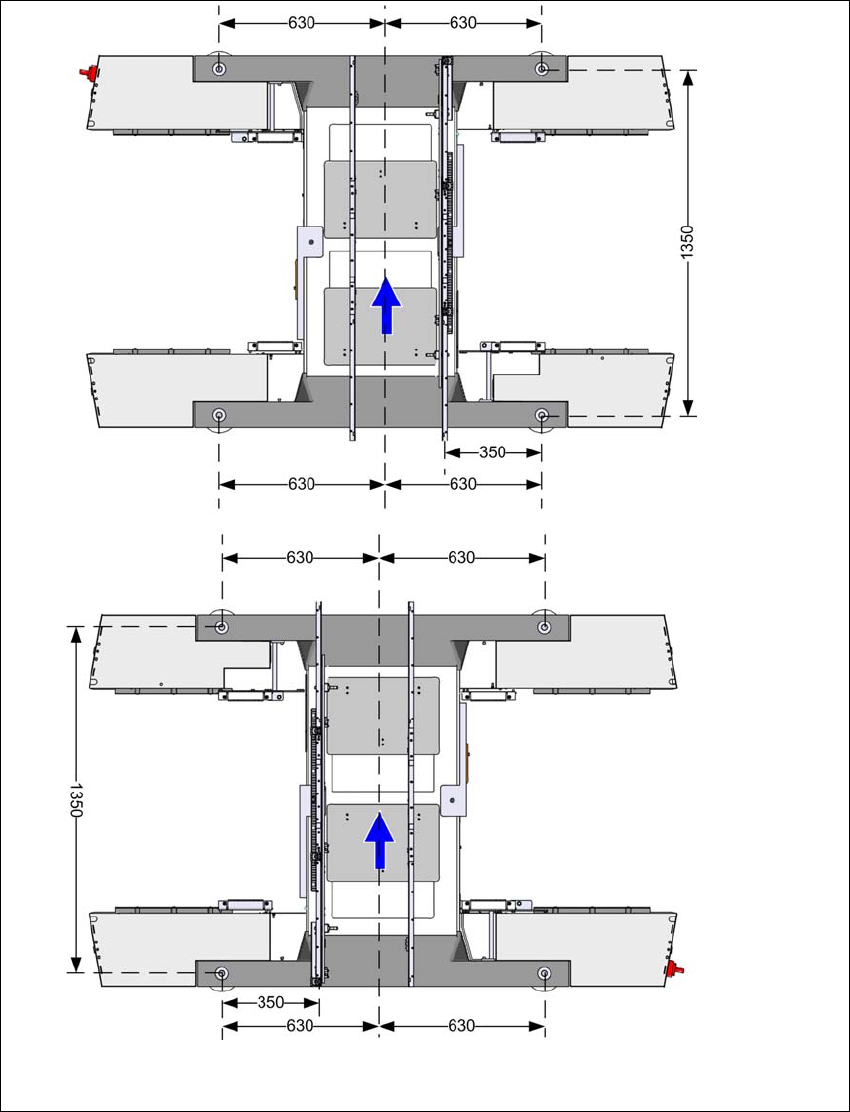
4.3.7 Machine foot clearances and the stationary PCB conveyor edges
4.3.7.1 Machine foot clearances for the PCB single conveyor
4
Fig. 4.3 - 5 Machine foot clearances for the PCB single conveyor in millimeters
Fixed conveyor side at
maximum right position
a
.
Fixed conveyor side at
maximum left position
a
.
a) The value depends on the position of the fixed side.
All dimensions in millimeters.
4 Setting up and commissioning User Manual SIPLACE SX1/SX2/DX1/DX2
4.3 Setting up the machine From software version SC.706.xx Version 06/2012 EN
228
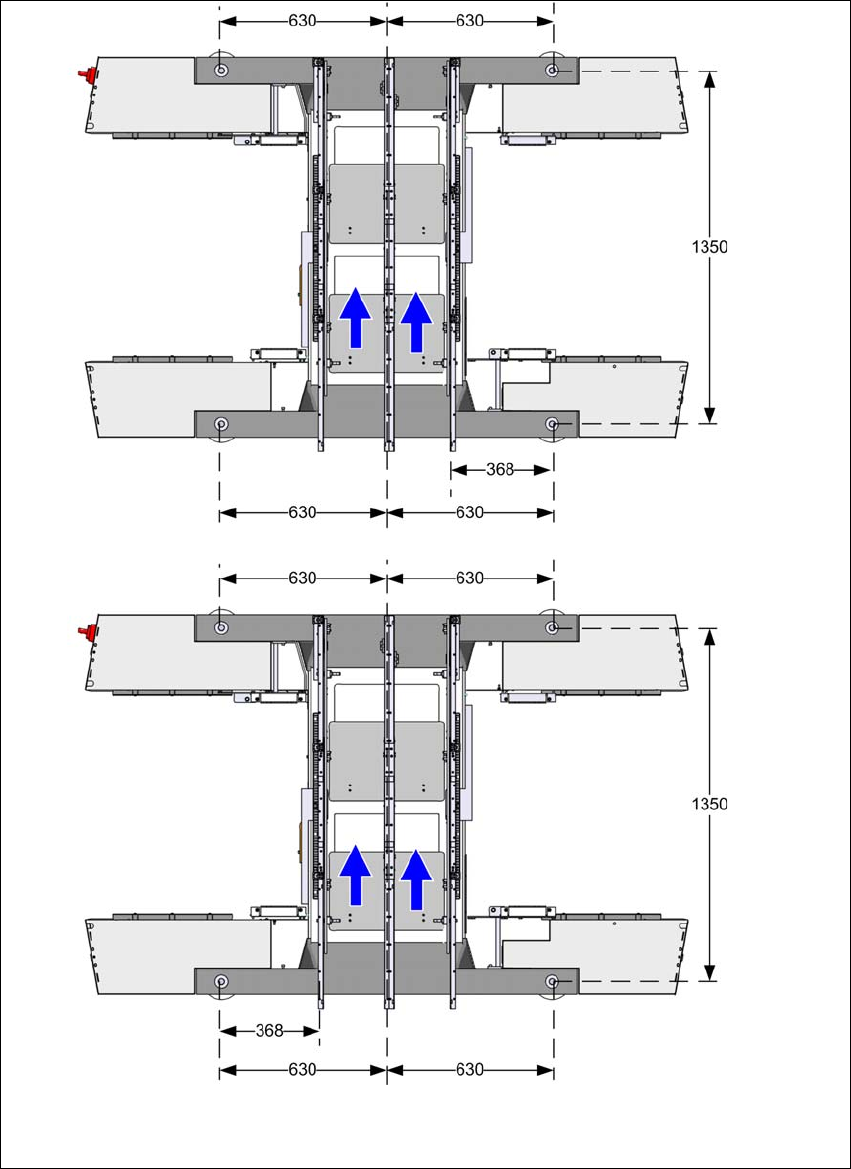
4.3.7.2 Machine foot clearances for the PCB dual conveyor
4
Fig. 4.3 - 6 Machine foot clearances for the PCB dual conveyor in millimeters
Fixed conveyor side at maxi-
mum right position
a
.
Fixed conveyor side at
maximum left position
a
.
a) The value depends on the position of the fixed side.
All dimensions in millimeters.