CP45-英文版培训教材.pdf - 第111页
Operating Manual Reference Figure CP-45/55 Operation Process That is, if there is a Feeder arranged already, arrange new feeder for increasing the concurrent pickup efficiency. If there is a feeder what you want to apply…
Operating Manual Reference Figure
CP-45/55 Operation Process
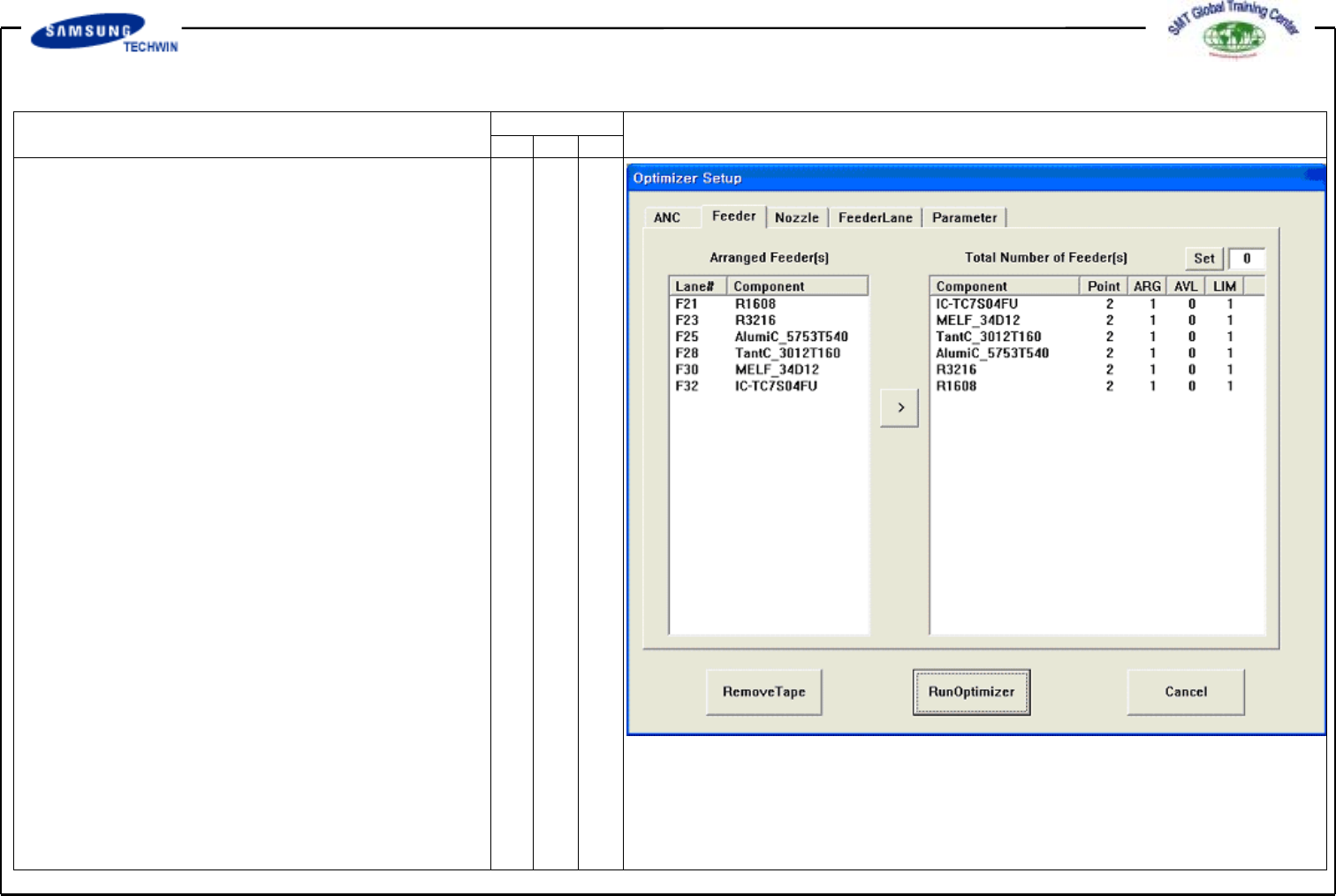
Optimizer Setup: Tape Feeder
* Setup Menu/Tape Feeder
This screen is to set the optimized
arrangement of Tape Feeder.
Tape Feeder can be arranged
automatically on the optimized
Feeder Lane by considering of
concurrent pickup and work time on
the Optimizer. But, for the tray
feeder and the stick feeder, an
operator shall define the place
position directly.
^ <FEED COMP> List Box
The List Box shown in the right
displays the Feeder Lane Number
and individual Part Name. The
front Feeder Base has F in the
front of Feeder Lane Number, and
the rear Feeder Base has R.
Feeder displayed here can not be
arrayed optionally by the
Optimizer. However, Feeder
which has been arrayed already
has an effect on arraying another
feeder on the Optimizer.
Operating Manual Reference Figure
CP-45/55 Operation Process
That is, if there is a Feeder
arranged already, arrange new
feeder for increasing the
concurrent pickup efficiency.
If there is a feeder what you
want to apply the optimized
arrange among feeders displayed
here, move the feeder to the
right List Box by clicking the
Arrow Buttom(
)andthen
execute the Optimizer.
^ <COMP # ARG AVL LIM>
List Box
The right List Box shows
numbers of place points for
individual part, tape feeder
arranged numbers and numbers
of feeders to arrange newly.
^ <COMP> Column
All Tape Feeder Parts among the
parts being used on PCB under
Edit are displayed here.
Operating Manual Reference Figure
CP-45/55 Operation Process
^ <#> Column
This displays the place points
by individual part.
You can refer to this for determining
the quantity of feeder to arrange.
^ <ARG> Column
This displays quantity of feeder which
has been arranged on the feeder lane by
individual part. This quantity is identical
to that of feeder lane displayed on the
left List Box.
^ <AVL> List Box
This displays quantity of feeder to
arrange on the Optimizer by individual
part.
^ <LIM> List Box
This displays the sums of feeder quantity
displayed on <ARG> and <AVL> columns
by individual part. That is, this displays
the limited quantity of feeder to arrange
to individual part. The minimum value
has one.