CP45-英文版培训教材.pdf - 第113页
Operating Manual Reference Figure CP-45/55 Operation Process ^ <Limit> Button This is used for defining the numbers of feeder to use by individual part. If there is one feeder arranged already for certain part, AVL…
Operating Manual Reference Figure
CP-45/55 Operation Process
^ <#> Column
This displays the place points
by individual part.
You can refer to this for determining
the quantity of feeder to arrange.
^ <ARG> Column
This displays quantity of feeder which
has been arranged on the feeder lane by
individual part. This quantity is identical
to that of feeder lane displayed on the
left List Box.
^ <AVL> List Box
This displays quantity of feeder to
arrange on the Optimizer by individual
part.
^ <LIM> List Box
This displays the sums of feeder quantity
displayed on <ARG> and <AVL> columns
by individual part. That is, this displays
the limited quantity of feeder to arrange
to individual part. The minimum value
has one.
Operating Manual Reference Figure
CP-45/55 Operation Process
^ <Limit> Button
This is used for defining the
numbers of feeder to use by
individual part. If there is one
feeder arranged already for
certain part, AVL Column
quantity will be 2 if inputting 3
in this window and pressing the
Limit button. The Optimizer
will arrange new feeders within
the max. 2 feeders. You should
set the suitable quantities of
feeders in consideration of
the numbers of place points.
For parts having a lot of place
points, you should allocate
a lot of feeders to obtain the
good work efficiency.
^ Arrow Button(
)
This can be used when
modifying the setting to feeder
to arrange newly on the
Optimizer among the feeders
arranged already.
^ <Remove Tape> Button
Operating Manual Reference Figure
CP-45/55 Operation Process
Click the <Remove Button>
when arraying newly all of
Tape Feeder by ignoring all of
Tape Feeders arrayed which
have been arrayed already.
Since this button remains on the
bottom of Optimizer setup
screen, you can select it even
though Tape Feeder setup tap is
not shown.
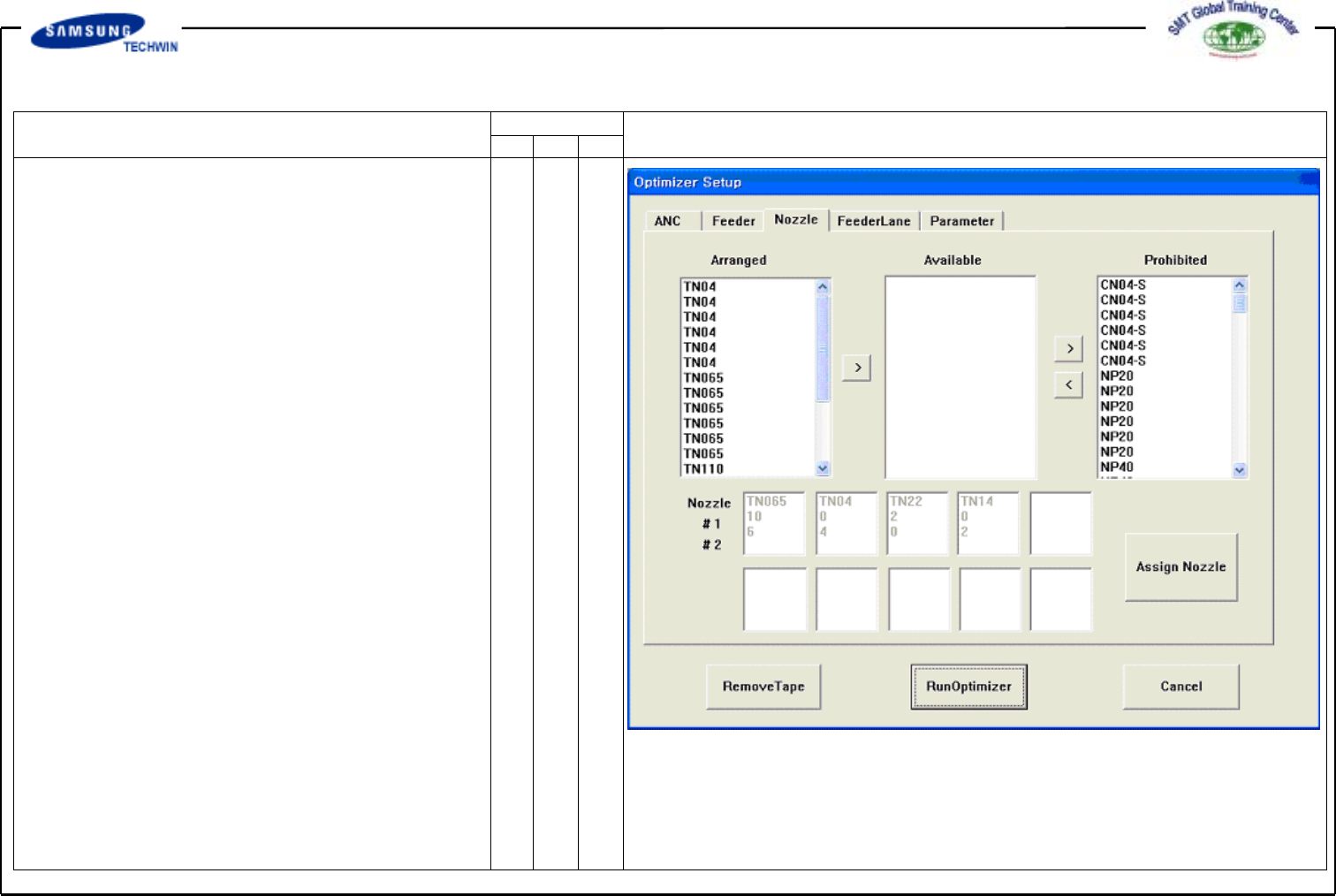
* Setup Menu/Nozzle
This screen is to set the optimized
arrangement of Nozzle. All nozzles
registered to the system are shown
in <Arranged>, <Available> and
<Prohibited> list boxes, and the
sums of numbers of individual
nozzle shown in every List Box are
identical to numbers of all heads.
(6 for CP-45)
You can set the nozzle numbers as
much as what you want to arrange
it on the Optimizer by adjusting the
numbers in <Available> List Box.