CP45-英文版培训教材.pdf - 第122页
Operating Manual Reference Figure CP-45/55 Operation Process * Setup Menu/Parameters This screen is to set the option and parameters which are u sed when executing the Optimizer finally. ^ <Head> Check Box This is …
Operating Manual Reference Figure
CP-45/55 Operation Process
^ <Prohibited> List Box
Set this in order that the
Feeder Lane not allowable to
arrange on the Feeder Unit or
ANC, Camera, etc. is to be
shown in this area. The
optimizer does not arrange any
unit on the lane shown in this
area. However, it is needless to
assign separately the lane on
<Prohibited> in consideration of
widths of Feeder Unit or ANC,
Camera Unit, etc. The optimizer
can arrange the unit to be
arranged on the Feeder Lane
without mechanical interferences
in consideration of its width.
Use the arrow buttons
and
for movements between
<Available> and <Prohibited>
List Boxes.
Operating Manual Reference Figure
CP-45/55 Operation Process
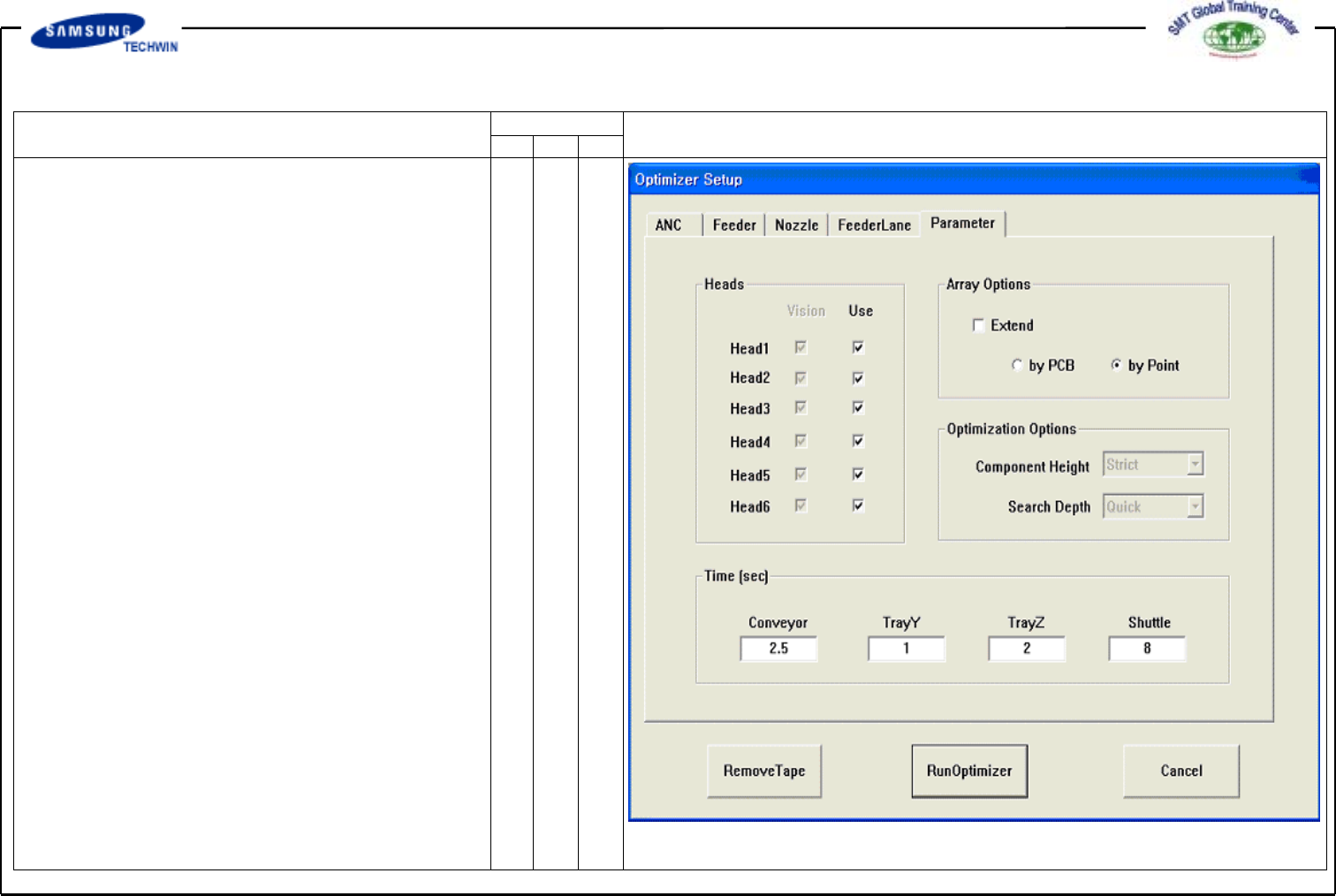
* Setup Menu/Parameters
This screen is to set the option
and parameters which are used
when executing the Optimizer
finally.
^ <Head> Check Box
This is to set the use existence
by individual head and the
work existence of part arranged by
use of vision array part. Vision
check box is to be checked when
editing the vision arranged part on
relevant head, for Full Vision unit
such as CP-45FV, leave it with all
checked conditions. Use check
box shows whether the relevant
head is to be used or not. For
example, if it is impossible to
work Head3 caused that some
problems occur to it, click the
Use check box of Head3 to
make empty. Resulted that, the
Optimizer creates the work
program with remaining heads
except for the prohibited head.
Operating Manual Reference Figure
CP-45/55 Operation Process
If all heads are prohibited, an
error message will be shown
immediately on the Optimizer.
^ <Array Option> Box Area
This is to use for setting the
display method of MMI step
program and the optimized
option when editing the Array
PCB. The Array PCB can
display only one Unit PCB on
the step program, repeated work
to be carried out by individual
PCB, or the optimized step
program to be shown for the
entire PCB. This function can
be selected on the step edit
screen of MMI. Where, if
selecting the former, do not
check the <Extend> in the
<Array Option> box, and if
selecting the latter, check it.
<By PCB / By Point >
This combo box will be active
only when <Extend> was
selected.