CP45-英文版培训教材.pdf - 第128页
Operating Manual Reference Figure CP-45/55 Operation Process # Tray Y: Time(sec) to be taken when Tray of Multi-Tray Feeder moves to Y direction. #Tray Z: Time(sec) to be taken when Tray of Multi-Tray Feeder moves to Z d…
Operating Manual Reference Figure
CP-45/55 Operation Process
Modifying this option may
have no effect on the array of
nozzle or feeder.
^ <Time(sec)> Edit Box Area
This area is to input time taking
when executing individual
movement on the unit and can be
used for calculating the work
time in the Optimizer. Also,
values of Tray Y and Tray Z
may have an effect on the
determination of work order.
Thus, be sure to input the value
close to the actual to increase
the work efficiency and take the
accurate prediction value of work
time.
# ANC : Time(sec) to be taken
for 1 time nozzle replacement
# Fiducial : Time(sec) to be taken
for Fiducial mark acknowledge
# Vision: Time(sec) to be taken
for acknowledging Vision part
in Fixed Camera
Operating Manual Reference Figure
CP-45/55 Operation Process
# Tray Y: Time(sec) to be taken
when Tray of Multi-Tray
Feeder moves to Y direction.
#Tray Z: Time(sec) to be taken
when Tray of Multi-Tray
Feeder moves to Z direction.
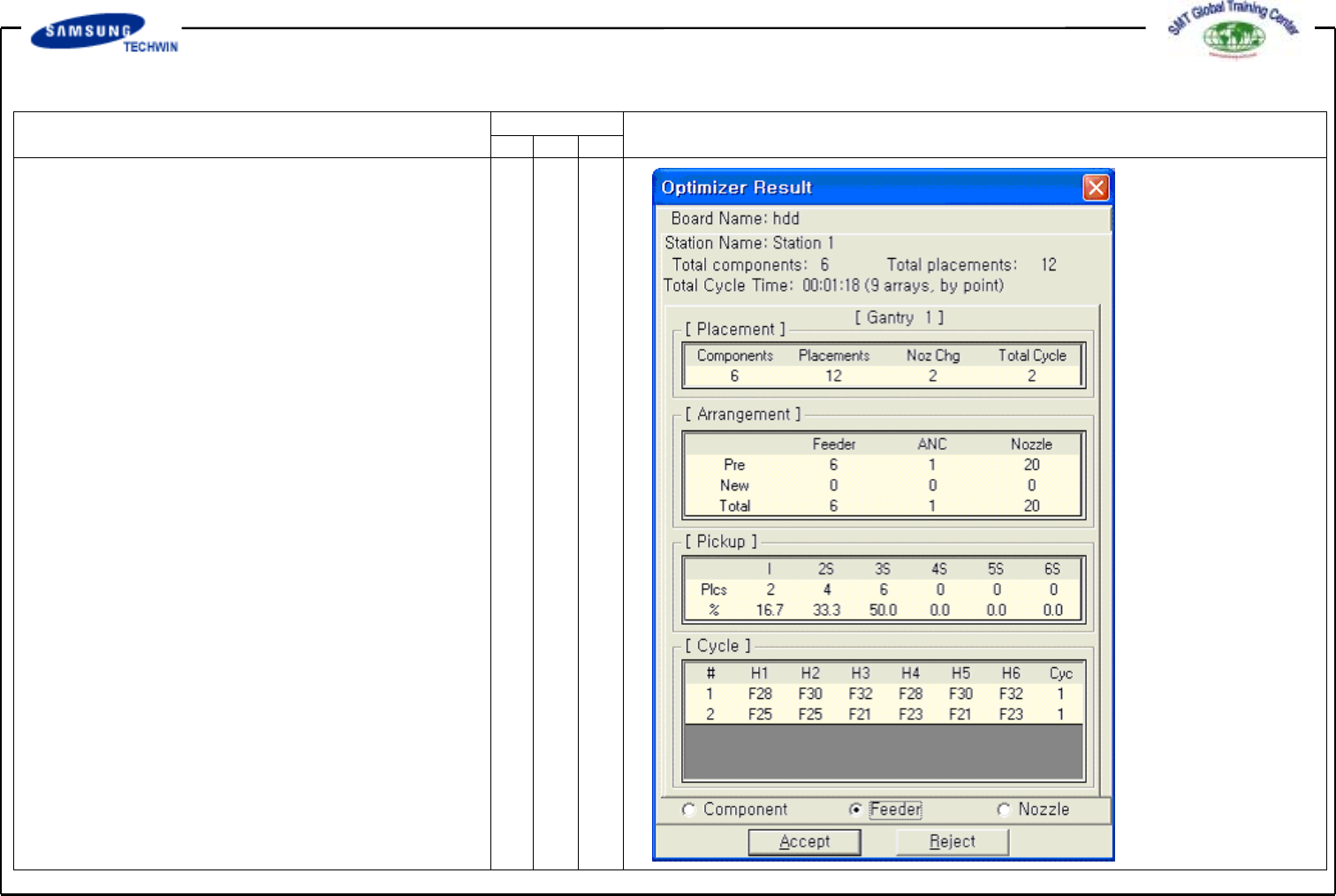
If execution of Optimizer is
completed, a dialogue box will be
shown as follows. This dialogue box
displays various results so that the
optimized status can be shown at
a glance. If clicking the <Accept>
button, this dialogue box will be
closed, the Optimizer will be finished,
and this result will be reflected to
the step program of MMI. If clicking
the <Reject> button, the result will
not be reflected to the step program
of MMI and the Optimizer option
dialogue box will be open again.
If necessary, readjust the Optimizer
option and execute it again.
* Optimization Result
Operating Manual Reference Figure
CP-45/55 Operation Process
^ <Placement> Area
This area displays quantity of
part types, quantity of total
mounting points, nozzle
replacement times and total
cycles. Since the total work time
above represents the estimated
time by a simulation, it may
differ from the actual mounting
time. When calculating the
outputs, produce one PCB from
the actual machine and refer to
the time.
^ <Arrangement> Area
This area displays the
arrangement status of Tape
Feeder and ANC nozzle. Pre
represents the quantity
arranged directly by an user,
New represents the quantity
arranged newly by Optimizer,
and Total represents the quantity
arranged totally.
^ <Pickup> Area