CP45-英文版培训教材.pdf - 第43页
Operating Manual MODEL Reference Figure CP-45/55 Operation Process V Step (Place Program Setting) ^Reference ^ X ,Y ,Z ,RT e a c h i n g ^Part/Feeder/Nozzle/Head /Cycle Finish ^Cycle Check ^Save (Program Save) -> To P…
Operating Manual
MODEL
Reference Figure
CP-45/55 Operation Process
1.2)
PCB Edit Procedure
1.2-1)
File
V
New -> Create
1.2-2)
PCB Edit (1)
Board / Part / Feeder / Step
/ Optimizer
V
Board
^Customer Name / Board Name
^Coordinate (Coordinate Setting)
^Board Size / Conveyor Width
^Handling / PCB In
^Place Origin
^Array
^Fiducial Mark Part
To (Work Part Register)
V
Part (Work Part Register)
^Copy from existing PCB File
Register to Part List
^New Part (New Part Register)
Part Name & Group
AlignData&CommonData
To Feeder (Feeder Setting)
V
Feeder (Feeder Register)
^Stick Feeder Place
^Tray Feeder Place
^Tape Feeder Place Step
To (Place Program Setting)
Operating Manual
MODEL
Reference Figure
CP-45/55 Operation Process
V
Step (Place Program Setting)
^Reference
^X,Y,Z,RTeaching
^Part/Feeder/Nozzle/Head
/Cycle Finish
^Cycle Check
^Save (Program Save)
-> To Production
1.2-3)
Production
V
Finish
V
PCB Data Down Loading
V
Start
V
Production
Operating Manual
MODEL
Reference Figure
CP-45/55 Operation Process
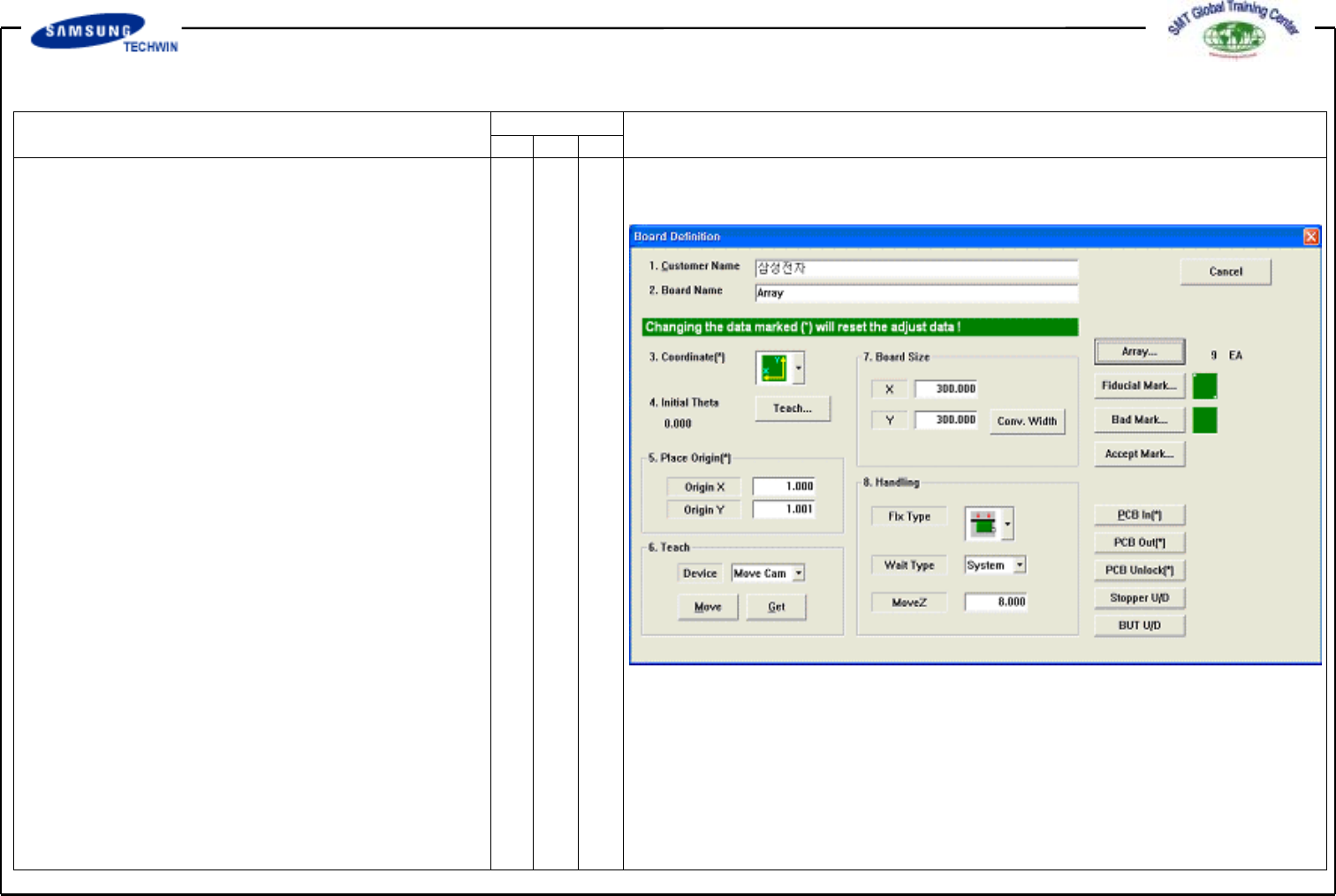
2. PCB Edit (1)
This defines Data related to name
and size of a Board, place origin and
Array Board.
2.1)
Board
2.1-1)
Board Definition
Customer Name / Board Name /
Coordinate/ Board Size. Apply same
method as PCB Edit (1).
<5. Place Origin> Area
To set the place origin of Board.
This origin refers to offset from
PCB Origin of System to place origin
of PCB Board. This is to set
the reference point of Board to work
in accordance with coordinates
selected. In general a pattern close
to Stopper will be set.
Define it with position where is
identified easily within Board.
V
<Origin X> Edit Box
To set the Place Origin X value of
PCB Board.
V
<Origin Y> Edit Box
To set the Place Origin Y value of
PCB Board.
To teach the place origin with
the device selected, click <Origin X>
or <Origin Y) and then click "Move"
"Get" button on <8. Teach> Area.