CP45-英文版培训教材.pdf - 第54页
Operating Manual MODEL Reference Figure CP-45/55 Operation Process a b d c f e V <5. Mark List> Area This means Fiducial Mark Type Data list. This is used for giving name of Mark and selecting a type. Select a Circ…
Operating Manual
MODEL
Reference Figure
CP-45/55 Operation Process
V
<4. Teach> Area
This is to be used when moving
the device XY drive shaft to
set position or obtaining the
current position of XY drive
shaft.
^<Device> Combo Box
To select the relevant device
when moving XY drive shaft or
obtaining the position.
Move Cam: Defines Teaching
Camera.
^<Move> Button
To move XY drive shaft with
a device selected in <Device>. Be
sure to click a cell of grid
corresponding to a desirable
position prior to execution of
“Move”.
^<Get> Button
To obtain the current position
of XY Drive Shaft of the device
selected in <Device>.
Be sure to click a cell of grid
corresponding to a desirable
position prior to execution of
“Get”.
Operating Manual
MODEL
Reference Figure
CP-45/55 Operation Process
a b
dc
fe
V
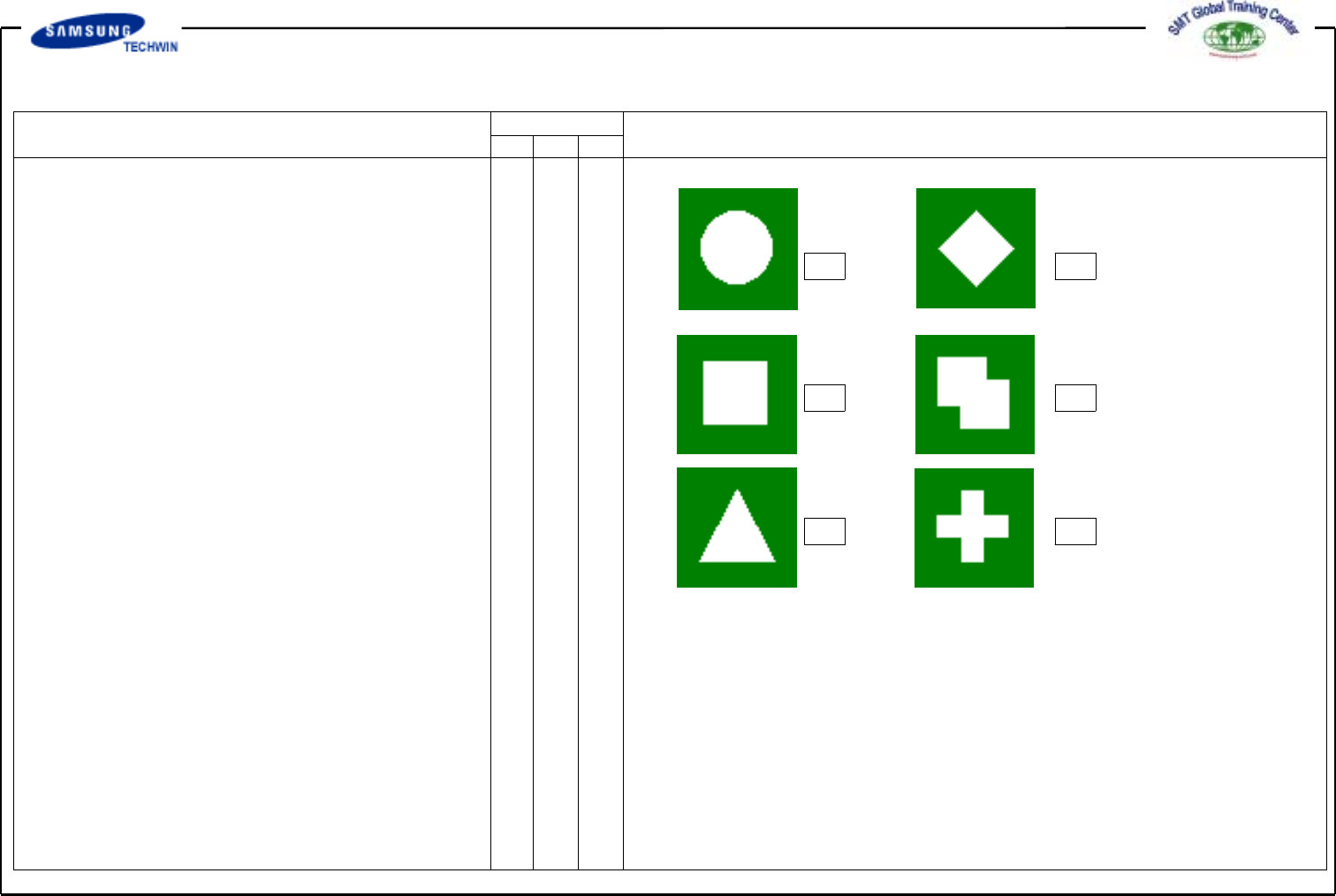
<5. Mark List> Area
This means Fiducial Mark Type
Data list. This is used for giving
name of Mark and selecting a type.
Select a Circle in here.
^<No> Column: Serial Number for
Fiducial Mark type.
^<Name> Column: Name of Fiducial
Mark.(Max. 10 letters)
6<Shape> Column: To select the
Fiducial Mark type. Selectable Types
are as follows:
a - Circle: Circle type Fiducial
Mark
b - Diamond: Diamond type
Fiducial Mark
c - Rectangle: Rectangle type
Fiducial Mark
d - Rectangle2: Fiducial Mark type
overlapped with two rectangles
e - Triangle: Triangle type Fiducial
Mark
f - Cross: Cross type Fiducial
Mark
Operating Manual
MODEL
Reference Figure
CP-45/55 Operation Process
^<Camera> Column
To select Camera to test Fiducial
Mark. At present this is fixed in
"Move Camera".
V
<6. Form Data> Area
To input Data related with Fiducial
Mark types.
Check it with <Outline> button
and adjust it to the real size.
^<Size X> Edit Box
To set the size of X direction of
Fiducial Mark.(Based on a device
coordinator indicator)
^<Size Y> Edit Box
To set the size of Y direction of
Fiducial Mark.(Based on a device
coordinator indicator)
^<Arm> Edit Box
To set the width of a bar in
Cross type Fiducial Mark.
^<Polarity> Combo Box
To select a color of Fiducial Mark.
Selectable colors are as follows: