SiplaceX4_en.pdf - 第602页
1 - 35 S tudent Guide SIPLACE X Edition 09/2005 13 MTC 2 35 13.3 Calibration MTC 2 13.3.1 Calibration sequence in general Fig. 13.3 - 1 General Calibration sequence Preparation for Calibration y Ch eck th e po sition MTC…
1 - 34
Student Guide SIPLACE X
13 MTC 2 Edition 09/2005
34
13.2.9 Single functions of the MTC 2
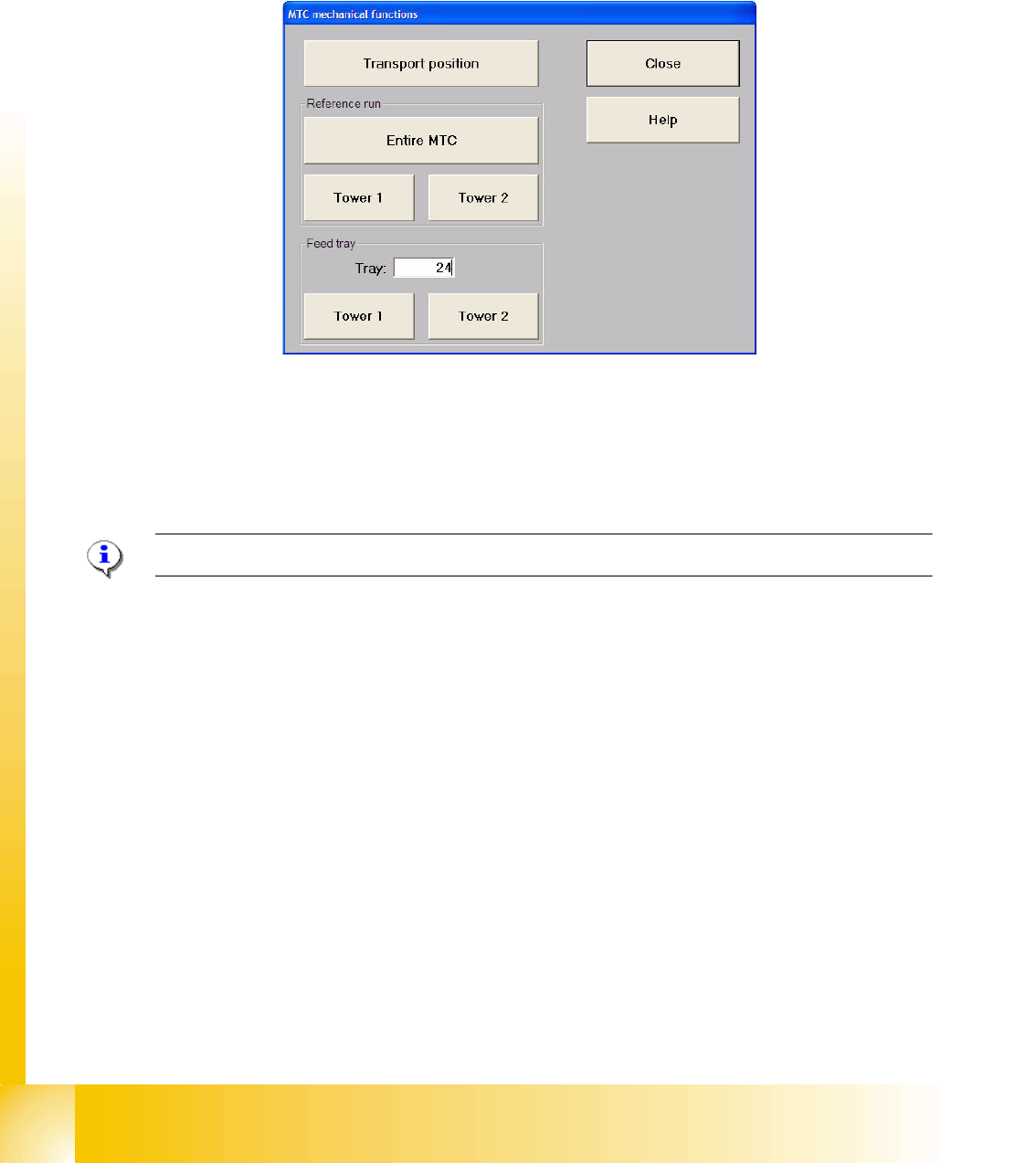
The ”Mechanical functions..." button in the "Matrix-tray changer" view (see Fig. 13.2 - 9) calls the
single functions for the MTC 2.
13.2.9.1 "Matrix-tray changer single functions" view
Fig. 13.2 - 11 "Matrix-tray changer single functions" dialog box
Functions in the "Matrix-tray changer single functions" view 13
"Transport position" button
Using this function, the MTC 2 is moved into a defined position for transport.
NOTE:The MTC 2 must not be in the refill position when this function is executed.
"Reference run" field:
"Entire MTC 2" button
A reference run is carried out with the entire MTC 2.
"Tower 1" button
A reference run is carried out with tower 1.
"Tower 2" button
A reference run is carried out with tower 2.
"Feed tray" area:
"Level:" entry field
Entry field for the level containing the waffle pack tray to be made available.
"Tower 1" button
The waffle pack tray of the level entered is moved out of tower 1.
"Tower 2" button
The waffle pack tray of the level entered is moved out of tower 2.
1 - 35
Student Guide SIPLACE X
Edition 09/2005 13 MTC 2
35
13.3 Calibration MTC 2
13.3.1 Calibration sequence in general
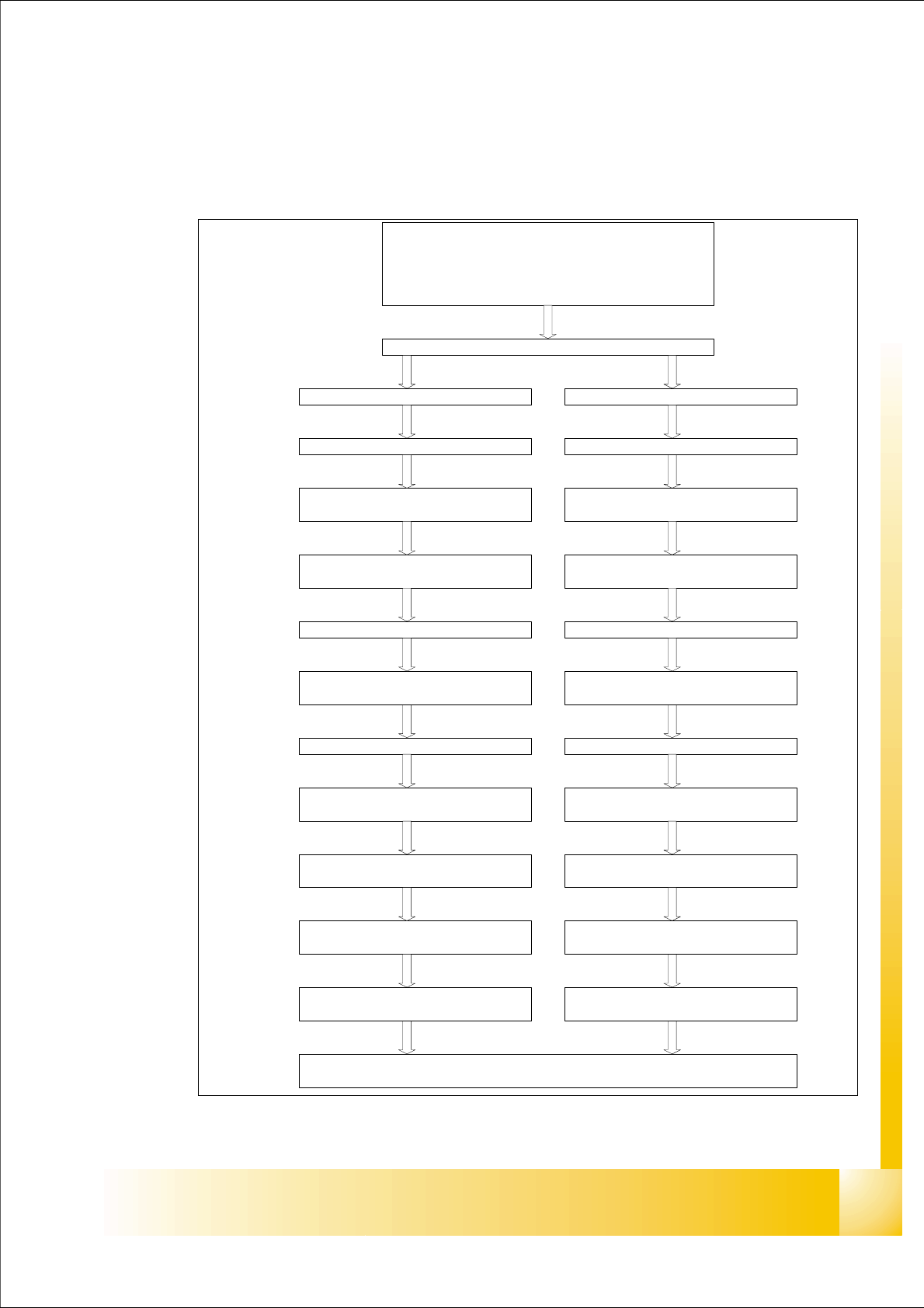
Fig. 13.3 - 1 General Calibration sequence
Preparation for Calibration
y Check the position MTC into the machine
y Set up the MTC with empty cassette
y set up a cassette in each lowest position from the magazine
y Start Sitest
Start: Reference run Machine / MTC
Tower 1 (XL) Tower 2
Lifting axis
Calibrate the zero point correction
(Zero Offset)
Calibrate the travel range
(max./min)
Lifting axis
Calibrate the zero point correction
(Zero Offset)
Calibrate the travel range
(max./min)
Feed axis
Calibrate the zero point correction
(Zero Offset)
Feed axis
Calibrate the zero point correction
(Zero Offset)
Calibrate the travel range
(max./min)
Calibrate the travel range
(max./min)
Calibrate the fiducial MTC 2
Calibrate refill position
Calibrate the transfer position
(Cassette 1-5)
Calibrate refill position
Calibrate the transfer position
(Cassette 1-4)
Calibrate the removal position
(FMT 1-5)
Calibrate the transfer position
Calibrate the removal position
(FMT 1-4)
Calibrate the transfer position

1 - 36
Student Guide SIPLACE X
13 MTC 2 Edition 09/2005
36
13.3.1.1 Terms of calibration lifting axes
Zero offset (zero position)
The zero offset is used to define the refill position of cassette 1. The zero offset is the difference
between the physical home position of the lifting axis and the refill position of cassette 1.
Refill positions (operator removal positions)
At the refill positions of cassettes 1 - 5 (tower 2: cassette 1 - 4), the cassettes can be removed
from the tower by the operator. The relevant cassette is located at the level of the tabletop which
is used as an aid in removal and feeding.
Transfer positions (WTC removal positions)
At the transfer positions of WTCs 1 - 5 (tower 2: WTCs 1 - 4) the lowest WTC in each cassette
can be moved onto the rails of the feed axis by the driver.
End positions (min. and max. position)
The end positions of an axis are reached when contact is made with the relevant limit switch. The
value determined here is used as a safety constraint when values are entered in the service menu
of the controller software.
Guide rails and stopper bars
The guide rails and stopper bars ensure that operation is only restored after refilling if the
cassettes and WTCs have been inserted correctly. They prevent them from inadvertently straying
out of the locked position during operation.
Cassette guide rails
The cassette guide rails guide cassettes onto the tabletops during refilling.
WARNING
Incorrectly set machine data can result in a crash between the lifting and feed axes or at the limit
positions of these axes.