SiplaceX4_en.pdf - 第616页
1 - 49 S tudent Guide SIPLACE X Edition 09/2005 13 MTC 2 49 ➠ Remove the left co ver in front of the electronic s board and the covers on the rig ht and the left in front of the Master drives. ➠ Switch the motor protecti…
1 - 48
Student Guide SIPLACE X
13 MTC 2 Edition 09/2005
48
13.3.3.1 Belt tension
Note:
The construction of the lifting axis was change since 05.2005. That means new spindle, spindle
with counter bearing, motor lifting axis, gear on the motor and therefore new parametersets for
Masterdrives. The MTC 2 has the versionsnumber 02. The belt tension for the lifting axis was
change, please note!
Tools and accessories 13
– Belt frequency measurement device (inductive)
– 2 belt tension stickers
– 1 set of hexagon socket wrenches
– 1 set of open-ended wrenches
Preparatory measures 13
➠ Empty the MTC 2 completely (see the User Manual).
➠ Move the lifting axis to its lowest position (see Sitest ).
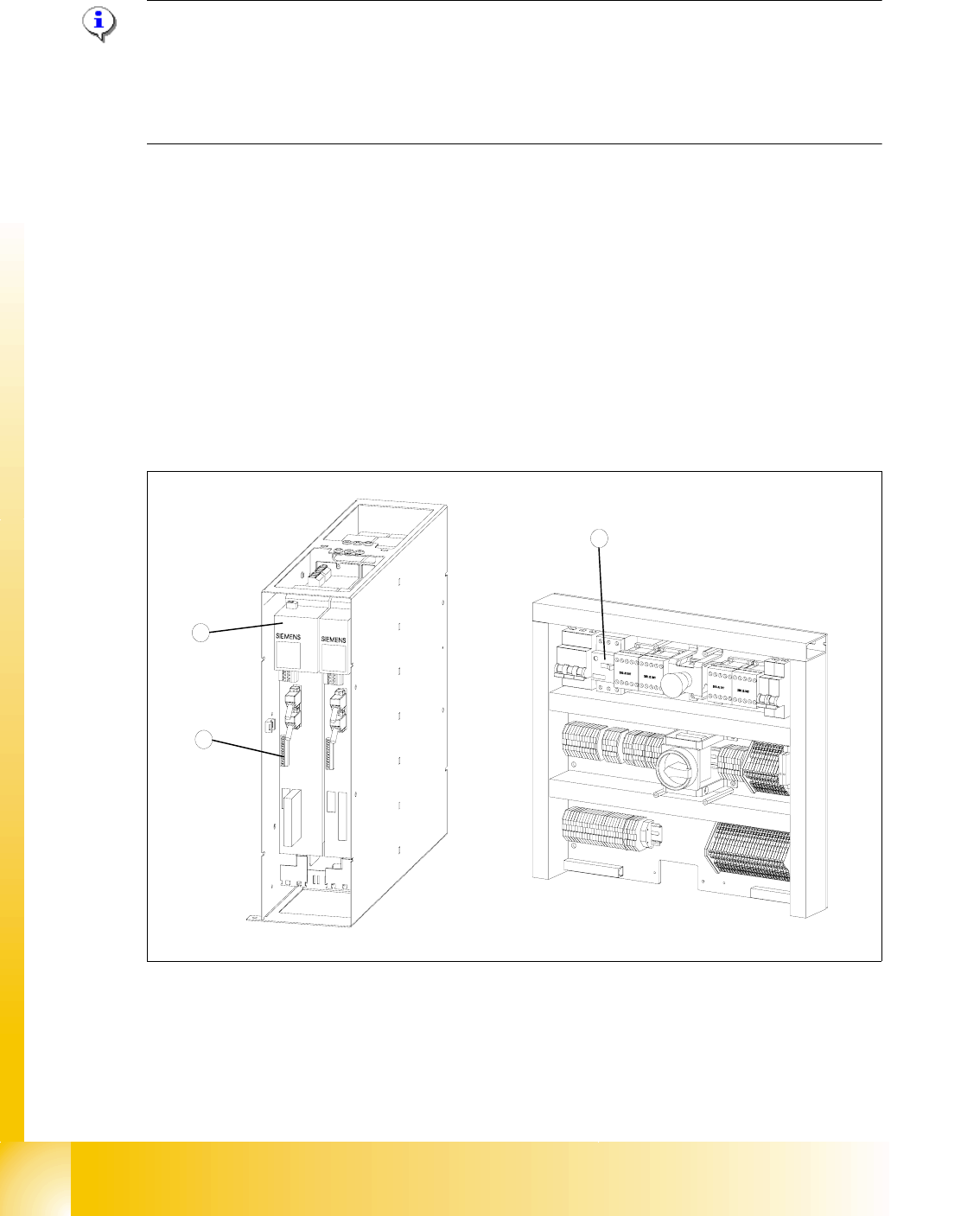
Fig. 13.3 - 14 Connections to the Masterdrives of the lifting axes
Key
1 Masterdrive, lifting axis (shown here for tower 1)
2 Connection terminal for external signals
3 Motor protection switch on the electronics board
2
1
3

1 - 49
Student Guide SIPLACE X
Edition 09/2005 13 MTC 2
49
➠ Remove the left cover in front of the electronics board and the covers on the right and the left
in front of the Masterdrives.
➠ Switch the motor protection switch off (see Fig. 13.3 - 14).
➠ To relieve the tension the toothed belts, loosen the brake on the servo motor in the following
way to rest the lifting axis on the buffer:
➠ Check that the MTC 2 has been switched off and is isolated from the power supply.
➠ Remove the connector for external signals from the Masterdrive for the lifting axis (see Fig.
13.3 - 14
, item 2).
➠ Move the cable from Pin 3 to Pin 1.
➠ Attach the connector.
➠ Connect the MTC 2 to the power supply and switch it on.
The lifting axis audibly moves a distance of a few mm up to the buffer.
➠ Check that the lifting axis is actually at its end position.
➠ Reconnect the cable as it was originally in the following way:
➠ Switch off the MTC 2 and isolate it from the power supply.
➠ Remove the connector for external signals from the Masterdrive for the lifting axis (see Fig.
13.3 - 14
, item 2).
➠ Move the cable from Pin 1 to Pin 3.
➠ Attach the connector.
➠ Switch the motor protection switch on.
➠ Attach the covers.
➠ Undock the MTC 2 from the SIPLACE station (see User Manual).
➠ Crank up the MTC 2 in a clockwise direction until it stops.
1 - 50
Student Guide SIPLACE X
13 MTC 2 Edition 09/2005
50
Checking and setting the belt tension 13
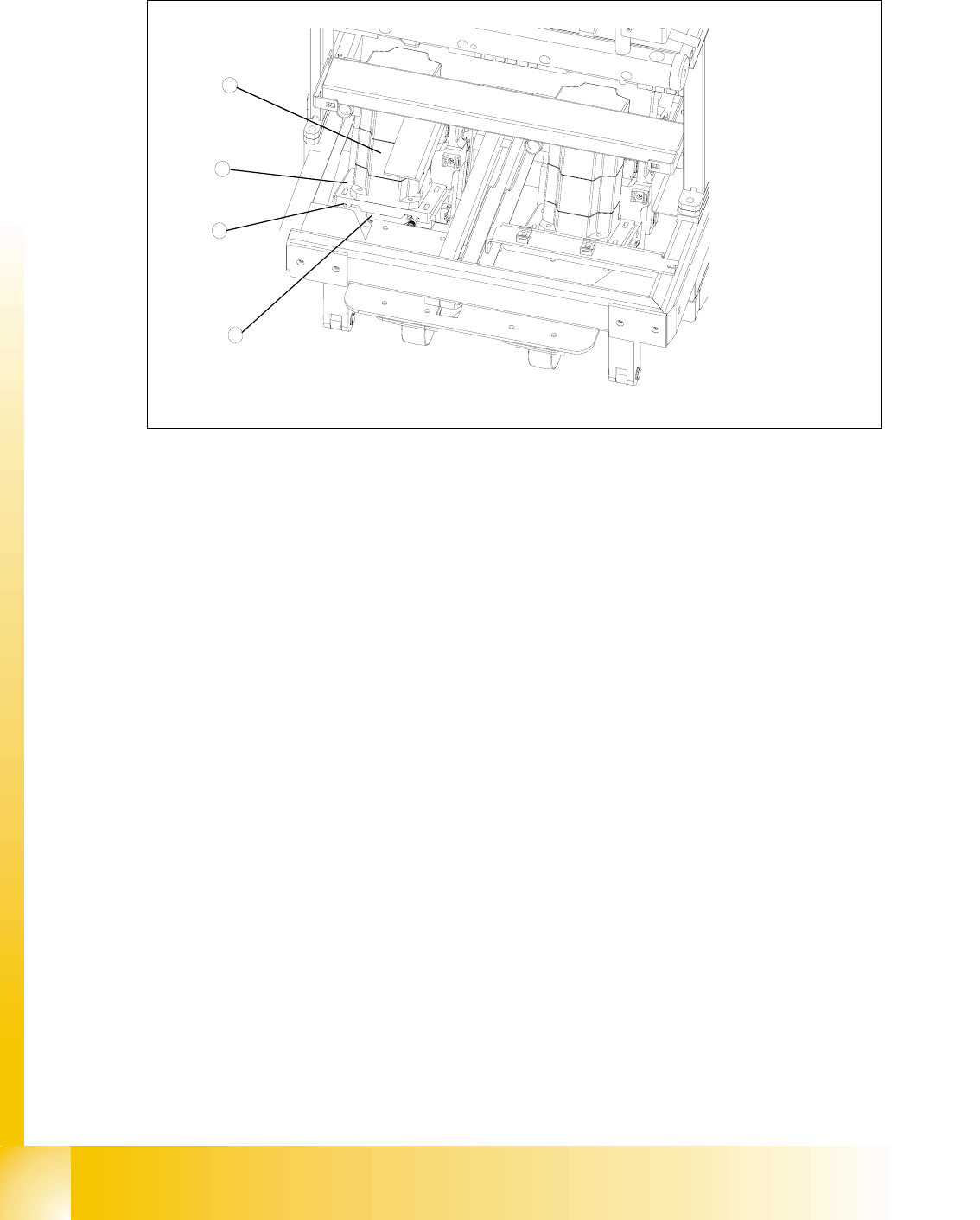
Fig. 13.3 - 15 Setting the belt tension
Key
1 Servo motor of the lifting axis (shown here for tower 2)
2 Dual toothed belt (shown here for tower 2)
3 Mounting plate with clamping screws (shown here for tower 2)
4 Adjusting screws with lock nuts (shown here for tower 2)
➠ Carry out the relevant preparatory measures (see section 13.3.3.1 "Preparatory measures").
➠ Measure the belt tension with the belt frequency measuring device in the following way:
➠ Find the holes for the measurement head of the belt frequency measuring device on the
lifting axis. Two holes are provided for each of the dual toothed belts (see
Fig. 13.3 - 13,
item 7).
➠ Attach the toothed belt tension stickers (Siemens item no. 00370691-0) onto the belts in this
area.
➠ Cause the belts to oscillate and measure their frequency.
You must set the belt tension if the measured frequency deviation deviates from the nominal
value
[(200Hz ± 5Hz),(210Hz ± 5Hz) see note above]
➠ Turn the adjusting screws as far as they will go. Before doing this you will need to loosen
the lock nuts.
➠ Loosen the four lock screws on the mounting plate of the motor.
➠ Use the two adjusting screws to raise the belt tension (by turning in a clockwise direction)
or lower it (by turning in an anticlockwise direction), until the nominal frequency is achieved.
Tighten the lock nuts each time you measure the belt tension.
1
3
4
2