00195741-0102_UM_D1_D2_SR605_EN.pdf - 第259页
User Manual SIPLACE D1/D2 5 Tasks for the operating personnel From software version SR.605.xx 07/2008 EN Edition 5.10 Docking the component trolley in or out 259 → Push the sleeve (item 1 in Fig. 5.10 - 3 ) up using both…
5 Tasks for the operating personnel User Manual SIPLACE D1/D2
5.10 Docking the component trolley in or out From software version SR.605.xx 07/2008 EN Edition
258
5.10.3 Docking in the component trolley
PLEASE NOTE 5
Shorten the component tapes on the front end of the S feeder modules to approximately 1 cm
before you dock in the component trolley.
CAUTION 5
Check that the placement head is outside the range of the component trolley.
→ Check that the left and right contact surfaces (item 7 in Fig. 5.10 - 2
, page 257) in the machine
for the component table are clean.
→ Check that the contact surfaces on the underside of the component table are clean.
→ CAREFULLY push the component trolley into the machine.
→ Plug the connecting cable of the component trolley into the socket (item 2 in Fig. 5.10 - 2
,
page 257
) on the machine.
→ Turn the switch on the component table (item 4 in Fig. 5.10 - 2
, page 257) up.
→ Press the button until the component table has reached the upper final position (item 1 in Fig.
5.10 - 2
, page 257).
→ Carefully push the component trolley into machine as far as the stop.
→ Check that the centering holes in the component table bed lie precisely over the centering
pins of the machine (item 8 in Fig. 5.10 - 2
, page 257).
WARNING DANGER OF CRUSHING 5
When lowering the component table bed, never reach into the gap between the feeders and
the used tape channel. 5
→ Turn the switch on the component table (item 4 in Fig. 5.10 - 2
, page 257) down.
The component table is lowered.
→ Ensure that the centering pins engage in the centering holes in the component table and that
the component table is fully lowered.
→ Close the protective cover.
→ Press the start button to start the machine.
User Manual SIPLACE D1/D2 5 Tasks for the operating personnel
From software version SR.605.xx 07/2008 EN Edition 5.10 Docking the component trolley in or out
259
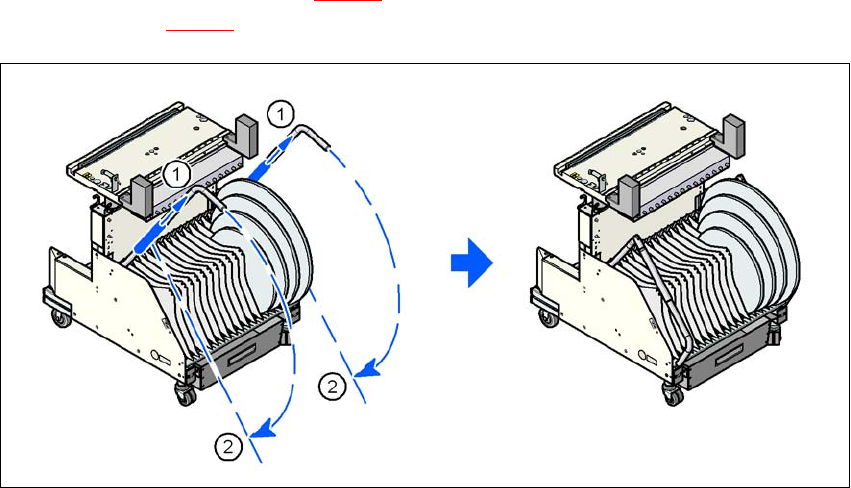
→ Push the sleeve (item 1 in Fig. 5.10 - 3) up using both handles and swivel the handle down
(item 2 in Fig. 5.10 - 3
).
5
Fig. 5.10 - 3 Component trolley - swivel handles down
(1) Push sleeve up
(2) Fold handle down
5 Tasks for the operating personnel User Manual SIPLACE D1/D2
5.10 Docking the component trolley in or out From software version SR.605.xx 07/2008 EN Edition
260