00195741-0102_UM_D1_D2_SR605_EN.pdf - 第274页
6 Station extensions User Manual SIPLACE D1/D2 6.1 Nozzle changer From software version SR.605.xx 07/2008 EN Edition 274 → First place the side of the magazine with the centering hole (item 3 in Fig. 6.1 - 9 ) and the sl…
User Manual SIPLACE D1/D2 6 Station extensions
From software version SR.605.xx 07/2008 EN Edition 6.1 Nozzle changer
273
6.1.2.6 Changing the magazine
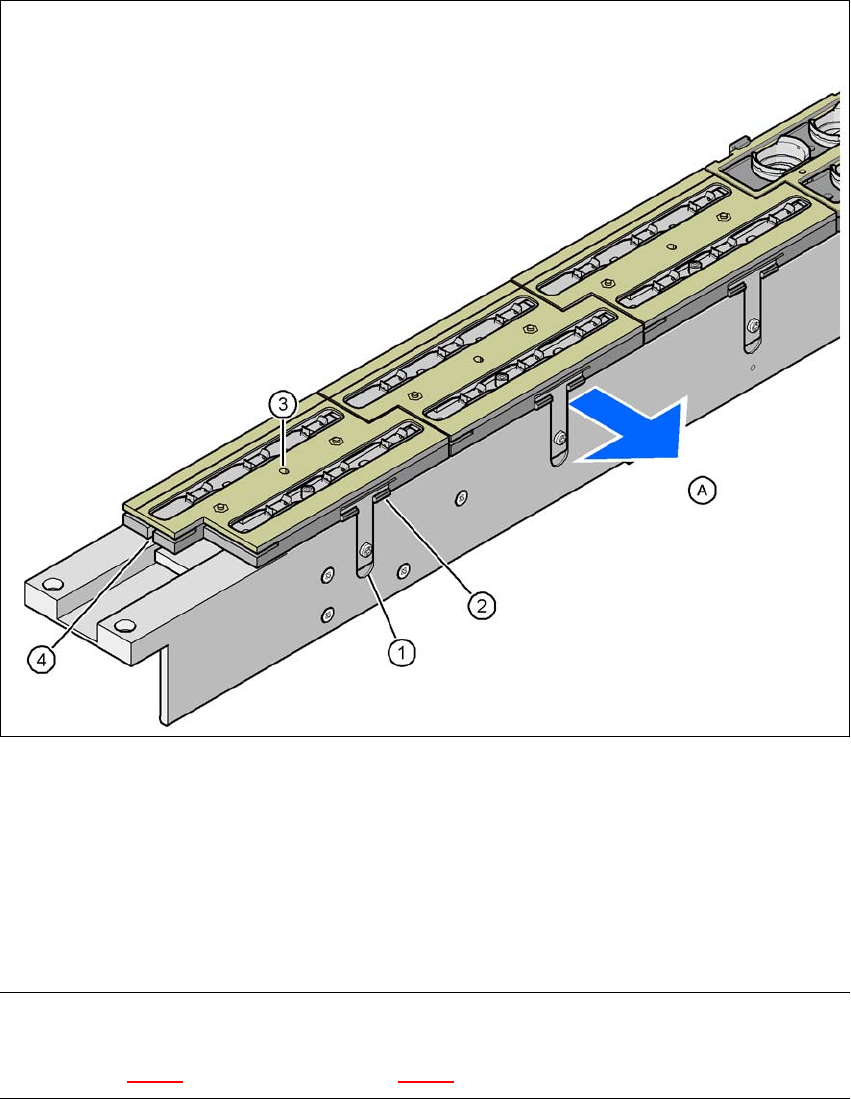
→ To remove the magazine, press the spring hook (item 1) away from the magazine and lift the
magazine out of the base.
6
Fig. 6.1 - 9 Changing the magazine
(1) Spring hook
(2) Retaining clamp
(3) Centering hole
(4) Slot
(A) Push the spring hook away from the magazine
PLEASE NOTE
Make sure that you insert the magazine so that the centering pins slide into the centering hole
(item 3 in Fig. 6.1 - 9) and slot (item 4 in Fig. 6.1 - 9). 6
6 Station extensions User Manual SIPLACE D1/D2
6.1 Nozzle changer From software version SR.605.xx 07/2008 EN Edition
274
→ First place the side of the magazine with the centering hole (item 3 in Fig. 6.1 - 9) and the slot
(item 4 in Fig. 6.1 - 9
) on the base. The two knobs on the magazine must slide into the retain-
ing clamp (item 2 in Fig. 6.1 - 9
).
→ Push the spring hook away from the magazine.
→ Press the magazine so that it lies flat on the base, then release the spring hook. The spring
hook must latch into place.
6.1.2.7 Position detection
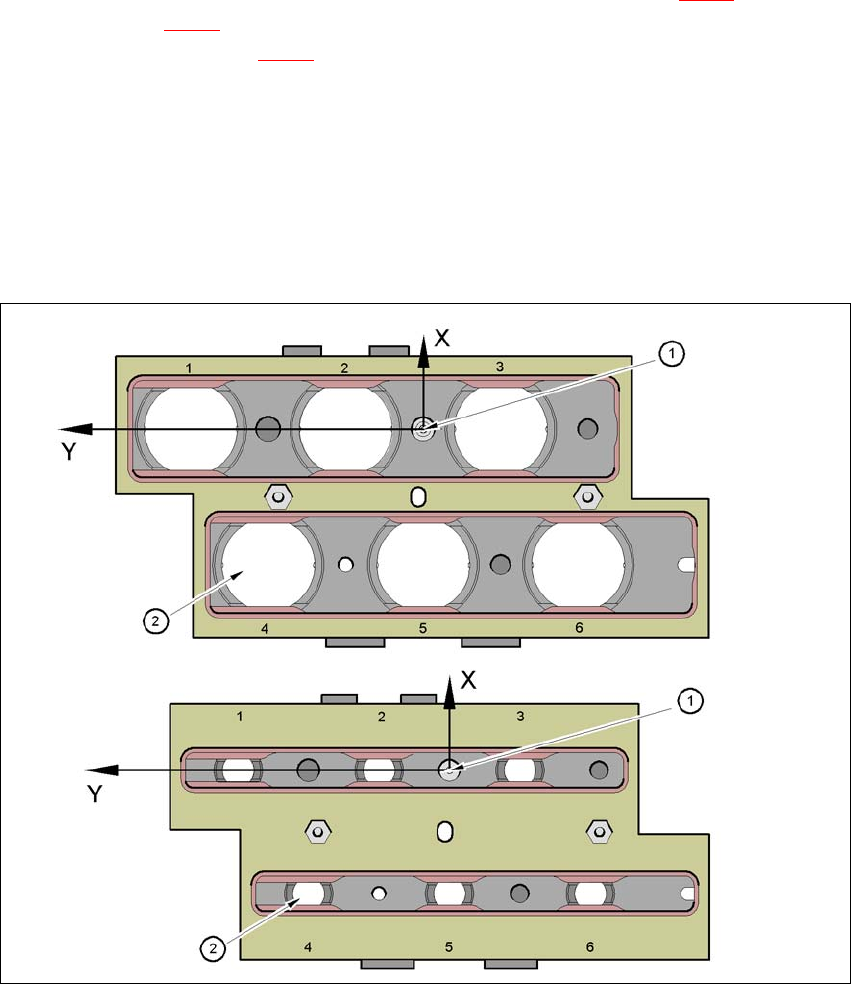
Every magazine of the nozzle changer has a positioning fiducial for position detection.
6
Fig. 6.1 - 10 Nozzle changer - Position detection
(1) Positioning fiducial
(2) Position of the nozzles in the magazine relative to the positioning fiducial
User Manual SIPLACE D1/D2 6 Station extensions
From software version SR.605.xx 07/2008 EN Edition 6.1 Nozzle changer
275
6.1.3 Nozzle changer for the SIPLACE Pick&Place head
Item no. 00119817-xx Nozzle changer, P&P, D1
Item no. 03048676-xx Magazine for 2 nozzles
Item no. 03048639-xx Magazine for 1 nozzle
6.1.3.1 Description
This nozzle changer can hold up to 10 nozzle magazines. There are two types of magazine avail-
able: standard magazines and magazines for special nozzles or grippers. The magazines are
seated on a common support. They are centered with two parallel pins and fixed in place with two
countersunk screws.
Standard configuration: 2 magazines, each for two nozzles
1 magazine for special nozzles or grippers
6
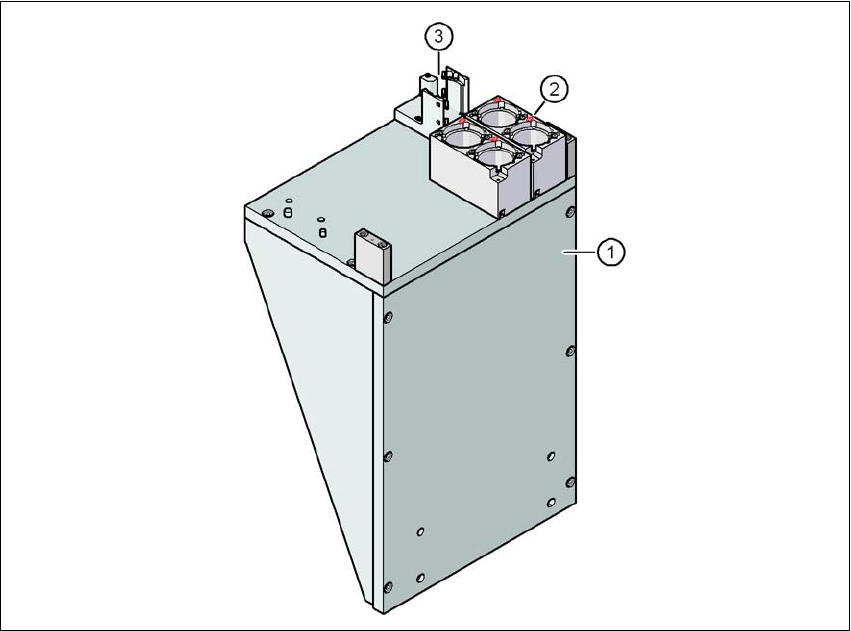
Fig. 6.1 - 11 Nozzle changer for the SIPLACE P&P head
(1) Carrier
(2) Magazine for 2 nozzles
(3) Magazine for special nozzles or grippers
6
6