FUJI NXT Programming Manual QD004-18.pdf - 第103页
QD004-18 4. Part Data Settings NXT Programming Manual 93 insertion pres sure is to be used (a setting of 1 to 4 is set for [ Place Motion Selection]). Placement Wait Time Specify the time that th e axis stops at the lo w…
4. Part Data Settings QD004-18
92 NXT Programming Manual
compatible head. The valid range for the NXT is 220 gf to 1020 gf. If "0" is specified here,
the part is placed using no pressure control. When settings less than the minimum are
specified, the part is placed using the minimum pressure. When settings more than
maximum are specified, the part is placed using the maximum pressure. This setting is only
applicable for heads that support this function. This setting has priority over soft placement
settings.
Transport Speed
Specify, as a percentage of the maximum transport speed, the speed at which the placing
head carries the part from the pick-up position to the placing position.
Transport Speed Z
Specify the maximum speed at which the nozzle moves along the Z axis while transporting
a part (i.e., from pickup to placement).
Transport Speed Q
Specify the maximum speed at which the nozzle rotates while transporting a part (I.e., from
pickup to placement).
Soft Place Speed
This sets the Z-axis transport speed. This is the speed at which the part is lowered to the
surface of the board. If this speed is too high, the part will spring back when the nozzle
retracts, resulting in a misalignment.
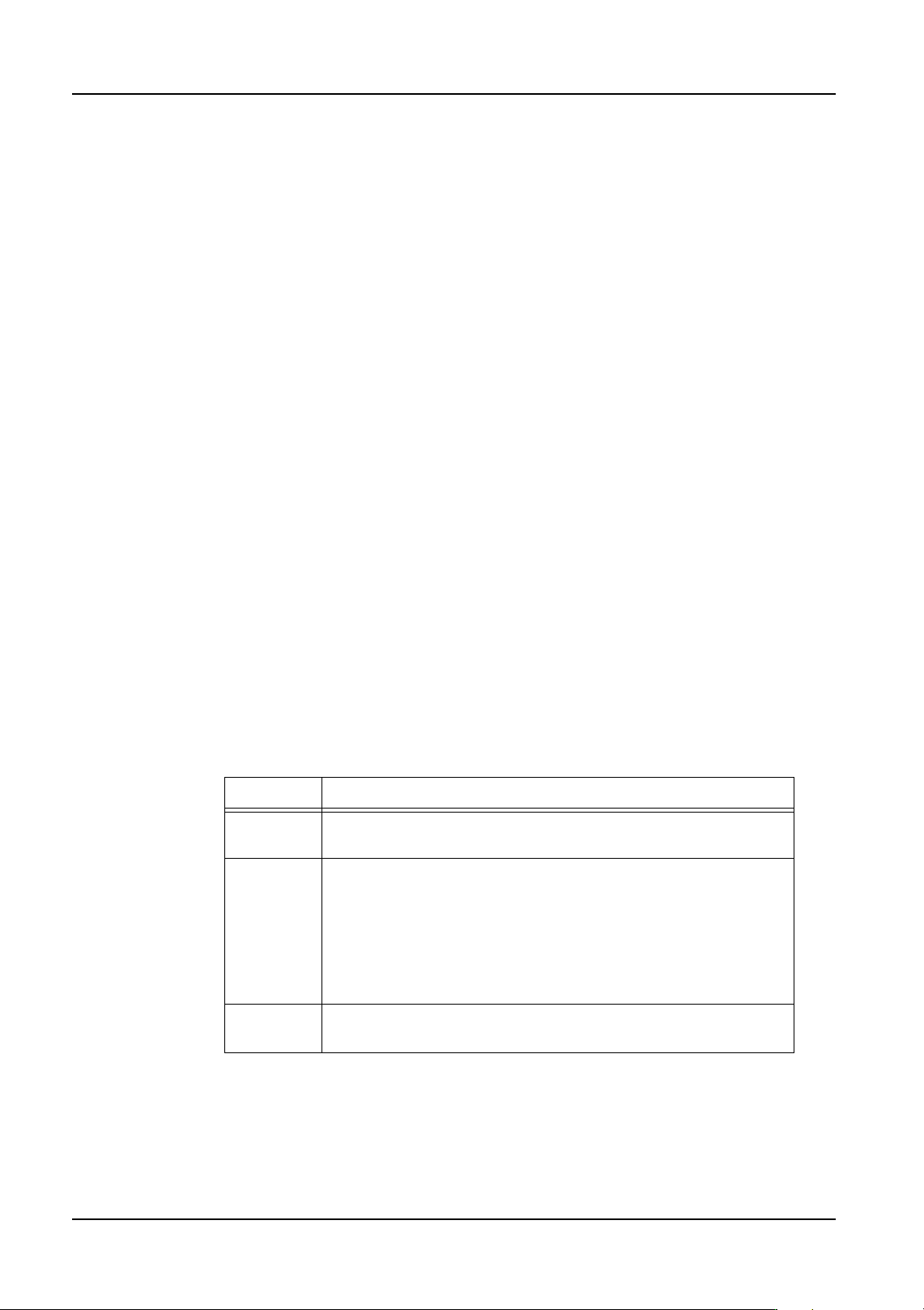
Place Motion Selection (from NXT V3.10)
Specify the pressure (torque) method to be used for insertation pressure. In order to use
this function, Fuji Flexa V2.2.0 or higher must be used. The default setting of "0" disables
this function. Enter a value between 1 to 4 to enable insertion pressure placing. If 5 is
entered, insertion pressure is not used but if a claw is used to pick the part, the margin
between the top of the part and the ledge on the claw will be 0 mm (normally there is a
clearance of 0.5 mm).
Note: Always ensure to use backup pins underneath the panel when using insertion pressure.
Note: When an insertion error occurs and the user then clears the error, the machine determines
that the part has been placed and proceeds to the next placement sequence when
production is resumed. (Recovery is not performed)
Placing Thrust Pressure
Specify the force between 39.2 N to 98 N to be used to insert the part in newtons when
Setting Description
0 Insertion pressure is not used and the part is picked up and
placed normally.
1 to 4 Any setting in this range is treated the same. Insertion pressure
is used for placement. The part is picked up normally and during
placement, the torque amount specified in [Placing Thrust
Pressure] is used. If the torque is not reached in the proper
placing height range, an error occurs and the part is not placed.
(Operation is different for these settings for older machines. In
order to preserve compatibility with older machines, this is used
no matter what setting is specified.)
5 Insertion pressure is not used and the part is picked up and
placed normally.

QD004-18 4. Part Data Settings
NXT Programming Manual 93
insertion pressure is to be used (a setting of 1 to 4 is set for [Place Motion Selection]).
Placement Wait Time
Specify the time that the axis stops at the lower Z-axis limit for the placement. If a value
shorter than the default time specified for the head type is specified, then the time specified
in this setting is ignored and the time for the head type is used instead.
Stack Placing Down Speed
Specify the lowering speed of the Z-axis during Package-on-Package placement.
Stack Placing Up Speed
Specify the raising speed of the Z-axis during Package-on-Package placement.
Do Place Precision Priority
Specify whether or not to perform placement with high placing accuracy. If [Yes] is
selected, parts with this shape data are assigned to M6SP modules with high accuracy
placing heads (H01, H02, F04 and G04). If [No] is selected, then parts with this shape data
are assigned to modules without consideration of the accuracy of the head.
4. Part Data Settings QD004-18
94 NXT Programming Manual
Process - Error
Alt Feeder Trigger
This setting is not used from the part data, but is set for the NXT through Accessory
Software.
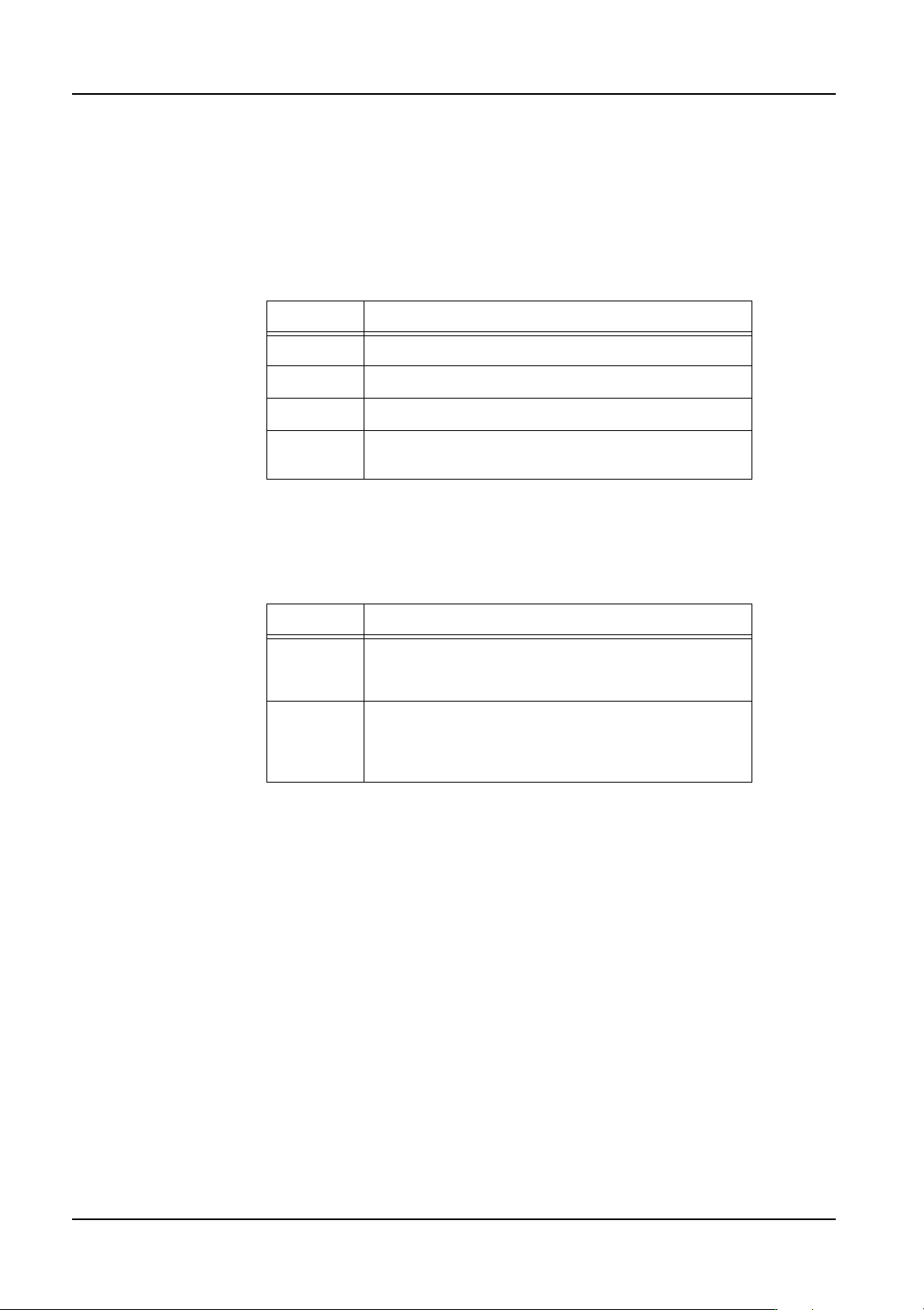
Dump Position
Specify the location where parts are dumped when an error occurs.
Forcing Recovery Times As 0 (from NXT V3.10)
Specify whether to force the number of recovery times to be zero (0) or to use the recovery
times set in the shape/machine data. In order to use this function, Fuji Flexa V2.2.0 or
higher must be used.
Recovery Times
Specify the number of times a recovery is attempted when an error occurs. If no setting is
specified here, the Recovery Count value in the configuration data is used.
Setting Description
Conveyor Parts are dumped on the reject parts conveyor.
Box Parts are dumped into the reject parts box.
Tray This setting is not supported for the NXT.
Pickup
Tray
Parts are dumped back into the tray they were
picked from.
Setting Description
Yes The recovery times for parts using this shape data is
zero (0) no matter what is set in the other recovery
settings.
No The recovery times specified in the shape data is
used. However, if the recovery times setting in the
shape data is zero, then the machine configuration
recovery times setting is used.