FUJI NXT Programming Manual QD004-18.pdf - 第41页
QD004-18 3. Job Builder NXT Programming Manual 31 3.3.4 Distributing the same part to multiple modules 1. There a re several tabs at the bottom of the [Machin e Configura tion] pane. S elect the [General] tab. 2. Click t…
3. Job Builder QD004-18
30 NXT Programming Manual
Specifying the available feeders for a machine
By setting which feeders are available for the NXT machine, an unavailable feeder will not
be selected when optimization is performed. In addition, it is possible to specify the quantity
of each feeder type available so the optimizer will not use more feeders of a certain type
than that is available.
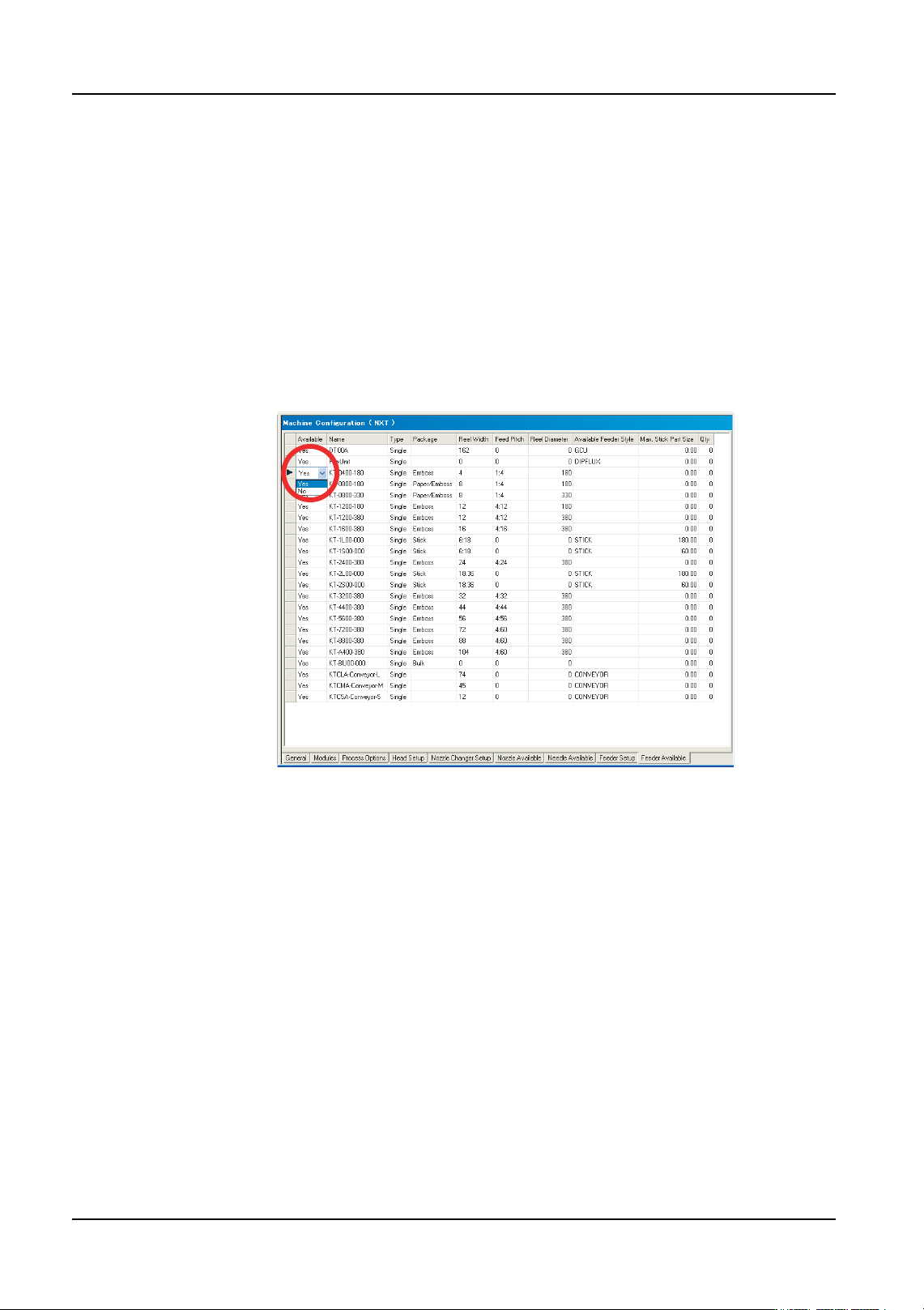
1. There are several tabs at the bottom of the [Machine Configuration] pane. Select the
[Feeder Available] tab and the available feeders for the machine display.
2. Double-click in the data cell under [Available] that is on the row for the desired feeder
and a drop-down list displays. Select the “Yes” if that feeder is available for that
machine, or “No” if the feeder is not available for that machine. Repeat until all of the
available and unavailable feeders have been specified.
3. If you want to specify the quantity of feeders present, then scroll the window to the right
and then specify the quantity of feeders available in the [Qty] column. If left at 0 and the
feeder available setting is “Yes”, then it is considered that there is no limit on the feeder
quantity.
The new settings will take effect the next time optimization is performed.
01PRG-0060E
QD004-18 3. Job Builder
NXT Programming Manual 31
3.3.4 Distributing the same part to multiple modules
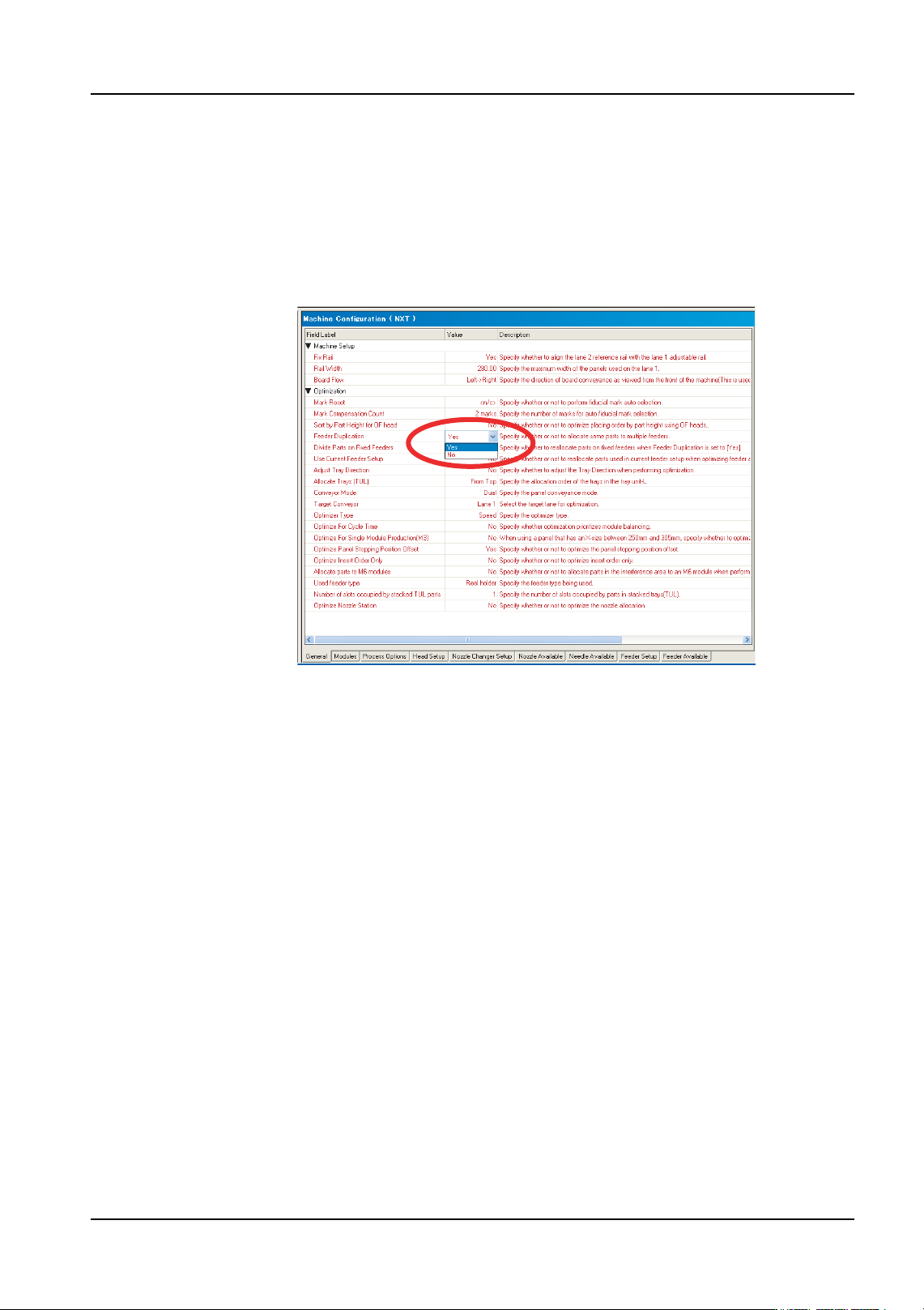
1. There are several tabs at the bottom of the [Machine Configuration] pane. Select the
[General] tab.
2. Click the data cell for [Feeder Duplication] in the [Optimization] to display a drop-down
list.
3. Select “Yes” to distribute high part count parts to multiple modules.
4. Optimize the job for the changes to take effect. Parts that have “Yes” specified for [Allow
Multiple Slots] in their part data settings and can be placed on more than one module
are possibly distributed to modules with a compatible configuration by the optimizer.
01PRG-0061E

3. Job Builder QD004-18
32 NXT Programming Manual
3.3.5 Assigning an alternate feeder
The method for assigning a fixed alternate feeder for an NXT-series is different than other
Fuji machines. For other machines, an alternate feeder loop has to be created while for the
NXT an extra feeder with the part is just added to the module. The NXT automatically uses
this extra feeder as an alternate feeder and a loop does not have to be created. It is not
possible to specify which feeder is to be used next for the NXT if there are two or more
alternate feeders as this is decided by the machine. If using Fujitrax Verifier, use the
dynamic alternate feeder function instead.
1. Select the [Top] or [Bottom] tab from the job information bar depending on which side of
the panel the machine is located for which the configuration data needs to be edited.
2. Double-click the name of the line to display the machines in that line.
3. Double-click the name of the NXT machine to set the configuration file for to display the
items for that machine.
4. Double-click [Configuration] under the machines name and a window displays in the
data area.
5. There are several tabs at the bottom of the [Machine Configuration] pane. Click the
[Feeder Setup] tab.
6. Select the module for which the alternate feeder is to be added.
7. Select the feeder position in which to add the alternate feeder by selecting the gray
extreme left cell of that row for the feeder.
8. Right-click and select [Add Feeder] from the shortcut menu and the [Add Feeder] dialog
box is displayed.
9. Select the part for which this feeder is to be the alternate feeder from the drop-down list
and click [OK]. The extra feeder is added and the NXT uses this extra feeder as an
alternate feeder.