FUJI NXT Programming Manual QD004-18.pdf - 第28页
3. Job Builder QD004-18 18 NXT Programming Manual Nozzle station nozzle allocation method Specify the nozzle station nozzle arrangement method. "Minimum" arranges for the minim um number nozzles required by the…
QD004-18 3. Job Builder
NXT Programming Manual 17
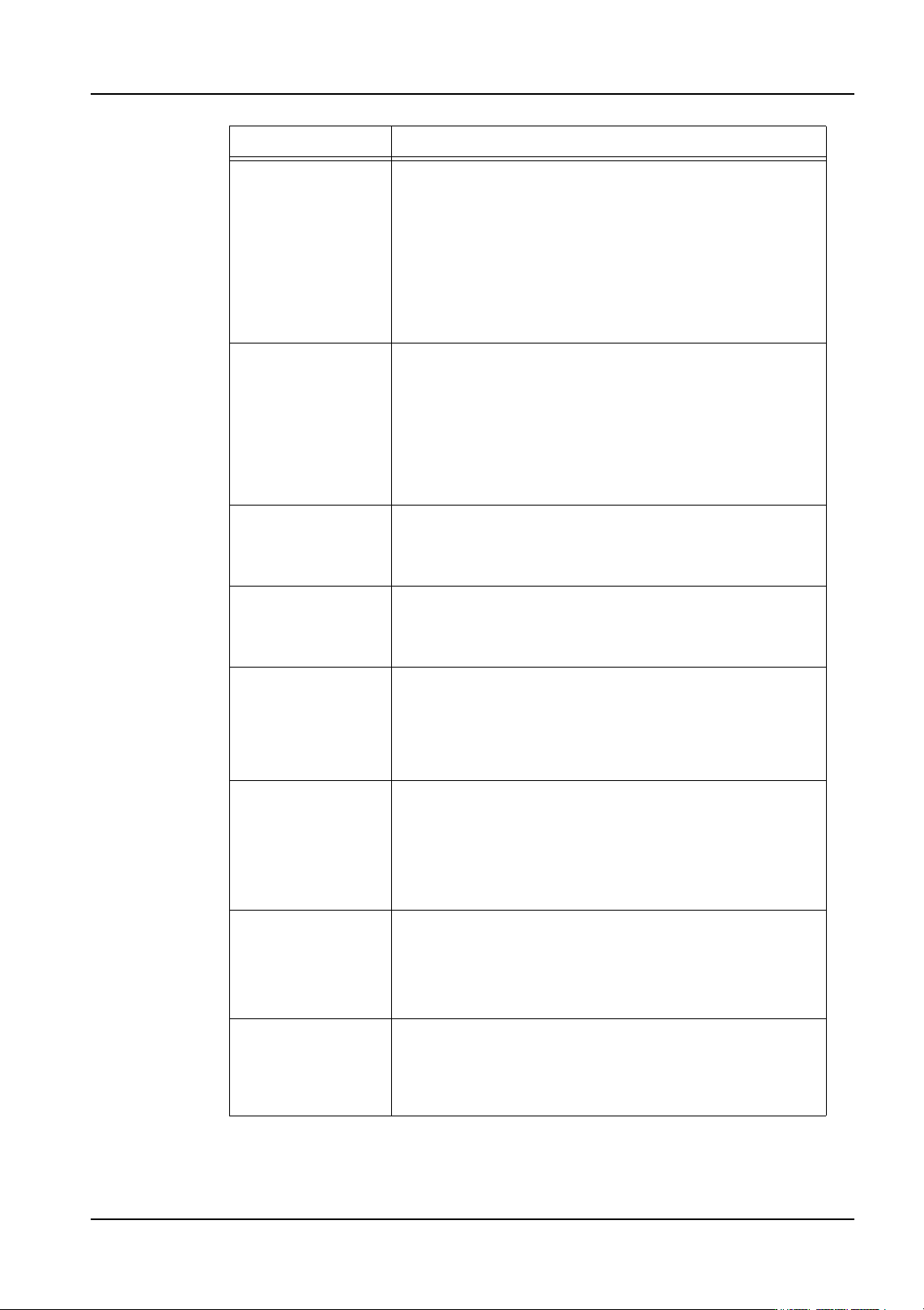
Optimize For Cycle
Time
Specify whether optimization prioritizes module balancing.
No: Optimization is performed so that small parts are
placed first whenever possible. Furthermore, the number
of divided feeders is not increased greatly when feeders
are divided. This setting decreases calculation time.
Yes: Optimization prioritizes module balance over part
size. More feeders are divided when feeders are divided.
This setting often improves cycle time but increases the
calculation time.
Optimize For Single
Module Production
(M3)
This specifies whether or not paired module production is
used for panels between 250 and 305 in length. This
setting has no bearing for panels outside of this range.
When set to "No" and the panel size is within the range, the
M3 modules are automatically paired for paired production.
If set to "Yes" and the panel size is within the range, the M3
modules are not paired. For panels smaller than the range,
M3 modules are never paired. For panels larger than the
range, M3 modules are always paired.
Optimize Insert
Order Only
When this setting is set to “No”, insert order, feeders, head
setup, nozzle stations and other items can be optimized/
changed during optimization. Only the insert order is
changed during optimization when this setting is “Yes”.
Optimize Panel
Stopping Position
Offset
This specifies whether or not the panel stopping position is
optimized for paired module production. This is only for M3
modules when they are performing paired module
production.
Allocate parts to M6
modules
This specifies whether or not to allocate parts that are in
the head interference area during paired module
production to M6 modules if possible. By setting this to
“Yes”, head waiting time during paired module production
is reduced. However, more parts are assigned to the M6
module.
Used feeder type Specify the whether of not reel holders are on the feeders.
If set to “Reel holder”, the optimizer positions feeders in the
feeder setup considering that the feeders have reel
holders. If this is set to “Reel holder-E”, the optimizer
positions feeders in the feeder setup considering that
feeders have no reel holders and a bucket type feeder
pallet is used.
Number of slots
occupied by
stacked TU-L parts
Specify the number of slots occupied by parts in stacked
trays (TU-L).
1: Optimize all trays as stacks of one slot.
2: Optimize all trays as stacks of two slots.
3: Optimize all trays as stacks of three slots.
Optimize Nozzle
Station
This specifies whether the nozzle allocation should be
optimized or not. If this is set to “Yes” the nozzles in the
nozzle station will be changed to be “optimized” for
production. If this is set to “No” then optimization is
performed without changing the nozzle setup.
Setting Description
3. Job Builder QD004-18
18 NXT Programming Manual
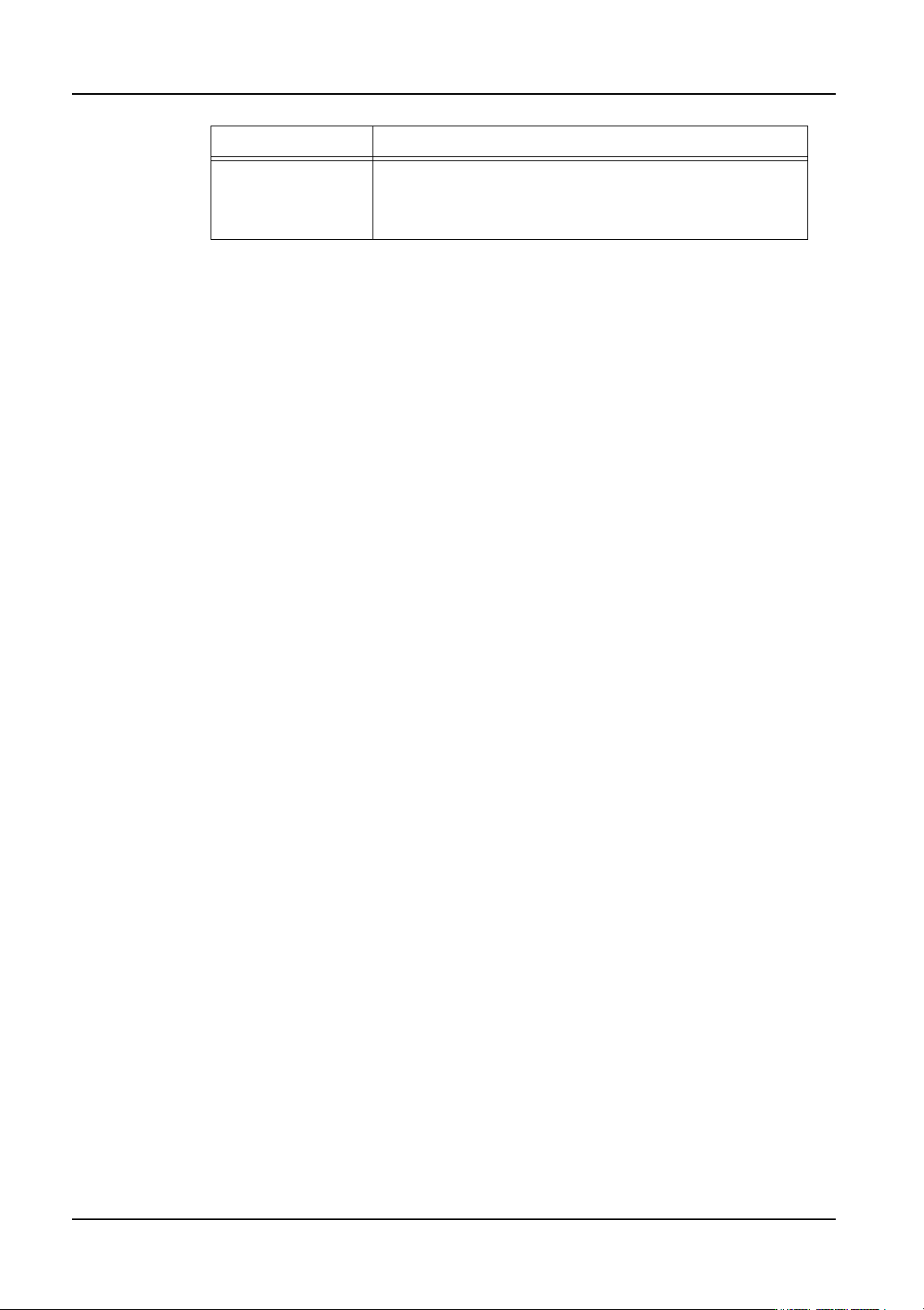
Nozzle station
nozzle allocation
method
Specify the nozzle station nozzle arrangement method.
"Minimum" arranges for the minimum number nozzles
required by the head. "Maximum" arranges for the
maximum number of nozzles allowable in the station.
Setting Description
QD004-18 3. Job Builder
NXT Programming Manual 19
Specifying the modules for an NXT
After adding the NXT line, it is very important to configure the modules to match the
modules in the current machine. Since items and modules are easily interchanged, always
be sure to check the current module configuration.
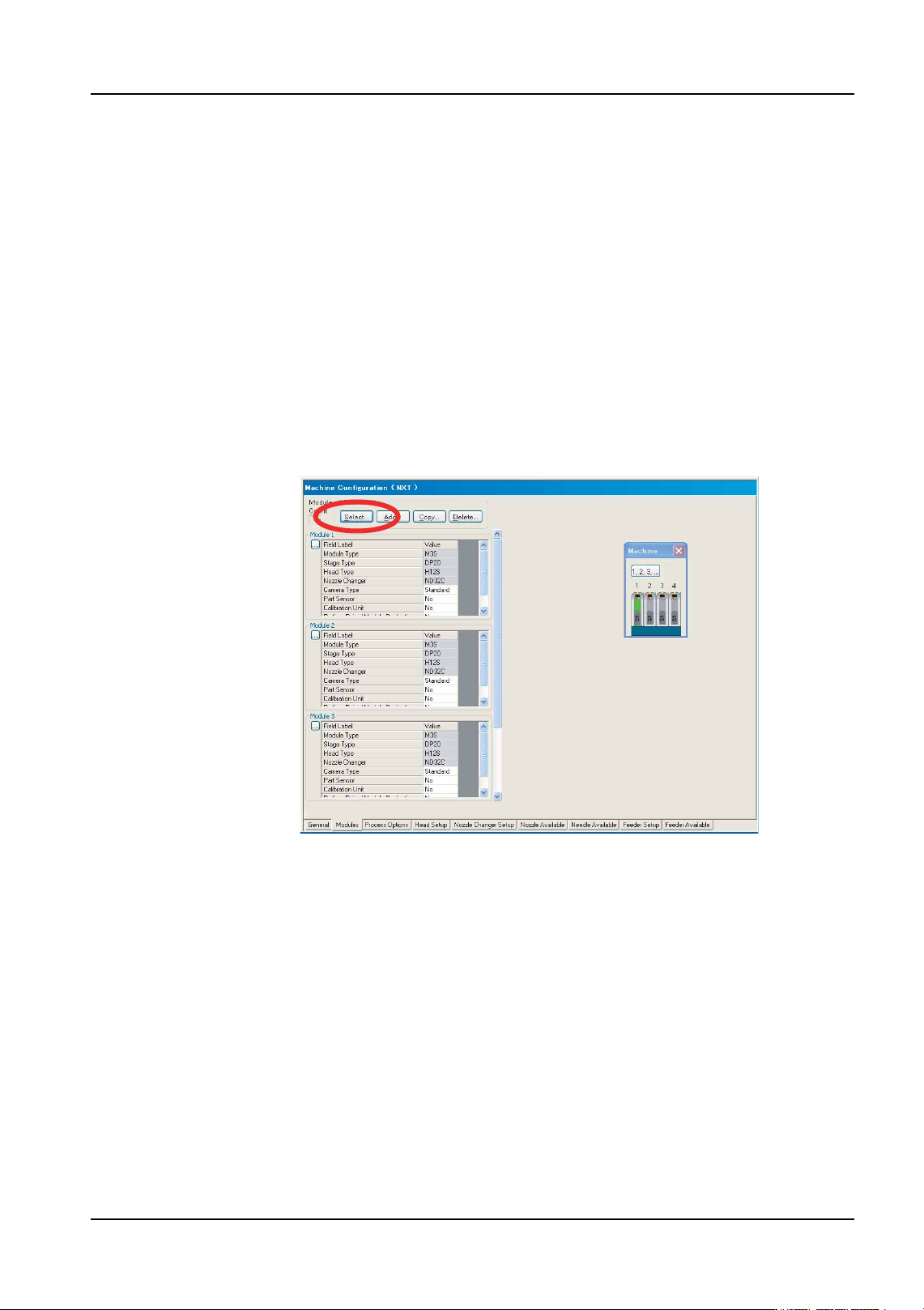
1. There are several tabs at the bottom of the [Machine Configuration] pane. The second
tab is [Modules] and this is the location where the modules are set. Click this tab.
2. Click [Select] from the [Module Edit] group. A small dialog box displays with a
representation of the current NXT module configuration.
• Click a module in this dialog box to display that module in the information area.
• By using this dialog box, it is easy to navigate and understand the current
module configuration. In addition, this dialog box can be used to jump to
different modules on other tabs such as [Nozzle Changer Setup], and [Feeder
Setup].
3. Check the current modules. If the number and type of modules is correct in the module
information area then proceed to 13.
4. If the number of modules is incorrect, click [Add] and in the dialog box that displays,
specify the position for the new module. Once the desired position has been specified,
click [OK] and the module is added to the specified position using the default module
settings. Continue adding modules until the number of modules is correct for the NXT
machine.
Note: The NXT “machine” in Fuji Flexa is comprised of multiple bases that are next to each other.
One NXT machine can be created with up to 32 modules in this manner (e.g., eight 4M
bases with 4 M3 modules on each base). In this module configuration, the NXT machine
will have the number of modules that all of the bases put together have regardless of the
fact that the bases are different. For details on making the line configuration settings for the
NXT, refer to the “Setting Up a Line with a NXT” chapter in the NXT Setup Manual.
Note: Do not use [Copy] to add a new module. Copy only will replace the settings of an existing
module with the settings from the copied module. This is a convenient feature to use after
adding new modules to apply the same settings to the new modules.
01PRG-0054E