FUJI NXT Programming Manual QD004-18.pdf - 第24页
3. Job Builder QD004-18 14 NXT Programming Manual 3.3.3 Configuring an NXT machine Data about the configuration of the NXT must be ente red. When an NXT machine with a certain name is added for the firs t time, the defa …

QD004-18 3. Job Builder
NXT Programming Manual 13
3.3.2 Adding an NXT line to a job
It is easy to add any current line to a job. This step is required with making new jobs for the
NXT.
When adding the line, a line that has been previously setup for transmission is used. This
makes adding lines easier and more error free, because the basic NXT data already exists
and the NXT in the job will match the NXT for transmission. If the NXT lines have not been
setup for transmission, then this must be done before adding an NXT line to the job is
possible.
Adding the NXT line for the top side of the panel.
1. Select the [Top] tab from the job information bar.
2. Right-click in the data area for [Top] and select [Select line…] from the shortcut menu.
The [Select Line] dialog box displays.
3. Select the factory for the desired line and select the desired NXT line from the list that
displays and click [OK]. The dialog box closes and the machines from the selected line
are added to the job.
Note: If there are no other Fuji machines in the line, then there most likely will only be one NXT
machine. For further details, refer to the chapter about setting up an NXT line in the NXT
Setup Manual.
When the line is added, the default machine data for each machine is also brought into the
job.
Adding the NXT line for the bottom side of the panel.
1. Select [Flip Panel] from the [View] menu and then select the [Bottom] tab from the job
information bar.
2. Right-click in the data area for [Bottom] and select [Select line…] from the shortcut
menu. The [Select Line] dialog box displays.
3. Select the factory for the desired line and select the desired line from the list that
displays and click [OK]. The dialog box closes and the machines from the selected line
are added to the job.
Note: If there are no other Fuji machines in the line, then there most likely will only be one NXT
machine. For further details, refer to the chapter about setting up an NXT line in the NXT
Setup Manual.
When the line is added, the default machine data for each machine is also brought into the
job.
3. Job Builder QD004-18
14 NXT Programming Manual
3.3.3 Configuring an NXT machine
Data about the configuration of the NXT must be entered. When an NXT machine with a
certain name is added for the first time, the default information is used. This data must be
checked and edited if it does not match the actual machine with that name.
Entering NXT configuration data
1. Open the job.
2. Select the [Top] or [Bottom] tab from the job information bar depending on which side of
the panel the machine is located for which the configuration data needs to be edited.
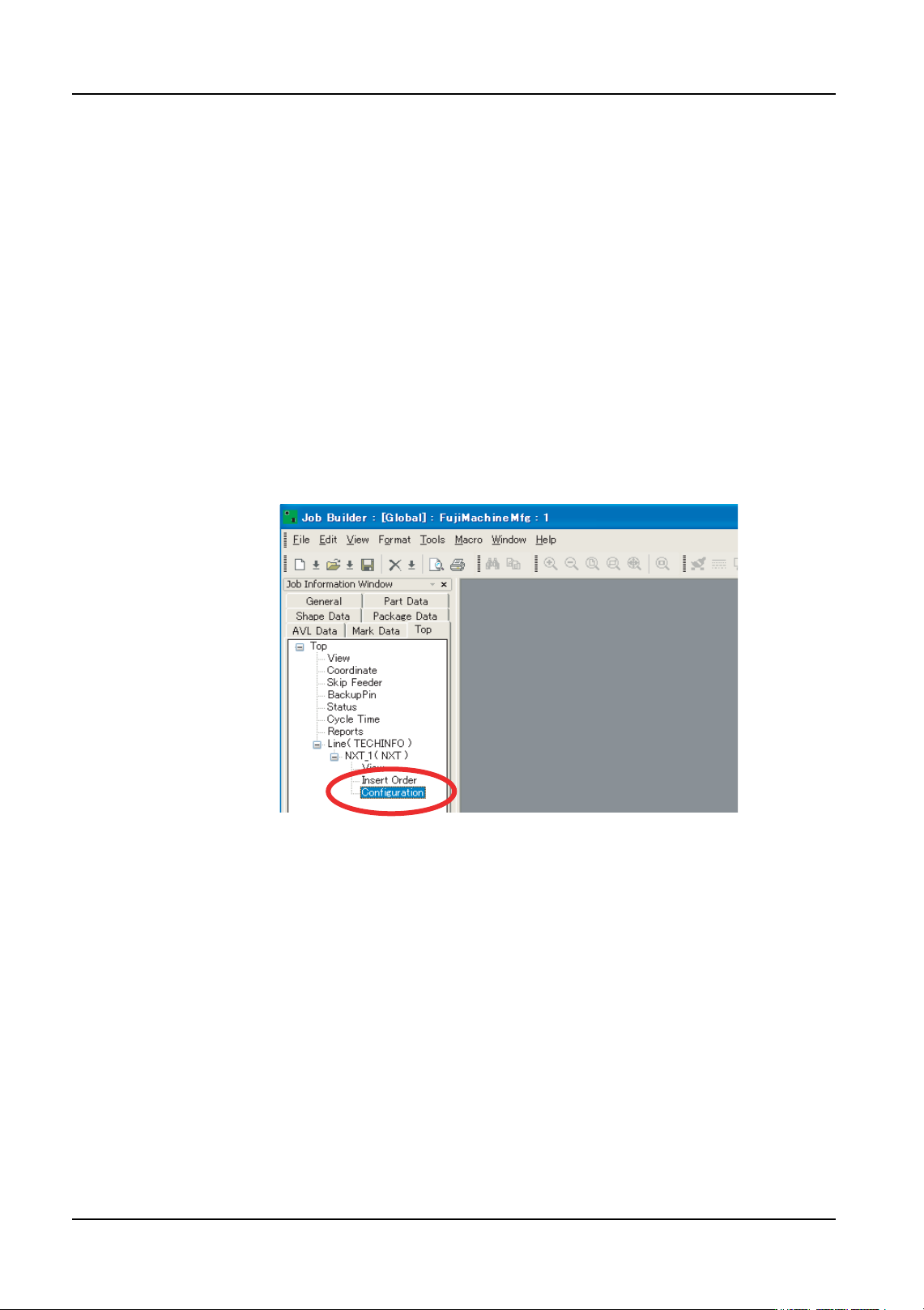
3. Double-click the name of the line to display the machines in that line.
4. Double-click the name of the NXT machine to set the configuration file for to display the
items for that machine.
5. Double-click [Configuration] under the machines name and a window displays in the
data area.
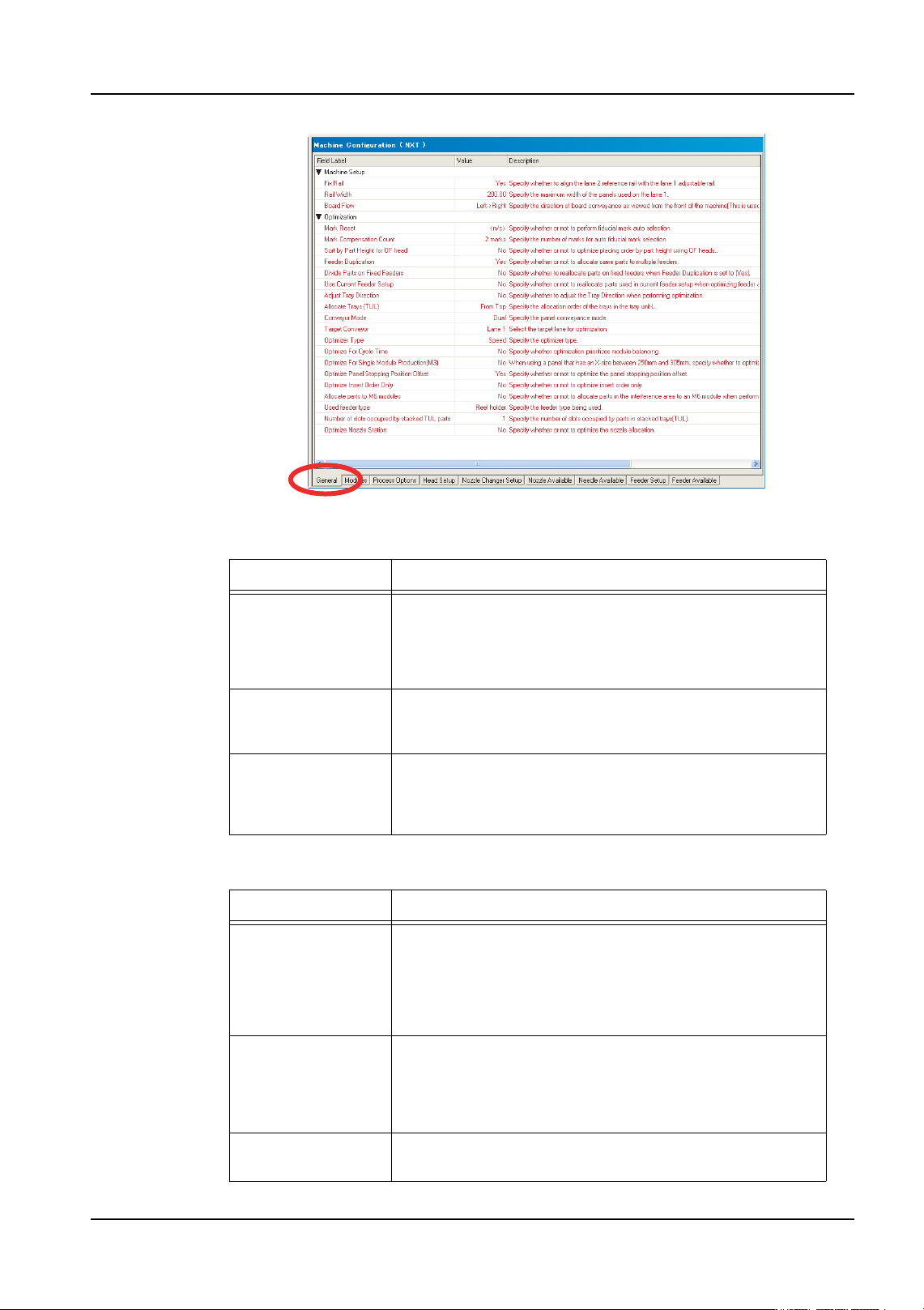
6. There are several tabs at the bottom of the [Machine Configuration] pane. The first tab
is [General] and this is the location where the machine configuration data is set. There
are two groupings of data. Data in the [Machine Setup] affect the conveyor system, and
the settings in the [Optimization] affect the optimization of the NXT machine. Refer to
the tables below for information on the settings.
01PRG-0052E
QD004-18 3. Job Builder
NXT Programming Manual 15
Machine setup
Optimization
Setting Description
Fix Rail This specifies whether or not the reference rail for the
second lane can move to different positions. If this is set to
“Yes” the reference rail cannot move to different positions
and a setting must be specified for [Rail Width]. This is the
location that the reference rail for lane 2 will be positioned.
Rail Width This setting only displays when the setting for [Fix Rail] is
“Yes”. This setting specifies the location at which the
reference rail for lane 2 will be fixed.
Board Flow This specifies the direction in which the panels flow
through the machine. This settings does not actually
control the direction in the machine but is used for job
related processing in Fuji Flexa.
Setting Description
Mark Reset This specifies whether or not the fiducial marks for the
sequences are cleared and reassigned. If this is set to “<n/
c>”, only sequences at have no fiducial mark assignment
at all, have fiducial marks assigned. If this is set to “Reset”
then all fiducial mark assignments are cleared for all
sequences and then they are reasigned.
Mark
Compensation
Count
This specifies how many marks are to be used for aligning
the sequences when assigning fiducial marks. If this
setting is changed then only marks that have no fiducial
assignments are affected or all sequences are affected
only if the [Mark Reset] setting is “Reset”.
Sort by Part Height
for OF Head
Specify whether or not to optimize placing order by part
height (only used for the OF head).
01PRG-0053E