FUJI NXT Programming Manual QD004-18.pdf - 第25页
QD004-18 3. Job Builder NXT Programming Manual 15 Machine se tup Optimization Setting Description Fix Rail This specifies whether or not the re ference rail for the second lane can move to different positions. If th is i…
3. Job Builder QD004-18
14 NXT Programming Manual
3.3.3 Configuring an NXT machine
Data about the configuration of the NXT must be entered. When an NXT machine with a
certain name is added for the first time, the default information is used. This data must be
checked and edited if it does not match the actual machine with that name.
Entering NXT configuration data
1. Open the job.
2. Select the [Top] or [Bottom] tab from the job information bar depending on which side of
the panel the machine is located for which the configuration data needs to be edited.
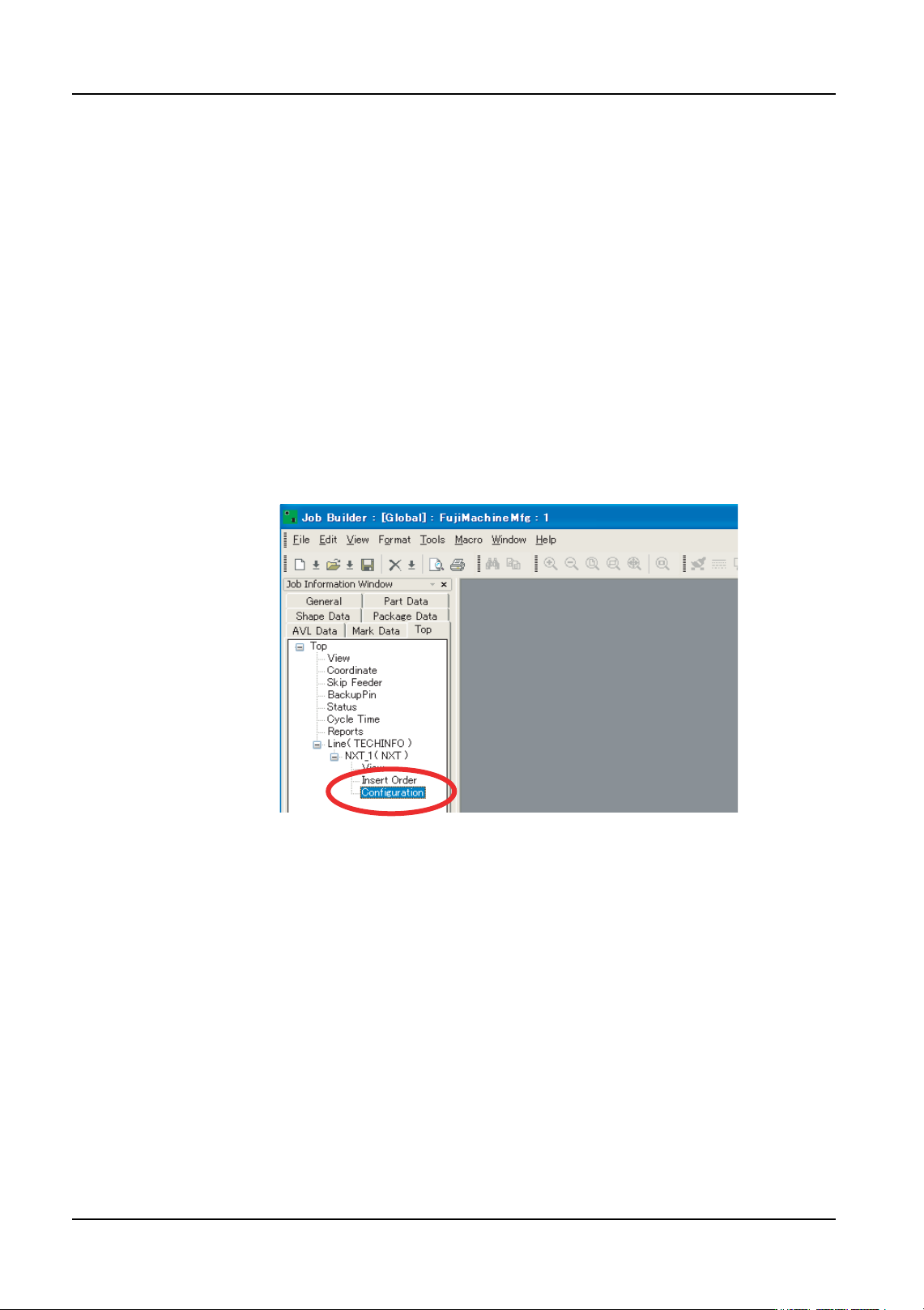
3. Double-click the name of the line to display the machines in that line.
4. Double-click the name of the NXT machine to set the configuration file for to display the
items for that machine.
5. Double-click [Configuration] under the machines name and a window displays in the
data area.
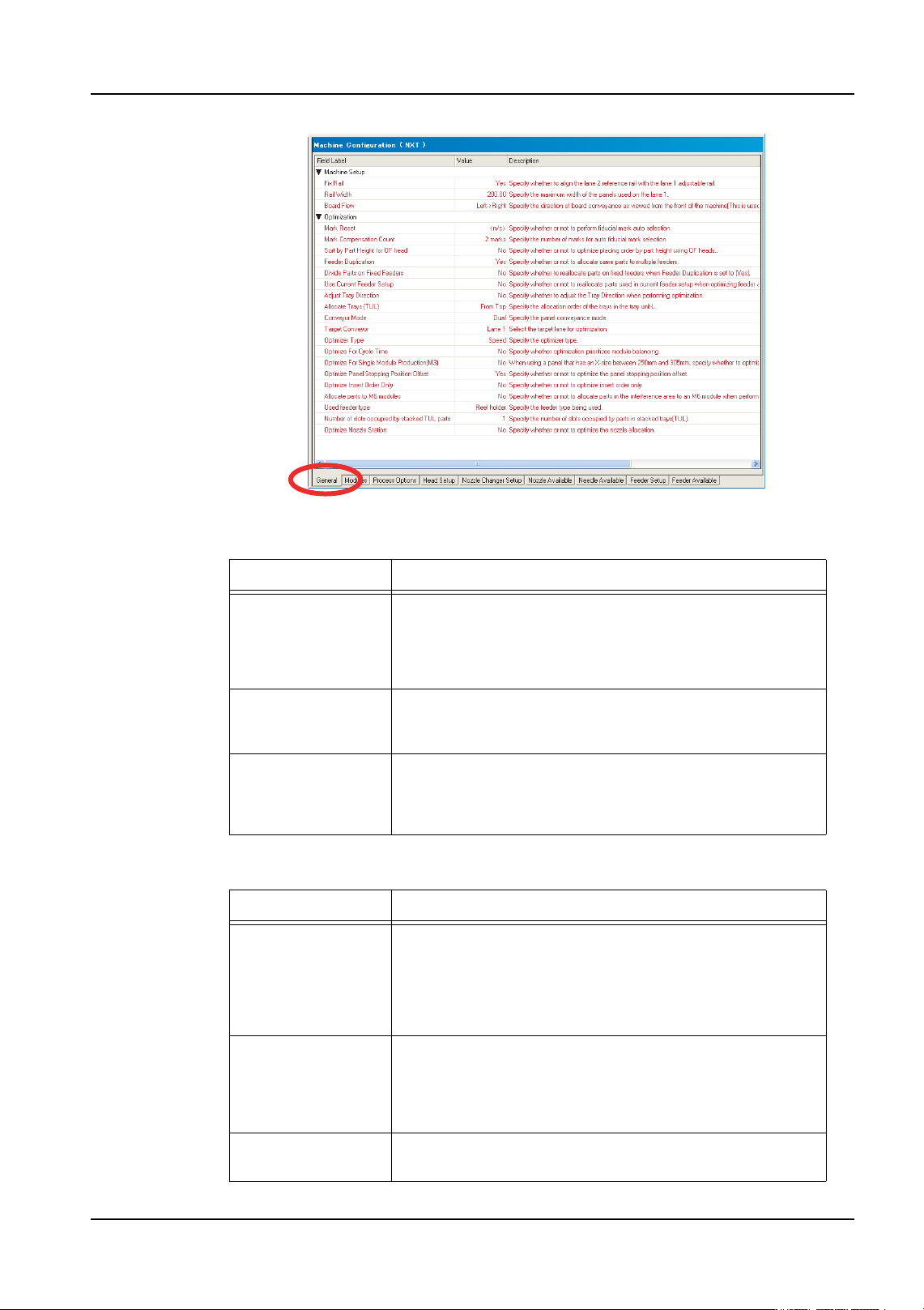
6. There are several tabs at the bottom of the [Machine Configuration] pane. The first tab
is [General] and this is the location where the machine configuration data is set. There
are two groupings of data. Data in the [Machine Setup] affect the conveyor system, and
the settings in the [Optimization] affect the optimization of the NXT machine. Refer to
the tables below for information on the settings.
01PRG-0052E
QD004-18 3. Job Builder
NXT Programming Manual 15
Machine setup
Optimization
Setting Description
Fix Rail This specifies whether or not the reference rail for the
second lane can move to different positions. If this is set to
“Yes” the reference rail cannot move to different positions
and a setting must be specified for [Rail Width]. This is the
location that the reference rail for lane 2 will be positioned.
Rail Width This setting only displays when the setting for [Fix Rail] is
“Yes”. This setting specifies the location at which the
reference rail for lane 2 will be fixed.
Board Flow This specifies the direction in which the panels flow
through the machine. This settings does not actually
control the direction in the machine but is used for job
related processing in Fuji Flexa.
Setting Description
Mark Reset This specifies whether or not the fiducial marks for the
sequences are cleared and reassigned. If this is set to “<n/
c>”, only sequences at have no fiducial mark assignment
at all, have fiducial marks assigned. If this is set to “Reset”
then all fiducial mark assignments are cleared for all
sequences and then they are reasigned.
Mark
Compensation
Count
This specifies how many marks are to be used for aligning
the sequences when assigning fiducial marks. If this
setting is changed then only marks that have no fiducial
assignments are affected or all sequences are affected
only if the [Mark Reset] setting is “Reset”.
Sort by Part Height
for OF Head
Specify whether or not to optimize placing order by part
height (only used for the OF head).
01PRG-0053E

3. Job Builder QD004-18
16 NXT Programming Manual
Feeder Duplication This specifies whether or not parts with many placements
will be broken up into multiple feeders and set into different
modules. If this is set to “Yes”, parts with many placements
will be set in multiple feeders and placed on multiple
modules.
Divide Parts on
Fixed Feeders
Specify whether to reallocate parts on fixed feeders when
Feeder Duplication is set to "Yes".
Yes: Reallocate parts on fixed feeders to other modules to
reduce cycle time.
No: Do not reallocate parts on fixed feeders.
Note: The following are considered fixed feeders.
- Feeders with a Status of "Fixed"
- Feeders that have already been allocated in the Feeder
Setup when Use Current Feeder Setup is set to "Yes".
Use Current Feeder
Setup
When the [Allocate Feeders] option is selected for
optimization, this specifies whether or not the current
feeder setup will be changed or not. If the is set to “No” and
the [Allocate Feeders] option is selected for optimization,
then the current feeder positions and settings are
completely ignored and all feeders are redistributed. If
there are variable status feeders that are not being used in
the current job in the feeder setup, these feeders are
removed.
Adjust Tray
Direction
Specify whether to adjust the tray direction when
performing optimization.
Yes: Adjust the tray direction
No: Do not adjust the tray direction
Allocate Trays
(TUL)
Specify the allocation order of the trays in the tray unit-L.
From Top: Allocated from the top.
From Bottom: Allocated from the bottom.
Conveyor Mode This settings specifies the panel conveyance mode to be
used for production for determining optimization.
Target Conveyor This specifies the target lane on which the job will be
optimized. If set to “Lane 1”, then the job is optimized with
the premise that the panels are to be loaded on lane 1.
Optimizer Type This setting specifies the level of optimization to be
performed.
“Speed” performs optimization with a priority on achieving
a relatively fast cycle time and processing is performed
quickly.
“Optimal” performs optimization with a priority on achieving
the fastest cycle time and processing takes longer.
“Time Limit” performs processing the same as “Optimal”
but within a specified time limit.
Time Limit This only displays if [Optimizer Type] is set to “Time Limit”.
This specifies the time limit in minutes that the optimizer
has to complete processing.
Setting Description