FUJI NXT Programming Manual QD004-18.pdf - 第104页
4. Part Data Settings QD004-18 94 NXT Programming Manual Process - Error Alt Feeder Trigger This setting is not used from the part data, but is set for the NXT through Accessory Software. Dump Position Specify the locati…

QD004-18 4. Part Data Settings
NXT Programming Manual 93
insertion pressure is to be used (a setting of 1 to 4 is set for [Place Motion Selection]).
Placement Wait Time
Specify the time that the axis stops at the lower Z-axis limit for the placement. If a value
shorter than the default time specified for the head type is specified, then the time specified
in this setting is ignored and the time for the head type is used instead.
Stack Placing Down Speed
Specify the lowering speed of the Z-axis during Package-on-Package placement.
Stack Placing Up Speed
Specify the raising speed of the Z-axis during Package-on-Package placement.
Do Place Precision Priority
Specify whether or not to perform placement with high placing accuracy. If [Yes] is
selected, parts with this shape data are assigned to M6SP modules with high accuracy
placing heads (H01, H02, F04 and G04). If [No] is selected, then parts with this shape data
are assigned to modules without consideration of the accuracy of the head.
4. Part Data Settings QD004-18
94 NXT Programming Manual
Process - Error
Alt Feeder Trigger
This setting is not used from the part data, but is set for the NXT through Accessory
Software.
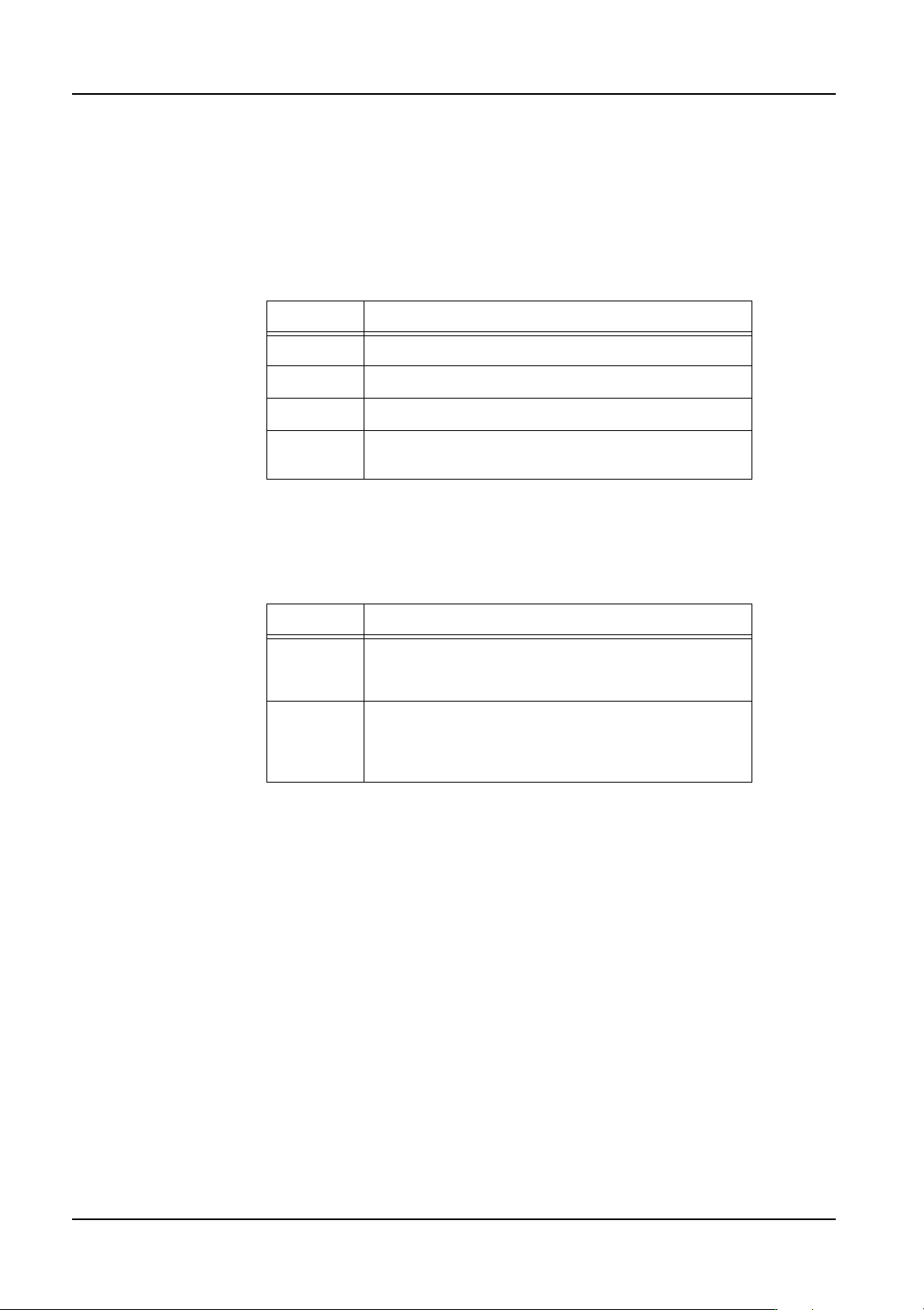
Dump Position
Specify the location where parts are dumped when an error occurs.
Forcing Recovery Times As 0 (from NXT V3.10)
Specify whether to force the number of recovery times to be zero (0) or to use the recovery
times set in the shape/machine data. In order to use this function, Fuji Flexa V2.2.0 or
higher must be used.
Recovery Times
Specify the number of times a recovery is attempted when an error occurs. If no setting is
specified here, the Recovery Count value in the configuration data is used.
Setting Description
Conveyor Parts are dumped on the reject parts conveyor.
Box Parts are dumped into the reject parts box.
Tray This setting is not supported for the NXT.
Pickup
Tray
Parts are dumped back into the tray they were
picked from.
Setting Description
Yes The recovery times for parts using this shape data is
zero (0) no matter what is set in the other recovery
settings.
No The recovery times specified in the shape data is
used. However, if the recovery times setting in the
shape data is zero, then the machine configuration
recovery times setting is used.
QD004-18 4. Part Data Settings
NXT Programming Manual 95
Process - Vision
Vision Type
Refer to section Åu4.6Vision Type DetailsÅv for details on settings for this item.
Multi Camera
Specify the possible camera type(s) for the part. When no camera for the NXT is specified,
then any camera that can be used for the specified part data settings is used. If a camera(s)
is specified, then only that camera(s) can be used.
Vision Height Offset
This option is enabled when the side light camera is used in image acquisition. The use of
this option allows the image to be acquired with light hitting pin tip positions rather than the
bottom surface of the part.
Vision Area Offset X
This option is enabled for odd-form parts (when "240" to "243" is set in Vision Type and
image acquisition is performed). If the lead(s) of an odd-form part is protruding beyond the
image acquisition range, the range within which the image is acquired can be moved.
Vision Area Offset Y
This option is enabled for odd-form parts (when "240" to "243" is set in Vision Type and
image acquisition is performed). If the lead(s) of an odd-form part is protruding beyond the
image acquisition range, the range within which the image is acquired can be moved.
Exposure Time (VPDplus)
Displays the exposure time (msec) that is specified in VPDplus. If "0" is displayed, then the
exposure time is automatic based on the vision type. This setting can only be changed in
VPDplus.
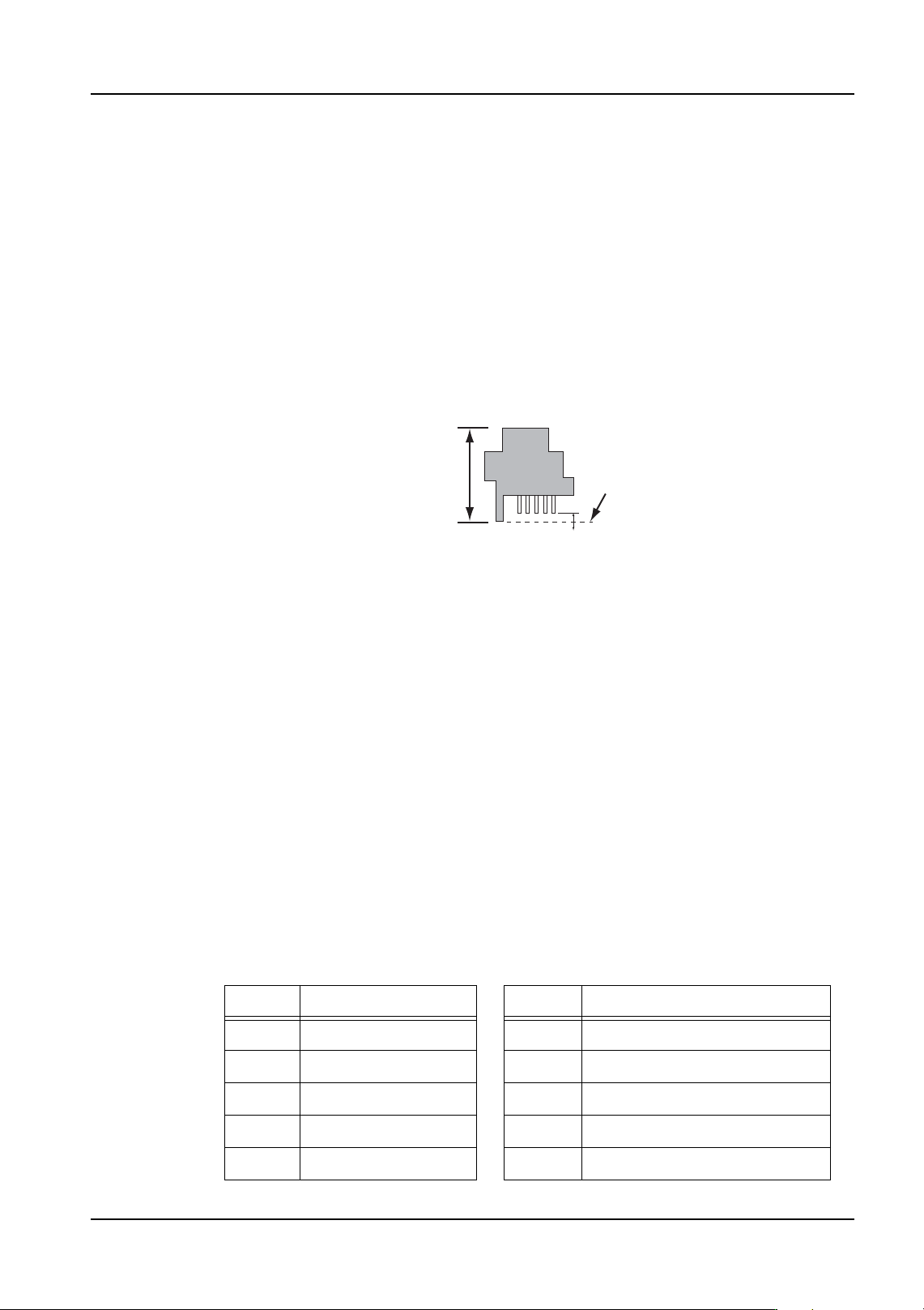
Lighting Pattern (VPDplus)
Displays the lighting pattern that is specified in VPDplus. If "0" is displayed, then the lighting
pattern time is automatic based on the vision type for NXT and AIM machines. This setting
can only be changed in VPDplus. This setting is not used for machines other than NXT and
AIM.
Body Height
01PRG065E
Part Body
Vision Height
+
-
Insertion pins
Setting Lighting Pattern Setting Lighting Pattern
0 Auto selected 16 Backlight
1 Sidelight 17 Backlight and sidelight
8 Incident 24 Backlight and incident
12 Incident and sidelight 30 Backlight, incident and sidelight
15 Frontlight all ON 31 Backlight and frontlight all ON