FUJI NXT Programming Manual QD004-18.pdf - 第142页
4. Part Data Settings QD004-18 132 NXT Programming Manual Vision Type 241 Insertion pin in spection Vision Type 242 Insertion pin in spection Vision Type 243 Insertion pin in spection This vision type uses only the “side…
QD004-18 4. Part Data Settings
NXT Programming Manual 131
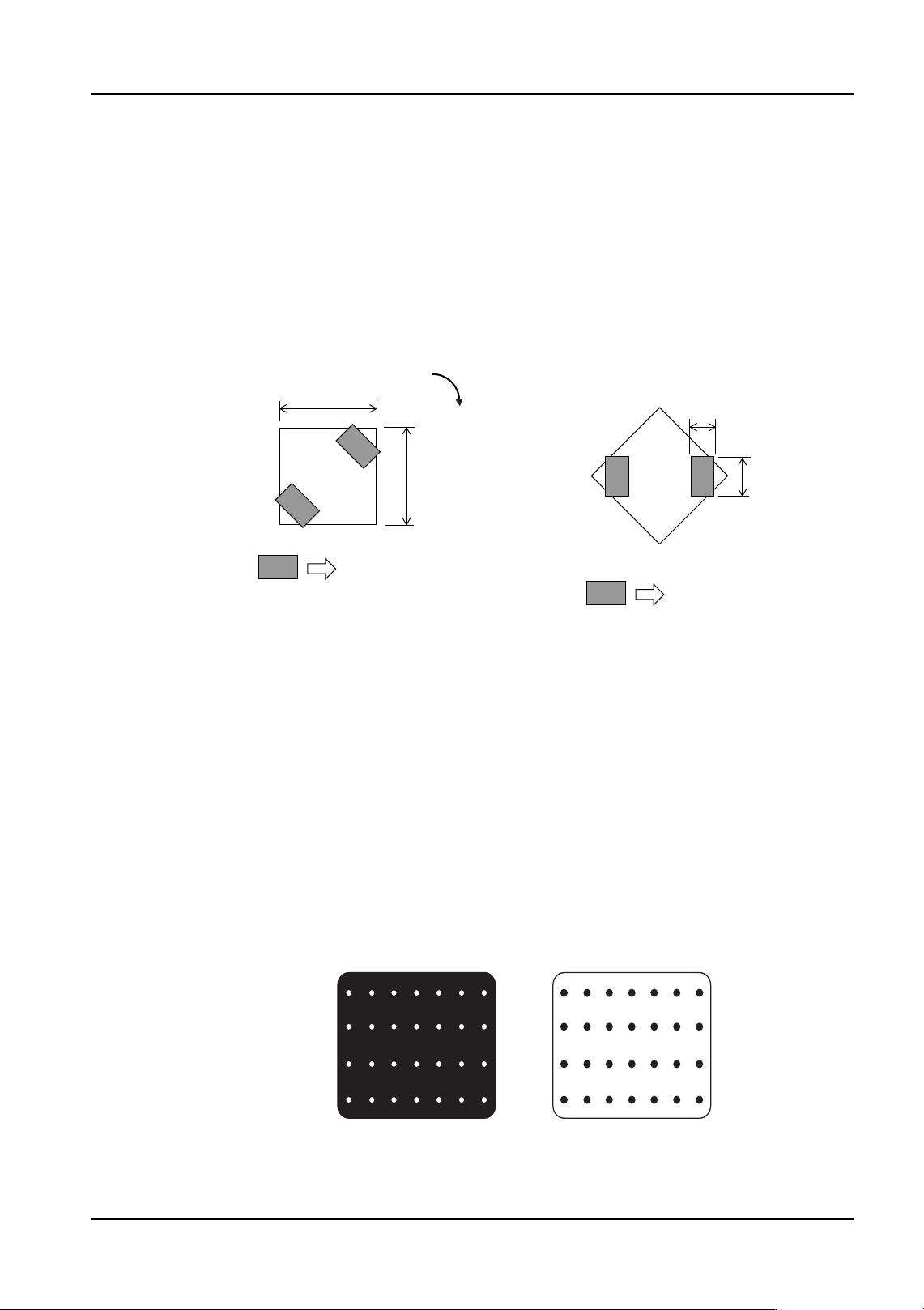
Vision Type 181 Coil parts with two leads at 45 degree angles
Use this vision type for coil parts with 2 leads that are at 45 degree angles from the x-axis
(as shown below). The body color is black and only the leads are visible during vision
processing.
It is necessary to input the following body size and element information.
• The lead elements must be defined as “Side 0” and “Side 2”
• For each element, define the number of leads as [1].
Vision Type 230 (235) Black bodied BGAs
Vision Type 231 (236) White bodied BGAs
Vision Type 233 (238) Black bodied CSPs
Vision Type 234 (239) White bodied CSPs
Enter the part body size and element information in part data. Vision types 230, 231, 233,
and 234 use the body center while vision types 235, 236, 237, and 238 use the part center.
Due to the use of frontlighting, there are cases in which the image of the ball grid may vary
depending on the shape of the leads and the lighting conditions. In such cases, it may be
necessary to make adjustments to the ball grid position, length and width of the lead
information in element information.
Note: For details on parts that contain bumps in a non-symmetrical pattern, refer to vision type
142(147).
Coil in 0 direction
Coil rotated -45 degrees
Body Length (X)
Body Width (Y)
Element
Lead Length
Lead Width
Side 0
Side 3
Side 1
Side 2
Side 0
NXTPRG046Ea
-45 degrees
Element
Black BGA
White BGA
4. Part Data Settings QD004-18
132 NXT Programming Manual
Vision Type 241 Insertion pin inspection
Vision Type 242 Insertion pin inspection
Vision Type 243 Insertion pin inspection
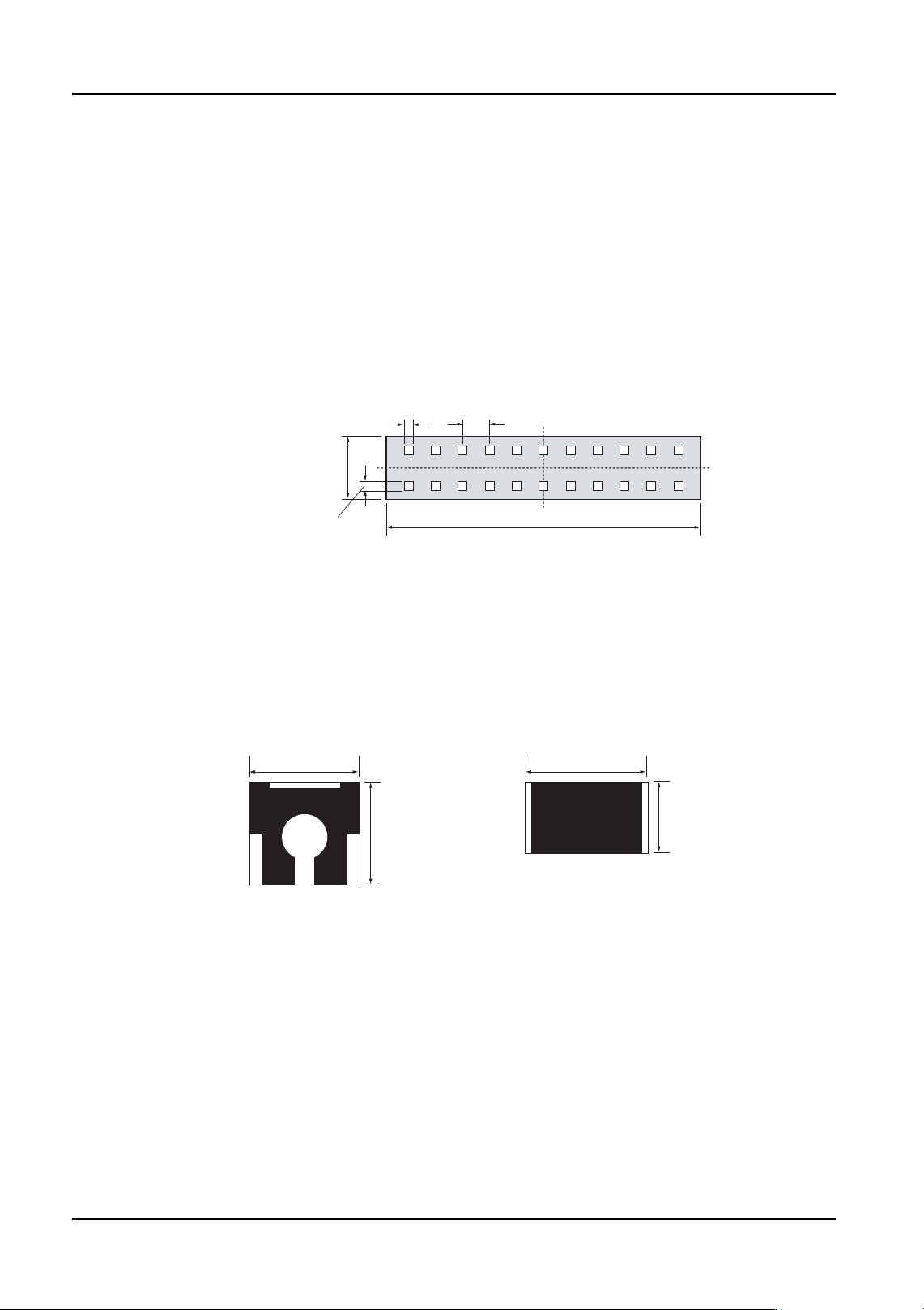
This vision type uses only the “sidelight” lighting pattern.
Vision type 241 determines positioning based on the shape of the part, and then checks for
bending of the pins. Vision type 242 estimates positioning based on the shape of the part,
and the makes a final determination of positioning based on the pins. Vision type 243
checks for bending of the pins, and then determines positioning based on the pins.
Body size and element information should be entered in shape data. It is also necessary to
enter radical data for vision type 241 and 242.
Vision Type 251 Segmented parts inspection
This vision type is different from vision type 252, and should be used for rectangular parts
whose body is divided into several different sections. Body size, body tolerance, and body
color should be entered in shape data.
Note: Refer to vision type 60 for rectangular chips.
Vision Type 252 Bodied parts inspection
This vision type is used for those parts with a white or gold colored body, and processes
only the part outline.
It is necessary to enter the body size in part data. The body size should be measured from
edge to edge. Positioning is performed using the outer-most points on the upper and lower,
and left and right part edges.
Lead Width
Lead Pitch
Lead Length
Body Length (X)
Body Width (Y)
Ex: Vision Type 243
NXTPRG048E
NXTPRG049E
Body Length (X) Body Length (X)
Body Width (Y)
Body Width (Y)
Segmented part
Chip with non-standard rectangular
(small electrode)
QD004-18 4. Part Data Settings
NXT Programming Manual 133
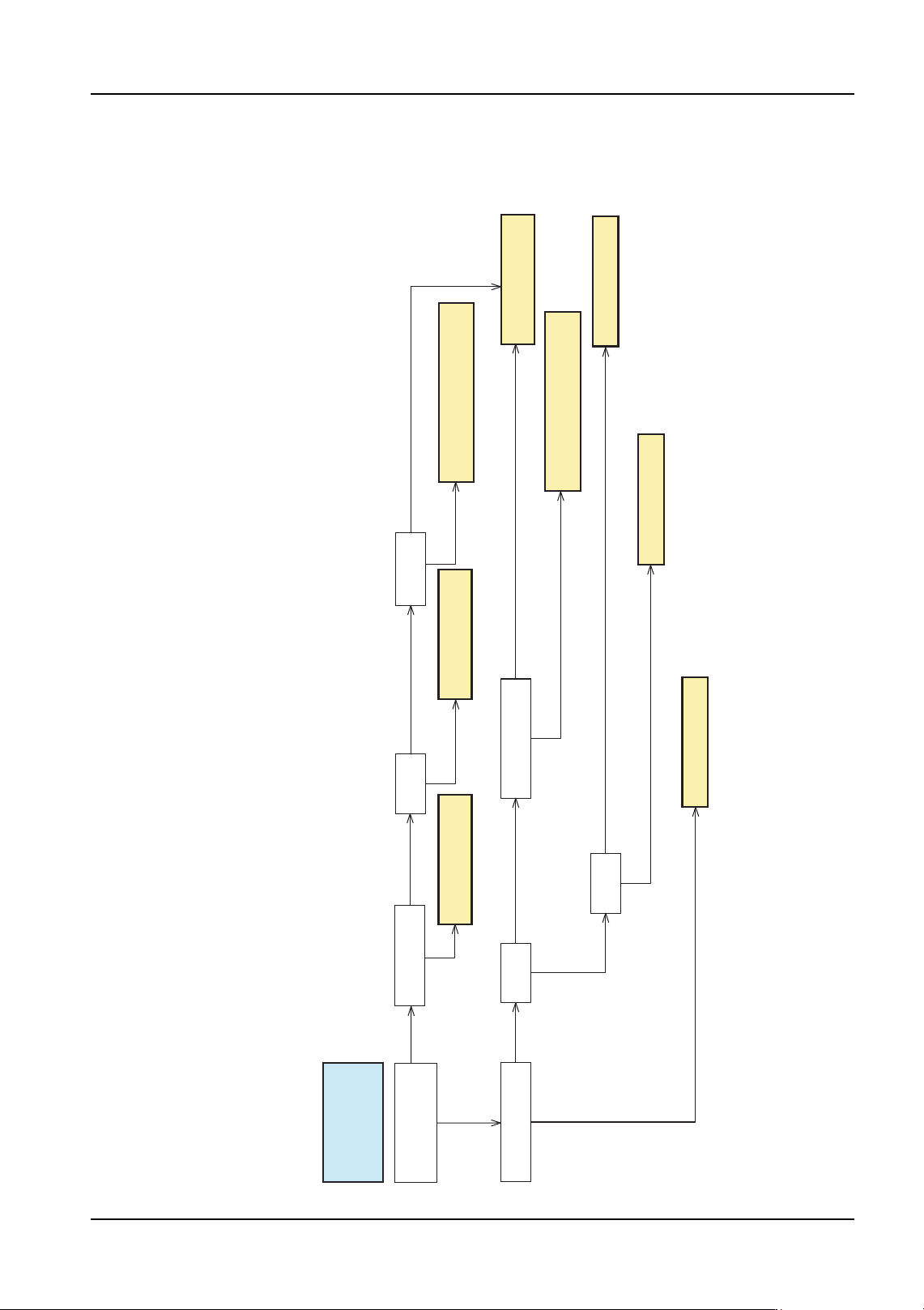
4.6.3 Selecting a Vision Type flowcharts (leaded parts)
Case 1: Entire body color is black or a dark color (black, blue, green or
yellow green)
No
Non-rectangular or connected
to some other leads
The outside shape of the white items is rectangular
(Refer to fig. 3)
The outside shape of the white items is rectangular (Refer to fig. 3)
Yes
Non-rectangular or connected
to some other leads
No
Yes
Entire body color is
black or a dark color
(black, blue, green or
yellow green)
Lead shape Part shape
Vision Type 18 or 19
(Use 19 when checking leads)
One element has more
than five leads?
Lead shape
Element
directions
Part shape
Vision Type 123
The part has J-leads
Yes (Refer to fig. 1)
Rectangular and not connected to other leads
(Refer to fig. 2)
The outside shape of the white items is not rectangular
(Refer to fig. 4)
The outside shape of the white items is not rectangular (Refer to fig. 4).
Cannot be determined
Vision Type 70
NXTVPP038Ea
No
Leads are diagonal
and there are only 2
Rectangular and not connected to other leads
(Refer to fig.2)
Vision Type 181 Vision Type 180
Vision Type 18 or 19
(Use 19 when checking leads)
Vision Type 152
Vision Type 124
2 to 4 directions
1 direction