FUJI NXT Programming Manual QD004-18.pdf - 第208页
6. Editing Jobs on the Machine (MEdit) QD004-18 198 NXT Programming Manual MEMO:
QD004-18 6. Editing Jobs on the Machine (MEdit)
NXT Programming Manual 197
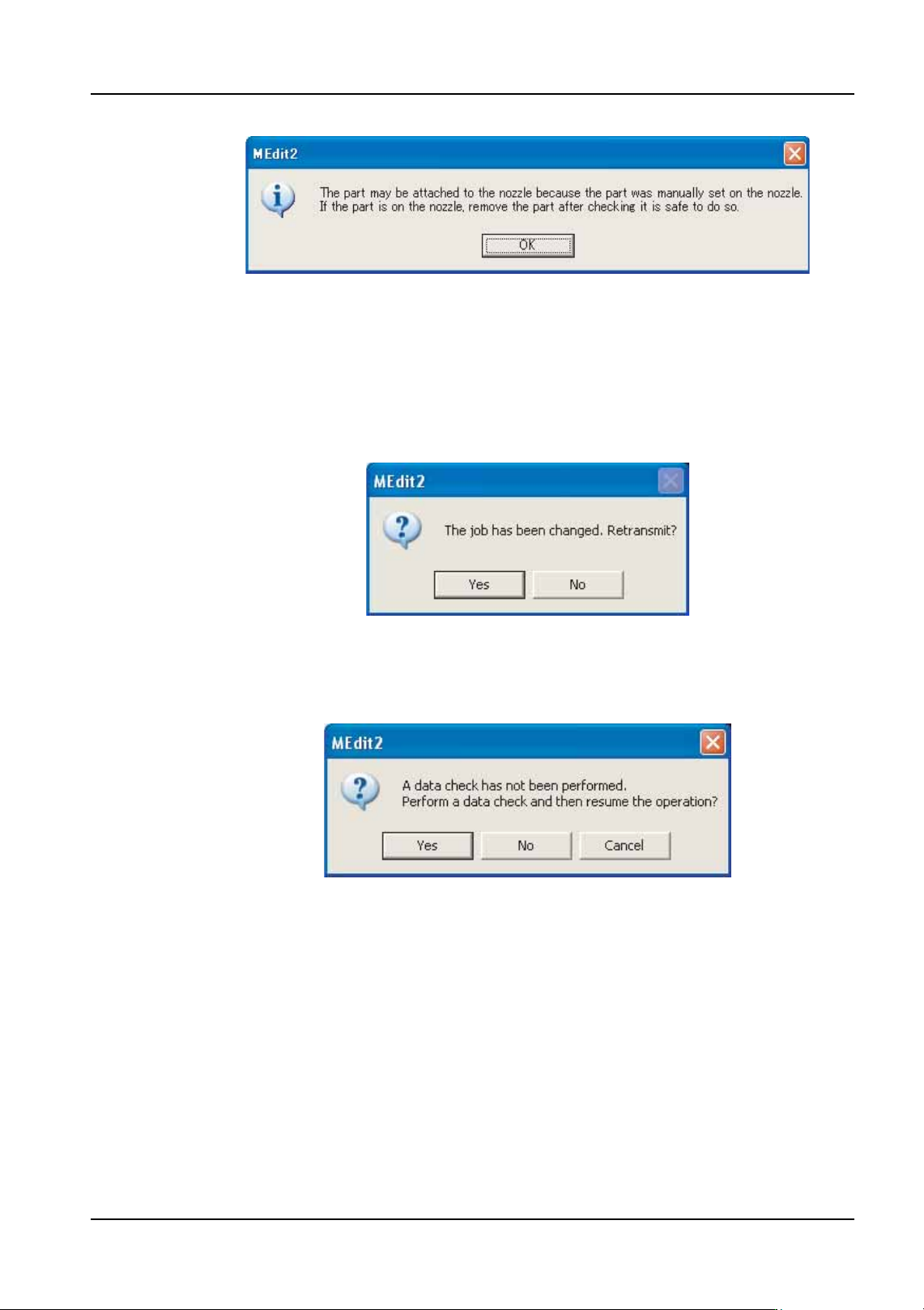
b. Push EMERGENCY on the module and remove the part from the head by hand.
c. Once the part has been removed, close the door and release the EMERGENCY
button.
d. Click [OK] in the dialog box above.
Reflecting Changes to the Machine
18.The dialog box shown above is displayed, click [Yes] to send the changes in the job back
to the machine. When [Yes] is clicked, a dialog box asking if a data check should be
performed is displayed.
19.Click [Yes] to perform a data check of the data. The data check is completed and then
the [Retransmit Job] dialog box is displayed.
20.Select the module(s) for which the edited data is to be reflected and click [OK]. If the
edited data affects multiple modules, select all of the affected modules and click [OK].
NXTEJM037E
NXTEJM038Ea
NXTEJM039Ea

6. Editing Jobs on the Machine (MEdit) QD004-18
198 NXT Programming Manual
MEMO:

QD004-18 Glossary
NXT Programming Manual 199
Glossary
A
alternate feeder
An empty slot on a feeder table can be readied with the same part that is being supplied
from another feeder position. When the original feeder runs out of parts, the pick-up
position changes to this alternate feeder. Multiple alternate feeders can be specified.
When an alternate feeder runs out of parts, the next alternate feeder in the loop is used. If
the feeder is the last feeder in the loop then the original feeder is used again. If not using
dynamic alternate feeders (when using Fujitrax), then the alternate feeder positions must
be specified in the feeder setup.
assign
This is found in the coordinate data in the job and specifies which machine is to use the
mark or place the part/glue dot.
B
background
A term used for recipe conditions commonly for older Fuji machines. An portion of the
machine's memory used to stores recipes that aren't being used. A "background" recipe is
a recipe stored in this position. Conversely, active recipes are referred to as "foreground"
recipes. This term does not apply to the NXT and the term “next job” is used.
board
The smallest independent unit of a printed circuit board on which electronic components are
placed
BOM file
An acronym for "Bill Of Materials". The BOM file containes data such as part numbers for
each location that corresponds to a reference designator on the board. This file may
contain extra fields to add to the job's part data.
C
CAD file
A file which is output from a CAD system. This file generally contains the reference
designators, X,Y coordinates, and angles, etc., for each location on the board.
calibration data
Machine-specific data that is required for a machine to operate. An example of calibration
data would be the data that defines the spatial relationships between various machine
components.
CCIMF format
An intermediary file format. F4G programs and part data translated by Port Wizard are
output as CCIMF files. Recipes from Fuji Flexa and FujiCam are in CCIMF format.