FUJI NXT Programming Manual QD004-18.pdf - 第70页
3. Job Builder QD004-18 60 NXT Programming Manual 3.4.8 Specifying the tape pitch and indexing speed in the job (from NXT V5.15) Until now the pitch and inde xing speed of tape have be en set using the dip switches on th…
QD004-18 3. Job Builder
NXT Programming Manual 59
4. If a security warning is displayed asking if macros should be enabled (if macro security
is set to "medium"), click [Enable Marcos].
Note: Macros must be enabled for this Excel sheet to function properly.
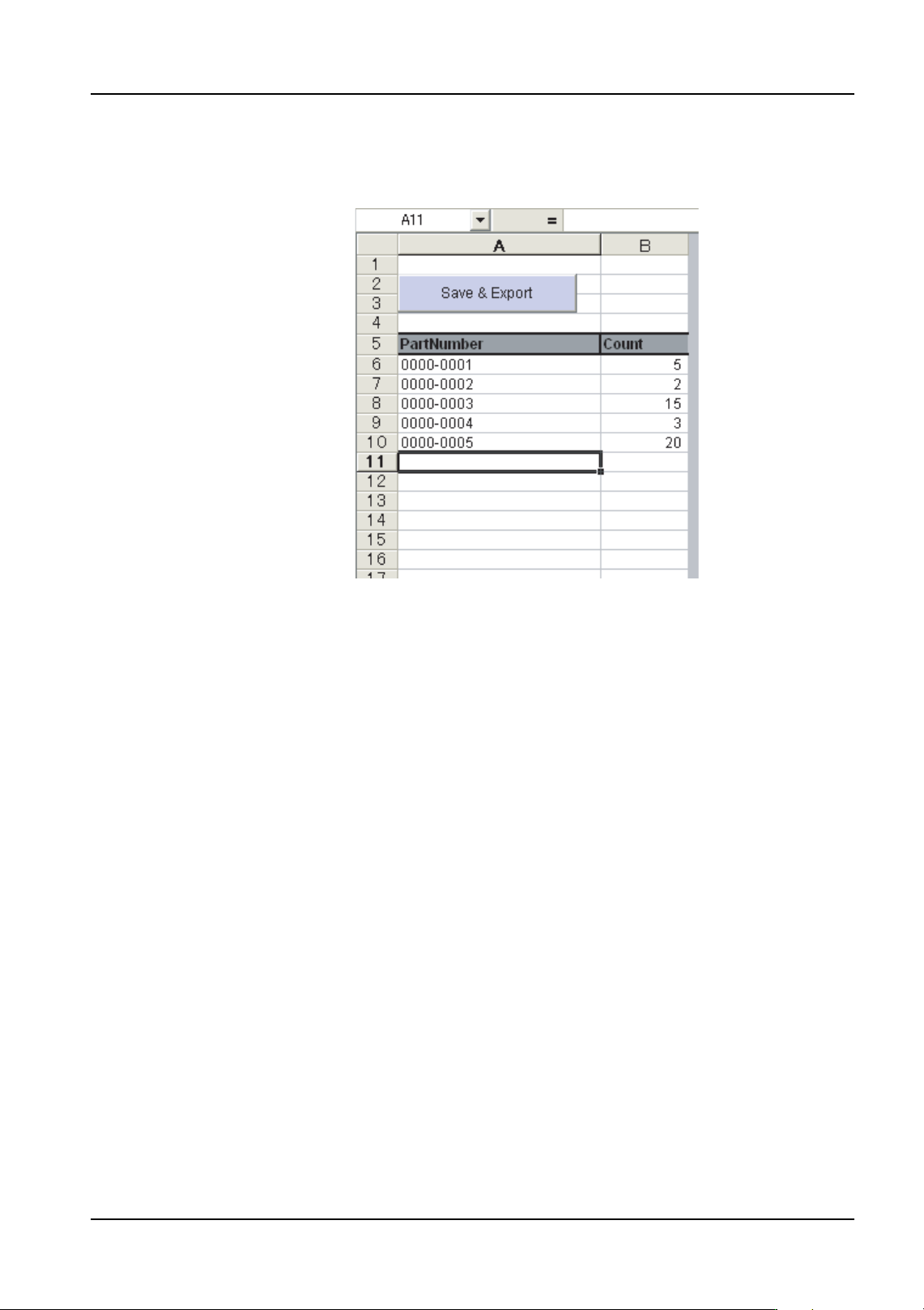
5. Specify the part numbers for the parts that you want to limit the reel quantity in the
[PartNumber] column and then specify the number of reels possible for each part
number in the [Count] column.
6. Ensure that the entered settings are correct and then click [Save & Export].
7. Optimize the job.
Note: If you want to change the limit settings, then change the Excel sheet, save and export and
then optimize again. The limit settings are used the next time optimization is performed
after the data is saved and exported.
That completes specifying a limit on the number of available reels for part numbers. If you
open a new job and want to limit the number of reels for different part numbers in that job,
you must specify the different part numbers in the Excel sheet and then save and export it.
01PRG103E
3. Job Builder QD004-18
60 NXT Programming Manual
3.4.8 Specifying the tape pitch and indexing speed in the job (from
NXT V5.15)
Until now the pitch and indexing speed of tape have been set using the dip switches on the
feeder itself. However, from this version onwards these can be set in the job.
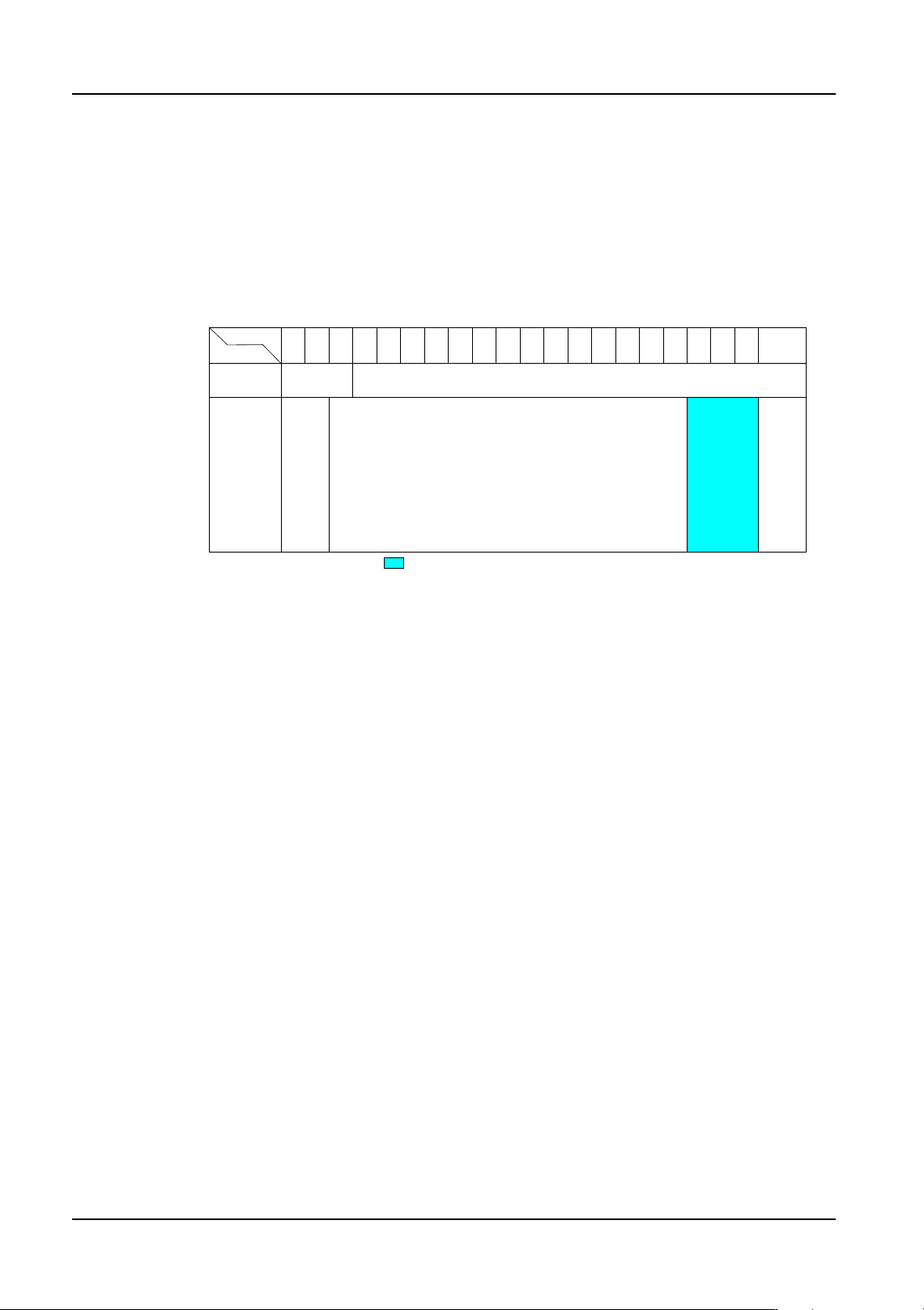
Also, for W12 and larger feeders, pitch sizes that could not be set using the dip switches on
the feeder (64, 68, and 72 mm) can now be set. (Refer to the illustration below.)
Feeder types and pitches that can be set in the job
Required items
Intelligent Feeders
• W04b/W08b/W08c (V1.10 or higher)
• Not including W04b/W08b/W08c (V3.14 or higher)
Software
• NXT application (V5.15 or higher)
• Fuji Flexa (V5.0.0 or higher)
How to specify settings
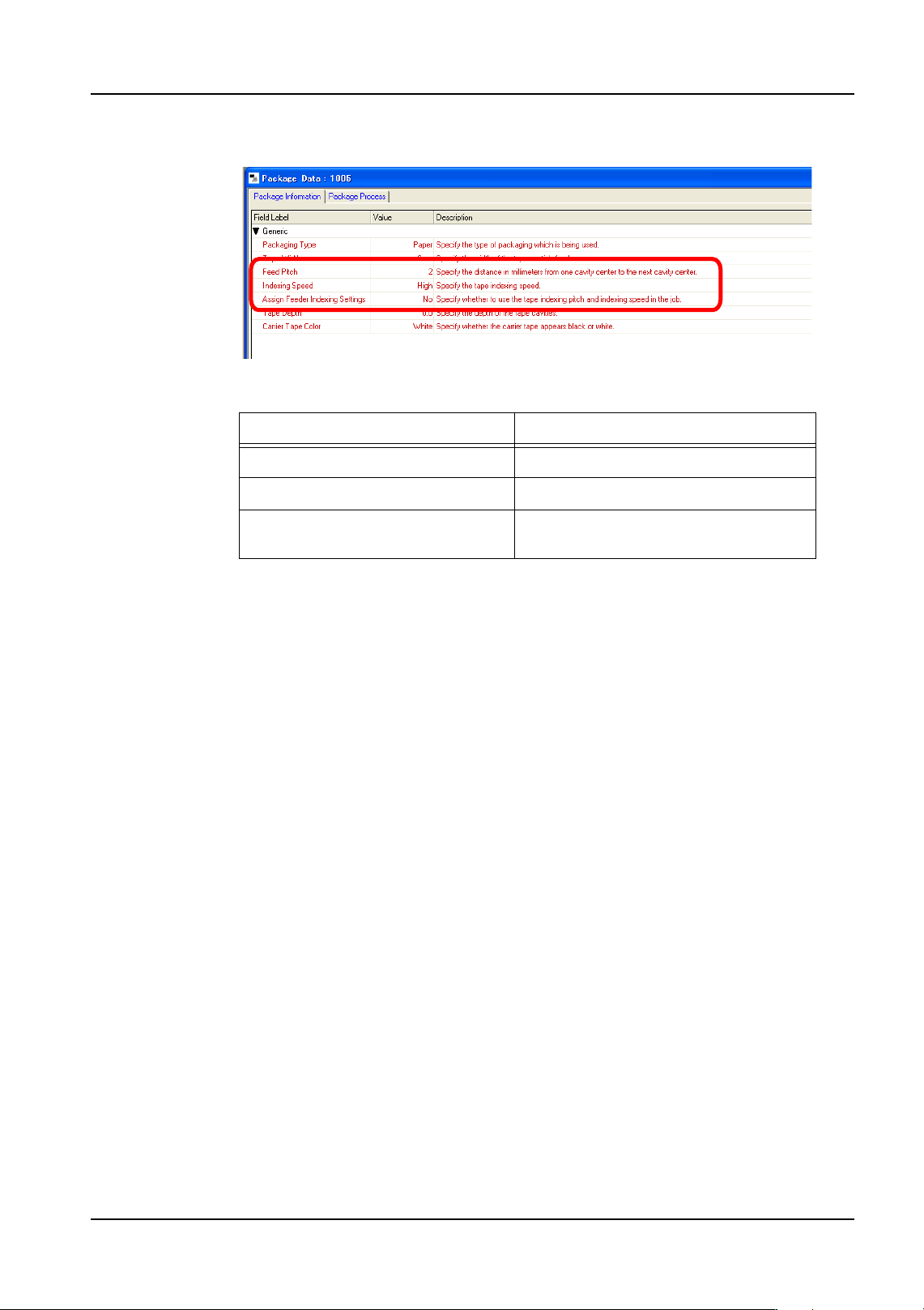
Set [Feed Pitch], [Indexing Speed] and [Assign Feeder Indexing Settings] in the job
Package Data.
1. Open the job in Fuji Flexa.
2. Select the [Package Data] tab on the job information bar in Job Builder.
3. Double click the appropriate Package Data.
4. Select the [Package Information] tab from the [Package Data] screen.
W12
W16
W24
W32
W44
W56
W72
W88
W104
W120
W136
W152
W168
W184
W200
1
W04b
W08b/W08c
W08
Feeder type
Pitch (mm)
24812 60 6864 7216 20 24 28 32 36 40 44 48 52 56 73 ~ 100
01PRG-0113E
O: Supported X: Not supported : Can be set in the job
O
O
O
X X
X
QD004-18 3. Job Builder
NXT Programming Manual 61
5. Set the following items.
Important points
• The dip switches on the feeder are disabled when the job is transmitted and the
settings in the job for tape pitch and indexing speed are used in production.
• The settings from the job are saved and remain even if the job is deleted. If the
feeder is removed from the pallet and then inserted again, the settings in the
feeder are cleared and the dip switches on the feeder are enabled.
• The dip switches on the feeder are enabled when the Package Data setting
[Assign Feeder Indexing Settings] is changed from [ON] to [OFF]. Use this
setting as required.
• When using AVL, tapes with different pitches or indexing speeds cannot be set.
• When splicing, tapes with different pitches or indexing speeds cannot be
connected.
• When using MEdit, the [Feed Pitch] is not used. It is only possible to set
[Indexing Speed] and the setting for using settings specified in the job [Assign
Feeder Indexing Settings].
• When performing different name dual production, do not specify different values
for [Assign Feeder Indexing Settings] for parts with the same device comment.
• With free allocation, when [Kit Line Configuration] - [Splicing Warning: ON] is
specified, set [Assign Feeder Indexing Settings] to [OFF].
• When the feeder firmware is not supported, guidance to exchange the feeder
displays. Change to a feeder that is supported.
Item Details
Feed Pitch The pitch of the tape (mm)
Indexing Speed The tape indexing speed
Assign Feeder Indexing Settings Set whether to specify the tape pitch
and indexing speed in the job (On/Off).
01PRG-0114E