FUJI NXT Programming Manual QD004-18.pdf - 第50页
3. Job Builder QD004-18 40 NXT Programming Manual Job settings When performing Po P placement, in addition to normal settings, it is also necessary to specify settings for Coordinate data and Shap e data. Note: Fuji Flex…
QD004-18 3. Job Builder
NXT Programming Manual 39
3.4.3 Package-on-Package placement (from NXT V4.10)
The package-on-package (PoP) placement function uses pressure control to stack parts on
top of parts that have already been placed.
Note: The distance used for the placing pressure control start height (H) varies depending on
whether the lower and upper parts are stacked at the same module or at different modules.
* If parts are stacked at the same module, H is equal to the top of the lower part that has
already been placed plus 2.5 mm.
* If parts are stacked at different modules, H is equal to the premounted parts height
specified for the module at which the lower part is placed.
Restrictions:
If PoP placement is performed at paired modules, the lower part and upper part of the stack
must be placed at the same module within the pair (see the figure on the lower left).
However, the lower part can be placed at a module within a set of paired modules, and then
the upper part can be placed at a different module within a different set of paired modules
(see the figure on the lower right).
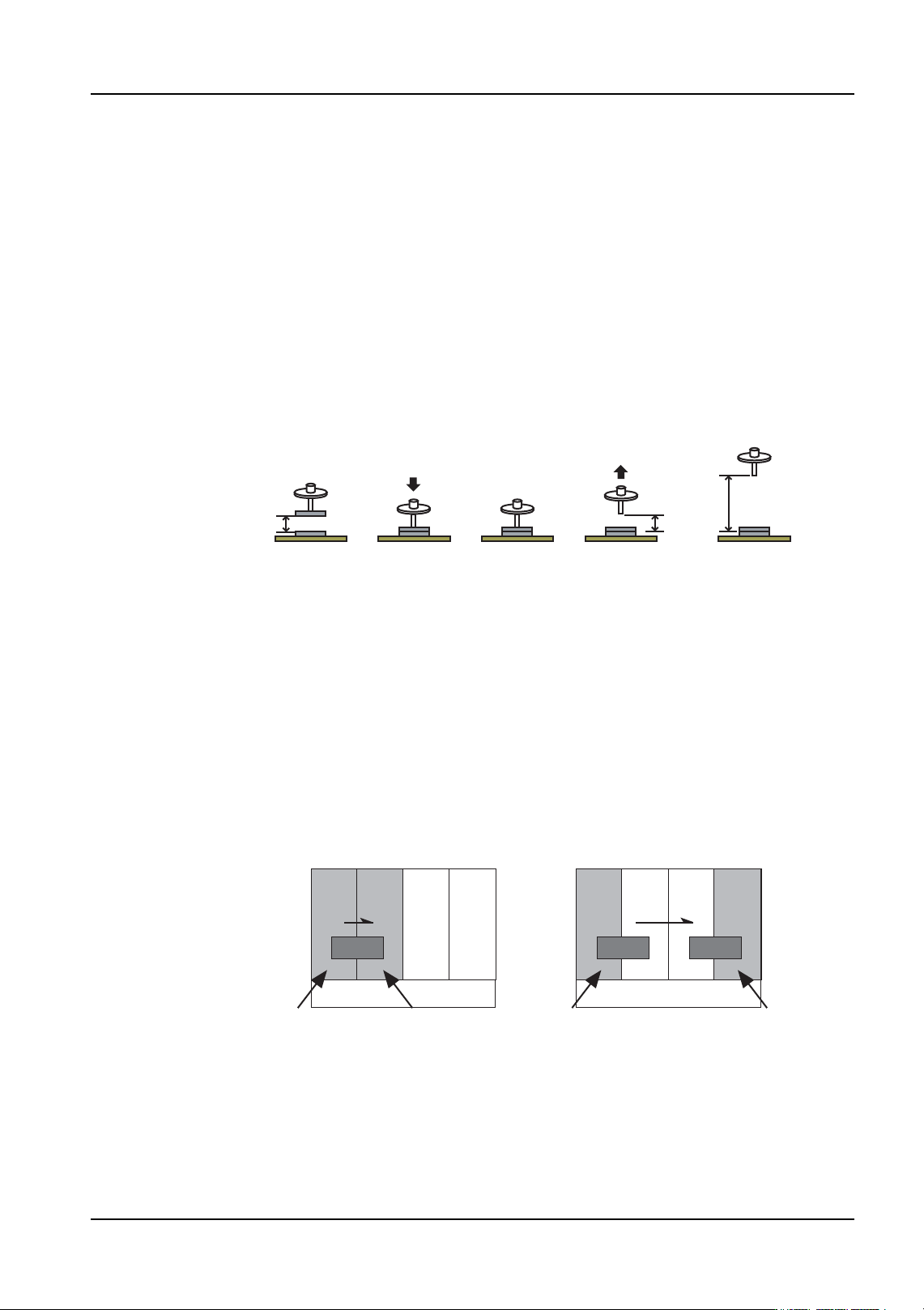
(1) The nozzle (Z-axis) is lowered at the specified speed from the placing
pressure control start height (H).
(2) The nozzle places the part, pushing down with the specified pressure.
(3) The head pauses for the specified time.
(4) The nozzle (Z-axis) rises to the placing pressure control end height (same
as H) at the specified speed. After reaching the placing pressure control
end height, the nozzle continues to rise at normal speed.
01PRG-0035
(4)(3)(2)(1)
HH
01PRG-0037E
Lower part is placed Upper part is placed
Lower part is placed
Upper part is placed
Paired module
Paired module Paired module
PoP placing is not possible PoP placing is possible
3. Job Builder QD004-18
40 NXT Programming Manual
Job settings
When performing PoP placement, in addition to normal settings, it is also necessary to
specify settings for Coordinate data and Shape data.
Note: Fuji Flexa V2.5.1 or higher is required to perform PoP placement.
Specifying placment data settings
1. Select the [Top] or [Bottom] tab from the job information bar depending on the side of
the panel for the part.
2. Double-click [Coordinate] to display the “All” window.
3. There are several tabs at the bottom of the [Coordinate] pane. Select the [Placement]
tab and the placement sequences are displayed.
4. Locate the placement sequence for the part to be placed on the other part.
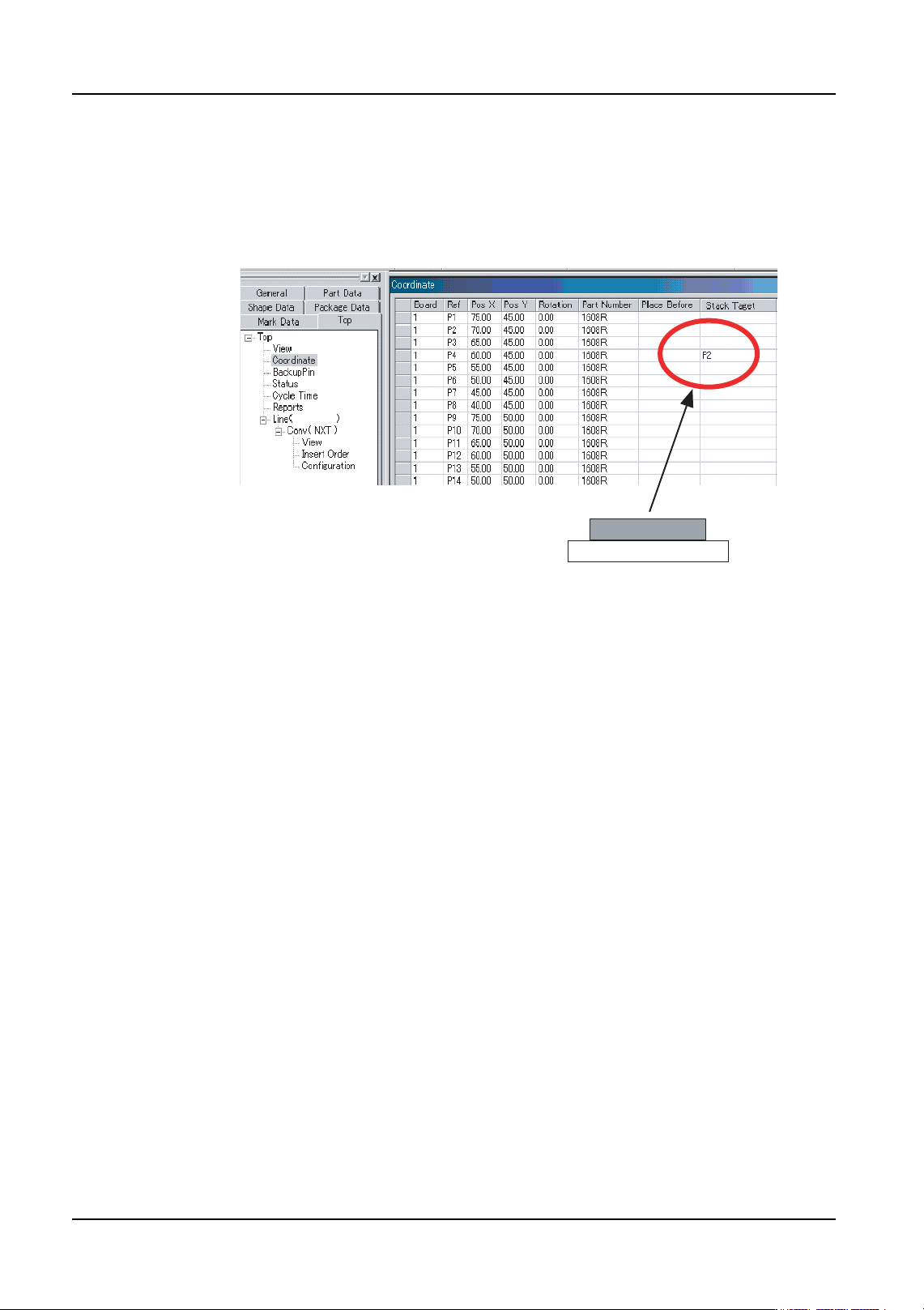
5. Click in the blank data cell for [Stack Target] and enter the value from the [Ref] column
(the reference designator) for the part on the bottom of the stack (refer to the picture
above).
6. Repeat these procedures for all parts that are to be stacked.
P2
P4
01PRG-0034
QD004-18 3. Job Builder
NXT Programming Manual 41
Shape data settings
1. Select the [Shape Data] tab from the job information bar.
2. Double-click the name of the shape data for the part. The shape data settings are
displayed.
3. Select the [Shape Process] tab and then select the [Process] tab.
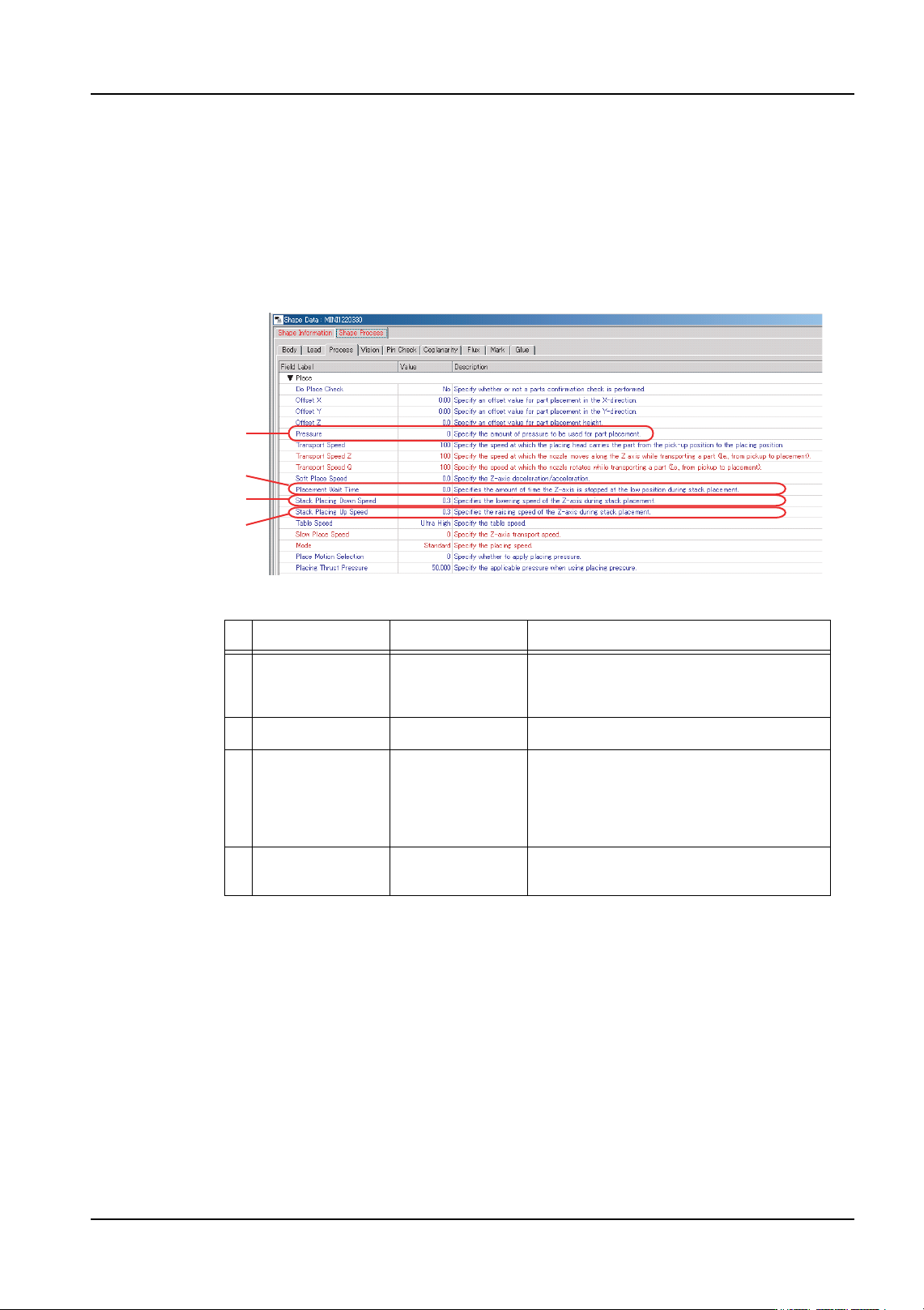
4. Specify settings for the settings listed below.
*1: If a value greater than “0.3” is specified for [Stack Placing Down Speed], the amount of
pressure exerted on the part when the nozzle is in the lowered position (placing the part)
may exceed the value specified for [Pressure].
*2: In Fuji Flexa, a value from “0” to “5000” can be specified. However, placing is performed
using 220 gf if a value less than 220 gf is specified. Likewise, placing is performed using
1020 gf if a value greater than 1020 gf is specified.
Setting name Setting range Details
1 Stack Placing
Down Speed
(*1)
0.1 to 10.0 (%) Speed at which the nozzle (Z-axis) is
lowered.
2 Pressure (*2) 220 to 1020 (gf) Pressure used when stacking parts.
3 Placement Wait
Time
0.000 to 20.000
(msec)
Amount of time the machine pauses
with the nozzle lowered (pushing on the
part on top of the stack). If “0” is
specified, the default value for the head
is used.
4 Stack Placing
Up Speed
0.1 to 10.0 (%) Speed at which the nozzle (Z-axis) is
raised.
01PRG-0036E
1
2
3
4