FUJI NXT Programming Manual QD004-18.pdf - 第57页
QD004-18 3. Job Builder NXT Programming Manual 47 3.4.6 Using the tray unit-LT and LTC The tray unit-LT/LTC uses two magazines, allowin g it to handle many parts for productio n and perform part resupply dur ing producti…
3. Job Builder QD004-18
46 NXT Programming Manual
Settings in shape data
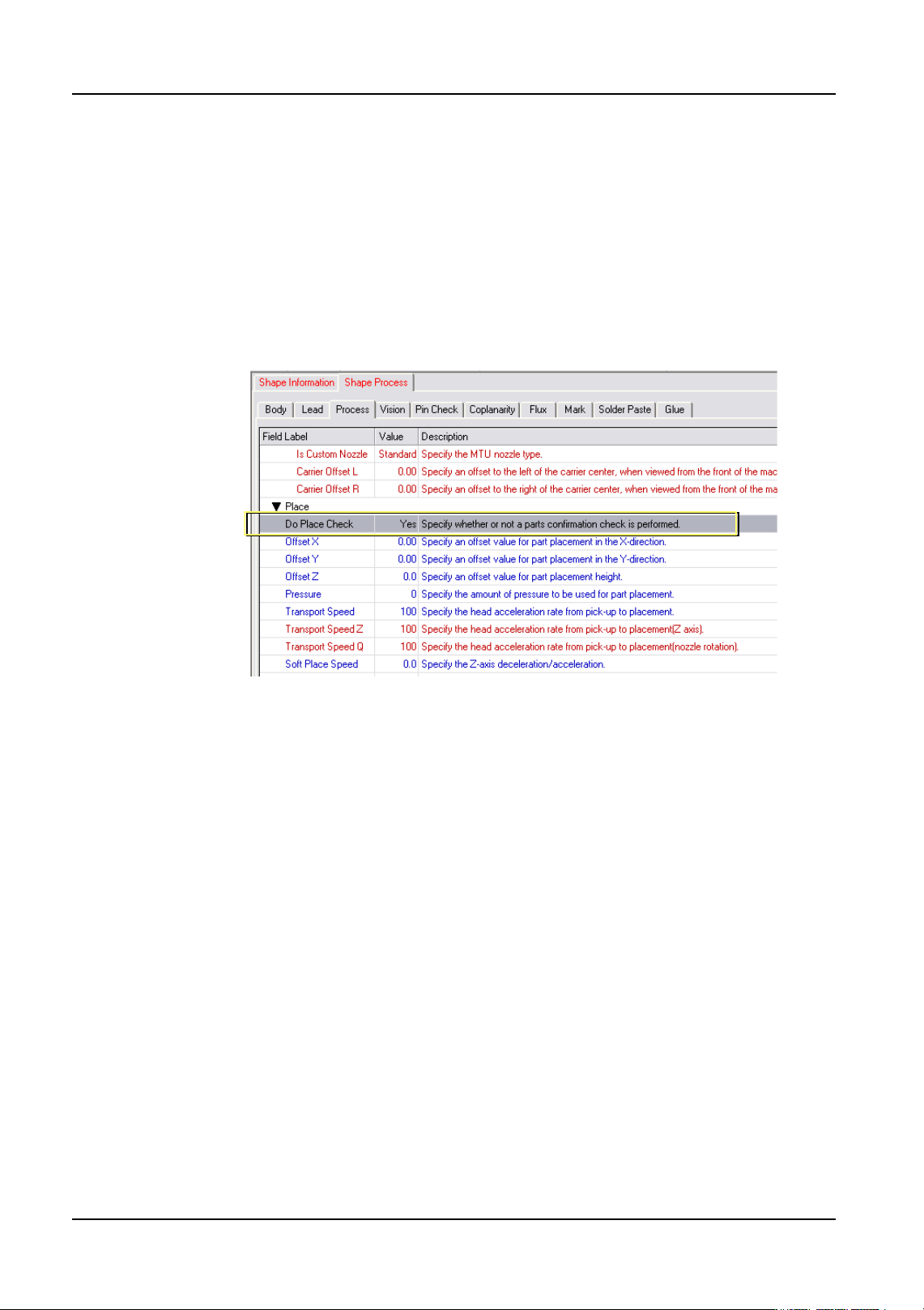
Specify that the presence of the part is to be checked by specifying the following setting in
the shape data (part data) for the part in Fuji Flexa.
1. Select the [Shape Data] tab from the job information bar in Job Builder.
2. Double-click the name of the shape data for the part. The shape data settings are
displayed.
3. Select the [Shape Process] tab and then select the [Process] tab.
4. Select [Yes] for the [Do Place Check].
01NST-0210E
QD004-18 3. Job Builder
NXT Programming Manual 47
3.4.6 Using the tray unit-LT and LTC
The tray unit-LT/LTC uses two magazines, allowing it to handle many parts for production
and perform part resupply during production. Four operation modes are available for use
depending on the production type. Use each type according to your needs.
Required items
See below for the supported software for each tray unit.
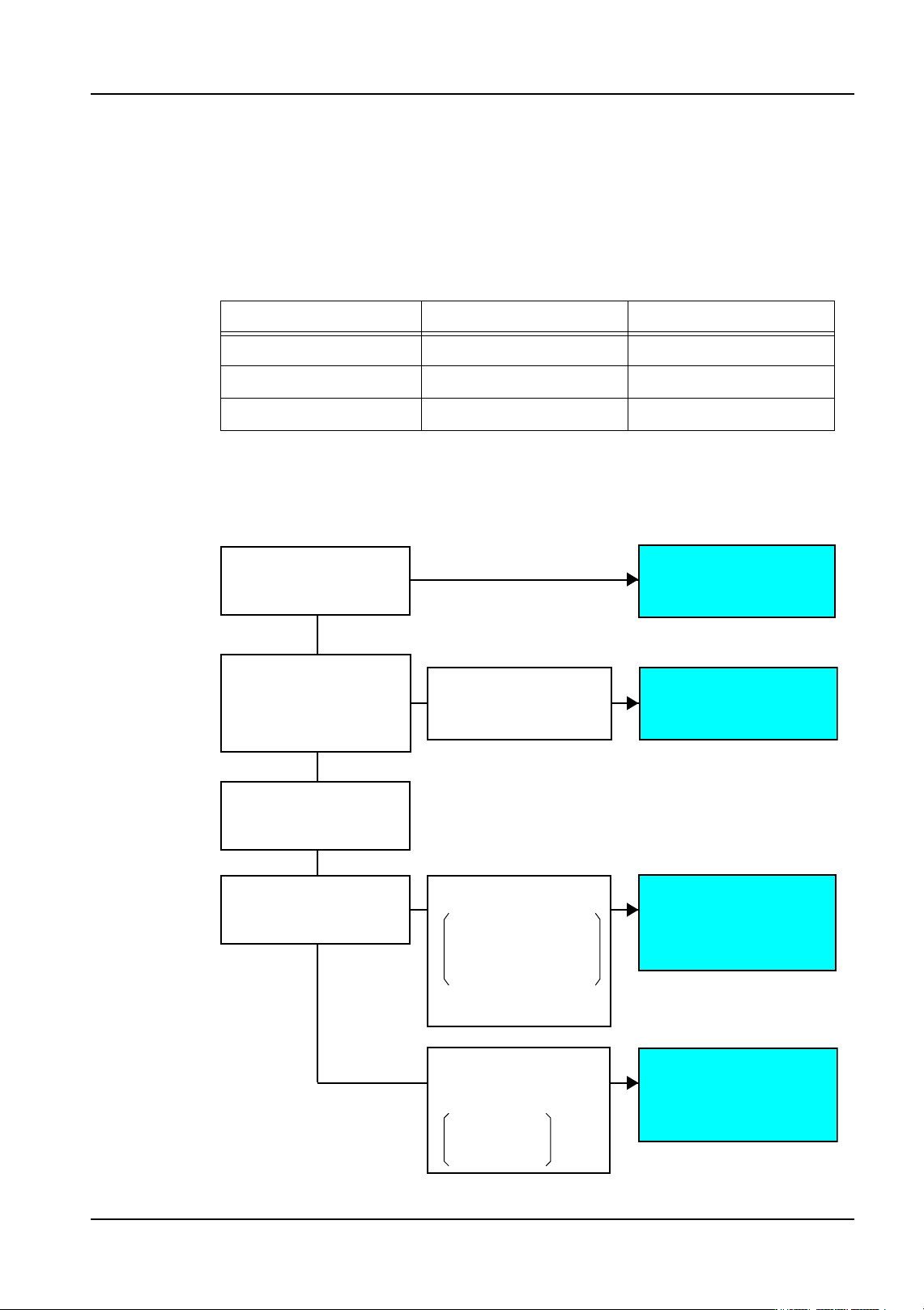
Operation mode selection
Select the operation mode that best suits the production type by referring to the following
chart.
Tray unit-LT Tray unit-LTC
NXT application software V5.03 V5.15
Fuji Flexa V4.2.0 V5.0.0 + Patch
Fujitrax V4.30 V5.01
Which is prioritized?
How many slots
are required for
production?
You want to reduce
changeover time because
changeover is performed
frequently
> More than 12 slots
You want to reduce downtime
during part resupply to improve
production efficiency
What is the supply
method?
* Reduce changeover time
* Improve production
efficiency
You do not want partially
used trays and want to
supply parts after they
have run out.
You don't care if partially
used trays occur.
[Mode 3]
[Mode 1]
[Mode 2]
[Mode 4]
Producing while reducing
changeover time
Producing panels with
many part types
Producing with minimum
downtime when resupplying
parts
Parts are required from
the resupply magazine
during production
01PRG-0118E
> Reduce changeover time
> Improve production efficiency
Usable slots
LT: 9 slots
LTC: 10 slots
You want to produce while
minimizing downtime.
Because there is only one
part type, you want to load
them on many trays to make
the time between resupply
as long as possible.
3. Job Builder QD004-18
48 NXT Programming Manual
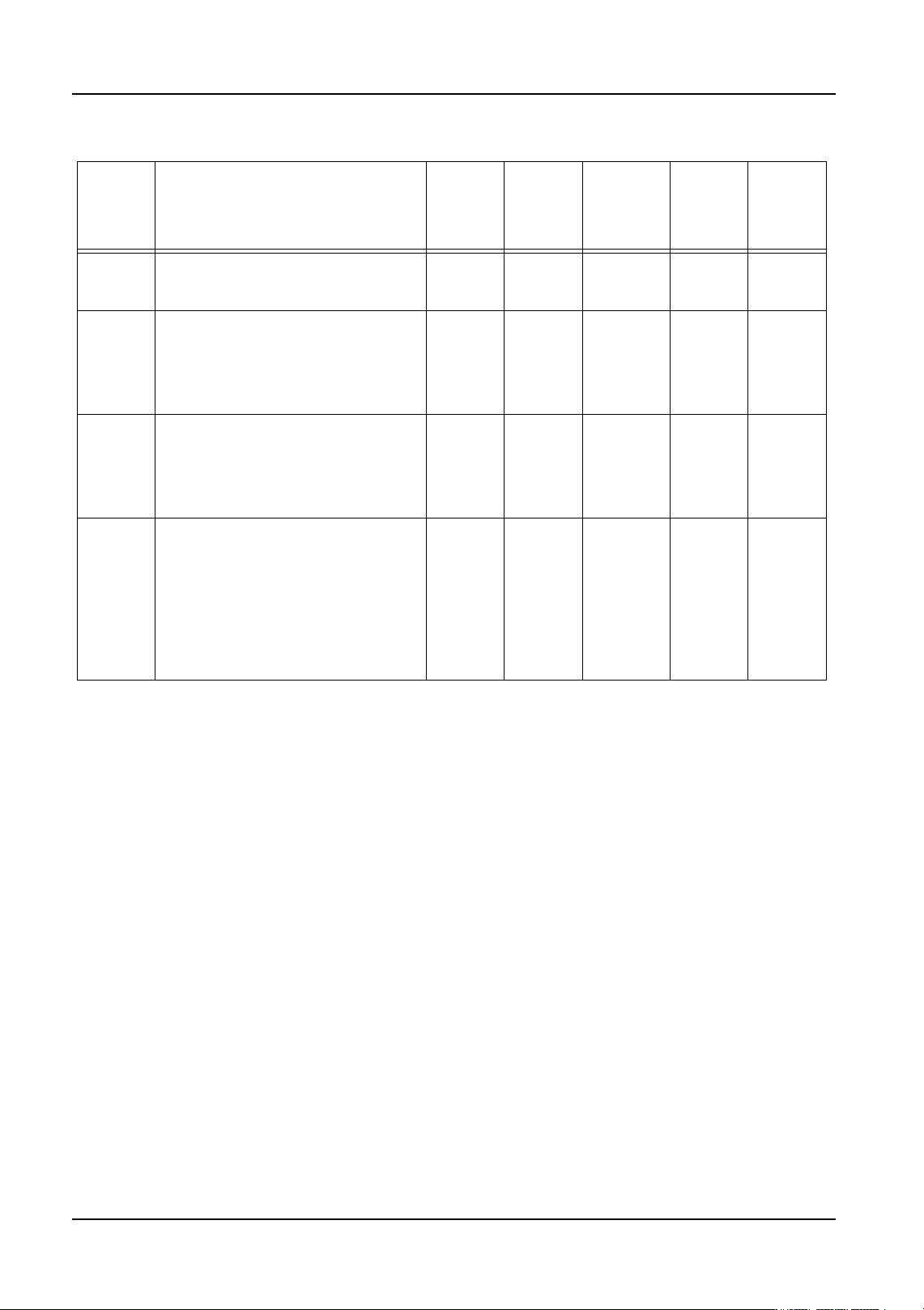
Summary of each mode
Note: 1: The quantities shown in the brackets indicate the number of subslots on the tray unit-LT.
2:There are cases of partially used trays occurring based on alternate trays settings.
Mode Details Max. no.
of slots
TU-LT
(Note 1)
Max. no.
of slots
TU-LTC
Part
resupply
downtime
Partially
used
trays
Next
produc-
tion
prepara-
tion
Mode 1 When using several different part types
that exceed 12 slots, both magazines
are used as one in the job settings.
24(48) 24 Medium (Note 2) Not
possible
Mode 2 Each magazine is used in production
separately. When a recovery limit is
reached at one of the magazines, the
other magazine continues production.
The magazine with the recovery limit
can then be replenished with parts.
12(24) 12 Short Possible Not
possible
Mode 3 This mode optimizes the job so that tray
exchange is minimized during
changeover. Several jobs are created
in the production schedule and then
tray allocation is optimized using Multi
Job Line Balancer in Fuji Flexa.
24(48) 24 Medium to
long
Not
possible
Possible
under
certain
condi-
tions
Mode 4 One of the magazines is used for parts
resupply and the other is used for
production. When parts run out at the
production magazine, the drawer with
the empty tray is unloaded to slot 12 of
the resupply magazine. A new tray is
then moved from the resupply
magazine to a slot in the production
magazine and then production
continues.
9(18) 10 Short Not
possible
Not
possible