FUJI NXT Programming Manual QD004-18.pdf - 第146页
4. Part Data Settings QD004-18 136 NXT Programming Manual Case 4: White body but partly black Yes (Refer to fig. 12) Unconnected (Refer to fig. 9) White body but partly black Black area is in the center of the body Leads…
QD004-18 4. Part Data Settings
NXT Programming Manual 135
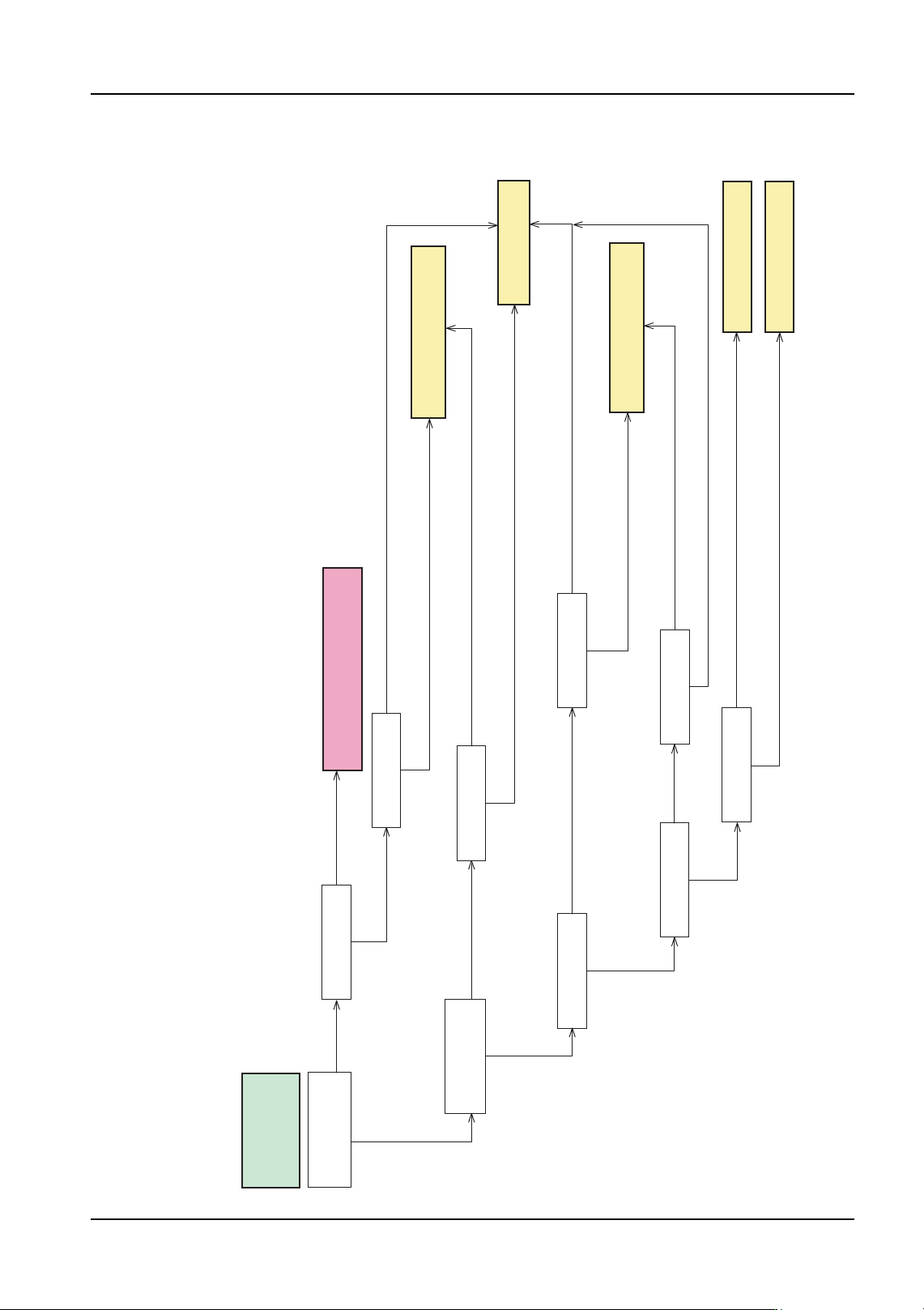
Case 3: Black body with partial white or there is a metal part in addition
to the lead
Almost the same as
the body size
Connected
Unconnected (Refer to fig. 9) Smaller than
the body size
The outside shape of the white items is rectangular (Refer to fig. 3)
The outside shape of the white items is not rectangular (Refer to fig. 4)
Cannot be determined
No
Yes
2 to 4 directions
1 direction
Non-rectangular or
connected to some other leads
Rectangular and not connected
to other leads (Refer to fig. 2)
No
Yes
(Refer to fig. 11)
Black body with
partial white or there
is a metal part in
addition to the lead
Lead and white parts
are connected or
unconnected
Parts shape
Element directions
The size of the white
area
Use the "Entire body is white or light
color (red, orange, brown or yellow)"
flowchart
Part shape
Vision Type 123
Lead shape Parts shape
Vision Type 152
One element has more
than five leads?
Shapes similar to leads
are in the body.
Vision Type 70
(Refer to fig. 10)
NXTVPP040Ea
Vision Type 18 or 19
(Use 19 when checking leads)
Vision Type 18 or 19
(Use 19 when checking leads)
The outside shape of the white items is not rectangular (Refer to fig. 4)
Cannot be determined
The outside shape of the white items is rectangular (Refer to fig. 3)
The outside shape of the white items is rectangular (Refer to fig. 3)
The outside shape of the white items is not rectangular (Refer to fig. 4)
Cannot be determined
Parts shape
The outside shape of the white items is not rectangular
(Refer to fig. 4) Cannot be determined
The outside shape of the white items is rectangular (Refer to fig. 3)
4. Part Data Settings QD004-18
136 NXT Programming Manual
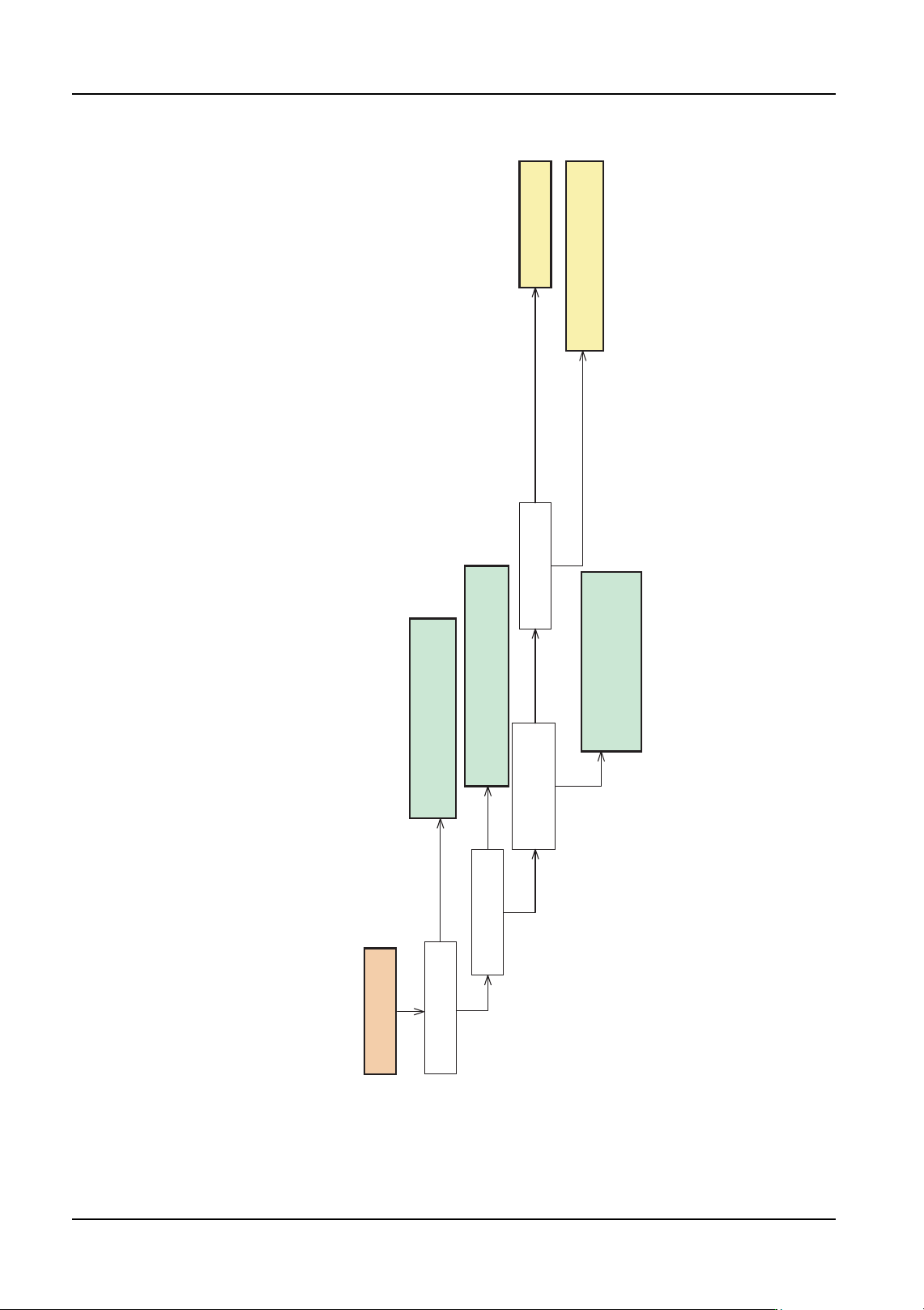
Case 4: White body but partly black
Yes (Refer to fig. 12)
Unconnected (Refer to fig. 9)
White body but partly
black
Black area is in the
center of the body
Leads and white parts
are connected or
unconnected
Parts shape
Use the "Black body with partial
white or there is a metal part in
addition to the lead" flowchart
Vision Type 70
Use the "Black body with partial
white or there is a metal part in
addition to the lead" flowchart
Use the "Black body with partial white
or there is a metal part in addition to
the lead" flowchart
Black area is surrounded
by white body
NXTVPP041Ea
The outside shape of the white items
is rectangular (Refer to fig. 3)
The outside shape of the white items is not
rectangular (Refer to fig. 4)
Cannot be determined
Vision Type 18 or 19
(Use 19 when checking leads)
QD004-18 4. Part Data Settings
NXT Programming Manual 137
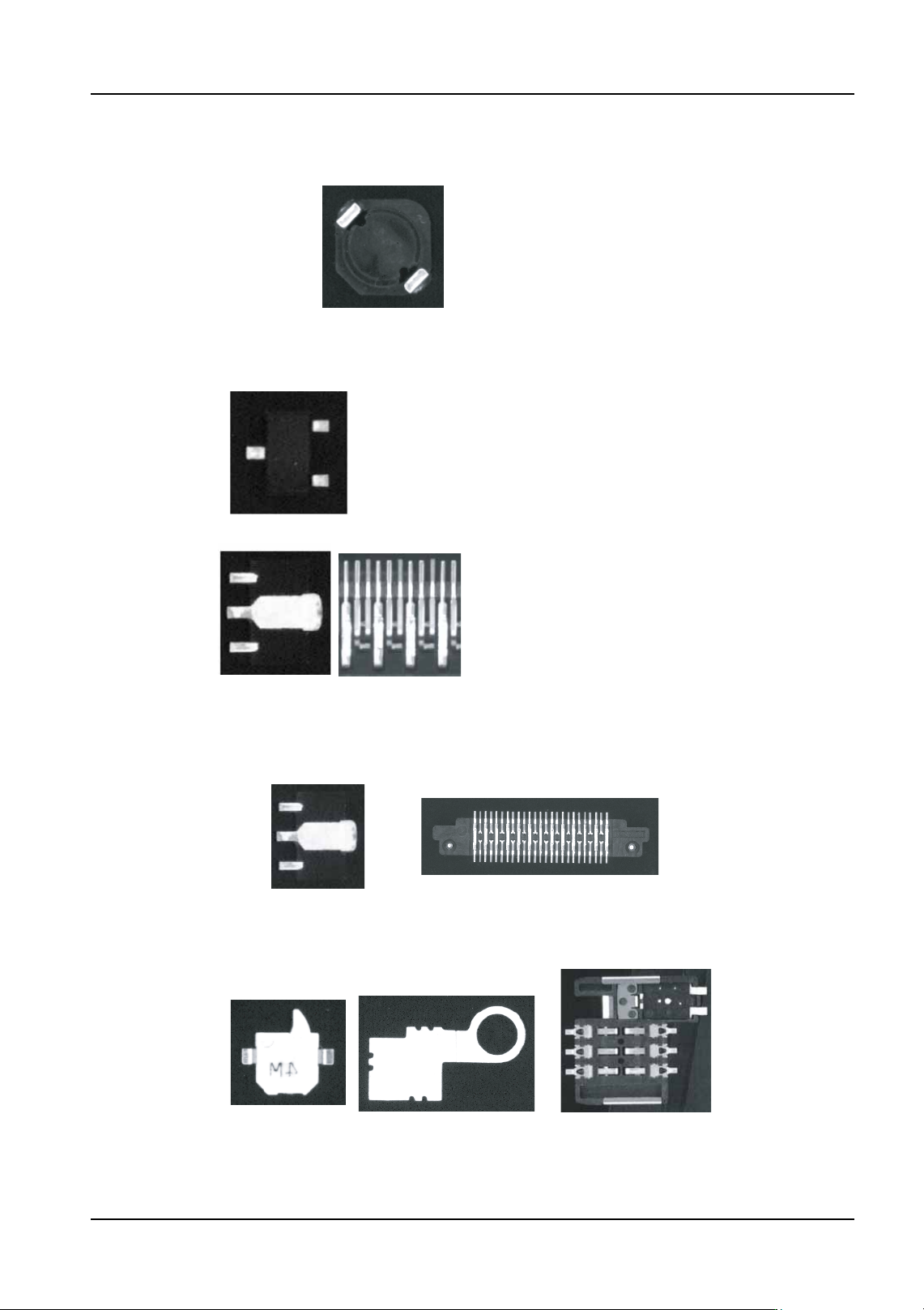
Figures 1 to 12
Figure 1 Example part with just 2 diagonal leads (inductor)
NXTVPP024Ea
Figure 2
Example part with rectangular and not connected to other leads (Vision Type 180)
Example parts with non-rectangular leads or are connected to some other leads (Vision Type 70)
NXTVPP025Ea
When the lead shape and the element shape do not
match, use vision type 70 or 18.
The element data shape and lead shapes match for the
minimold above. However, for the power transformer,
the center single lead must have element data definied
for side 0 and side 2.
It is the same for visible metal items even if they are not
connected to actual leads.
Figure 3
Example part with rectangular white reflective items (use vision type 70)
When distinguishing these areas is difficult, use vision type 18.
NXTVPP026Ea
Figure 4
Example parts when the outside shape of the white items is not rectangular
(vision type 18 usage examples)
NXTVPP027Ea
Use vision type 18 when distiniguishing is difficult.