FUJI NXT Programming Manual QD004-18.pdf - 第26页
3. Job Builder QD004-18 16 NXT Programming Manual Feeder Duplication This specifies whether or not parts with many placements will be broken up into multiple feeders and set into different modules. If this is set to “Yes…
QD004-18 3. Job Builder
NXT Programming Manual 15
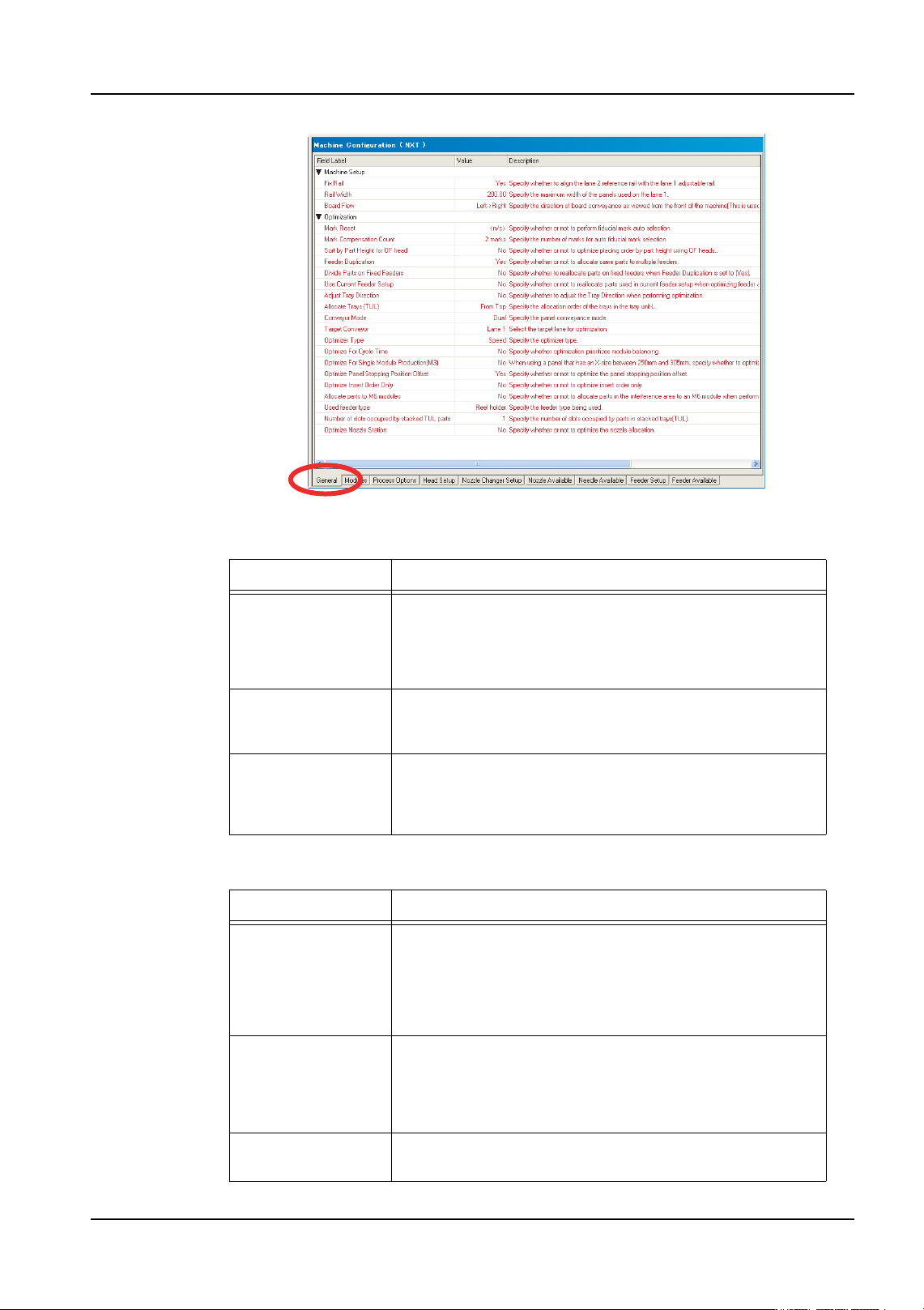
Machine setup
Optimization
Setting Description
Fix Rail This specifies whether or not the reference rail for the
second lane can move to different positions. If this is set to
“Yes” the reference rail cannot move to different positions
and a setting must be specified for [Rail Width]. This is the
location that the reference rail for lane 2 will be positioned.
Rail Width This setting only displays when the setting for [Fix Rail] is
“Yes”. This setting specifies the location at which the
reference rail for lane 2 will be fixed.
Board Flow This specifies the direction in which the panels flow
through the machine. This settings does not actually
control the direction in the machine but is used for job
related processing in Fuji Flexa.
Setting Description
Mark Reset This specifies whether or not the fiducial marks for the
sequences are cleared and reassigned. If this is set to “<n/
c>”, only sequences at have no fiducial mark assignment
at all, have fiducial marks assigned. If this is set to “Reset”
then all fiducial mark assignments are cleared for all
sequences and then they are reasigned.
Mark
Compensation
Count
This specifies how many marks are to be used for aligning
the sequences when assigning fiducial marks. If this
setting is changed then only marks that have no fiducial
assignments are affected or all sequences are affected
only if the [Mark Reset] setting is “Reset”.
Sort by Part Height
for OF Head
Specify whether or not to optimize placing order by part
height (only used for the OF head).
01PRG-0053E

3. Job Builder QD004-18
16 NXT Programming Manual
Feeder Duplication This specifies whether or not parts with many placements
will be broken up into multiple feeders and set into different
modules. If this is set to “Yes”, parts with many placements
will be set in multiple feeders and placed on multiple
modules.
Divide Parts on
Fixed Feeders
Specify whether to reallocate parts on fixed feeders when
Feeder Duplication is set to "Yes".
Yes: Reallocate parts on fixed feeders to other modules to
reduce cycle time.
No: Do not reallocate parts on fixed feeders.
Note: The following are considered fixed feeders.
- Feeders with a Status of "Fixed"
- Feeders that have already been allocated in the Feeder
Setup when Use Current Feeder Setup is set to "Yes".
Use Current Feeder
Setup
When the [Allocate Feeders] option is selected for
optimization, this specifies whether or not the current
feeder setup will be changed or not. If the is set to “No” and
the [Allocate Feeders] option is selected for optimization,
then the current feeder positions and settings are
completely ignored and all feeders are redistributed. If
there are variable status feeders that are not being used in
the current job in the feeder setup, these feeders are
removed.
Adjust Tray
Direction
Specify whether to adjust the tray direction when
performing optimization.
Yes: Adjust the tray direction
No: Do not adjust the tray direction
Allocate Trays
(TUL)
Specify the allocation order of the trays in the tray unit-L.
From Top: Allocated from the top.
From Bottom: Allocated from the bottom.
Conveyor Mode This settings specifies the panel conveyance mode to be
used for production for determining optimization.
Target Conveyor This specifies the target lane on which the job will be
optimized. If set to “Lane 1”, then the job is optimized with
the premise that the panels are to be loaded on lane 1.
Optimizer Type This setting specifies the level of optimization to be
performed.
“Speed” performs optimization with a priority on achieving
a relatively fast cycle time and processing is performed
quickly.
“Optimal” performs optimization with a priority on achieving
the fastest cycle time and processing takes longer.
“Time Limit” performs processing the same as “Optimal”
but within a specified time limit.
Time Limit This only displays if [Optimizer Type] is set to “Time Limit”.
This specifies the time limit in minutes that the optimizer
has to complete processing.
Setting Description
QD004-18 3. Job Builder
NXT Programming Manual 17
Optimize For Cycle
Time
Specify whether optimization prioritizes module balancing.
No: Optimization is performed so that small parts are
placed first whenever possible. Furthermore, the number
of divided feeders is not increased greatly when feeders
are divided. This setting decreases calculation time.
Yes: Optimization prioritizes module balance over part
size. More feeders are divided when feeders are divided.
This setting often improves cycle time but increases the
calculation time.
Optimize For Single
Module Production
(M3)
This specifies whether or not paired module production is
used for panels between 250 and 305 in length. This
setting has no bearing for panels outside of this range.
When set to "No" and the panel size is within the range, the
M3 modules are automatically paired for paired production.
If set to "Yes" and the panel size is within the range, the M3
modules are not paired. For panels smaller than the range,
M3 modules are never paired. For panels larger than the
range, M3 modules are always paired.
Optimize Insert
Order Only
When this setting is set to “No”, insert order, feeders, head
setup, nozzle stations and other items can be optimized/
changed during optimization. Only the insert order is
changed during optimization when this setting is “Yes”.
Optimize Panel
Stopping Position
Offset
This specifies whether or not the panel stopping position is
optimized for paired module production. This is only for M3
modules when they are performing paired module
production.
Allocate parts to M6
modules
This specifies whether or not to allocate parts that are in
the head interference area during paired module
production to M6 modules if possible. By setting this to
“Yes”, head waiting time during paired module production
is reduced. However, more parts are assigned to the M6
module.
Used feeder type Specify the whether of not reel holders are on the feeders.
If set to “Reel holder”, the optimizer positions feeders in the
feeder setup considering that the feeders have reel
holders. If this is set to “Reel holder-E”, the optimizer
positions feeders in the feeder setup considering that
feeders have no reel holders and a bucket type feeder
pallet is used.
Number of slots
occupied by
stacked TU-L parts
Specify the number of slots occupied by parts in stacked
trays (TU-L).
1: Optimize all trays as stacks of one slot.
2: Optimize all trays as stacks of two slots.
3: Optimize all trays as stacks of three slots.
Optimize Nozzle
Station
This specifies whether the nozzle allocation should be
optimized or not. If this is set to “Yes” the nozzles in the
nozzle station will be changed to be “optimized” for
production. If this is set to “No” then optimization is
performed without changing the nozzle setup.
Setting Description