FUJI NXT Programming Manual QD004-18.pdf - 第198页
6. Editing Jobs on the Machine (MEdit) QD004-18 188 NXT Programming Manual Sending changes back to the module. 27. The offs et results fo r the pickup po sition test are displayed. Check the results and if the results ar…
QD004-18 6. Editing Jobs on the Machine (MEdit)
NXT Programming Manual 187
and claws are present.
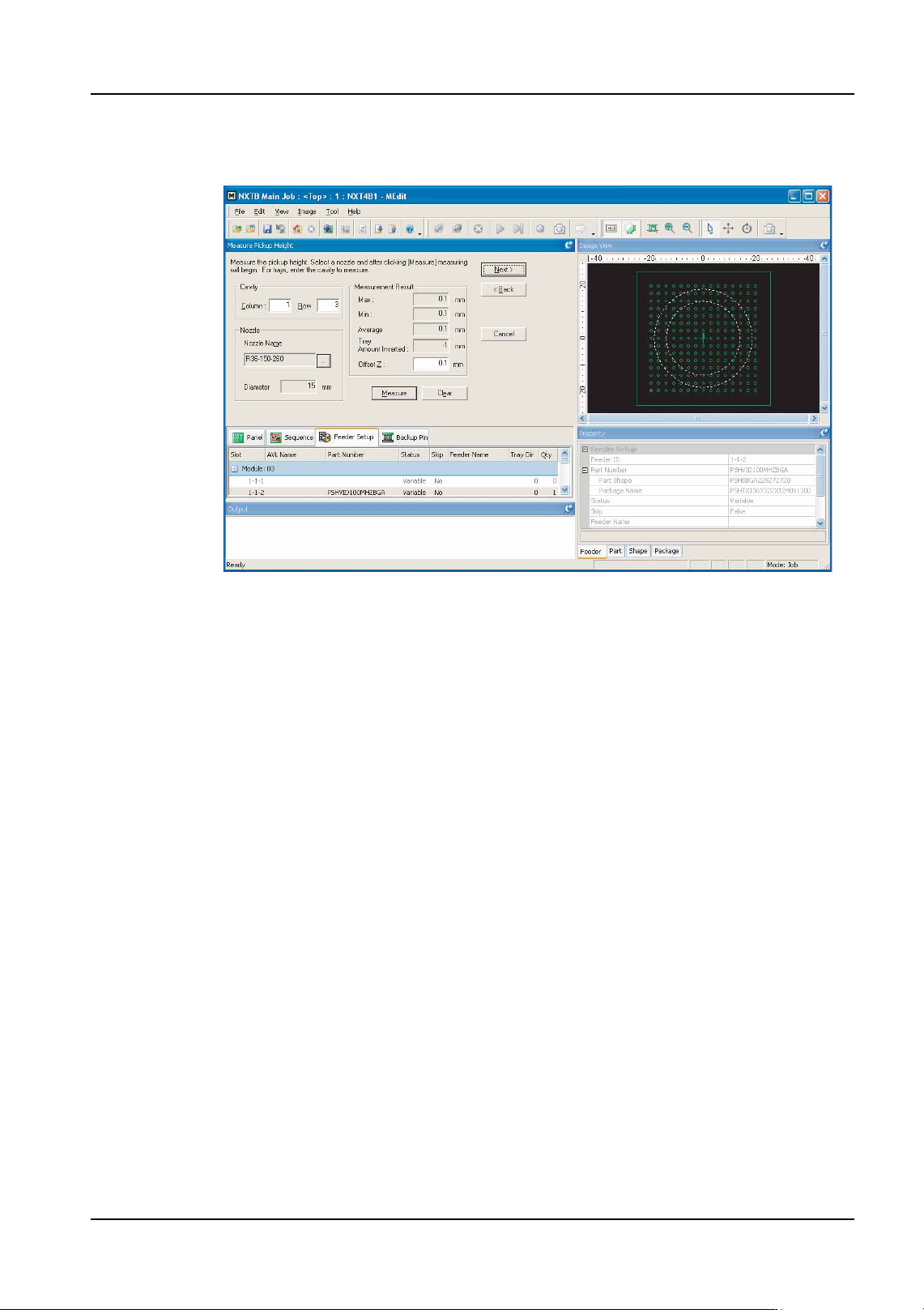
24.Click [Measure] to begin the pickup height test.
25.The results of the test are displayed and the Z offset is automatically determined. It is
possible to manually edit this value.
Note: A dialog box is displayed when a stroke error occurs. Click [Yes] in this dialog box to try
moving the head back down and measure again. The same error occurs if there is no part
in the pickup position. If unsure if a part is present or not, check the part status in the tray.
Caution: If measurement is performed for an OF head, even if the nozzle (claw) does not contact a
part when lowered, the lowest position of the Z-axis is displayed as the result of
measurement. Then, if measurement is performed again, the nozzle (claw) lowers to a
position that is -1.5 mm lower than the result for the previous measurement, so the
measurement value will change greatly. The position at which the result obtained is
approximately the same as the previous result is the position at which the part has actually
been contacted. Due to this, the measurement should be repeated until the result is
approximately the same.
26.Once the Z offset has been determined and the results are acceptable, click [Next].
NXTEJM024Ea
6. Editing Jobs on the Machine (MEdit) QD004-18
188 NXT Programming Manual
Sending changes back to the module.
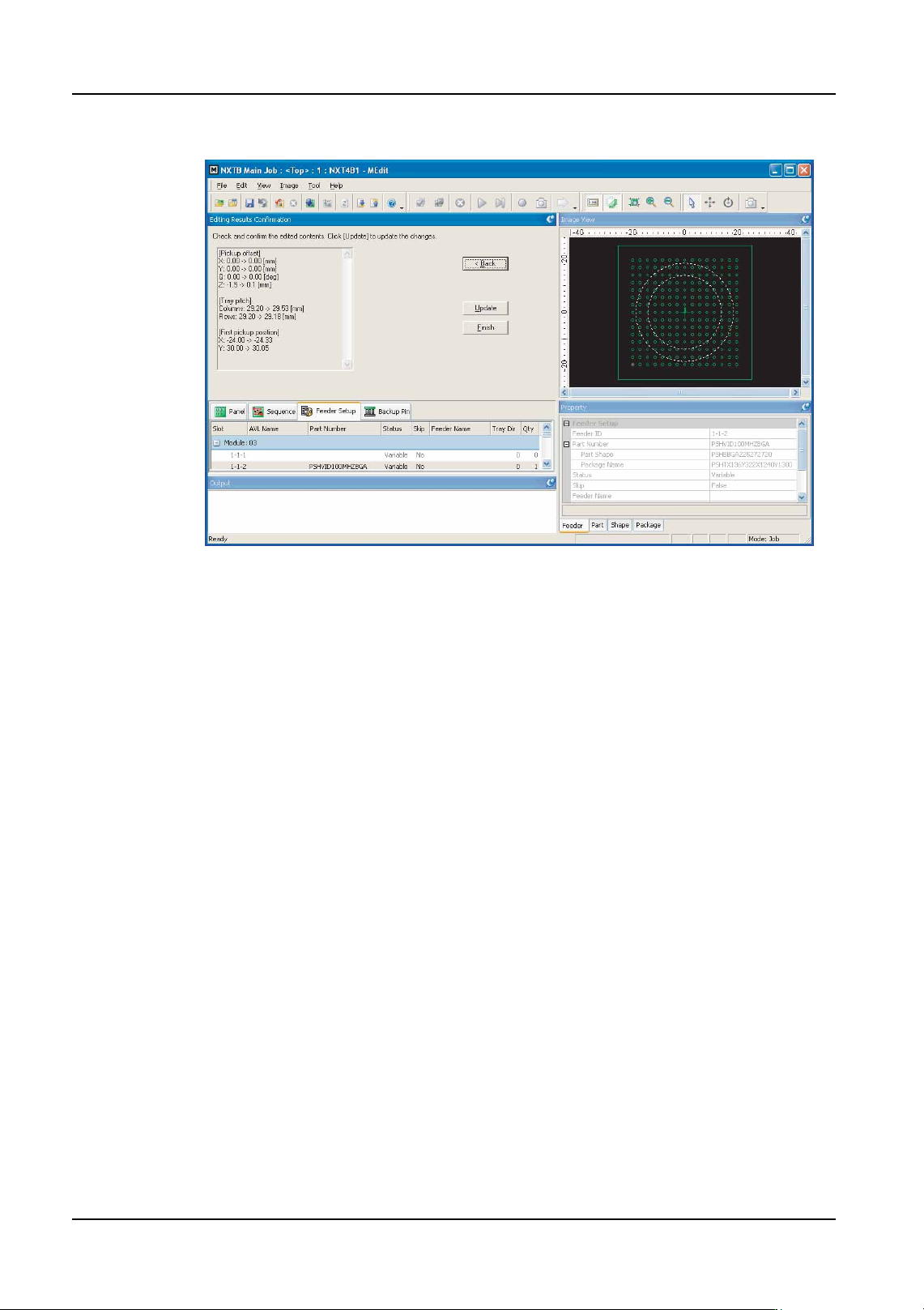
27.The offset results for the pickup position test are displayed. Check the results and if the
results are acceptable, click [Update] to send the changes back to the job. It is possible
to click [Back] to return to previous steps of the pickup test.
28.Click [Finish] to complete the test. If no changes were made, then the test is completed
at this point. If there were changes, then the following steps are performed.
29.A dialog box to specify to which modules to transmit the data is displayed. Select the
modules to which to sent the changes to the job data back and then click [OK]. Note
that if the same part is present in multiple modules, it is important to select all of the
modules that have the same part.
30.A dialog box is displayed asking if Data Checker should be run or not. Click [Yes] to
check the job data with data checker.
31.A dialog box is displayed with the results of the retransmission. Check the results and
click [Close] if transmission was successful.
NXTEJM025Ea
QD004-18 6. Editing Jobs on the Machine (MEdit)
NXT Programming Manual 189
6.8.4 Feeder index count and tape return method for pickup tests
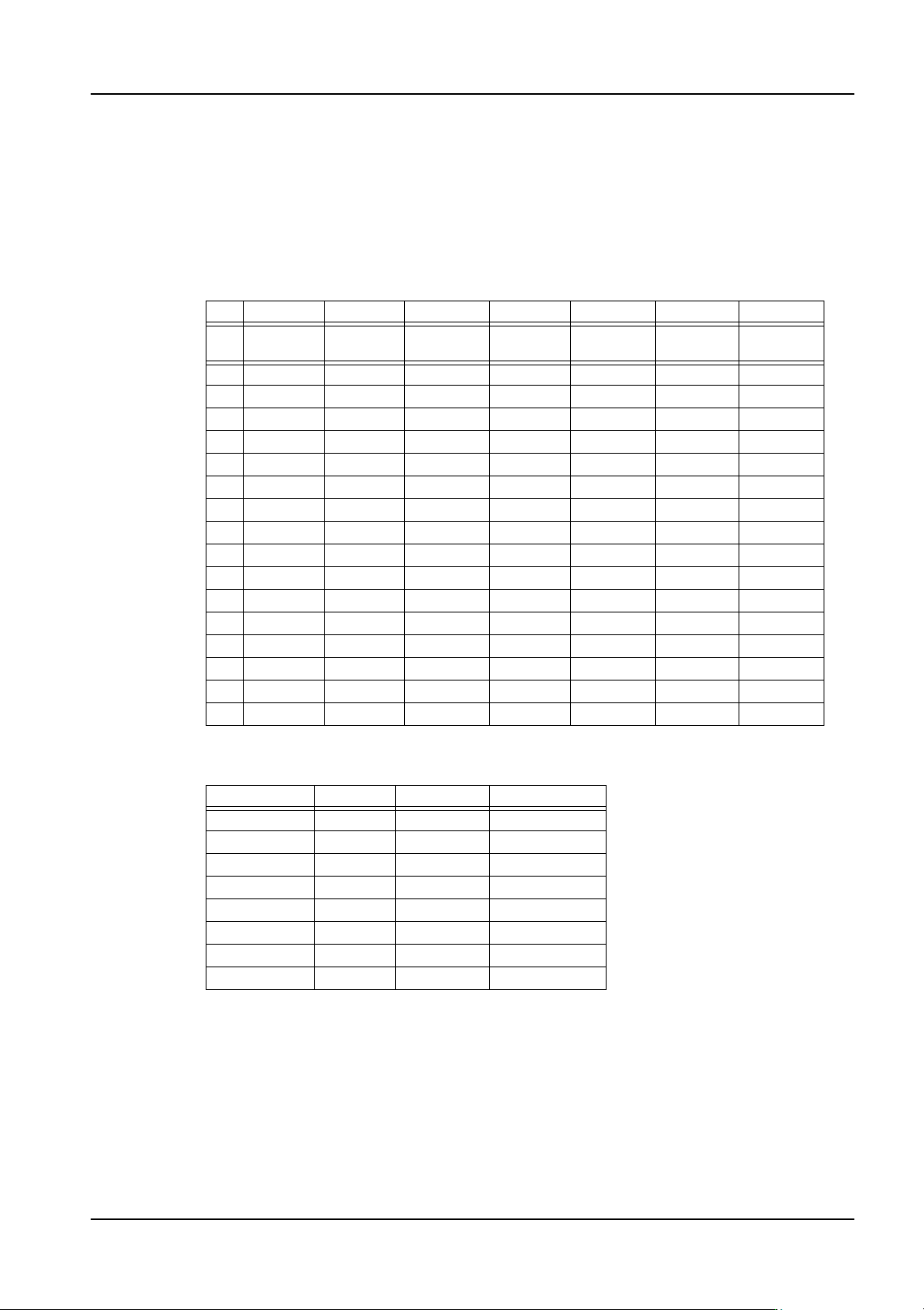
When performing a pickup test, it is necessary to index the parts because the test does not
automatically index them and there are certain cases in which indexing must be performed
a certain number of times, depending on the feeder. The feed count list is shown below.
Index count based upon feeder type and pitch table
Tape Feeders
Stick Feeders
Note: Items in the () indicate that it might be possible to use that amount to index the part for the
pickup test. However, there are times when a Y-axis movement tolerance error occurs and
the pickup test cannot be performed because the pickup position will change based on
calibration compensation or any pickup offset values (part size or smaller) and therefore the
pickup position will be outside the valid movement range.
W08 W12 W16 W24 W32 W44 W56
Pitc
h
Index
amount
Index
amount
Index
amount
Index
amount
Index
amount
Index
amount
Index
amount
11 X X X X X X
21 X X X X X X
4 1 3 (1) 3 (1) 4 4 4 4
8 2 (1) 2 (1) 3 3 3 3
12 2 (1) 2 (1) 2 (1) 2 (1) 2 (1) 2 (1)
16 2 (1) 2 (1) 2 (1) 2 (1)
20 2 (1) 2 (1) 2 (1) 2 (1)
24 2 (1) 2 (1) 2 (1) 2 (1)
28 (1) (1) (1)
32 (1) (1) (1)
36 (1) (1)
40 (1) (1)
44 (1)
48 (1)
52 (1)
56 (1)
Feeder Width Type Chute Type Index Amount
24 mm 1S Top (1)
24 mm 1S Bottom X
24 mm 1L Top X
24 mm 1L Bottom X
48 mm 2S Top (1)
48 mm 2S Bottom X
48 mm 2L Top X
48 mm 2L Bottom X