FUJI NXT Programming Manual QD004-18.pdf - 第77页
QD004-18 3. Job Builder NXT Programming Manual 67 13.If there is XPF machines in the lines then se lect the [Suppo rt XPF] setting. If there are no XPF machines or you wish to not con sider them during line balancing, th…
3. Job Builder QD004-18
66 NXT Programming Manual
Note: It is possible to start this wizard from Director by clicking the icon for it in the
[MultiJobLineBalancer] section of the icon bar.
2. Click [Next] to proceed to the next step.
3. Click [Add] and the [Select Job] dialog box displays.
4. Using the dialog box, locate and select the jobs on which to perform multi job line
balancing.
Note: Hold down Ctrl when selecting multiple jobs.
5. Select the side of the panel to be line balanced and then click [OK] in the dialog box that
is displayed.
Note: It is possible to change the side after this step by right-clicking the job name in the list and
then specifying the side in the shortcut menu.
6. Continue adding jobs until all of the jobs you want to line balance have been specified.
7. If you want to specify production quantity settings for jobs, right-click the job name and
then select [Enter the production quantity] and then specify the production quantity in
the dialog box and click [OK].
8. If you want to prioritize production for a side of the panel in a job, then right-click the job
name and then specify the side from [Prioritizing Production].
9. Once all of the jobs and desired settings have been specified, click [Next] to display Step
2.
10.Click the [...] button and specify the name of the job to be used for the line/feeder setup.
11.In the [Feeder allocation setting] group box, select the feeder allocation method to be
used.
12.In the [Settings] group box, select the appropriate setting.
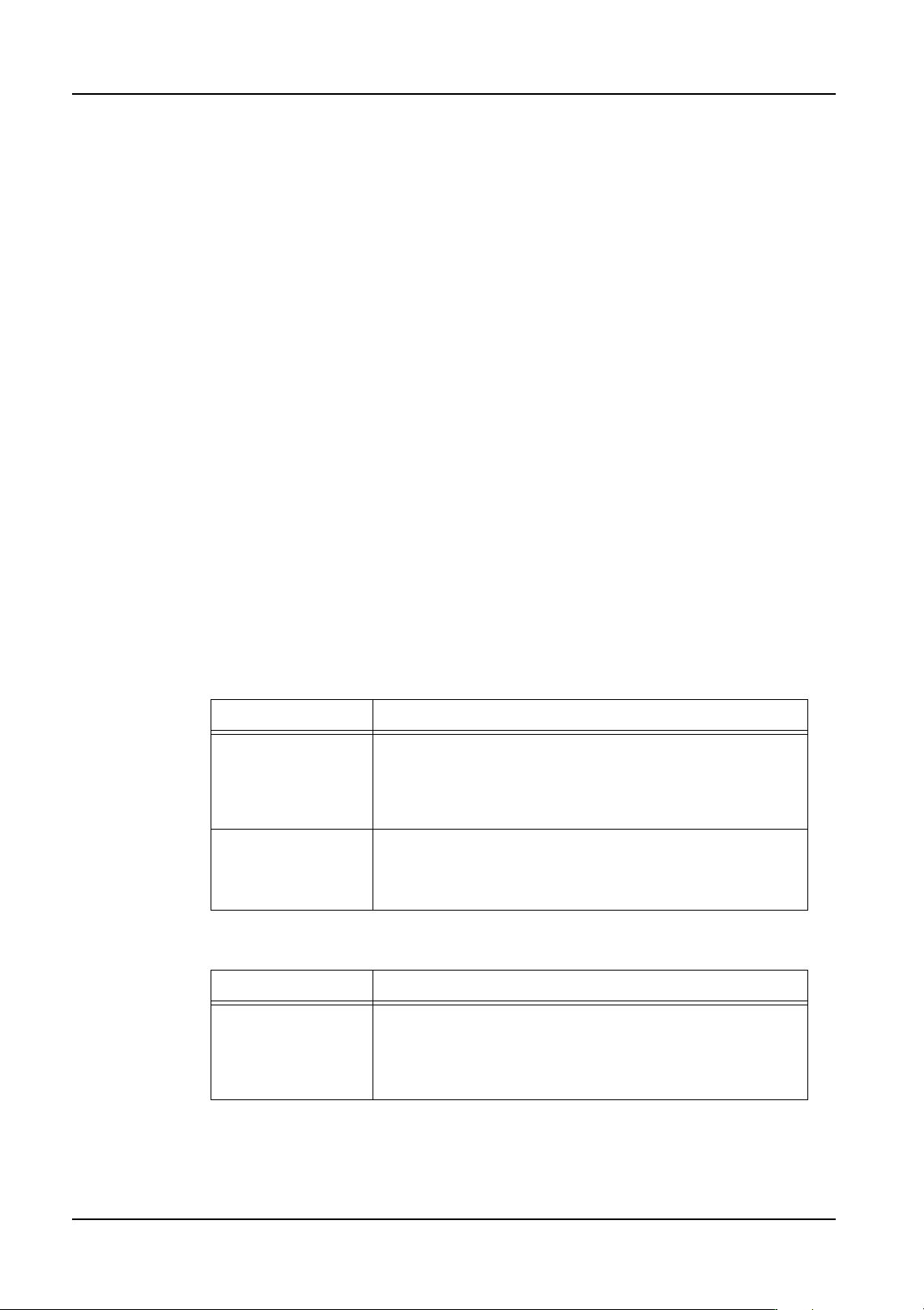
Setting Description
Consider the
allocation of all
feeders
All of the variable status feeders for the job in the [Job used
for line or feeder setup] setting are not moved from their
position as much as possible (a feeder will be altered if
necessary for other jobs). Fixed and reserved feeder
positions from this job cannot be altered.
Consider the
allocation of
Reserved and Fixed
feeders only
Fixed and reserved feeder positions for the job in the [Job
used for line or feeder setup] setting cannot be altered, but
the variable status feeders can be altered freely.
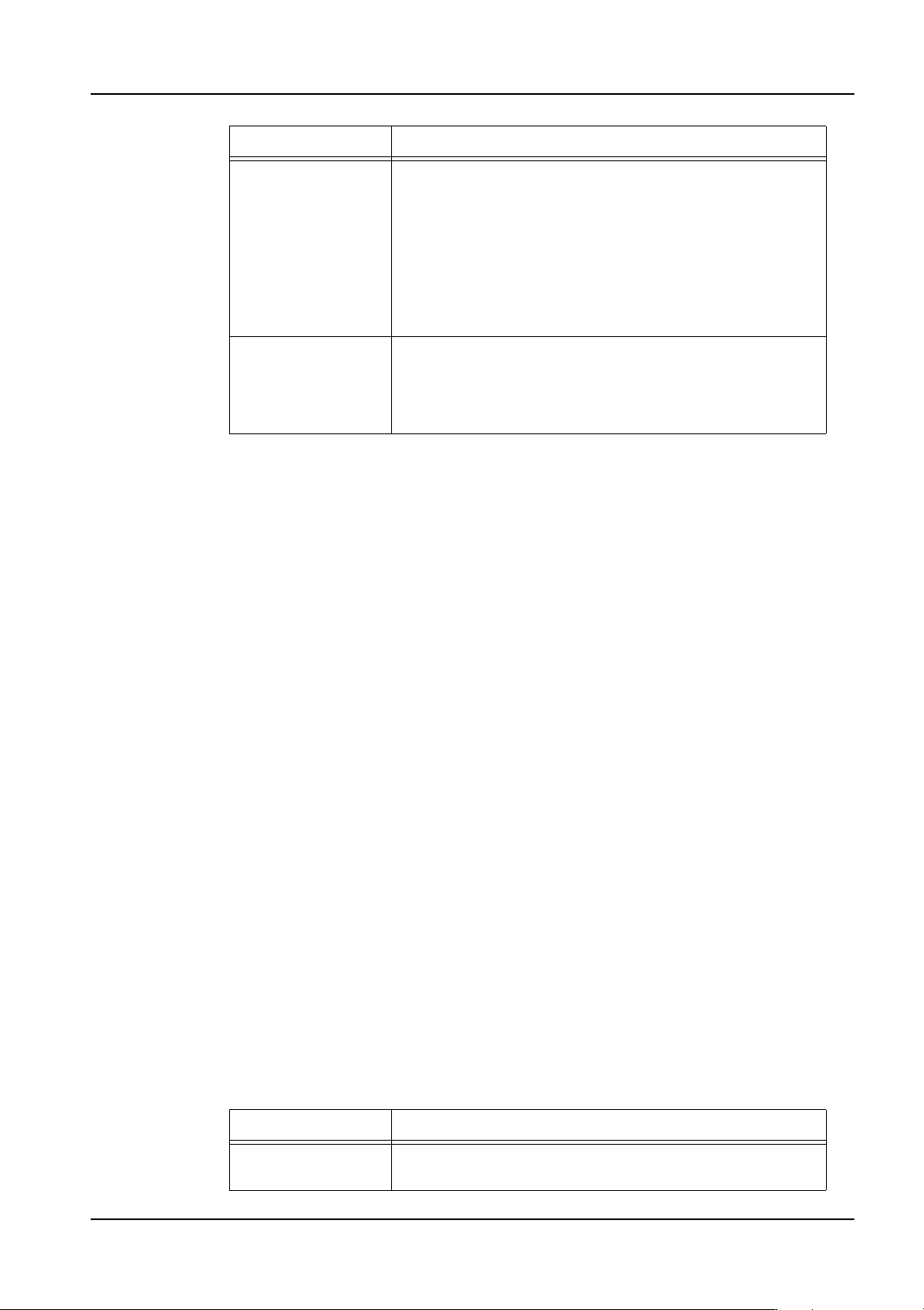
Setting Description
Group jobs for
batch changeover:
A common feeder allocation for multiple jobs is created and
the jobs are grouped. There are times when multiple
groups are possible. In this case, changeover between
groups occurs but the groups do not share a common
feeder allocation.
QD004-18 3. Job Builder
NXT Programming Manual 67
13.If there is XPF machines in the lines then select the [Support XPF] setting. If there are
no XPF machines or you wish to not consider them during line balancing, then do not
select this option.
14.Click [Next] to proceed to the next step.
15.In the [Changeover parameters] group box, set the parameters you want to use for the
machine concerning changeover conditions.
16.In the [Specify modules that should avoid changeover whenever possible] box, select
the appropriate modules. This option is enabled only if the following two settings have
been made in the previous step.
• Feeder allocation setting: Consider the allocation of Reserved and Fixed
feeders only
• Settings: Reduce feeder changeover times.
17.Click [Next] to display the step for specifying the production order and conveyance
method.
18.Set the production order for the jobs by using one of the methods below.
• To optimize the production order, click [Optimize]. Select the optimization
method for the production order and then click [OK] in the dialog box that is
displayed.
• To manually edit the production order, select a job and use the [Up] and [Down]
buttons to change the order.
19.Specify the panel conveyance method for the jobs, by right-clicking them and selecting
the method you want to use from the shortcut menu.
20.Click [Next] to display the next step.
21.Specify the optimizer options you want to use.
Reduce feeder
changeover times:
A common feeder allocation for multiple jobs is created and
the jobs are grouped. There are times when multiple
groups are possible. In this case, changeover between
groups occurs. However, the feeder allocation of the
previous group is considered. As a result, a feeder
allocation is created that reduces feeder allocation
changeover as much as possible. Compared to [Group
jobs for batch changeover], the number of feeder
changeovers is reduced. However, it is difficult to balance
the cycle time.
Calculate
changeover method
from production
count and cycle
time:
The program automatically calculates whether it is more
beneficial to prioritize changeover or cycle time before
optimization. (When this option is selected, select an
optimization level (Low, Mid, High).
Setting Description
Display cycle time
graph
If this option is selected, then a cycle time graph is
displayed during processing.
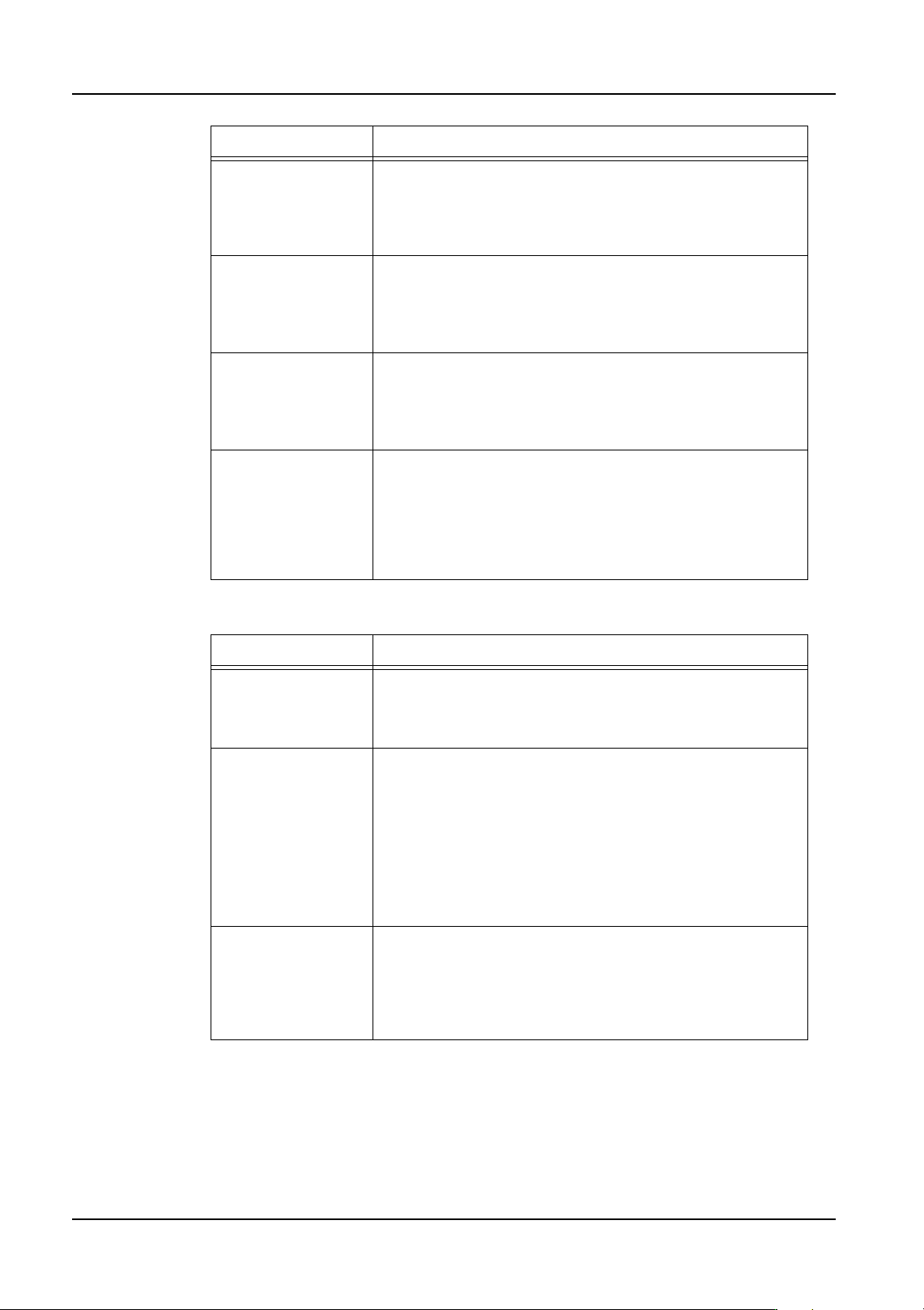
Setting Description
3. Job Builder QD004-18
68 NXT Programming Manual
22.If performing paired module production, then specify the settings you want to use below.
23.Click [Next] to display the next step.
24.Select the check boxes next to feeders and nozzles that are available. Clear the check
boxes next to any feeders or nozzles that are not available.
25.Click [Next] to display the final step.
Allocate parts with
excessive
sequences to
multiple modules
This specifies whether or not parts with many placements
will be broken up into multiple feeders and set into different
modules. If this is selected, parts with many placements
will be set in multiple feeders and placed on multiple
modules if possible.
Divide parts on
fixed feeders
Specify whether to reallocate parts on fixed feeders when
[Allocate parts with excessive sequences to multiple
modules] is selected. When this is selected, parts on fixed
feeders can be allocated to other modules to reduce cycle
time.
Optimize nozzle
station
This specifies whether the nozzle allocation should be
optimized or not. If this is selected, the nozzles in the
nozzle station will be changed to be "optimized" for
production. If this is not selected, then optimization is
performed without changing the nozzle setup.
Used feeder type Specify the whether of not reel holders are on the feeders.
If set to "Reel holder", the optimizer positions feeders in the
feeder setup considering that the feeders have reel
holders. If this is set to "Reel holder-E", the optimizer
positions feeders in the feeder setup considering that
feeders have no reel holders and a bucket type feeder
pallet is used.
Setting Description
Optimize panel
stopping position
This specifies whether or not the panel stopping position is
optimized for paired module production. This is only for M3
modules when they are performing paired module
production.
Optimize for single
module production
This specifies whether or not paired module production is
used for panels between 250 and 305 in length. This
setting has no bearing for panels outside of this range. If
this is not selected and the panel size is within the range,
the M3 modules are automatically paired for paired
production. If this is selected and the panel size is within
the range, the M3 modules are not paired. For panels
smaller than the range, M3 modules are never paired. For
panels larger than the range, M3 modules are always
paired.
Allocate parts in the
interference area to
M6 modules
This specifies whether or not to allocate parts that are in
the head interference area during paired module
production to M6 modules if possible. By selecting this
option, head waiting time during paired module production
is reduced. However, more parts are assigned to the M6
module.
Setting Description