FUJI NXT Programming Manual QD004-18.pdf - 第173页
QD004-18 6. Editing Jobs on the Machine (MEdit) NXT Programming Manual 163 6.5 Testing Skip Mark Data It is possible to test the skip mark data in a j ob for bo ard skip marks and glo bal skip marks. It is import ant to …
6. Editing Jobs on the Machine (MEdit) QD004-18
162 NXT Programming Manual
Procedure
1. A fiducial mark reading error will occur. Use Accessory Software to acquire and save
the image of the error.
2. Start MEdit and select [Open the Current Job] from the [File] menu.
Note: Refer to the MEdit Online Manual for details regarding the use of MEdit.
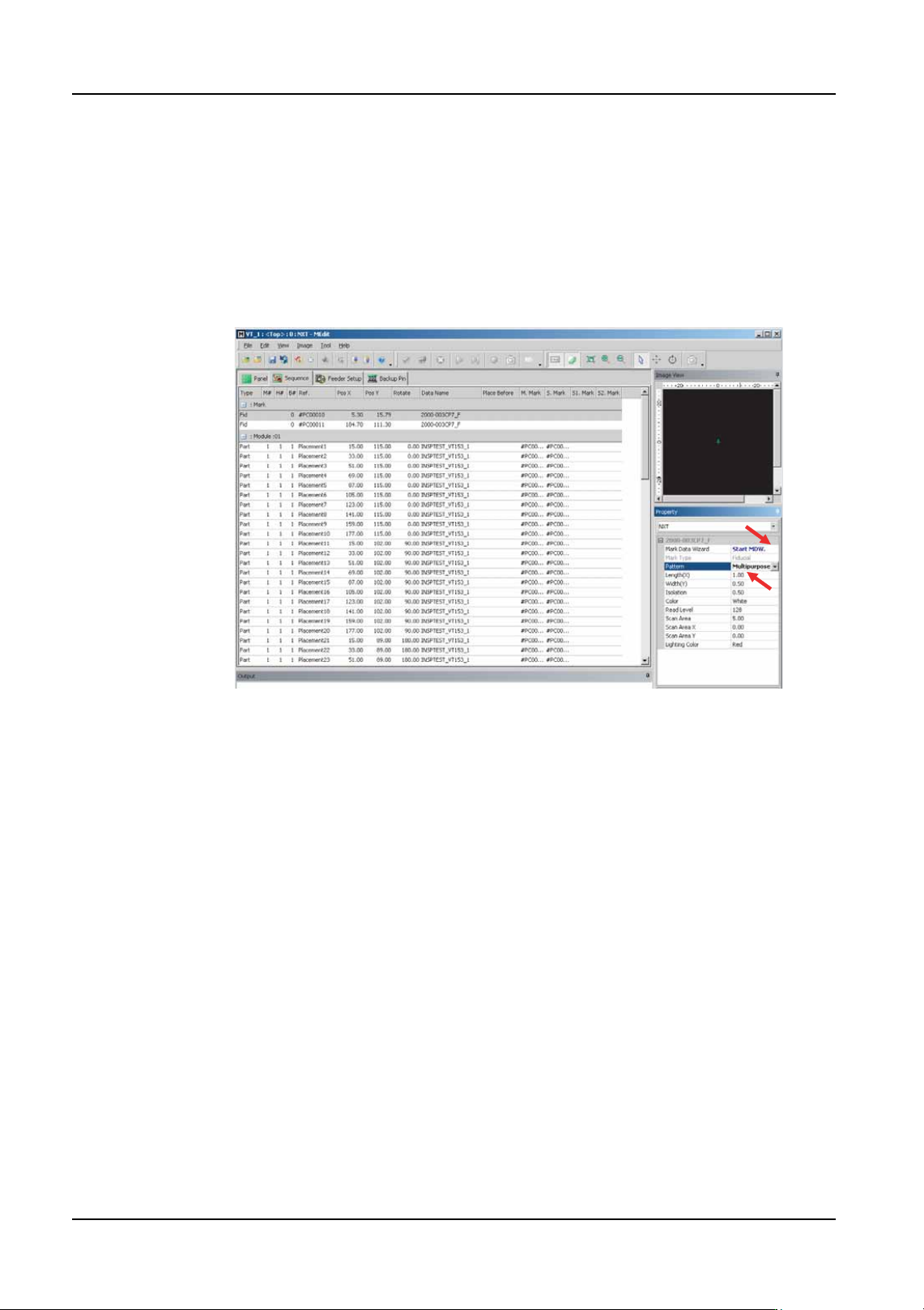
3. In MEdit, specify [Multipurpose] as the setting for the [Pattern] item in the [Property]
pane.
4. Click the button next to [Start MDW] to start MDW.
5. A dialog box to select the data to be edited is displayed. Acquire the image of the vision
processing error and edit the template.
6. Next, a dialog box to complete the editing process is displayed. Perform a vision
processing test.
7. After the test has been successfully completed, update the mark data.
Note: Refer to the Online Manual for details regarding the use of MDW.
8. Exit MDW and return to MEdit.
9. Remove the panel from the machine and return to the main screen at the machine
operation panel.
10.Use MEdit to transmit the updated job to the machine.
01PRG-0003E
QD004-18 6. Editing Jobs on the Machine (MEdit)
NXT Programming Manual 163
6.5 Testing Skip Mark Data
It is possible to test the skip mark data in a job for board skip marks and global skip marks.
It is important to test the data because the skip mark read level that is used to determine if
a skip mark is present or not must be manually set. Due to color and reflective differences
between panels for jobs, a level that is good for one job might not be good for another job.
Thus it is important to test the data to ensure that the marks are correctly detected and there
are no false detections.
1. Click [Start] and then point to [Programs] - [Fuji Accessory Software] and then click
[MEdit]. MEdit is started and the MEdit window displays.
2. Select [Open Current Job] from the [File] menu. The [Acquire current production job]
dialog box displays.
3. Double-click the line with the machine for the job to be edited and then double-click the
machine name to display the modules. Select the module on which the job is to be
edited. The name of the job in the module is automatically displayed in the [Job] group
box.
4. If necessary, select the lane on the module with the job to be edited.
5. Click [OK] and the specified data from the job is opened.
6. Load the panel to be tested into the module to be used.
7. Push MANUAL on the operation panel of the module to be tested to change to manual
mode. The module must be in manual mode or the following steps cannot be performed.
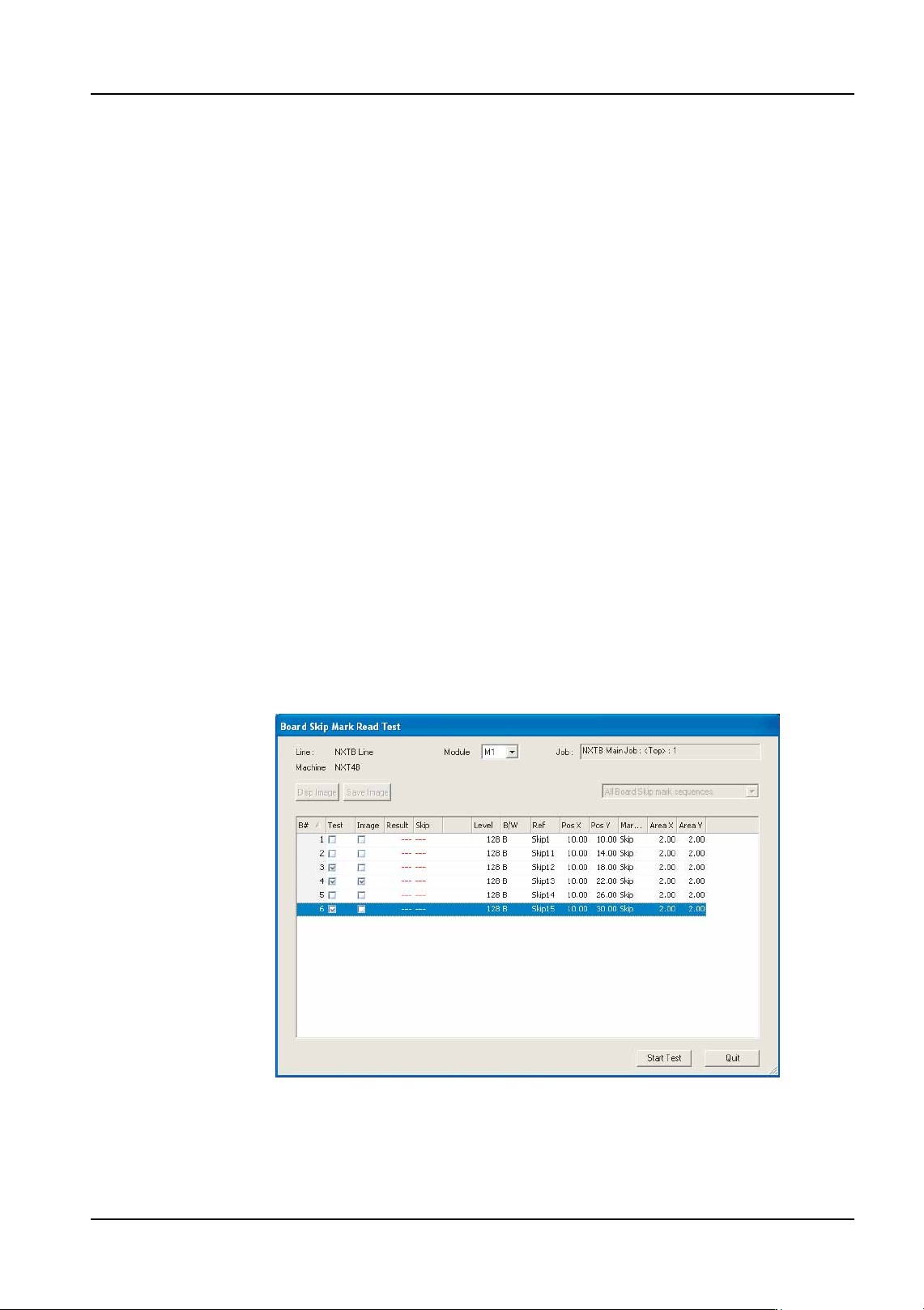
8. Select [Board Skip Mark Check] from the [Tools] menu. The [Board Skip Mark Read
Test] dialog box opens and the skip mark data in the job is displayed
9. Specify the module to perform the the read test on from the drop-down list.
10.Change the [Test] setting to "Yes" for the data that is to be tested. If an image is also to
be displayed, change the [Image] setting to "Yes".
NXTEJM002Ea

6. Editing Jobs on the Machine (MEdit) QD004-18
164 NXT Programming Manual
11.Click [Start Test] and the results of the test display in red.
12.If skip marks are misidentified, check the result number and then click [Quit] to close the
dialog box and then edit the data in MEdit based on the test results.
13.Retransmit the job back to the machine and then run the test read again. Repeat until
the skip marks are correctly identified.