FUJI NXT Programming Manual QD004-18.pdf - 第163页
QD004-18 6. Editing Jobs on the Machine (MEdit) NXT Programming Manual 153 6. Editing Jobs on the Machine (MEdit) 6.1 Introduction If panels are in a NXT machine, it is not possible to edit the jo b and then transmit the…

5. Transmission QD004-18
152 NXT Programming Manual
MEMO:

QD004-18 6. Editing Jobs on the Machine (MEdit)
NXT Programming Manual 153
6. Editing Jobs on the Machine (MEdit)
6.1 Introduction
If panels are in a NXT machine, it is not possible to edit the job and then transmit the edited
job back to the foreground in the machine using Fuji Flexa. Instead, MEdit is used to edit
jobs that are on machines. The job data that can be edited in MEdit is “safe” to change
while there are panels in the machine. If Fuji Flexa is used to edit the job, data that can
cause problems for partially produced panels can be changed and when the job is sent to
the machine, production problems occur. For example, if a job is reoptimized, it is possible
that the feeder setup and insert order across modules will be changed. If a partially
produced panel is in the machine, parts that were previously placed might be placed again
on the panel or there may be missing parts. MEdit limits the things that can be changed to
prevent these sort of problems from happening. In addition, MEdit also provides some
specialized functions for working with the NXT such as the skip functions and the job test
function.
In addition to MEdit, VPDplus can also be used to edit vision data for parts. MDW (Mark
Data Wizard) can be used to edit mark data (refer to section 6.4 "Irregular fiducial marks
(from NXT V3.90)"). Both VPDplus and MDW can be started from MEdit.
There is one point about MEdit that should be understood. When the current job that is in
the machine is opened in MEdit, the actual data from the machine is not being accessed.
MEdit checks what job is in the machine and then opens the matching job in the global
directory.
The procedures provided in this chapter are basic procedures for MEdit. For details on
MEdit and using it, refer to the MEdit Operation Manual.
6. Editing Jobs on the Machine (MEdit) QD004-18
154 NXT Programming Manual
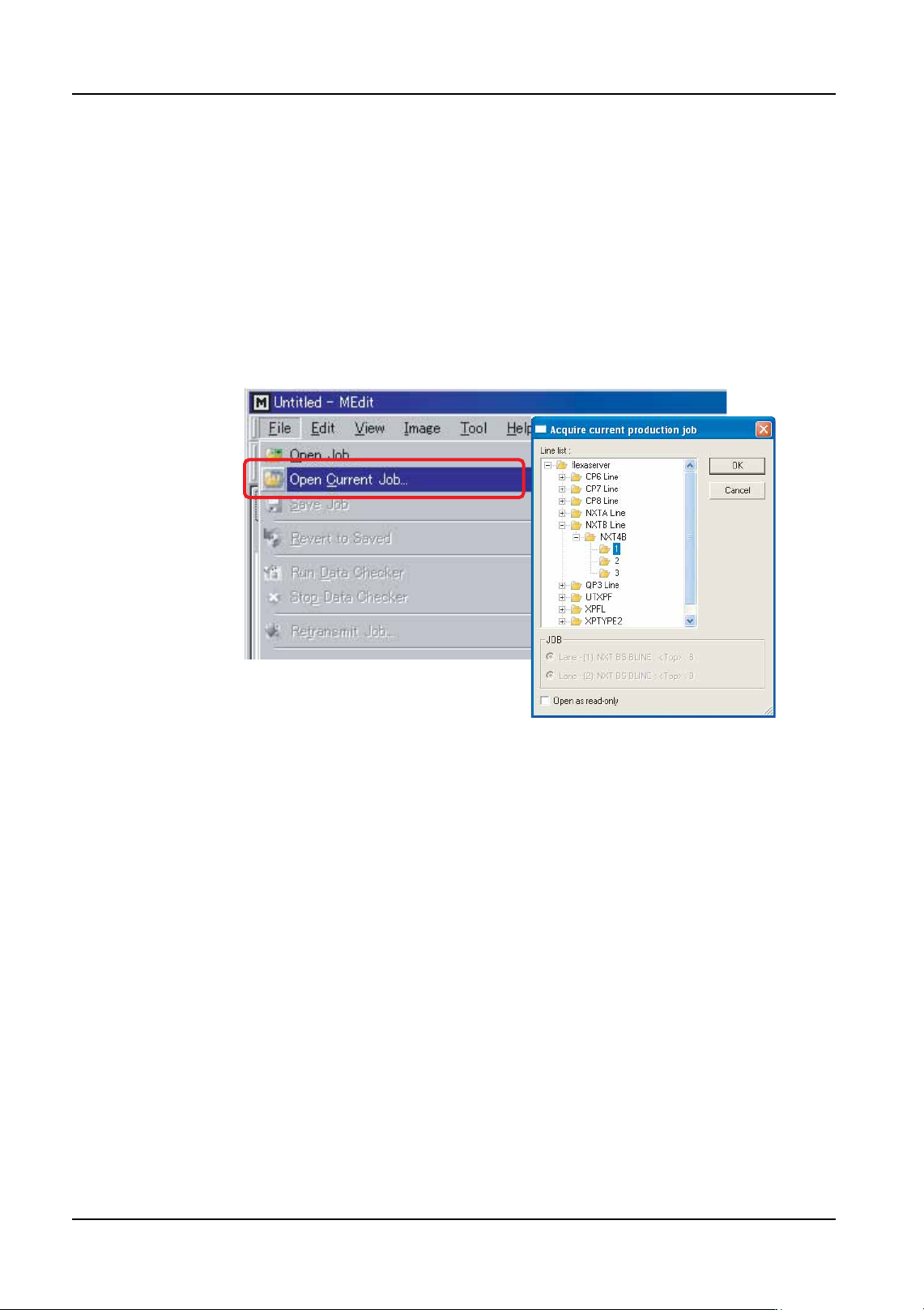
6.2 Opening a Job that is in the Machine
By following the procedures below, the job in the global directory that matches the job that
is currently in the machine is opened. When this is performed, changes made to the job
can be sent to the machine as well as being saved in the global job.
1. Click [Start] and then point to [Programs] - [Fuji Accessory Software] and then click
[MEdit]. MEdit is started and the MEdit window displays.
2. Click [Open Current Job] from the [File] menu. The [Acquire current production job]
dialog box displays.
Note: It is possible to open the same job with the [Open Job] command but if this command is
used, then changes cannot be sent to the machine.
3. Double-click the line with the machine for the job to be edited and then double-click the
machine name to display the modules. Select the module on which the job is to be
edited. The name of the job in the module is automatically displayed in the [JOB] group
box.
Note: If the relevant machine is not displayed in the line, check the settings in [Line display
settings] in Fuji Flexa. If necessary, change the settings so that the relevant line is
displayed.
4. If necessary, select the lane on the module with the job to be edited.
5. Click [OK] and the specified data from the job is opened.
Once the job is opened, it can be edited or tested. For procedure on editing items in MEdit,
refer to the MEdit Operation Manual. The procedures for testing a job are provided in a later
section.
Once the job has been edited/tested, retransmit the edited data back to the machine.
6.3 Correcting vision errors sent from the NXT
From NXT V2.81 and higher, it is possible to make settings that if a vision error occurs for
a particular feeder position, then the vision error image will automatically be sent to the
Accessory Software Server. In Accessory Software, the image can then be opened with
VPDplus and used to check the error condtion and make any corrections as necessary.
NXTEJM010Ea